
In Part I of this blog series, we introduced the four major steps in your path to updating your Oracle E-Business Suite 12.2 environment to the Next Generation Technology Stack:
1. Prepare → 2. Generate → 3. Stage → 4. Update
In this blog post, we will review the Prepare step that was covered in detail in a previous blog series.
Review of Step 1. Prepare
The following is a summary of the Preparing for the Next Gen Tech Stack blog series:
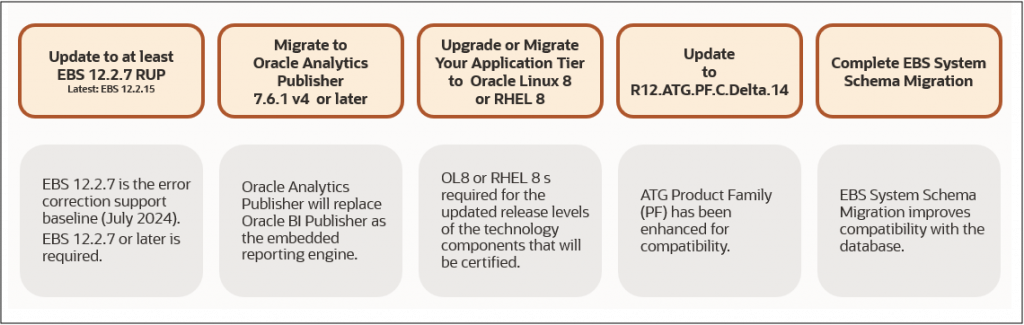
- Part I – Assess Your Readiness: Run the EBS Next Gen Tech Stack Readiness Checker to assess your environment and identify the readiness activities that apply to you.
- Part II – Update Oracle E-Business Suite: Update to Oracle E-Business Suite Release 12.2.7 or later and consider moving to the latest available Release Update Pack.
- Part III – Migrate to Oracle Analytics Publisher: If you’re using Oracle BI Publisher with the Classic Technology Stack, migrate to the required Oracle Analytics Publisher release.
- Parts IV and V – Upgrade or Migrate to Linux 8: Move your operating system to Oracle Linux 8 or Red Hat Enterprise Linux 8 using the supported upgrade or migration option appropriate for your environment.
- Part VI – Update ATG Product Family: Apply R12.ATG.PF.C.Delta.14 or later.
- Part VII – Complete the EBS System Schema Migration: Complete the EBS System Schema Migration to improve compatibility with the database.
- Part VIII – Keep Your Database Current: Run a Long Term Oracle Database release in Premier Support and stay current with applicable security updates.
- Part IX – Follow Oracle’s Security Recommendations: Review your EBS security posture and make every effort to implement the applicable security recommendations before or as part of your Next Generation Technology Stack update.
- Part X – Migrate to the Latest EBS 12.2 Features and Technologies: If you’re using products or features that depend on deprecated technologies, migrate to the latest EBS 12.2 features and technologies.
- Part XI – Review Your Customizations: Identify and review your customizations and dependencies now so you’re prepared to recompile, remediate as necessary, and test them with the Next Generation Technology Stack.
Reassess Your Readiness
As you complete the applicable prerequisites and recommendations, reassess your environment.
Run the EBS Next Gen Tech Stack Readiness Checker again to review your progress and identify any remaining readiness activities. You should also review the latest version of Preparing Oracle E-Business Suite Release 12.2 for the Update to the Next Generation Technology Stack (MOS Article KA1357) to confirm the current requirements and recommendations.
As Oracle continues to evolve the Next Generation Technology Stack, additional readiness guidance and prerequisite updates may become available. Continue to review the latest guidance as you prepare your environment.
What’s Next
Once you have completed the applicable prerequisites, you are ready to move on to Step 2. Generate.
In Part III of this blog series, we will walk through how to generate the manifest file for your Oracle E-Business Suite environment and upload it to My Oracle Support.
References
- FAQ: Oracle E-Business Suite Next Generation Technology Stack (MOS Article KA1014)
- Preparing Oracle E-Business Suite Release 12.2 for the Update to the Next Generation Technology Stack (MOS Article KA1357)
Related Articles
- Prepare EBS 12.2 for the Next Gen Tech Stack
- Introducing the EBS Next Gen Tech Stack Readiness Checker
- Blog Series Summary: EBS 12.2 Application Technology Stack Update – Terminology and Concepts
- Blog Series Summary: Preparing for the Next Gen Tech Stack – Summary and Next Steps
- Part I: Your Path to Update to the Next Generation Technology Stack
- Part II: Your Path to Update to the Next Generation Technology Stack – Review Prepare (this blog article)
- Part III: Your Path to Update to the Next Generation Technology Stack – Generate