
This is the eighth installment in a series of blog articles to highlight recommended security guidelines and features for Oracle E-Business Suite (EBS). This installment highlights the importance of enabling and configuring the Allowed Resources Authorizations feature.
Enable Allowed Resources Authorizations
The Allowed Resources Authorizations feature extends the existing Allowed Resources feature by enabling an additional permission check on web resource access at the beginning of each request.
Allowed Resources Authorizations is available with Oracle E-Business Suite Release 12.2.15 or R12.ATG_PF.C.Delta 14. It is recommended that you apply the necessary patches to obtain this feature and then enable it to enforce an additional layer of security for Oracle E-Business Suite.
After the required patching level is met, the Access Type attribute is available in the Management by Resource user interface. This feature assigns the least privilege access required for all seeded EBS resources. From the UI, you can update the access requirements for your custom resources.
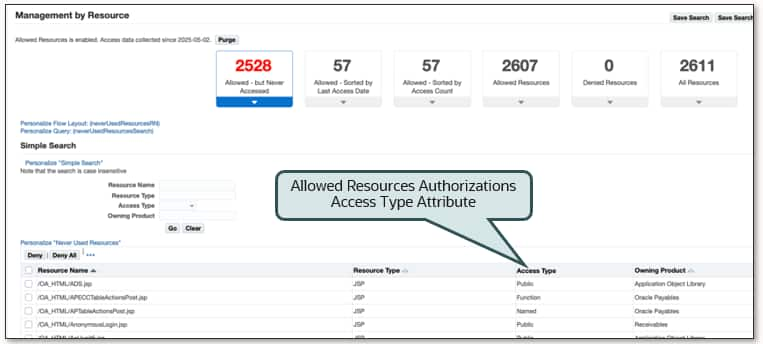
To use this feature start by enabling and configuring Allowed Resources. Then enable and configure Allowed Resources Authorizations. For information and recommendations on enabling and configuring this feature, see Enforce an Additional Layer of Security for Resource Access
Security Guidelines and Recommendations: Where to Begin?
For information on EBS security guidelines, security features, certifications, encryption, or other security-related topics, you should start with the FAQ: Oracle E-Business Suite Security (MOSFS Article ID KA1033, Formerly MOS Doc ID 2063486.1).
The content in FAQ: Oracle E-Business Suite Security (MOSFS Article ID KA1033, Formerly MOS Doc ID 2063486.1) is updated on a regular basis. We recommend that you bookmark this MOSFS Article and review it routinely for updates.
References
- Enforce an Additional Layer of Security for Resource Access
- Allowed Resources in the Oracle E-Business Suite Security Guide
- Allowed Resources Authorization in the Oracle E-Business Suite Security Guide
- FAQ: Oracle E-Business Suite Security (MOSFS Article ID KA1033, Formerly MOS Doc ID 2063486.1)
- What’s New: Applications Technology 12.2.15
- Oracle E-Business Suite What’s New Home Page
Related Articles
- Oracle E-Business Technology Blog – Security
- EBS Quarterly Update Recommendations
- How Do I Receive the Latest EBS 12.2 and 12.1 Technology News, Updates, and Announcements?
- REMINDER: EBS Security Guidelines and Recommendations – Part 1
- REMINDER: EBS Security Guidelines and Recommendations – Part 2
- REMINDER: EBS Security Guidelines and Recommendations – Part 3
- REMINDER: EBS Security Guidelines and Recommendations – Part 4
- REMINDER: EBS Security Guidelines and Recommendations – Part 5
- REMINDER: EBS Security Guidelines and Recommendations – Part 6
- REMINDER: EBS Security Guidelines and Recommendations – Part 7
- REMINDER: EBS Security Guidelines and Recommendations – Part 8 (this blog article)