
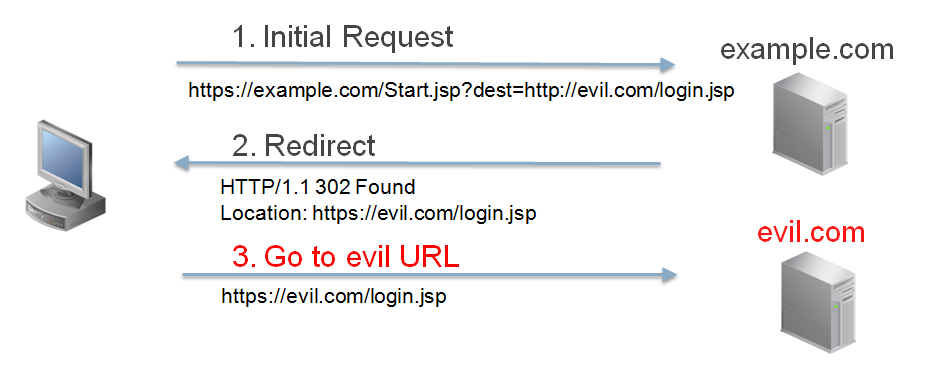
A redirect is an HTTP response status code “302 Found” and is common method for redirecting a URL. Client redirects are a potential attack vector. The Oracle E-Business Suite 12.2.4+ Allowed Redirects feature allows you to define a whitelist of allowed redirects for your Oracle E-Business Suite 12.2 environment. Allowed Redirects is enabled by default with Oracle E-Business Suite 12.2.6.
When the Allowed Redirects feature is enabled, redirects to sites that are not configured in your whitelist are not allowed. This feature provides defense against unknown and potentially damaging sites. This is an example of an attack that the Allowed Redirect feature will prevent if properly configured:

Note: Allowed Redirects will only block navigation to sites that happen via client redirects. It is not intended to prevent other methods for accessing external sites.
Where can I learn more?
- Read more about the Allowed Redirects feature available in the Oracle E-Business Suite 12.2 Security Guide
- Watch the online course for the Cookie Domain Scoping feature available from Oracle E-Business Suite Release 12.1 and 12.2 Transfer of Information (TOI) Online Training (Note 807319.1)
- Watch the Ready or Not: Applying Secure Configuration to Oracle E-Business Suite webcast on the Applications Technology Channel on the Oracle E-Business Suite Learning Subscription.
Related Articles
- Check and Deploy Secure Configuration for Oracle EBS 12.2 and 12.1
- Secure Oracle E-Business Suite 12.2 with Allowed JSPs/Resources
- Secure Oracle E-Business Suite 12.2 with Cookie Domain Scoping
- Frequently Asked Questions about EBS Security
- Critical Patch Update for October 2017 Now Available
References