

This is the second post in the series of learning how to use FSCR for CX Sales. The knowledge is applicable for any Fusion module. The first part is Getting Started with FSCR
The real work starts once you connect to a Fusion Instance. This will require you to be the admin or support from the admin team. Typically, you will have a properties file that will look like below:
environment=example-dev
restBaseUrl=https://fusion.example.com
clientId=YOUR_OAUTH_CLIENT_ID
redirectUrl=http://127.0.0.1:8765/oauth/callback

# Replace placeholders with registered values
scope=urn:opc:resource:fa:instanceid=YOUR_INSTANCE_IDurn:opc:resource:consumer::all
ai_scope=urn:opc:resource:fusion:example-dev:fusion-ai/
boss_scope=urn:opc:resource:fusion:example-dev:boss/
fusion_common_scope=urn:opc:resource:fusion:example-dev:fusion-common/

# Optional services
km_scope=urn:opc:resource:fusion:example-dev:knowledge-management/
rmc_scope=urn:opc:resource:fusion:example-dev:risk-cloud/
# cpq_scope=
fs_restBaseUrl=https://field-service.example.com/
fs_scope=urn:opc:resource:fusion:example-dev:field-service-common/
# cdp_restBaseUrl=
# cdp_scope=

# Confirm proxy support in the selected client
enableProxy=true
You can save your file with a name such as fusion_fscr.properties and then go to codex and say:
Fusion login for example-dev using attached file If all goes well codex will print:
Fusion login completed successfully for xxx-yyy27, using the standard Fusion REST service.

Environment trust was enrolled, and the access token was saved privately under /Users/vic/.xxx/, outside the repository.

Your properties file was unchanged. No Fusion setup changes were made.
Time to test if it actually works
Use a prompt like below which is looking for lead qualification templates
Using the FSCR implementation workflow, list the existing Sales Lead qualification templates in example-dev. Keep Fusion configuration unchanged. Save the export and evidence in the project workspace, then let me select one template to review. Do not create, import, or deploy a qualification template.And the response may look like below:
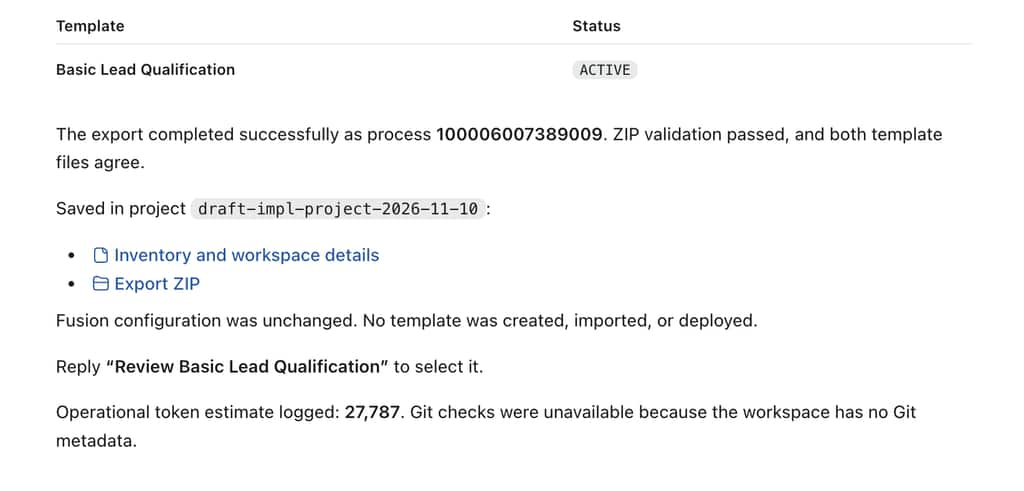
You will be able to download the template file as well as the entire seed data that is used to create the template. The export zip will have a bunch of csv files in this case where each file will be from one object/table showing the seed data.
This was a short post but a foundational step to validate that FSCR is connected to your Fusion CX Sales environment.