
In today’s fast-paced business environment, organizations face persistent challenges around efficiently processing expenses, managing exceptions, and ensuring data security—all while empowering employees and administrators with the right tools and insights. At Oracle, we’re dedicated to building solutions that address these issues head-on. With the latest PeopleSoft Travel and Expense enhancements delivered in Update Images 52 through 55, we continue to help organizations streamline expense management, resolve exceptions quickly, and make user experiences more intuitive and secure.
Addressing Real-World Challenges with Product Innovation
Many organizations struggle with time-consuming expense workflows, difficulty tracking and resolving exceptions, and the risks associated with sensitive financial data. We know these pain points can impact productivity, compliance, and end-user satisfaction. That’s why our recent updates focus on providing actionable visibility, intuitive tools, and flexible security options.
Key Enhancements in PeopleSoft Update Images 52 to 55
1.Smarter Exception Management with Work Management Framework
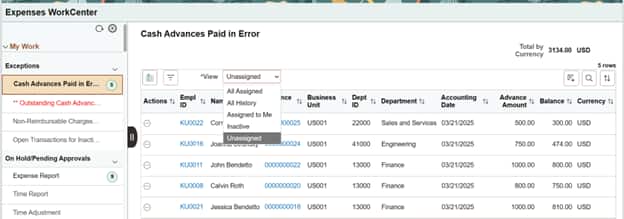
With Update Image 53, we introduced the Enterprise Components Work Management Framework, allowing you to view and manage exception transactions in the My Work: Exception section of the Expenses WorkCenter. Beyond standard actions, you now have expanded options to track and clear exceptions—even when system-based resolutions are unavailable. Exception transactions can be viewed by status: Active, All Assigned, All History, Assigned to Me, and Inactive, giving you granular control and better oversight.
Learn more in our blog: Unlock Success with the New Capability of WorkCenter Exception Handling in PeopleSoft
Check out this blog that covers a business problem solved with Work Management:Uncover hidden Travel & Expense documents for inactive employees with PeopleSoft Expenses WorkCenter tools
2. Enhanced Administrative Controls on Expense Reports
In Update Image 53, the Expenses Admin View was enhanced, giving administrators the ability to delete expense reports in Pending, Denied, and Approved statuses. Update Image 54 further extends this control by allowing administrators to deny already-approved expense reports or return them to requesters for further review or correction.
3. Improved Proxy (Delegate) Experience for Travel Authorizations
Update Image 54 introduced a safeguard to prevent proxy users from selecting the wrong employee when creating travel authorizations. Now, an Employee Search page appears, making it easier to ensure the correct employee’s information is selected. This enhancement reduces the risk of routing errors and boosts confidence in delegation processes.
4. Flexible and Secure Credit Card Data Handling
With growing security needs, Update Image 54 lets organizations choose from multiple credit card encryption algorithms through the Encryption Profile page in PeopleTools. You can now manage and update the encryption algorithm for all FSCM records quickly, keeping sensitive information protected.
5. My Proxy Insight Dashboard Enhancements
In Update Image 55, we improved the My Proxy Insight dashboard by adding two new visualizations and a data grid for Travel Authorizations. The dashboard now shows Travel Authorization by Status, allowing you to monitor approval workflows and spot delays or bottlenecks. The Travel Authorization Denied by Expense Type visualization helps you quickly identify trends and address the underlying causes of denials. 6. A Modern, Personalized User Experience with the New Landing Page Template
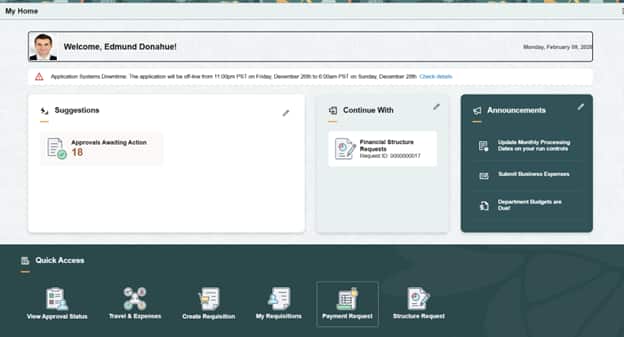
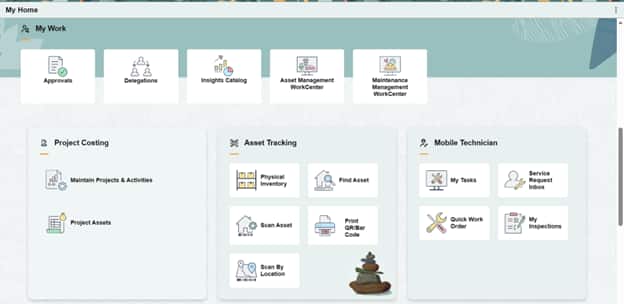
Also arriving in Update Image 55, the Travel & Expenses module now features the Sectionalized Homepage with a new Landing Page Template, introduced in PeopleTools 8.62. Users are greeted by a tailored homepage upon login, with key information and actionable items—such as Pending Expense Reports and Pending Travel Authorizations—front and center. Plus, the enhanced Travel & Expenses Dashboard is now easily accessible in the Quick Access section, moving from a secondary homepage to a primary user resource.
For more details, check out our blog: Transforming PeopleSoft Experience: The New PeopleSoft Landing Page
Benefit from the Latest Innovation
With these updates, organizations can expect improved efficiency in managing expense workflows, faster exception resolution, enhanced data protection, and a more intuitive user experience for both end-users and administrators. These enhancements are designed to address your most pressing business needs and empower your teams to work smarter, not harder.
Stay Up to Date—Make the Most of PeopleSoft Travel and Expense
We encourage you to explore these new features to optimize your expense management processes and drive greater value from your PeopleSoft investment. For step-by-step guides and further resources, visit our support pages and the PeopleSoft Blogs linked above.