
Introduction
For years PeopleSoft users have navigated a maze of role specific tiles, juggling multiple homepages, and notifications. The result? Friction, missed approvals, and a fragmented user experience. The PeopleSoft Landing Page rewrites that story, delivering a single, fluid, role aware homepage that puts the most critical actions and information right at the user’s fingertips. In this post we explore why this change matters, how it works, and the tangible business value it unlocks.
Unified Entry Point
The PeopleSoft Landing Page consolidates daily transactions, alerts, and personal data onto one configurable surface. No longer must employees remember which homepage hosts time entry, benefits enrollment, or recruiting tasks. By presenting a single landing “place”, the page reduces navigation time, boosts task completion rates, and creates a consistent experience across desktop, tablet, and mobile devices.
Dynamic, Role Aware Homepage
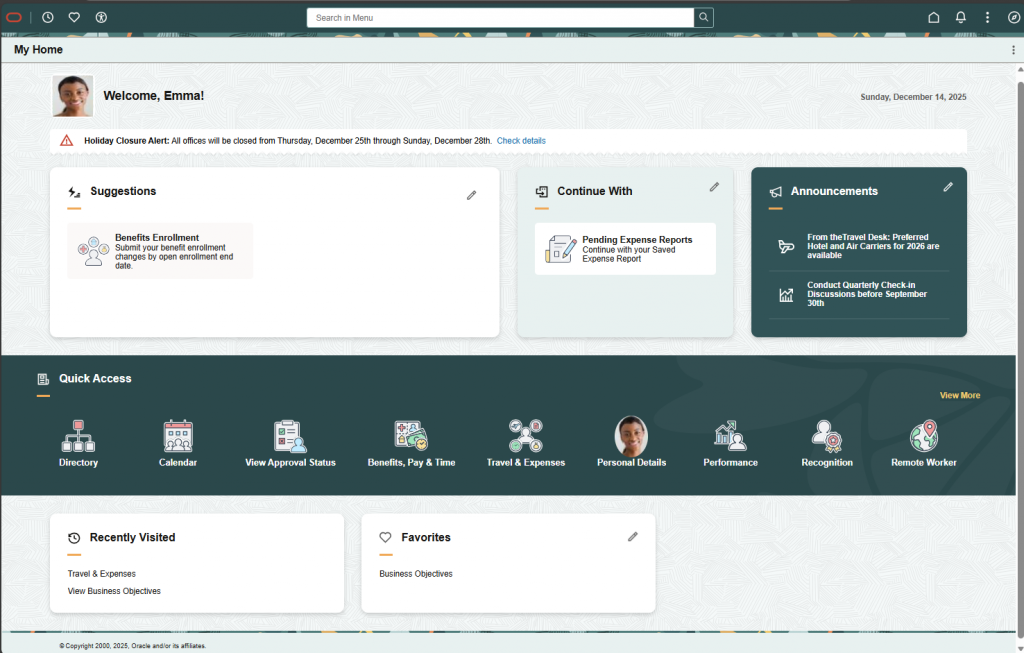
- Dynamic Sections – Suggestions, Continue With, and Announcements automatically surface based on pending actions and system generated notifications
- Role Aware Tile Rendering – Sections and Tiles appear only when the user’s security profile grants access, ensuring relevance while protecting sensitive data
- Responsive Design – Fluid layout adapts to any screen size preserving usability on the go
These capabilities turn a static list of links into an intelligent workspace that evolves with the user’s responsibilities.
Personalization & Human Touch
The Welcome section greets users with their photo, name, and the current date, creating an immediate sense of belonging. Administrators can clone delivered section templates (Welcome, Banner Announcement, Quick Access, My Work, etc.) make changes and re-import them, allowing organizations to brand the page and align the layout with specific business processes.
Key Features at a Glance
| Feature | Benefit |
| Dynamic Sections | Auto populate with actionable items so users never miss approvals or drafts |
| Notification Integration | Leverages Notification Composer & Publish for real time alerts (enrollment onboarding, etc) |
| Section Templates | Clone, customize, import for fast, code free branding and layout changes |
| Personalization | Photo, name, date in Welcome section humanizes the interface |
| Responsive Design | Consistent experience on desktop, tablet, and mobile |
| Administrative Controls | Configure sections, assign roles, manage templates without developer effort |
Real-World Impact: Emma’s Story
“Logging in feels like stepping into my own workspace. The suggestions tell me exactly what needs my attention, and I can finish my benefits enrollment and time sheet in a single session without having to remember where to navigate.”
Emma, a senior analyst, logs into the application each morning. The PeopleSoft Landing Page greets her with a friendly “Welcome, Emma!” and displays her photo. The Suggestions section flags a pending benefits enrollment, while Continue With shows a saved expense report from the previous day. Emma clicks the Benefits tile, completes enrollment, then returns to the Expense Report tile to submit her expenses—all without leaving the landing page. By the end of her session she has addressed all pending items, receives a system alert about an upcoming holiday, and favorites a performance link for future use. The experience feels like a single, cohesive workspace rather than a collection of disparate applications.
Business Benefits
- Higher Efficiency – Faster task completion and fewer missed approvals
- Reduced Support Load – Streamlined navigation lowers help desk tickets
- Improved Onboarding – New hires find critical actions instantly, accelerating ramp up
- Compliance Support – Timely alerts ensure deadlines (e.g., Form I-9) are met
- Future Ready Architecture – Modular templates let organizations add new tiles or processes with minimal disruption
Conclusion
The PeopleSoft Landing Page reimagines the enterprise entry experience. By unifying navigation, content, embedding real time notifications, and offering flexible, role aware navigation, it delivers a modern, efficient, and engaging interface that aligns with both user expectations and business objectives. This foundation positions PeopleSoft to meet evolving workforce needs while preserving the robustness and security enterprises rely on.
Embedded Resources
- PeopleSoft Landing Page on the Information Portal
- PeopleSoft Landing Page Knowledge Document on My Oracle Support
- PeopleSoft HCM Update Image 53 Highlights
- PeopleSoft FSCM Update Image 55 Highlights
Quick Glossary
- PeopleSoft Landing Page The new, role aware homepage that serves as the single-entry point for PeopleSoft users
- Dynamic Sections Areas of the page (Banner Announcements, Suggestions, Continue With, Announcements) that automatically populate based on pending tasks and notifications
- Section Templates Pre-built layout blocks (Welcome, Banner, Quick Access, My Work) that can be cloned, customized, or imported by administrators
- Responsive Design A design approach that adapts the page layout to any screen size, ensuring usability on desktops, tablets, and phones
- Notification Composer & Publisher PeopleSoft frameworks that generate and deliver real time alerts to users