

Introduction
Every support call your team handles is a small goldmine. A customer describes a real-world problem in plain language, an agent troubleshoots it live, and a resolution emerges. Then the call ends, and most of that knowledge evaporates. At best it survives as a few terse lines in a ticket; at worst, it is gone the moment the headset comes off. What if every call automatically became a clean, timestamped, speaker-separated transcript, written straight into Oracle Autonomous Database (ATP), ready to power semantic search or ground an OCI Generative AI Agent for Retrieval-Augmented Generation (RAG)?.
This is where Oracle Integration (OIC) earns its keep. OIC is the engine that makes the whole thing effortless: it takes a recording sitting in object storage, hands it to OCI AI Speech to convert speech into text, waits for the transcription to finish, retrieves and decodes the result, and lands a clean transcript in ATP, end to end, in one low-code flow. No functions to deploy, no servers to manage, no glue code to maintain. You build it once, visually, in the OIC canvas, and every call from then on transcribes and stores itself.
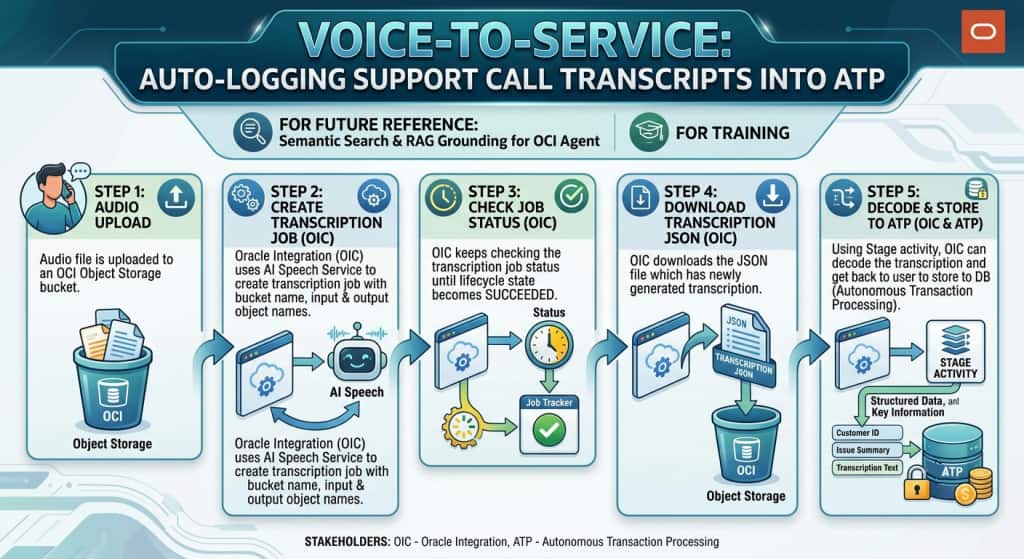
That is the Voice-to-Service pattern: OIC orchestrates the entire flow using its embedded actions for OCI AI Speech and OCI Object Storage, alongside adapters such as the ATP Database Adapter. Building on the same agentic foundations described in the Agentic AI in Oracle Integration and OIC Knowledge Base blogs, Voice-to-Service shows how a single OIC integration turns raw audio into a living, self-updating knowledge layer for your support organization.
In this blog, we walk through the Voice-to-Service use case end-to-end, showing how OIC drives every step, from an audio file landing in Object Storage to a transcript stored in ATP, ready for future use by AI Agents.
Architecture Overview
At the center of this architecture sits Oracle Integration. A single Oracle Integration flow is the brain and the muscle. As soon as a new recording lands in Object Storage, an event triggers the integration. From there, OIC does everything: it calls OCI AI Speech to convert speech to text, polls the job until it completes, downloads and decodes the JSON transcript, and inserts the clean text into ATP. Every arrow in the diagram starts at OIC — there are no functions, no microservices, and no custom runtime to manage, just a single low-code integration handling the whole job.
The three services OIC drives:
- OCI Object Storage — the landing zone OIC reads from. The call recording (
.m4a,.mp3, and similar) is uploaded here, and AI Speech writes its JSON transcript back here for OIC to pick up. - OCI AI Speech — the managed speech-to-text engine OIC invokes. It applies automatic speech recognition with optional speaker diarization and returns a structured transcript. OIC tells it what to transcribe and where to put the result.
- ATP (Autonomous Database) — the system of record OIC writes to. Once OIC has the clean transcript, a single database adapter call stores it, ready for AI Vector Search and an OCI Generative AI Agent to turn it into a RAG-ready knowledge base.
This is not a rigid chain; it is a reusable, OIC-owned capture-and-ground pipeline. Point that one integration at any bucket of recordings, and it keeps your knowledge base current automatically.
Prerequisites and Policies
Two principals need access before you build: the OIC instance, which calls the Speech and Object Storage APIs via a resource principal, and the OCI AI Speech service itself, which reads the input audio and writes the JSON transcript on its own behalf. So you first create a dynamic group matching your OIC instance in the tenancy, then grant that group access to Object Storage and AI Speech, and finally, grant the AI Speech service permission to access Object Storage on its own behalf.
# Dynamic group: oic-instances — match your OIC instance(s) in the tenancy
ANY { resource.id = 'ocid1.integrationinstance.oc1..xxxx' }

# OIC: read recordings, manage transcript output, run transcription jobs
Allow dynamic-group <<dynamic-group>> to read objects in compartment <<compartment-name>> where target.bucket.name = '<<bucket-name>>'
Allow dynamic-group <<dynamic-group>> to manage objects in compartment <<compartment-name>> where target.bucket.name = '<<bucket-name>>'
Allow dynamic-group <<dynamic-group>> to manage ai-service-speech-family in compartment <<compartment-name>>

# AI Speech service: read input audio, write transcripts
Allow dynamic-group <<dynamic-group>> to use ai-service-speech-family in compartment <<compartment-name>>
Allow dynamic-group <<dynamic-group>> to manage ai-service-speech-family in compartment <<compartment-name>>
Scope these to your own compartments and buckets, and verify the exact verbs and service names against current OCI documentation.
How It Works: The OIC Orchestration
Step 1: Audio lands and the flow is triggered.
Object Storage has no native OIC trigger, so choose one of two patterns:
- Event-driven (recommended). An OCI Event Rule fires on Object – Create in the input bucket and routes through OCI Notifications or Streaming, which OIC consumes for near-real-time processing.
- Scheduled. A scheduled OIC integration periodically lists new objects in the bucket and processes anything unhandled. Simpler to start with, slightly higher latency.
Either way, OIC obtains the namespace, input bucket, and input object name for the recording.
Step 2: Create the transcription job with the OCI AI Speech action.
This is where OIC’s native OCI Speech action does the heavy lifting. Drag the OCI Speech action onto the canvas and choose the Create transcription job operation. During configuration you select the compartment and the output bucket where the transcript should be written; both can be overridden at runtime in the mapper if you need to route per call.
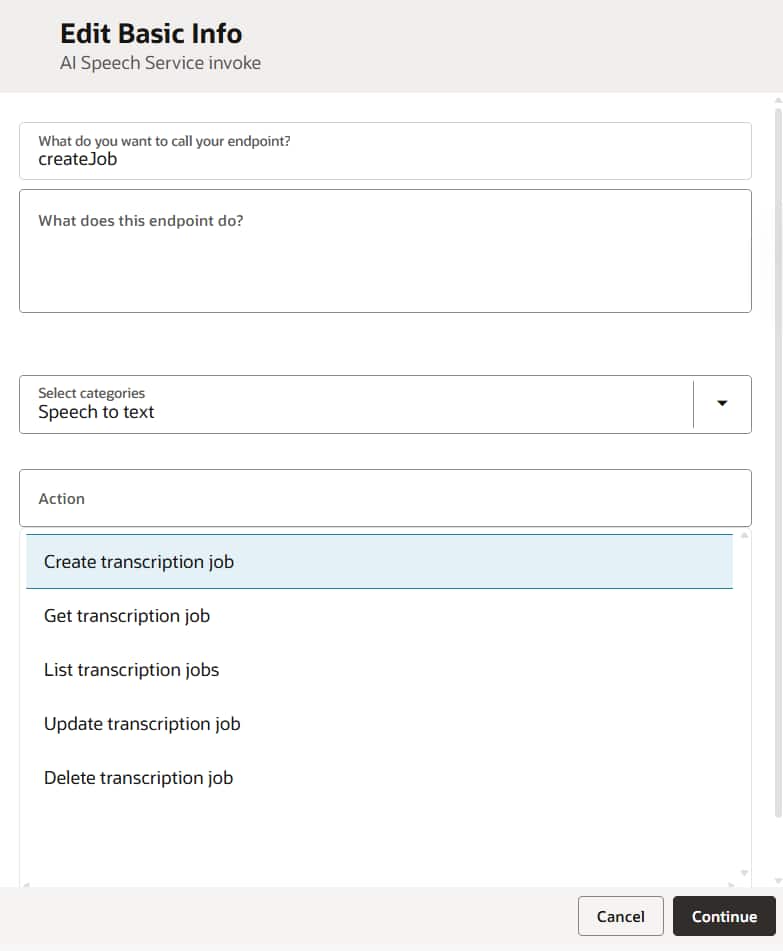
In the mapper, you wire up the input location, output location, and the model settings. Behind that simple configuration, OIC submits the equivalent of the following transcription request to OCI AI Speech, so you get the power of the full API without any connection configurations. The action returns the transcription job details, including its Id (OCID) and initial Lifecycle State. OIC stores the job Id in a variable, ready for the next step.
{
  "compartmentId": "ocid1.compartment.oc1..xxxx",
  "displayName": "call-ticket-48217",
  "inputLocation": {
    "locationType": "OBJECT_LIST_INLINE_INPUT_LOCATION",
    "objectLocations": [
      {
        "namespaceName": "myNamespace",
        "bucketName": "support-calls-input",
        "objectNames": ["ticket-48217.wav"]
      }
    ]
  },
  "outputLocation": {
    "namespaceName": "myNamespace",
    "bucketName": "support-calls-output",
    "prefix": "transcriptions"
  },
  "modelDetails": {
    "languageCode": "en-US",
    "modelType": "ORACLE",
    "transcriptionSettings": {
      "diarization": { "isDiarizationEnabled": true }
    }
  }
}
Step 3: Poll until the job reaches SUCCEEDED.
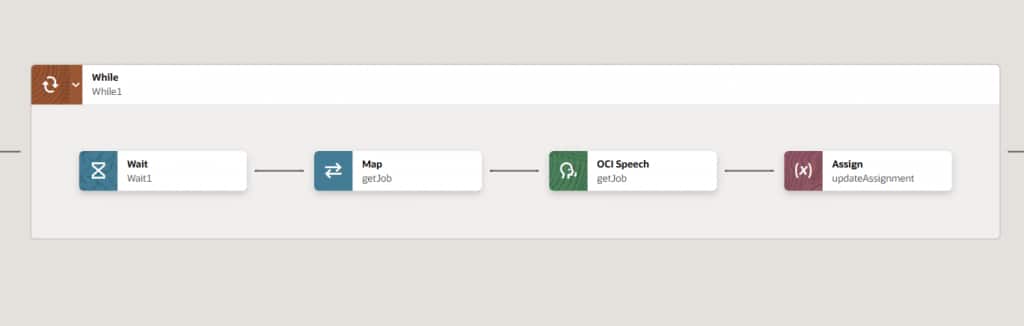
OCI AI Speech transcription is asynchronous, so OIC must wait for completion. Add a while loop, and inside it use the OCI Speech action again, this time with the Get transcription job operation, mapping the Transcription Job Id captured in Step 2. After a short wait, OIC reads the returned lifecycle state and decides whether to keep looping. The loop continues while the state is ACCEPTED or IN_PROGRESS. If you only check for SUCCEEDED, a failed job will loop forever — so always handle FAILED and CANCELED too, and set a maximum number of tries (or a timeout) so a stuck job can’t run forever.
Step 4: Download the output JSON with the Object Storage action.
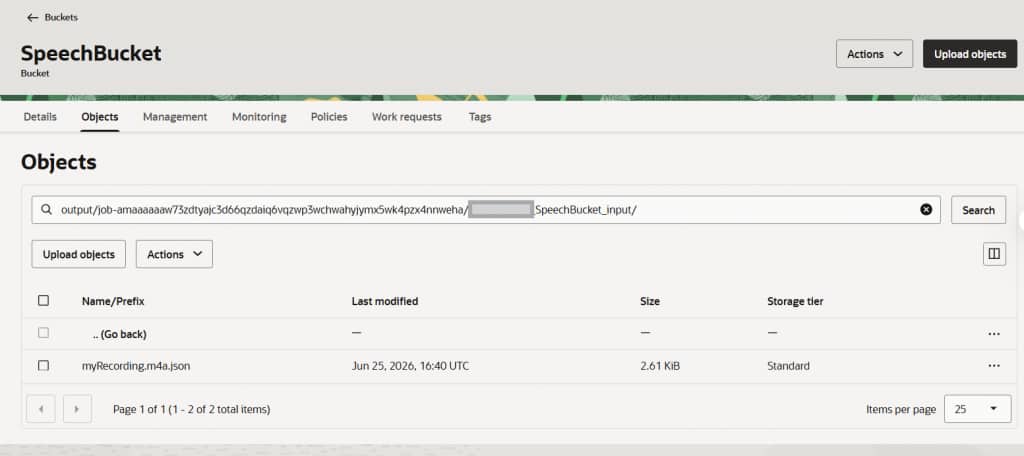
When the job succeeds, OCI AI Speech writes a JSON transcript into the output bucket under the prefix you specified. The output object name follows a deterministic convention:
<jobId>/<namespace>_<inputBucket>_<inputObject>.jsonFor our example: jobId/myNamespace_support-calls-input_ticket-48217.wav.json. Because the name is deterministic, OIC can dynamically construct it and fetch the file with the native OCI Object Storage action (Get Object / Download), again with no REST adapter and no bucket listing. The native OCI Object Storage action handles this directly.
Step 5: Decode and parse with a Stage activity.
A Stage File action reads and parses the downloaded JSON. In the Stage activity, use Read Entire File with a sample JSON schema so OIC parses the payload into a structured object. Map transcriptions[]. transcription to your full-text field, and optionally retain the tokens array, with speakerIndex and timestamps for QA. This is exactly where OIC’s Stage File capability shines: a clean, parsed structure to map from with no decoding code to write. The AI Speech service payload is structured as follows:
{
  "transcriptions": [
    {
      "transcription": "Hi, thanks for calling support... and that resolved the timeout.",
      "confidence": "0.94",
      "speakerCount": 2,
      "tokens": [
        { "token": "Hi", "startTime": "0.480s", "endTime": "0.690s",
          "confidence": "0.98", "type": "WORD", "speakerIndex": 0 }
      ]
    }
  ],
  "audioFormatDetails": { "format": "wav", "duration": 312.4 }
}
Step 6: Persist to ATP.
Finally, the Database (ATP) Adapter writes the result to the Autonomous Database. A practical schema stores both the flattened text and the raw JSON. Keeping both gives you the best of both worlds: searchable text today and the freedom to re-chunk or re-embed later without re-transcribing.
Landing text in ATP is the enabler, not the goal. Autonomous Database now supports AI Vector Search out of the box in recent releases and beyond. You store an embedding of each transcript alongside the text, and queries then match on meaning rather than exact keywords. So a search like “calls where the integration kept timing out” surfaces the right past resolution even when the wording is different.
How the Pieces Fit Together in OIC
Implementing Voice-to-Service reuses the same building blocks that power any agentic pattern in Oracle Integration.
- OCI Speech native action creates a transcription job and submits the audio for speech-to-text, and Get transcription job (inside the loop) drives it to completion. No REST connection, no endpoint URL, no request signing.
- OCI Object Storage native action lists incoming recordings and downloads the JSON transcript, again with no REST Adapter to configure.
- While loop with state handling drives the asynchronous transcription job to completion, exits on every terminal state, and is bounded by a timeout guard.
- Stage File activity reads and parses the transcript JSON into a structured payload, ready to map.
- Database (ATP) Adapter persists clean text and raw JSON in one insert, with an idempotency control table to make re-runs safe.
- AI Vector Search and OCI Generative AI Agent turn the stored transcripts into a grounded, citable knowledge base that improves with every call.
A few field-tested practices are worth carrying into your build: derive the output object name rather than listing the bucket; keep recordings in a supported codec and sample rate for best accuracy; add a PII redaction or access-control step before exposing transcripts broadly; and always store the raw JSON as cheap insurance against future reprocessing.
Conclusion
Voice-to-Service is, at its heart, an Oracle Integration story. The speech-to-text conversion, the polling, the decoding, and the database insert—all of it is orchestrated by a single low-code OIC integration, with no functions to deploy and no infrastructure to babysit. OIC reads the recording from Object Storage, calls OCI AI Speech to turn speech into text, and lands a clean transcript in ATP automatically on every call. The downstream magic—including AI Vector Search and OCI Generative AI Agents—is only possible because OIC reliably and effortlessly puts the right text in the right place.
That is the quiet power of OIC: it makes a multi-service, asynchronous, AI-driven pipeline look like a handful of activities on a canvas. Build it once, and every support call from then on transcribes and stores itself.