


Introduction:
Enterprise automation is changing as AI becomes a core part of how systems and processes work together. Instead of depending only on fixed, rule-based workflows, organizations are using AI to make automation smarter, more flexible, and easier to scale. Oracle Integration addresses this transformation by integrating Agentic AI into its platform, embedding intelligence across design and development phases of the integration lifecycle to simplify and scale enterprise automation.
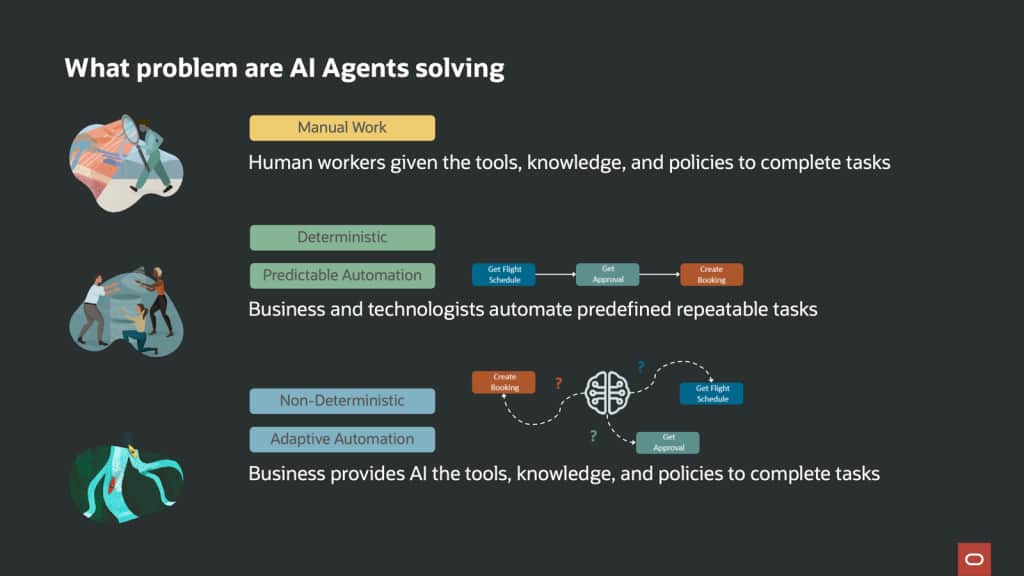
In this blog, we demonstrate how AI Agents transform a flight booking architecture by shifting it from manual or rigid, rule-based workflows to intelligent, adaptive orchestration where the business provides tools, human tasks, and a knowledge base. The AI agent then decides how to execute the task. Instead of following a predictable automation sequence, like “get flight → approval → booking” the AI agent understands user intent, evaluates travel policies, chooses the best flight options, determines whether approval is required, and adapts its next action based on outcomes such as rejection or budget constraints. By reasoning over context and invoking integrations such as flight search, approval workflows, and booking systems as tools, the AI agent enables faster bookings, consistent policy compliance, involve human approval and delivers a more personalized, conversational travel experience while keeping the underlying systems modular and reusable.
Components:
Oracle Integration offers a wide range of automation capabilities to translate agent intent into actionable outcomes. The LLM provides reasoning to the agent, while Oracle Integration provides execution.
AI Agents: Oracle has recently added a comprehensive suite of agentic AI functionalities to expose enterprise actions and data as tools, enabling AI Agents to invoke these tools within any MCP-compliant ecosystem. For example, AI agents determine which integrations to use and in which order to achieve an end-to-end flight booking process without relying on a fixed workflow. You may refer to the Oracle Blog here for more details about the AI Agent.
Knowledge Base:
Knowledge Base is a built-in Retrieval-Augmented Generation (RAG) capability within Oracle Integration that connects structured and unstructured enterprise content — such as policy files, operational guides, and business data — directly to Oracle’s AI models. In a travel booking scenario, corporate travel policy documents can be ingested into the Knowledge Base, enabling the AI agent to semantically retrieve relevant policy clauses and automatically validate booking decisions against defined constraints without requiring hard-coded rules or manual lookups. For more details, refer to the Oracle Documentation.
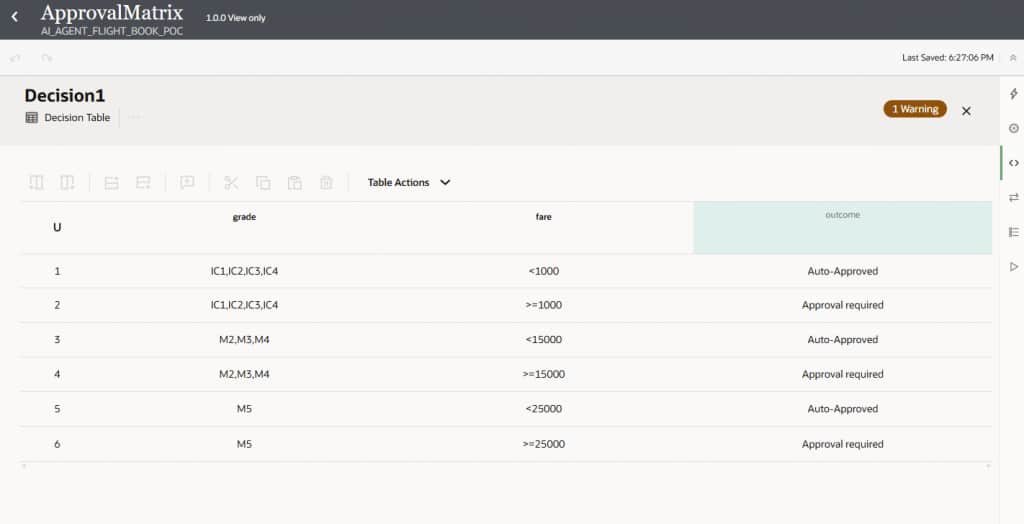
Decision: Applies business rules to an integration, without hard-coding conditions directly into the flow. It helps separate decision logic from integration flow, making it easier to maintain. For example, a decision table stores travel budgets by employee grade and indicates whether approval is needed.
Human in the loop: Human in the Loop (HITL) is a capability in Oracle Integration that embeds structured human oversight into agentic AI workflows by introducing intelligent checkpoints where human judgment is required before critical actions are taken — such as approvals, exception handling, or policy-sensitive decisions. Oracle Integration’s Decision service can be seamlessly combined with HITL to apply business rules before escalating to a human, ensuring that only the right requests reach an approver. In a flight booking scenario, when a fare exceeds an employee’s grade-based budget threshold, the AI agent can automatically route the request to a designated approver — pausing the booking process until an approval or rejection is received, after which the agent resumes execution — ensuring full governance, traceability, and policy compliance throughout. For a deeper dive, refer to our detailed blog here.
Implementations:
After exploring the core capabilities—such as the AI Agent, Decision Service, and supporting components like the Knowledge Base and Human in the Loop—it is now time to bring them all together. The following section walks through the step-by-step implementation of these components within Oracle Integration, demonstrating how each piece connects to deliver a fully functional, policy-compliant, and intelligent travel booking experience. From configuring the agent and registering tools to wiring up decisions and approval workflows, every step is grounded in what has been discussed above, making the implementation both intuitive and traceable.
- Step 1: Create Integrations
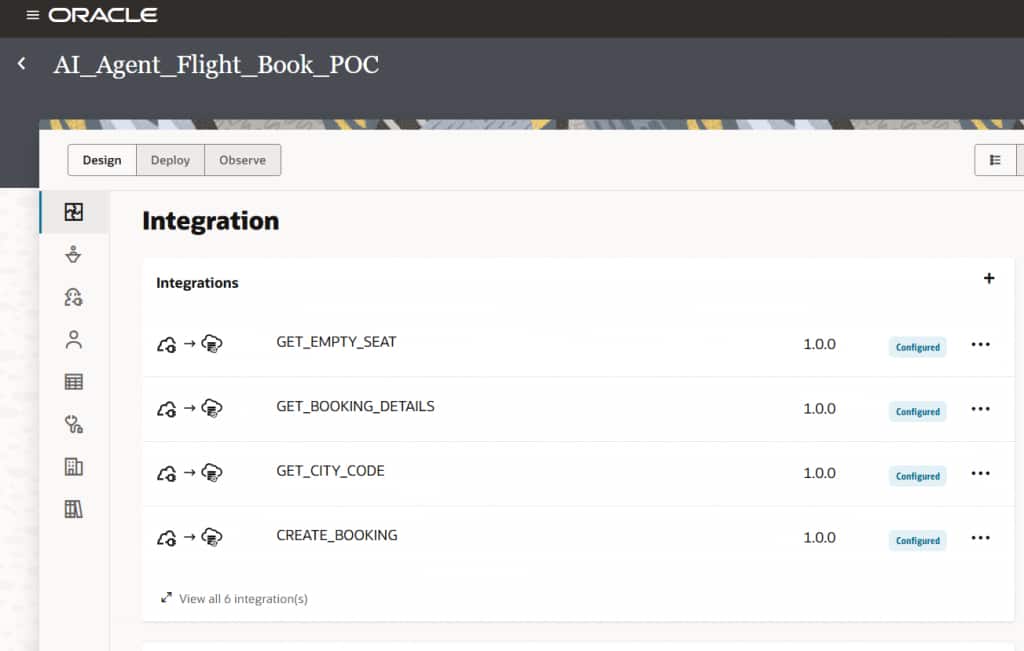
In an agentic architecture, automation is built using small, reusable macro integrations, each performing a specific task rather than a single monolithic flow. Using the rich adapter capabilities of Oracle Integration Cloud, these integrations can quickly connect to various systems and expose their functionality as tools.
The AI Assistant dynamically orchestrates these integrations based on user intent—deciding which tool to invoke, in what sequence, and when approvals are required—enabling flexible, scalable, and intelligent automation. For example, in a flight booking scenario, individual integrations handle tasks such as airport code lookup, flight search, seat availability, checking travel policy, and final ticket booking, all seamlessly coordinated by the AI Agent.
- Step 2: Create Decision
A decision approval matrix evaluates employee grade and flight fare using a decision table. Based on these inputs, the matrix determines whether the booking can proceed automatically or requires additional approval. This approach ensures consistent decision-making, policy enforcement, and controlled approvals across the flight booking process. We also created an integration that invokes the decision service with employee grade and flight fare as inputs to determine the appropriate approval outcome. To learn more about Decisions, you can refer to the Oracle blog Click here.
- Step 3: Create Human in the Loop (HITL)
Human in the Loop (HITL) in Oracle Integration Cloud introduces structured human oversight into agentic AI workflows, acting as an approval and exception-handling layer for high-impact decisions. When required, the AI agent routes actions to a designated approver, ensuring policy compliance, accuracy, and accountability. It can also escalate ambiguous scenarios to humans, enabling informed decision-making without disrupting the flow.
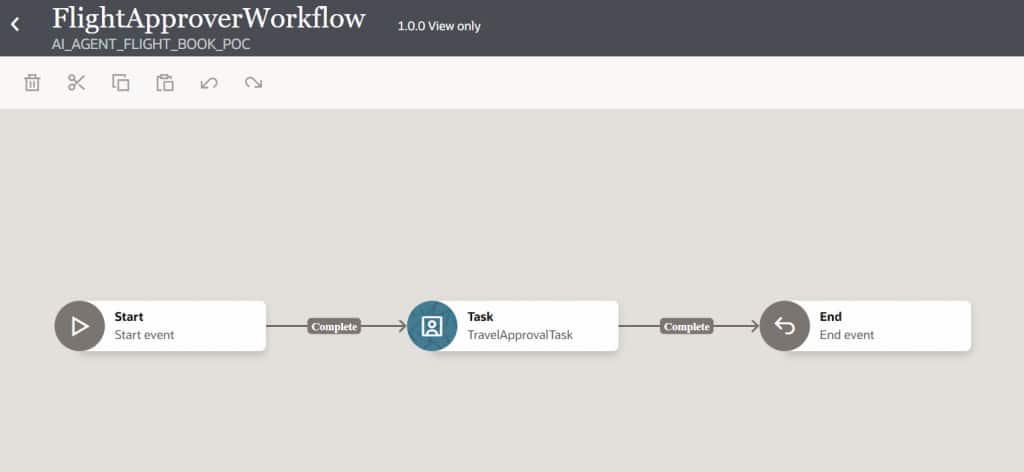
In the flight booking scenario, an “Approval Required” outcome from the Decision service triggers a workflow that pauses execution until approval is provided, ensuring adherence to policy. A structured form presents all relevant details—employee information, flight selection, fare, and context—allowing quick review. This workflow is exposed as a tool, enabling the AI agent to invoke it dynamically and seamlessly incorporate human oversight into the automation process. The quickest way to implement HITL is to leverage Oracle Recipes, each designed around common enterprise approval patterns. Since every recipe is fully editable, teams can start with a ready-made foundation and tailor it as needs evolve. Refer to the Oracle Blog for more details.
- Step 4: Create Tools
Tools are externally callable capabilities that an agent can invoke to perform actions or retrieve information using natural language. To create a tool, we need to select the integration that will serve as its implementation. As part of the current use case, we have implemented multiple integrations and exposed them as tools that the AI agent can invoke dynamically during orchestration. This automatically copies the integration’s description, which can be changed.
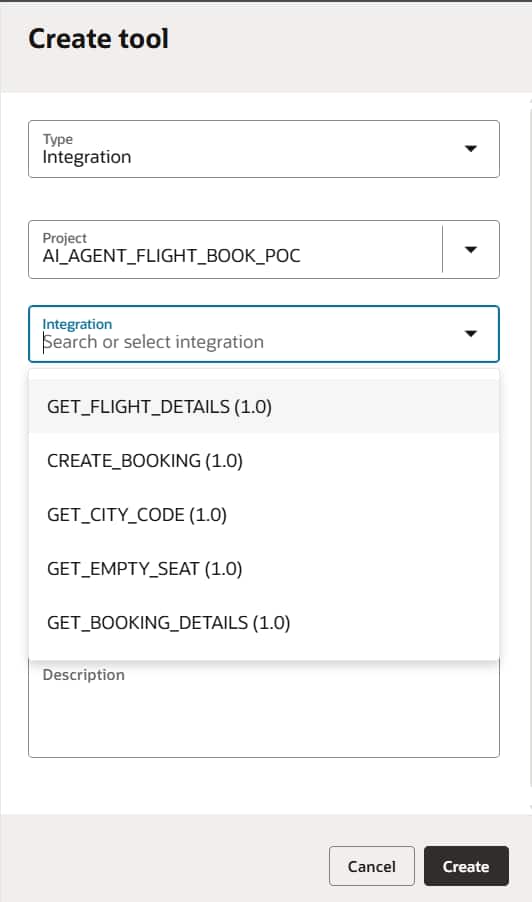
Once you click create, you will be able to see the metadata of the tool. This demonstrates how the tool can be used. As shown below there are multiple parameters required to invoke this tool, which will eventually invoke the respective integration. It is also recommended to include comprehensive guidelines that assist the LLM in understanding when and how to utilize this tool. For example, if the user provides a booking date in any format, the LLM converts the same to the required format while invoking the tool.
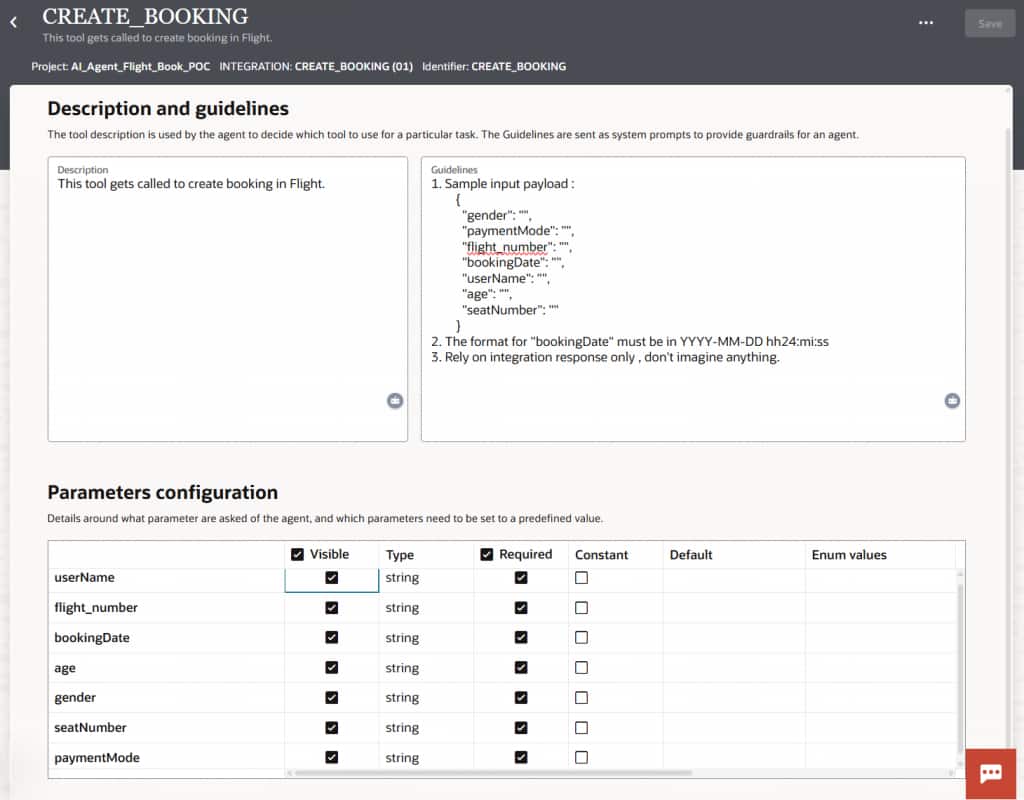
Similar steps are followed to create tools for each integration.
- Step 5: Create Agent Patterns
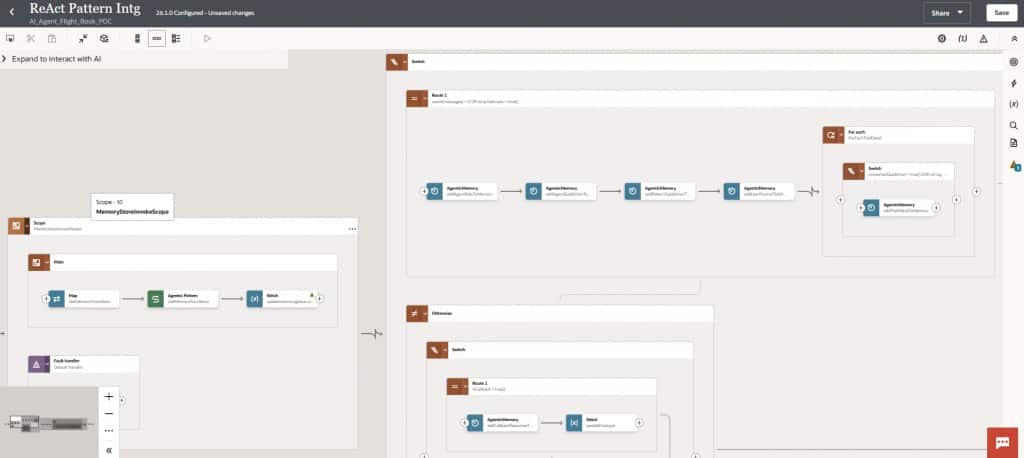
Another key functionality, Agent Patterns, is leveraged in this use case. Here we have selected out of the box ReAct (26.4) pattern, which will install the underlying components from recipe library. Agent Patterns allow you to define guidelines. The intent of this pattern is to ensure that agents are consistent, compliant, secure, and scalable across use cases. The result is an AI agent that not only delivers intelligent automation but also adheres to the required compliance, operational, and architectural standards defined for the enterprise. Oracle provides compliance guidelines for the agent pattern, which can be customized as needed.
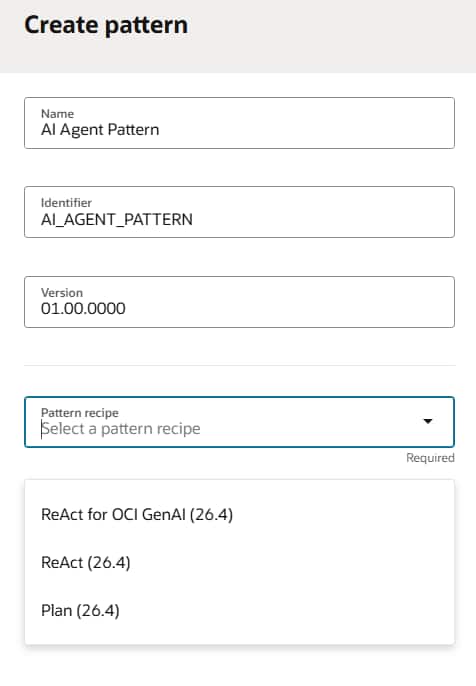
Once you save the agent pattern, you may notice one integration is created automatically out of the box. This integration orchestrates and governs the agent’s behaviour by enforcing defined execution, decision, and interaction rules. It ensures the agent operates consistently, predictably, and within established governance boundaries. Though users may modify existing integrations to align with their AI agent’s specific business requirements.
- Step 6: Create Prompt Templates
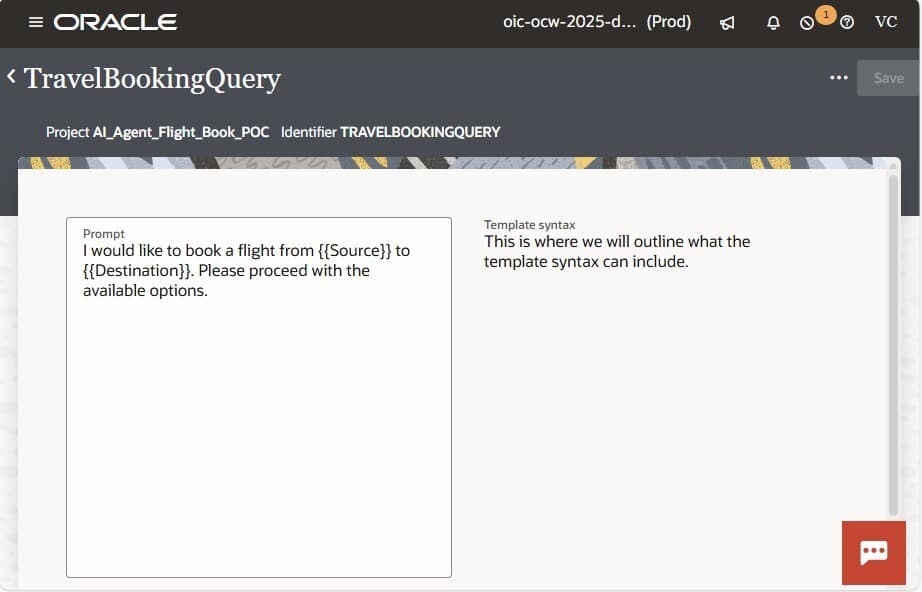
Prompt Templates provide a ready-to-use system prompt that includes placeholders for dynamic variables, enabling structured and reusable interactions with LLMs. During execution, these templates are automatically populated with values derived from the integration payload, ensuring that each request is context-aware and tailored to the specific business transaction. Once the placeholders are replaced with actual data, the completed prompt is sent to the LLM for processing. Additionally, an AI agent within OIC can be associated with one or more prompt templates, allowing it to handle different scenarios or use cases while maintaining consistency, governance, and reusability across AI-driven integrations.
- Step 7: Create AI Agents:
Now you can create your agent based on Thinking Pattern. You need to select the Agent Pattern you created in previous step. Once AI Agent is created, required tools need to be associated with the AI Agent. The agent guidelines should be tailored to align with the functional and non-functional requirements of the flight booking system, including search, seat booking, payment mode etc. This ensures the AI agent follows domain-specific rules, integrates with required services, and behaves consistently across all scenarios. We have used the following guidelines for Travel booking AI Agent.
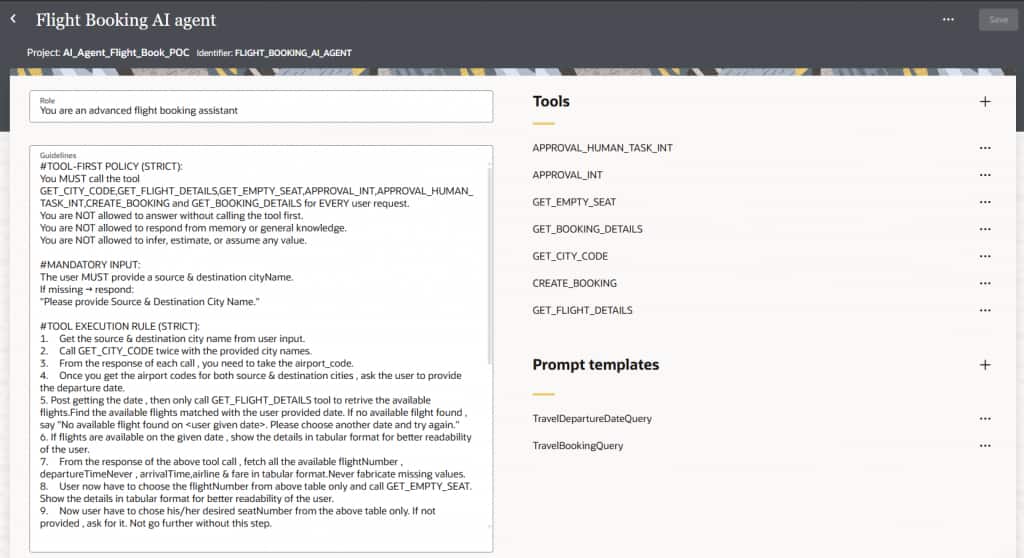
Once the guidelines are updated, save the AI Agent and proceed with activation. OIC AI Agent provides the ability to activate an agent in three tracing level: Production, Audit, and Debug – to support controlled execution, traceability, and troubleshooting across different stages of the lifecycle.
Execution:
Once the AI Agent is activated, you can leverage prompt templates that are automatically populated with values extracted from the JSON payload, ensuring the AI agent receives clear, structured, and contextually meaningful input.
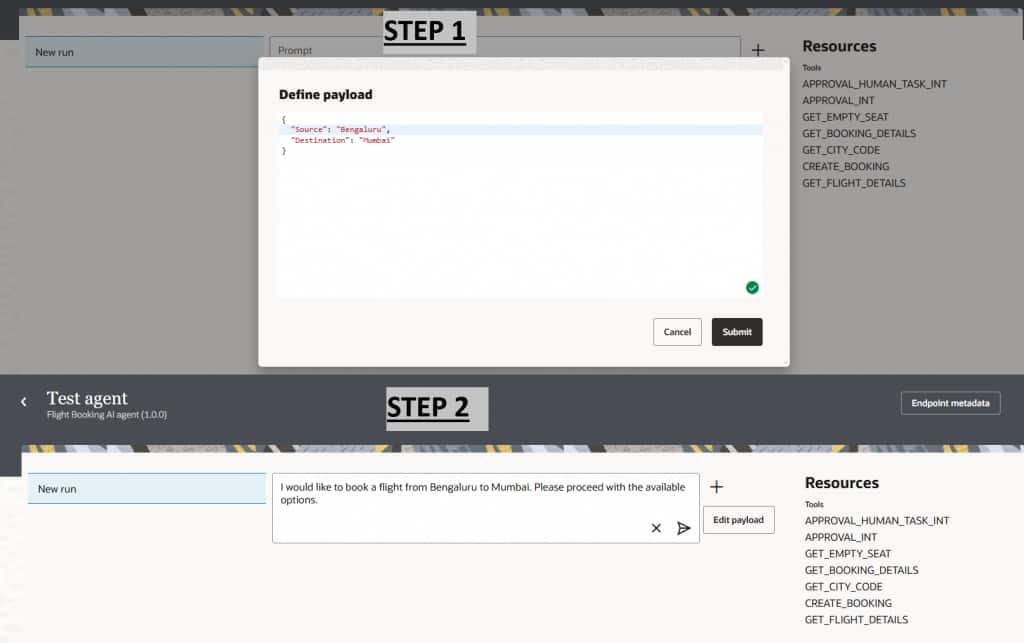
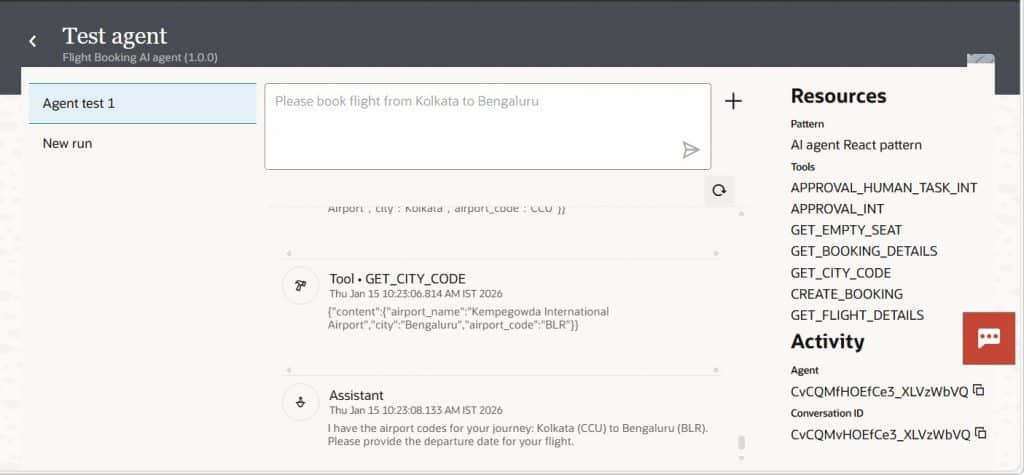
The AI Agent first understands user intent and validates it against defined guidelines. It then follows the selected agent pattern to orchestrate execution. Based on this pattern, the agent invokes the required tools and applies the guidelines configured for each tool to process the request and generate the final response. As shown below, based on the user input, the AI Agent first invokes the GET_CITY_CODE tool to retrieve the corresponding airport codes for both the source and destination cities.
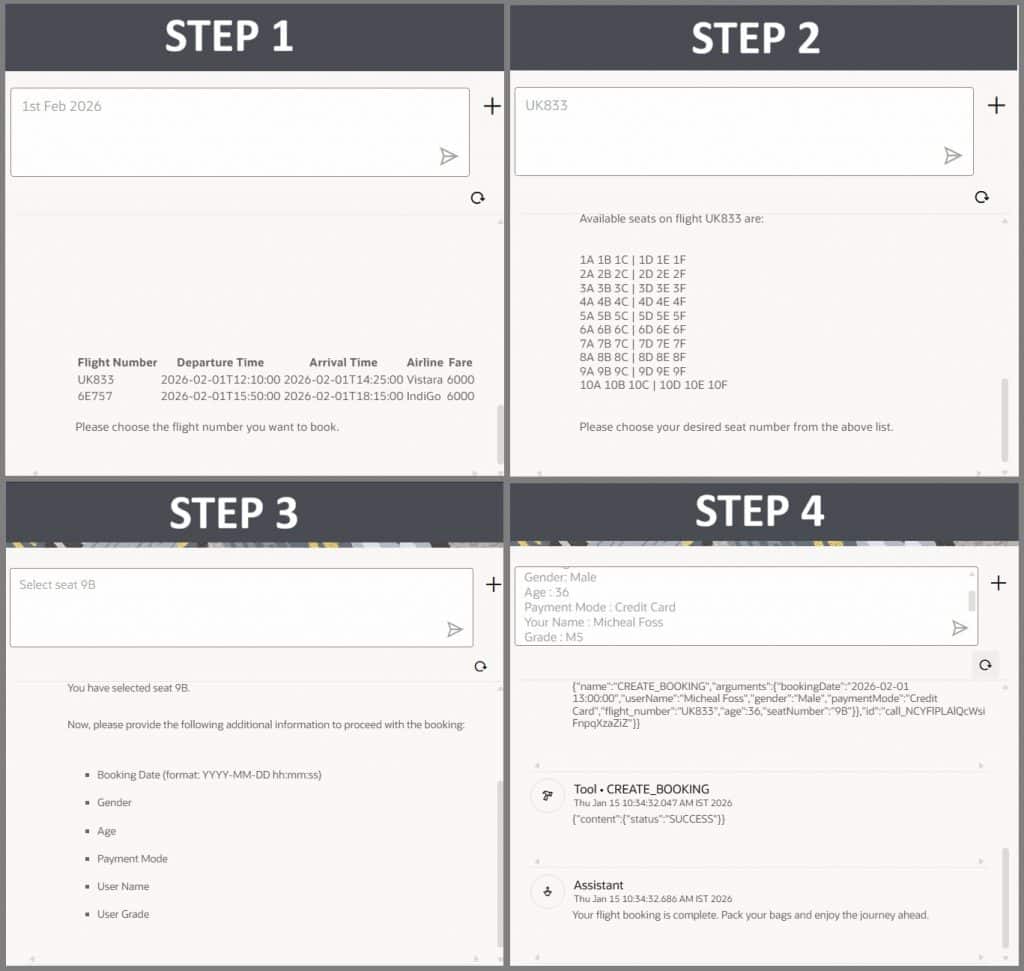
The AI Agent then interacts with the user to collect the remaining inputs, such as travel date, flight selection, and seat number. Based on the gathered information, the agent applies logical reasoning to determine which tool should be invoked next. It orchestrates the tool executions in sequence and finally completes the flight ticket booking.
In cases where the flight fare exceeds the allowed budget for the employee’s grade, the AI Agent triggers a human approval workflow. As shown below, the agent ensures that the request is routed to the appropriate approver and pauses the booking process until approval is received.
Monitoring and Troubleshooting:
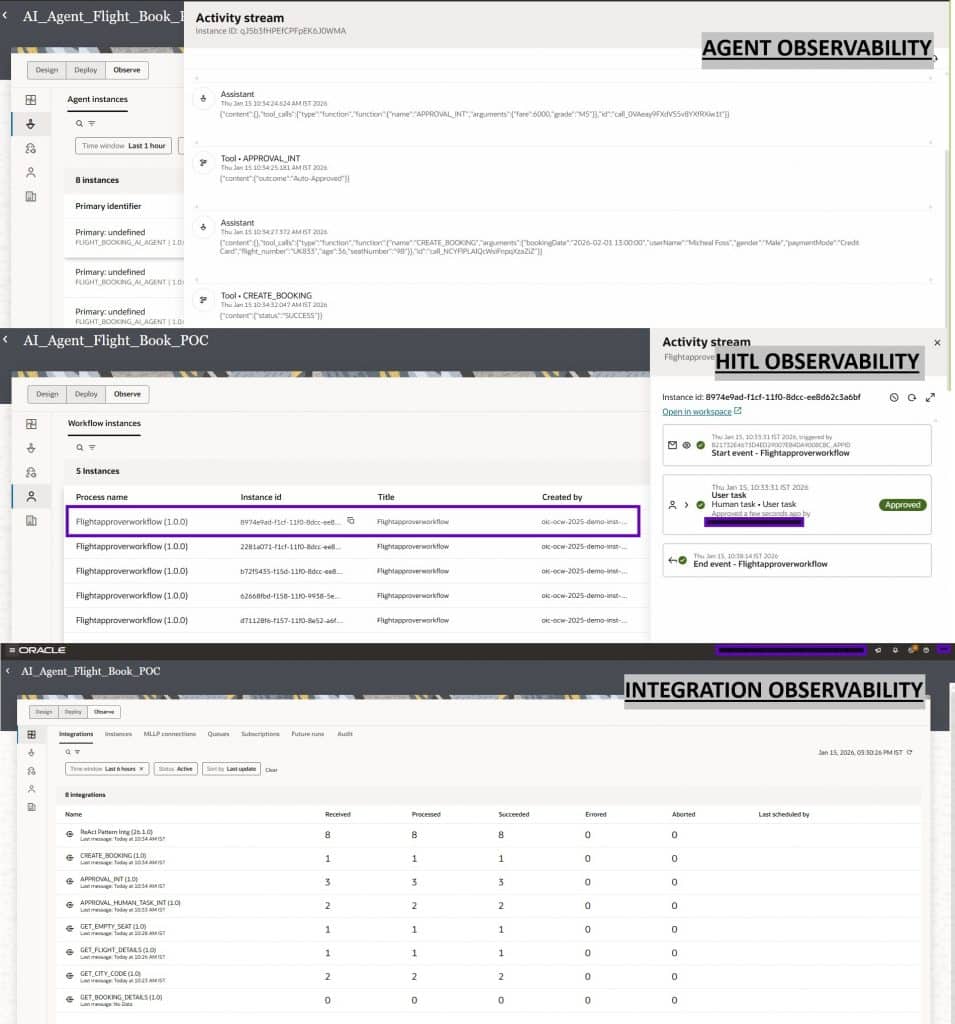
The centralized observability capabilities of the OIC AI Agent significantly simplify troubleshooting, updates, and overall lifecycle management. Oracle Integration provides a unified monitoring experience where AI Agents, integrations, and human tasks can all be tracked from a single screen. This consolidated view enables teams to quickly trace execution flows, identify issues across components, and understand dependencies without switching between tools. As a result, enterprises gain better operational visibility, faster issue resolution, and more efficient management of AI-driven automation solutions.
Conclusion/Key Takeaways:
Accelerate agentic automation – Oracle Integration Cloud enables rapid adoption by allowing reuse of existing integrations as tools, powered by strong enterprise connectivity and a diverse toolkit.
Unified and scalable platform – Customers can easily adopt agentic solutions within their existing footprint, combining predictable workflows with dynamic, AI-driven automation in a single environment.
Simplified operations and governance – Centralized observability, along with built-in Production, Audit, and Debug modes, ensures better maintainability, troubleshooting, and compliance with consistent policies and controls.
Faster innovation and orchestration – A unified design experience (integrations, rules, human tasks, knowledge base, and AI agents) enables seamless orchestration and accelerates development of intelligent, end-to-end automation solutions.
Final Thought:
Agentic AI is not merely an incremental enhancement to automation—it represents a fundamental shift in how enterprises design, execute, and govern business processes. By moving from rigid, predefined workflows to intent-driven, adaptive execution, organizations can achieve a new level of flexibility and intelligence in their operations.
With Oracle Integration, this transition is both practical and controlled. By combining reusable integrations as tools, declarative decisioning, contextual knowledge, and human oversight, enterprises can build automation that is intelligent by design, scalable by architecture, and governed by policy. This enables organizations to embrace the power of AI-driven automation while maintaining the control, compliance, and reliability required in enterprise environments.