
An Oracle Database license or subscription package includes numerous components that support Oracle Database AI features. Whether the goal is to run AI agents, generate vectors and vector indexes, perform any kind of text generation, or even provide intelligent memory for agents and AIs, specialized containers can offload work from the Oracle Database. A wide range of AI tasks can be carried out in controlled, private environments across any cloud or on premises. Managed by a Kubernetes operator such as OraOperator, these various containers gradually form a construct that could be described as a “private AI platform” for the Oracle Database — and not only for the Oracle Database.
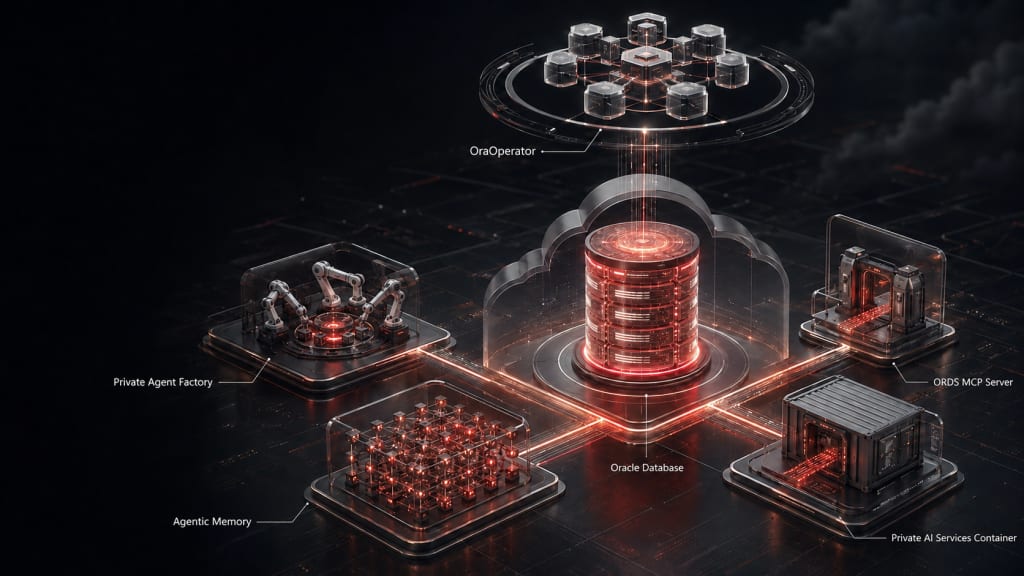
The components Private Agent Factory from version 26.7, ORDS MCP Server from version 26.2, Private AI Services Container from version 26.2, and the intelligent, database-backed AI Agent Memory included in Private Agent Factory are available as containers on container-registry.oracle.com and are gradually being supported by the Kubernetes Operator for Oracle Database, OraOperator.
Today I would like to explain how the Private AI Services Container 26.2, with the help of OraOperator 2.2, can download almost any LLM from Huggingface.co and run it on a GPU-enabled node. The Private AI Services Container 26.2 onwards can do more than calculate embeddings and vector indexes: it also supports other key parts of the OpenAI-compatible inferencing API. For example, it and the LLMs it manages can be integrated by in-database agents, SELECT AI, and Private Agent Factory agents and chatbots; it can also serve as a general AI service for common AI tools and chatbots.
Brief information about the Private AI Services Container
The Private AI Services Container, also known simply as PAI, is designed to take on especially compute-intensive tasks in the Oracle Database AI environment and, entirely optionally, offload the database. Rather than loading LLMs in the so-called ONNX format into the database and running them there, PAI provides several important ONNX-formatted LLMs preinstalled and ready to use (please see “Included Models” in the Oracle Container Registry PAI repository. In Oracle Database, a parameter can determine whether embeddings and vector indexes are created on database CPUs or by a nearby service such as PAI. If your security policies and networks allow it, a cloud service such as OpenAI, OCI GenAI, Microsoft Foundry, or AWS Bedrock would of course work as well.
The key feature of the new PAI is that the container now offers three execution engines for using LLMs, running them either on GPUs or on more affordable multi-core CPUs. You can choose the engine through configuration:
- An Oracle-adapted, CPU-based ONNX runtime with six preinstalled small, fast embedding LLMs. You can of course add further LLMs. This runtime provides a REST API for creating embeddings—not for generating chats or text.
- The llama.cpp runtime, which currently runs on CPUs and can operate small general-purpose, chat-capable LLMs optimized and quantized for CPUs (GGUF format with AVX512 CPU optimization and mixed-integer quantization).
The preconfigured “large” PAI container already includes a small ministral LLM with 3 billion parameters. No further download or LLM license-agreement approval is required. It also enables you to download LLMs directly from Hugging Face repositories and start them locally. - The vLLM runtime, which supports NVIDIA GPUs as well as CPUs. Alongside ollama and sglang, vLLM is probably the most popular LLM execution engine. This runtime can also download and start LLMs directly from Hugging Face repositories.
Brief information about OraOperator
OraOperator is a specialized, non-application container that registers and manages new resources in the Kubernetes cluster that runs it. These may be in-cluster or remote Oracle databases of various types (RAC, Data Guard, Autonomous, BaseDB Service, Globally Distributed, and more), or perhaps more interestingly, the growing number of database-adjacent components such as ORDS, database metrics, PAI, and soon PAF (Private Agent Factory).
OraOperator is particularly convenient for PAI containers. Among other things, it handles or orchestrates:
- Integration of SSL certificates
- Integration of security tokens for REST calls and Hugging Face downloads
- Persistent volumes for downloaded LLMs
- Integration of configuration files with LLM configurations
- Network connectivity through a load balancer
- Scaling and placement of containers on available servers
- Reconciliation—that is, comparing the desired and actual configuration and applying configuration changes
Prerequisites
- A Kubernetes cluster (OpenShift, OKE, AKS, and so on) with at least one GPU node (for example, with an NVIDIA A10 GPU). My example uses the OKE service running in OCI, but I will address particulars and differences. For example, GPU nodes are labeled or annotated differently. The cluster should temporarily have internet egress to download operators, LLMs, and application containers.
- A preinstalled cert-manager, a Kubernetes operator that handles certificate management, issuance, and renewal. Its installation is described during OraOperator installation, which also needs it for internal purposes.
- A preinstalled OraOperator—the installation is relatively straightforward and described here:
https://github.com/oracle/oracle-database-operator/blob/main/README.md
In principle: apply YAML files with resource definitions, apply YAML files with permissions depending on whether resources should be visible globally or locally (“namespaced”), then download and start the container using a deployment YAML. - A Hugging Face login token (HF_TOKEN), created on the Hugging Face site, and acceptance—usually free—of the license for the LLM you intend to use by clicking the relevant button. The LLMs “openai/gpt-oss-20b” and “google/gemma4-12b-it” do not require license-agreement acceptance or an HF_TOKEN for download. An LLM such as the medical “google/medgemma-27b-it” must be approved before downloading and therefore requires an HF_TOKEN.
To create a token, click your Hugging Face user profile and select “Access Tokens”. - A download token on container-registry.oracle.com. It is used as the password for downloading PAI containers, which also require license-agreement approval before each download. To create a token, click your user profile on container-registry.oracle.com and select “Auth Token”.
Let’s get started: creating certificates, configuration files, and tokens
Let’s start by creating a new namespace for our test:
$ kubectl create namespace private-aiNext, we need a Kubernetes secret named container-registry-secret in the new namespace, to store the credential for downloading the containers, as mentioned in the prerequisites. For example:
$ kubectl create secret docker-registry container-registry-secret -n private-ai --docker-server=container-registry.oracle.com --docker-username=meinusername@oracle.com --docker-password=DOWNLOADTOKENTo ensure that access to the PAI container also requires a key, we generate one and store it in a secret named paisecret under the entry, or key, api-key. Any character string is sufficient. For more professional-looking tokens, you can use the GitHub-provided create_auth_secret.sh script.
We also place the HF_TOKEN, the download token for Hugging Face repositories, in the same secret. The token must be stored under the huggingface-token key so that the PAI container can find it later.
$ kubectl create secret paisecret -n private-ai --from-literal=api-key=MYAPIKEY --from-literal=huggingface-token=MYHF_TOKENThe PAI container should be accessed through HTTPS with its own certificates. Let’s create a test certificate with the preinstalled cert-manager by creating a new Certificate resource using kubectl apply -f and the following file:
apiVersion: cert-manager.io/v1
kind: Certificate
metadata:
  name: privateai-cert
  namespace: private-ai
spec:
  commonName: api.example.com
  dnsNames:
  - api.example.com
  - pai-sample.private-ai.svc
  - pai-sample.private-ai.svc.cluster.local
  duration: 2160h
  issuerRef:
    kind: ClusterIssuer
    name: selfsigned-issuer
  keystores:
    pkcs12:
      create: true
      passwordSecretRef:
        key: privateai-ssl-pwd
        name: paisecret
  privateKey:
    algorithm: RSA
    rotationPolicy: Always
    size: 3072
  renewBefore: 360h
  secretName: privateai-tls
  usages:
  - digital signature
  - key encipherment
  - server auth
The SSL certificate is created using the usually preinstalled test issuer named selfsigned-issuer and stored in a secret named privateai-tls. The password for the keystore created as well is added to the existing collection of secrets in paisecret . The GitHub-provided tr-cert-manager.sh script offers even more comprehensive support for creating a certificate.
Next comes a configuration file in the form of a Kubernetes ConfigMap. It specifies which LLMs to load from which Hugging Face repository and which special parameters are needed, for example to limit memory consumption somewhat on smaller GPUs (an NVIDIA A10 in my environment). You can also submit this YAML definition to your Kubernetes cluster using “kubectl apply -f”:
apiVersion: v1
kind: ConfigMap
metadata:
  name: private-ai-config
  namespace: private-ai
data:
  config.json: |
    {
      "models":[
        {
          "name":"gpt-oss-20b",
          "path":"openai/gpt-oss-20b",
          "runtime":"vllm",
          "capabilities":["TEXT_GENERATION"],
          "runtime_arguments": [
             "--max-num-seqs", "8",
             "--max-model-len", "16384",
             "--gpu-memory-utilization", "0.95"
          ]
        }
      ]
    }
The “config.json” file included in the ConfigMap will later be made available to the PAI container at the appropriate location. Once the LLM initializes successfully, it can be used by chatbots and agents under the name “gpt-oss-20b”. This is OpenAI’s open-weight GPT-OSS LLM. Incidentally, it requires no HF_TOKEN for download, nor does a license agreement need to be accepted in the browser beforehand; the same is true for google/gemma-4-12B-it. Other LLMs, such as google/medgemma-27b-text-it, require both a token and license-agreement acceptance.
Note: for security reasons, the PAI container’s vLLM runtime supports only LLMs in SafeTensor format. Increasingly, heavily quantized LLMs are available in GGUF format. You can often find the same LLMs in other repositories in SafeTensor format, or convert an LLM of your choice and provide it in your own Hugging Face repository (essentially a huge git repository).
The llama.cpp runtime also included in the PAI container supports GGUF format, but currently runs only on CPUs and prefers CPU-optimized LLMs. There is another PAI container runtime for ONNX format. The slowly fading TensorFlow format remains unsupported by the PAI container.
The remaining parameters specify the runtime to use, such as onnx, llamacpp or vllm; the purpose the LLM should serve (for example, EMBEDDINGS or TEXT_GENERATION); and optional command-line parameters for the vLLM runtime.
If you use no config.json file, the LLMs bundled with the container are available to you. Simply start multiple PAI containers with different configurations; OraOperator is happy to help.
Creating and customizing a new “PrivateAI” resource
Now everything comes together: we define a new PrivateAI resource and submit it to the Kubernetes cluster and OraOperator. From the resource description, it will create and manage additional Kubernetes components, such as a deployment, pod, network service, and will integrate the configurations into those components. Here is an example YAML for a new PAI container that uses everything we have defined so far:
apiVersion: privateai.oracle.com/v4
kind: PrivateAi
metadata:
  name: pai-quickstart
  namespace: private-ai
spec:
  security:
    authEnabled: true
    secret:
      name: paisecret
      mountLocation: /privateai/ssl
    tls:
      secretName: privateai-tls
      mountLocation: /privateai/ssl
  runtime:
    image:
      name: container-registry.oracle.com/database/private-ai:large-gpu-infer-26.2.1.0.0
      pullSecret: container-registry-secret
    replicas: 1
    # workerNodes:
    #   - 10.0.10.35
    resources:
      limits:
        nvidia.com/gpu: '1'
      requests:
        nvidia.com/gpu: '1'
  configuration:
    configFile:
      name: private-ai-config
      mountLocation: /privateai/config
  networking:
    service:
      ports:
      - port: 8443
        targetPort: 8443
        protocol: TCP
Explanation of the parameters:
- Setting security.authEnabled to true means that the API key will be used and validated when the PAI container is called through REST.
- security.secret specifies the Kubernetes secret that contains the API key or keys to use, as well as the optional HF_TOKEN for downloading LLMs.
- security.tls specifies the name of the Kubernetes secret in which the SSL certificates are stored. Do not change the mount point for now.
- runtime.image specifies the PAI container image to load, together with the credential secret. The “large” container used here includes several small LLMs that we are not currently using, as well as the GPU-capable vLLM runtime.
- runtime.workerNodes is commented out here. You can enter the names of eligible Kubernetes nodes on which the containers should be started. This lets you target nodes equipped with GPUs. Arbitrary nodeSelector configuration is planned for the future.
- runtime.resources can also control which nodes start the containers. The requests setting requests a GPU device that Kubernetes reserves for the container being started. The limits setting limits the container to using no more than one GPU device.
- configuration.configFile specifies the Kubernetes ConfigMap from which to obtain the config.json file and where to mount it in the PAI container. Please do not change the path specified here for now.
- networking specifies which types of Kubernetes services to attach to the container and through which ports. You can use this configuration initially, then add your own services such as load balancers, gateways, and ingresses. Or, as described in an extended configuration on GitHub, you can specify load balancer services here already.
A manual deployment adjustment may still be necessary. For now, the PrivateAI resource does not support settings for so-called Tolerations. According to the roadmap, this will be addressed in the next OraOperator version.
So please do not be surprised if, after you create the PrivateAI resource, the pod managed by OraOperator remains permanently in the Pending state: the Kubernetes event list (kubectl get events -n private-ai) will probably reveal that no suitable node could be found. This happens because GPU-enabled Kubernetes nodes in cloud environments are often specially marked by the system with a “Taint“. It ensures that only containers that tolerate this taint can start on those nodes.
In this case, edit the Deployment created by OraOperator using “kubectl edit deployment pai-quickstart -n private-ai“. Add a Toleration appropriate for the marked node; in my OKE environment, for example, as in the following snippet:
...
      imagePullSecrets:
      - name: container-registry-secret
      restartPolicy: Always
      schedulerName: default-scheduler
      securityContext:
        fsGroup: 2001
        runAsGroup: 2001
        runAsUser: 2001
      terminationGracePeriodSeconds: 30
      tolerations:
      - effect: NoSchedule
        key: nvidia.com/gpu
        operator: Exists
...
You can see which taint must be tolerated in your environment by querying the metadata of your Kubernetes nodes, for example as follows:
$ kubectl get nodes -o json|jq '.items[].metadata.name'
"10.0.10.12"
"10.0.10.159"
"10.0.10.35"
"10.0.10.37"

$ kubectl get nodes -o json|jq '.items[].spec.taints'
null
null
[
  {
    "effect": "NoSchedule",
    "key": "nvidia.com/gpu",
    "value": "present"
  }
]
null
Please do not worry that this adjustment will be overwritten by OraOperator during the next reconcile operation: OraOperator currently does not monitor the tolerations section and therefore does not reset it to its absent desired value. This will probably change in the next version.
Starting and testing the container
The PAI container should now start cleanly, and with kubectl logs we can see whether all parameters take effect and the container starts completely. Note: the LLMs to be downloaded are loaded into GPU RAM and compiled ahead of time. This can take tens of seconds to several minutes. For example:
$ kubectl get pods -n private-ai

NAME                             READY   STATUS    RESTARTS   AGE
pai-quickstart-7f9757b8f-2dg8p   1/1     Running   0          6h40m


$ kubectl logs pai-quickstart-7f9757b8f-2dg8p -n private-ai

INFO: Config file set to /privateai/config/config.json
INFO: Keystore path set to file:/privateai/ssl/keystore
INFO: API Key path set to /privateai/ssl/api-key
INFO: Hugging Face token loaded from secret /privateai/ssl/huggingface-token

08:51:48.618 [main] INFO  i.m.s.ObjectMappers$ObjectMapperContext$1 - Established active environments: [k8s, cloud]
  ____       _            _            _    ___
 |  _ \ _ __(_)_   ____ _| |_ ___     / \  |_ _|
 | |_) | '__| \ \ / / _` | __/ _ \   / _ \  | |
 |  __/| |  | |\ V / (_| | ||  __/  / ___ \ | |
 |_|   |_|  |_| \_/ \__,_|\__\___| /_/   \_\___|
  Private-AI (version small-cpu-infer-26.2.1.0.0, build 2.0.42)

08:51:48.846 [main] INFO  i.m.c.DefaultApplicationContext$RuntimeConfiguredEnvironment - Established active environments: [k8s, cloud]
08:55:33.357 [main] INFO  i.m.l.PropertiesLoggingLevelsConfigurer - Setting log level 'ERROR' for logger: 'io.micrometer.core.instrument.binder.cache.CaffeineCacheMetrics'
08:55:33.357 [main] INFO  i.m.l.PropertiesLoggingLevelsConfigurer - Setting log level 'ERROR' for logger: 'io.micrometer.core.instrument.binder.cache.caffeine-cache-metrics'
08:55:33.691 [main] INFO  io.micronaut.runtime.Micronaut - Startup completed in 224855ms. Server Running: https://0.0.0.0:8443
The first lines already show that the API key, keystore, configuration file, and Hugging Face token have been mounted. At the very end of the log, you can see that the loaded LLM needed several minutes to initialize. Lucky are those who have multiple GPUs available and can restart the containers one after another!
Let’s now test whether we can chat with the LLM. On the command line, this is quite easy: connect directly to the container with a shell and run a few curl commands there:
$ kubectl get pod -n private-ai

NAME                             READY   STATUS    RESTARTS   AGE
pai-quickstart-7f9757b8f-2dg8p   1/1     Running   0          6h53m

$ kubectl exec -ti pai-quickstart-7f9757b8f-2dg8p -n private-ai -- /bin/bash

[ai_user@pai-quickstart-7f9757b8f-2dg8p app]$ curl https://127.0.0.1:8443/v1/models --insecure -H "Authorization: Bearer MYAPIKEY"

{"data":[{"id":"gpt-oss-20b","modelDeployedTime":"2026-09-03T08:51:52.059736071Z","modelSize":"14.03G","modelCapabilities":["TEXT_GENERATION"]}]}[
The curl call just issued checks which LLMs are loaded and the name under which they are available (here: gpt-oss-20b). The –insecure parameter prevents further validation of the test certificate.
The following call uses the OpenAI-compatible Chat API to greet the started LLM:
$ curl -X POST https://127.0.0.1:8443/v1/chat/completions --insecure \
-H "Authorization: Bearer MYAPIKEY" \
-H "Content-type: application/json" \
--data '{
    "model": "gpt-oss-20b",
    "messages": [{"role": "user", "content": "Hello!"}],
    "stream": false,
    "options": {
        "use_mmap": true,
        "use_mlock": true,
        "num_thread": 4
    }}'

{"id":"chatcmpl-a6032acc20e02ed0","object":"chat.completion","created":1788454191,"model":"gpt-oss-20b","choices":[{"index":0,"message":{"tool_calls":[],"content":"Hello there! How can I help you today?","role":"assistant"},"finish_reason":"stop"}],"usage":{"prompt_tokens":11,"total_tokens":22,"completion_tokens":11}}
Discussion: network connectivity
In our example configuration, OraOperator has created an internal Kubernetes Service of type ClusterIP, which load-balances between multiple container instances or replicas.
$ kubectl get service -n private-ai

NAME             TYPE        CLUSTER-IP   EXTERNAL-IP   PORT(S)    AGE
pai-quickstart   ClusterIP   None         <none>        8443/TCP   16d
This makes the PAI containers reachable within Kubernetes. That is, if you also run an Oracle database or Private Agent Factory as containers in Kubernetes, you can now configure the provider “privateai“, “openai” (for OpenAI compatibility), or even “vllm” and use the PAI container privately and exclusively for chats, agents, and embeddings.
From this point, you can of course add network connectivity from outside the Kubernetes cluster. The PrivateAI Kubernetes resource (or OraOperator) can create a load-balancer service for you that receives an external IP address and points to the PAI containers. Personally, I prefer configuring an additional Kubernetes ingress or gateway service that uses official SSL certificates externally and communicates internally with the PAI container’s “technical” certificates—or that can be extended with additional security checks.
You can then reach your still very private AI service, or inferencing service, from your Exadata systems and developer workstations with their AI assistants, and use it more broadly.
Conclusion
The Private Agent Factory, Agent Memory, ORDS MCP, PAI container, and Oracle Database components are aligned and can form their own self-hosted—yet convenient thanks to Kubernetes—AI platform for use by other agents and AI systems. OraOperator is currently being extended to support these new components and makes deployment more convenient by grouping anonymous containers and network paths into monitored, CI/CD-ready microservices. The Private AI Services Container comes with common runtime environments and conveniently includes the key embedding LLMs and a small chat-capable LLM. All components are aligned and part of Oracle Database support. I look forward to telling you about further new services soon!
Links
Information and further blog posts about OraOperator and the Private AI Services Container:
- Sanjay Singh: Announcement of OraOperator 2.2 with further links
- Markus Kissling: Integrating the PAI container into Oracle Database
- Doug Hood: Getting started with the PAI Container (with podman)
- Oracle Database Documentation on PAI Container
- PAI container on container-registry.oracle.com, with instructions
- OraOperator on container-registry.oracle.com, with a link to the instructions
- OraOperator GitHub repository