
Beginning with Tax Year 2026 filings, organizations submitting information returns through the IRS Information Returns Intake System (IRIS) will have Name and TIN combinations validated at the time of submission. If a payee’s name and Taxpayer Identification Number (TIN) do not match IRS records, the submission will generally be Accepted with Errors, allowing the filing to proceed while identifying the records that require correction.
Rather than discovering Name/TIN mismatches during the IRIS filing process, organizations can proactively validate supplier information throughout the year using PeopleSoft’s built-in IRS TIN Matching functionality. By identifying discrepancies before filing, organizations can improve supplier data quality, reduce post-filing corrections, and simplify year-end compliance.
In this blog, we’ll explore how IRS TIN Matching works in PeopleSoft, what you’ll need to get started, and how incorporating TIN Matching into your supplier maintenance process can help ensure cleaner information return filings.
Why Run TIN Matching Throughout the Year?
Validating supplier information as suppliers are added or updated helps organizations:
- Resolve Name/TIN mismatches before filing season
- Reduce Accepted with Errors responses from IRS IRIS
- Improve supplier master data quality
- Minimize year-end corrections
- Streamline 1099 and information return processing
What is IRS TIN Matching?
The IRS Taxpayer Identification Number (TIN) Matching Program is a free pre-filing service available through IRS e-Services. It allows authorized payers to verify that a supplier’s legal name and TIN match IRS records before filing Forms 1099 and other information returns.
The IRS offers two matching options:
- Interactive TIN Matching – Validate up to 25 name/TIN combinations online and receive immediate results.
- Bulk TIN Matching – Submit up to 100,000 records in a single file and receive results, typically within one business day.
Using TIN Matching before filing helps organizations identify supplier data issues early, reducing IRS notices, filing corrections, and administrative effort.
How PeopleSoft Supports IRS TIN Matching
PeopleSoft Payables includes functionality that supports the IRS Bulk TIN Matching process, making it easy to validate large numbers of suppliers throughout the year.
The process is straightforward:
- Select suppliers that require validation.
- Generate an IRS-compatible TIN Matching file.
- Submit the file through IRS e-Services.
- Download the IRS response file.
- Import the results into PeopleSoft.
- Review supplier match status and resolve any discrepancies.
Instead of waiting until year-end, organizations can regularly validate supplier information as part of their ongoing supplier maintenance process.
Before You Begin
Before using IRS TIN Matching, ensure that:
- Your organization is enrolled in the IRS TIN Matching Program through IRS e-Services.
- Suppliers have complete tax information, including their legal name, TIN, and TIN type.
- PeopleSoft withholding is configured, and TIN Matching Fields is marked as Optional or Required for the IRS withholding entity on the Entity Fields – Supplier tab.
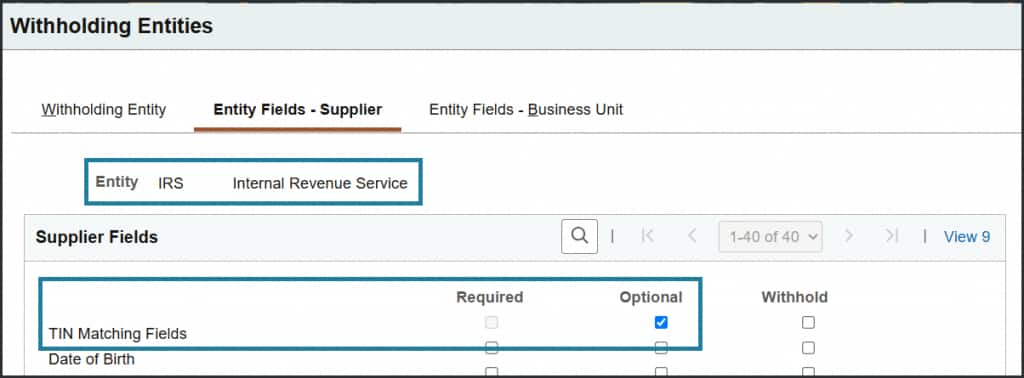

The PeopleSoft TIN Matching Process
Step 1: Select Suppliers
Identify suppliers that require validation. This typically includes:
- New suppliers
- Suppliers with updated tax information
- 1099-reportable suppliers
- Suppliers with previous TIN matching errors
Navigation: Suppliers > Supplier Information > Extract TIN Matching File
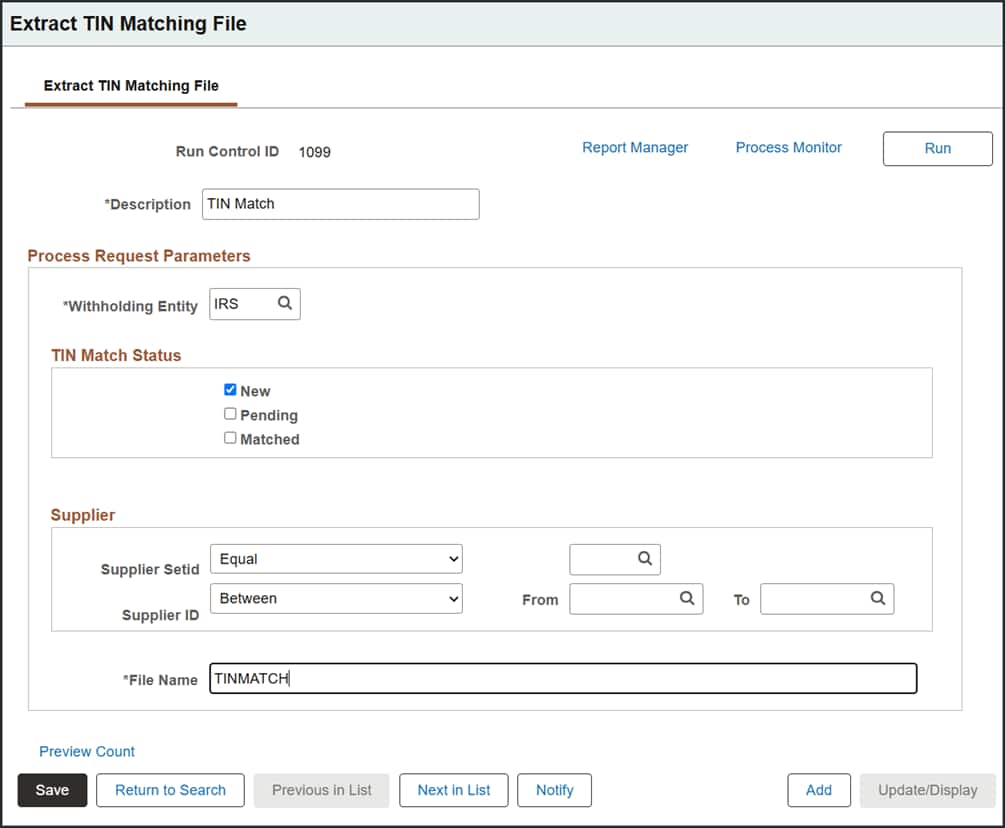
Step 2: Generate the TIN Matching File
Run the PeopleSoft process to create an IRS-compatible Bulk TIN Matching file containing supplier names and TINs.
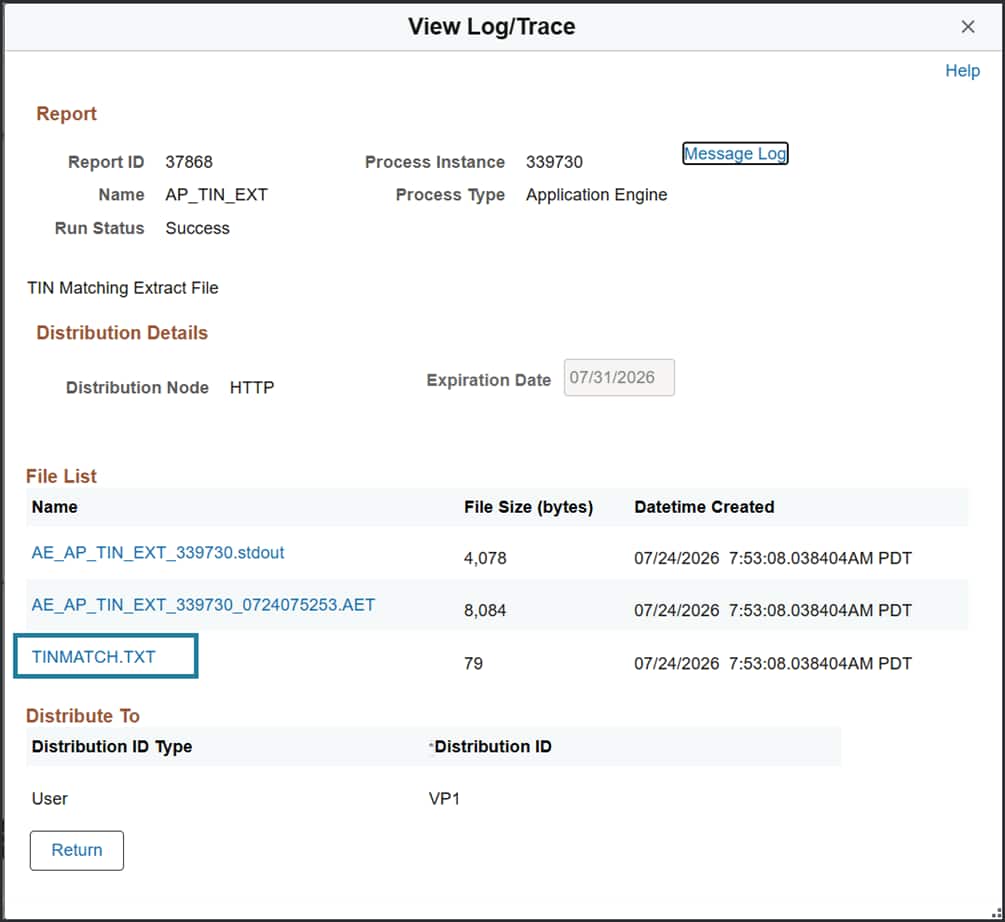
Step 3: Submit the File through IRS e-Services
Upload the generated file through the IRS e-Services TIN Matching portal. The IRS validates each Name/TIN combination against its records.
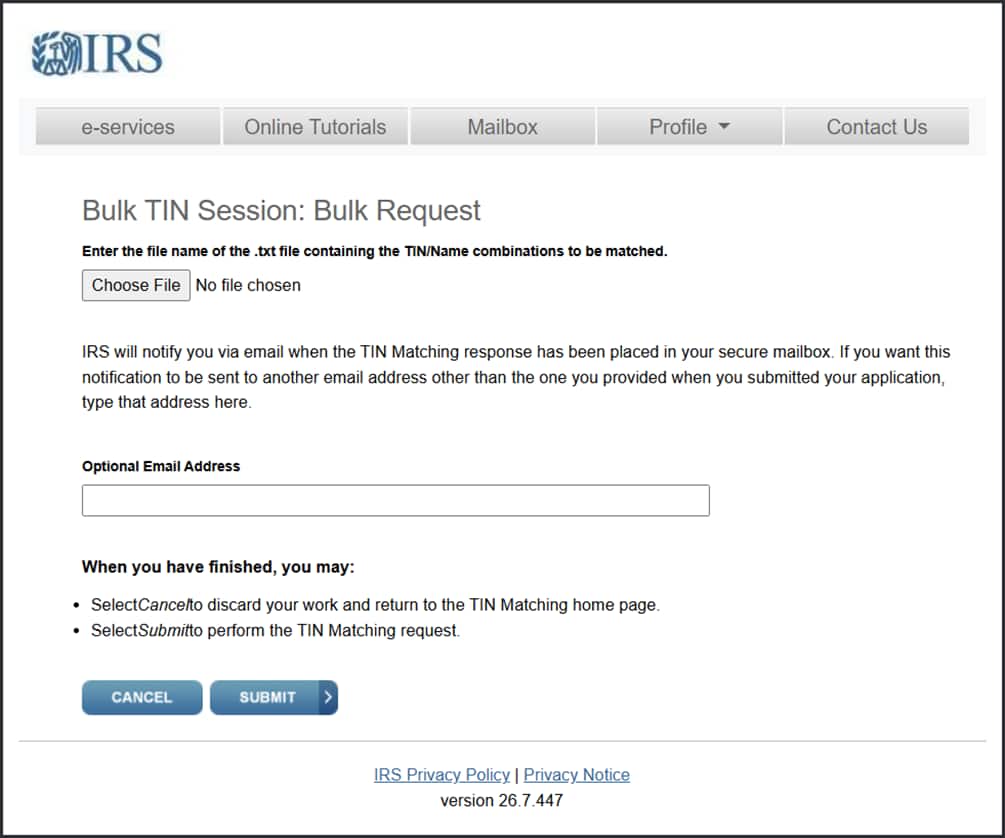
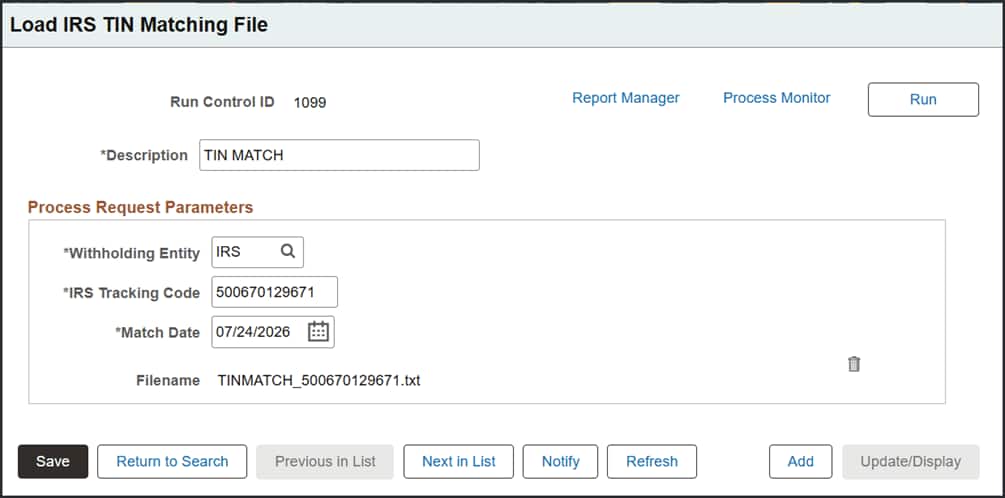
Step 4: Import IRS Results
After processing is complete, download the IRS response file and load it back into PeopleSoft.
Navigation: Suppliers > Supplier Information > Load IRS TIN Matching File
Step 5: Review the Results
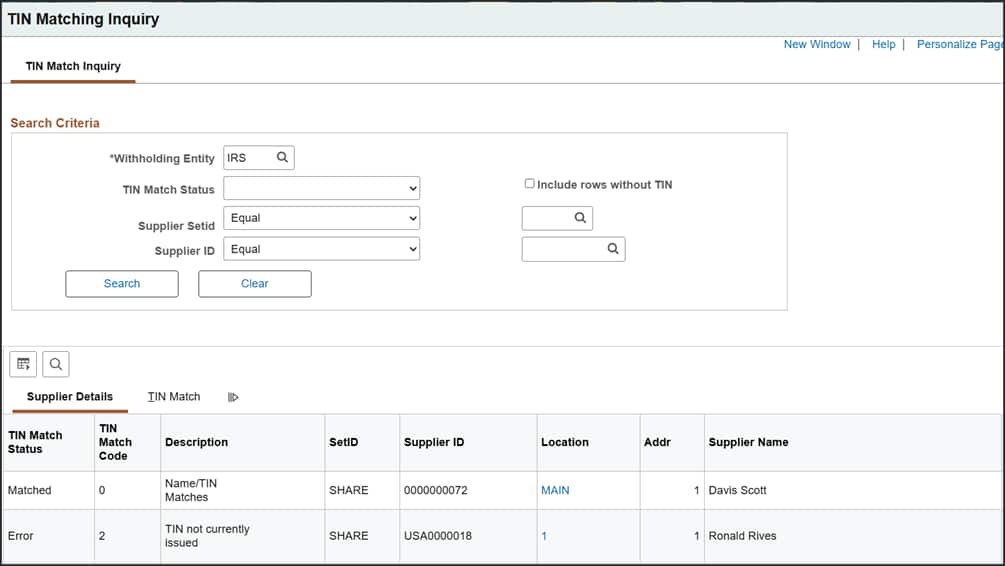
PeopleSoft automatically updates supplier records with the IRS response, including:
- Match Status
- Match Code
- Match Date
- IRS Tracking Number
Users can quickly identify suppliers requiring follow-up before information returns are filed. Corrected supplier information can then be resubmitted in a future TIN Matching request to confirm the updated Name/TIN combination before filing.
Navigation: Suppliers > Supplier Information > TIN Matching Inquiry
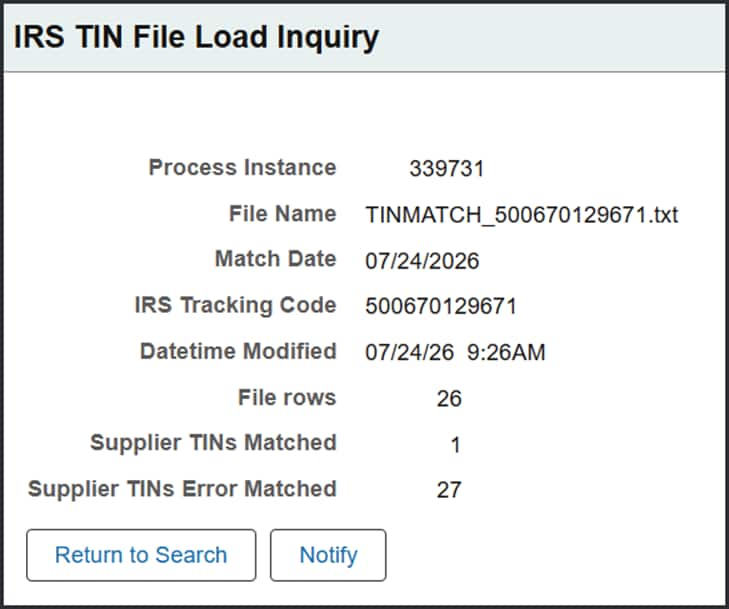
Optional: Review File Load Results
The IRS TIN File Load Inquiry page provides information about each processed IRS response file, including the number of supplier TINs successfully matched and the number that resulted in matching errors.
Navigation: Suppliers > Supplier Information > IRS TIN File Load Inquiry
Understanding Match Results
The IRS response identifies whether each Name/TIN combination matches its records.
PeopleSoft stores the IRS response so users can review match results, identify suppliers requiring follow-up, and resolve issues before filing information returns.
A successful match confirms the supplier information is valid. Mismatch codes indicate suppliers whose tax information should be reviewed, often requiring an updated Form W-9 before filing.
By addressing mismatches early, organizations can avoid many common reporting issues during 1099 processing.
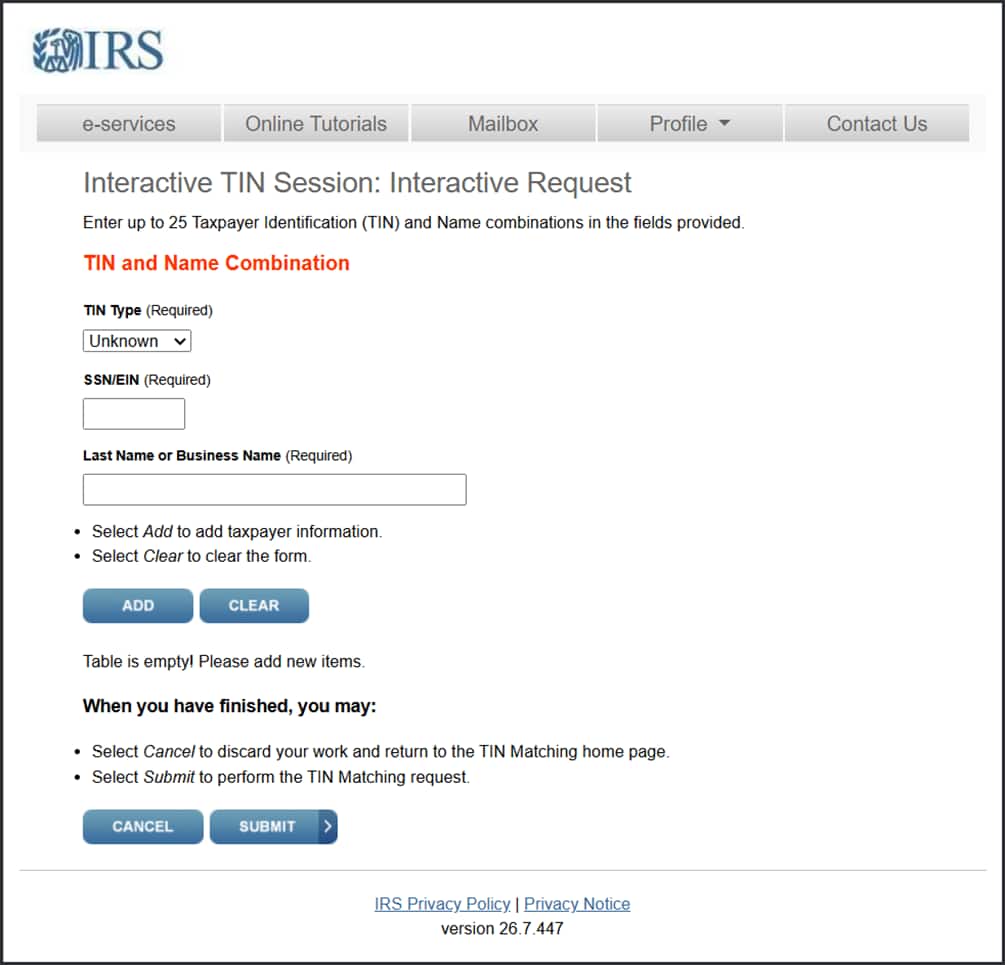
Interactive TIN Matching
For organizations validating only a few suppliers, the IRS also provides an Interactive TIN Matching service.
After validating a supplier directly on the IRS website, users can manually update the supplier’s TIN Match information in PeopleSoft by recording the match status, match date, and IRS tracking information.
While Interactive TIN Matching is useful for occasional validations, Bulk TIN Matching is generally the preferred option for organizations managing larger supplier populations.
Why TIN Matching Matters with IRIS
The transition to IRS IRIS makes proactive supplier validation more important than ever.
Because IRIS validates Name and TIN combinations during submission, organizations will immediately know which records contain mismatched information. Although filings with mismatches are generally Accepted with Errors, organizations are still responsible for reviewing those errors and correcting the affected records.
Using PeopleSoft’s IRS TIN Matching functionality throughout the year helps organizations identify and resolve supplier data issues before filing, resulting in cleaner submissions, fewer post-filing corrections, and a more efficient year-end reporting process.
Best Practices
To get the most value from TIN Matching:
- Validate new suppliers before issuing the first reportable payment.
- Run Bulk TIN Matching periodically throughout the year—not just before 1099 processing.
- Review and resolve Name/TIN mismatches promptly.
- Request updated Forms W-9 when supplier tax information changes.
- Revalidate suppliers whenever a legal name, business structure, or TIN changes.
Conclusion
Accurate supplier tax information is the foundation of successful information return reporting. PeopleSoft’s built-in IRS TIN Matching functionality enables organizations to proactively validate supplier information, automate bulk verification, and maintain high-quality supplier data throughout the year.
As organizations transition to the IRS IRIS filing platform, incorporating TIN Matching into routine supplier maintenance can help reduce filing errors, minimize post-filing corrections, and simplify year-end compliance. By resolving Name/TIN mismatches before submission, PeopleSoft customers can improve data quality, reduce manual effort, and submit cleaner information returns through IRIS.