
Every customization tells a story. Some customizations support a critical business requirement. Others connect several related objects into a single business solution. A few may have outlived the process they were originally created to support or were eventually delivered by PeopleSoft.
The challenge is that these stories are not always visible when customizations are viewed one object at a time.
With PeopleTools 8.63 that paradigm changes.
Organizing Technical Debt with Customization Groups
PeopleTools 8.62 introduced Customization Insights to help organizations understand how customized their PeopleSoft environments are, which customizations are being used, and how frequently those objects are affected by delivered maintenance. That visibility is valuable, but a customization rarely consists of a single object. An employee onboarding solution or payroll extension may include pages, records, PeopleCode, application packages, integrations, and other definitions. When those objects are reviewed individually, it can be difficult to see the complete business solution they support.
PeopleTools 8.63 builds on the foundation that PeopleTools 8.62 started with Customization Groups, giving customers a more flexible and business-focused way to organize, describe, manage, and evaluate their customizations.
Customization Groups turn collections of technical objects into meaningful units of work. Instead of seeing only pages, records, PeopleCode, and other individual objects, teams can see the business solution those objects collectively support, who owns it, how complex it is, and how urgently it should be reviewed.
This creates practical questions for organizations. Which objects belong together? Who owns the overall customization? How important is it to the business? How complex will it be to maintain? Which customizations are likely to require the most rework when a new update image is applied?
Organizations may answer these questions through spreadsheets, project naming conventions, external systems such as PHIRE, or knowledge held by individual team members. Customization Groups capture this information in a single place and will cross reference your groups with the Update Manager meta data to give a clear picture of how upcoming maintenance will affect your customizations.
Customization Group Insights
With the Customization Group Insights, administrators will be able to select one or more customized objects from a grid and create a new group or add the objects to an existing group. This connects analysis directly to action and supports the ongoing organization of custom objects as the environment changes.
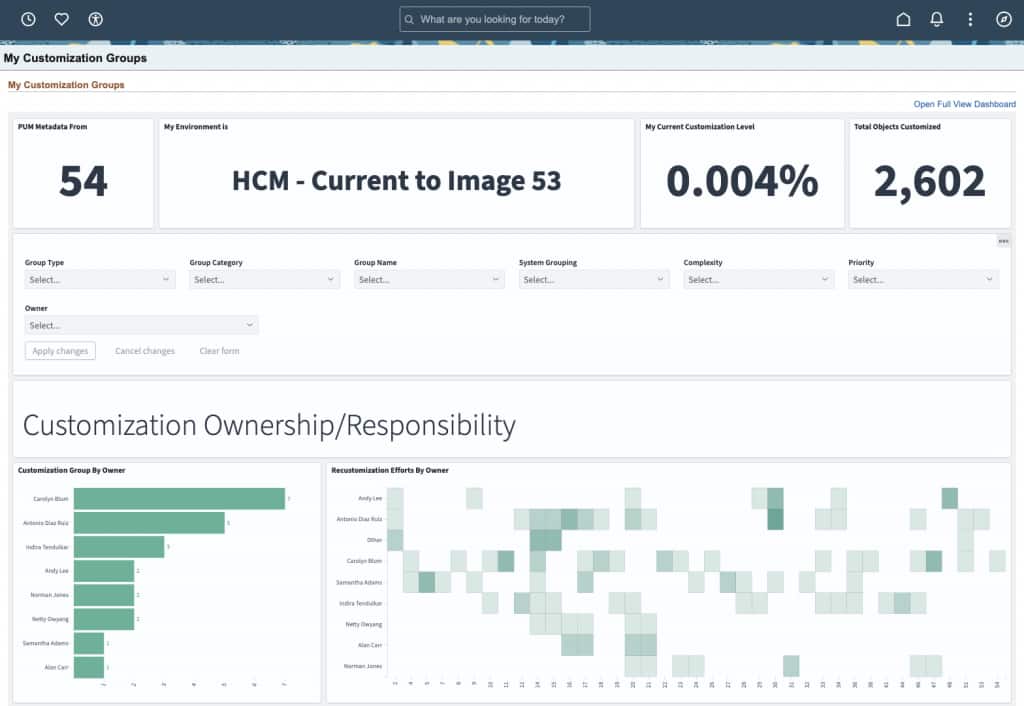
New group-based insights will complement the updated object-level insights delivered with PeopleTools 8.62. Administrators can continue to investigate the objects behind a customization, while leaders and application owners can review the portfolio by owner, category, priority, complexity, maintenance impact, and anticipated re-customization effort.
Why Customization Group Insights Matter
New group-based insights are designed to complement the object-level insights delivered with PeopleTools 8.62 that allow teams to analyze ownership, category, priority, complexity, maintenance impact, and anticipated re-customization effort by update image.
This makes it easier to answer questions such as:
- Which business areas own the highest-effort customizations?
- Which groups are most frequently affected by maintenance?
- Who is accountable for reviewing and maintaining each solution?
Closing Thoughts
Customization Groups in Customization Insights are part of PeopleTools 8.63. They help connect technical evidence with business responsibility. Instead of seeing a scattered collection of customized objects, organizations can see the functional solution those objects represent, the people who own it, and the effort required to maintain it.
The result is a clearer path from insight to action: better prioritization, stronger ownership, and more informed maintenance planning around technical debt.