

What happens when help needs help?
A key value offered by a Digital Adoption Platform is the assistance it provides to users aiming to accomplish specific tasks within an application. The goal is to deliver a seamless experience, enabling users to efficiently utilize their time while navigating the platform. Oracle Guided Learning has been doing a great job in this area using a wide range of guides and the Process guides play a prominent role in walking the users through the processes from start to end. However, if a process guide fails, users are typically left unaware, receiving no indication that the guide has stopped working. Even more critically, there is no additional support provided to help users complete their intended task. What do the users do in this case? Enter Guide break assistance.
Guide Break Assistance
Guide break assistance intends to solve the above discussed scenario both for the users using the guides and the content developers who are creating/maintaining the guides.
For the end users:
The users must be made aware that there has been an interruption in the guide that they were running and still assist them to the best of our ability.
For the content developers:
Whenever a guide is broken, the content developers must be notified about it as soon as they can so that they can action on it and fix it. This would help them mitigate the issue faster before the guide break is experienced by more users.
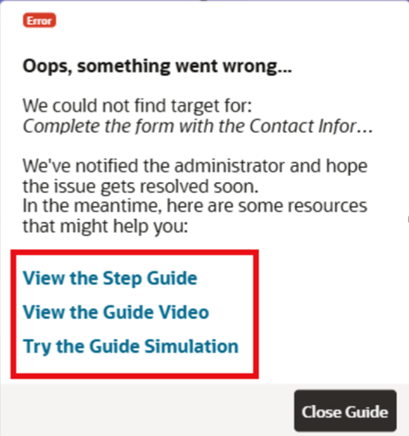
How does Guide Break Assistance help?
End User:
- For any end user running a process guide and faces an interruption in the guide run, the user is provided with an assistance modal letting them know that there seems to be an issue with the guide.
- The user is provided with alternative options such as a Step Guide, Simulation, or Guide Video to understand what needs to be done as part of the guide in order to complete their intended task.
Content Developer:
- The content developers are notified when a guide breaks for end users.
- The content developers receive a guide health error containing details about the specific step that is problematic in the guide, allowing them to perform a quick fix.
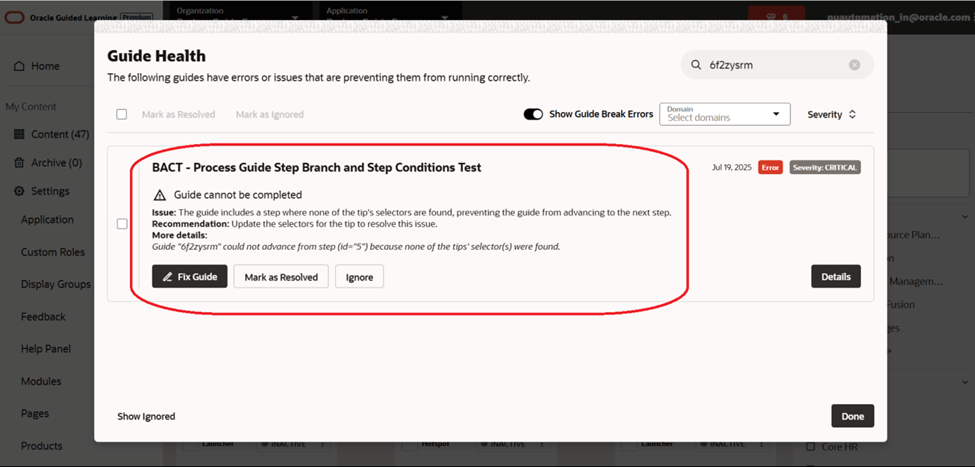
How does Guide Break Assistance work?
Pre-requisites
Enable the “Guide Break Assistance” setting in “Capture & Playback” in Application Settings. The setting enables the end user experience of the feature.
Also note that the version of player package being used should be 25D or later for the feature to work for the end users.
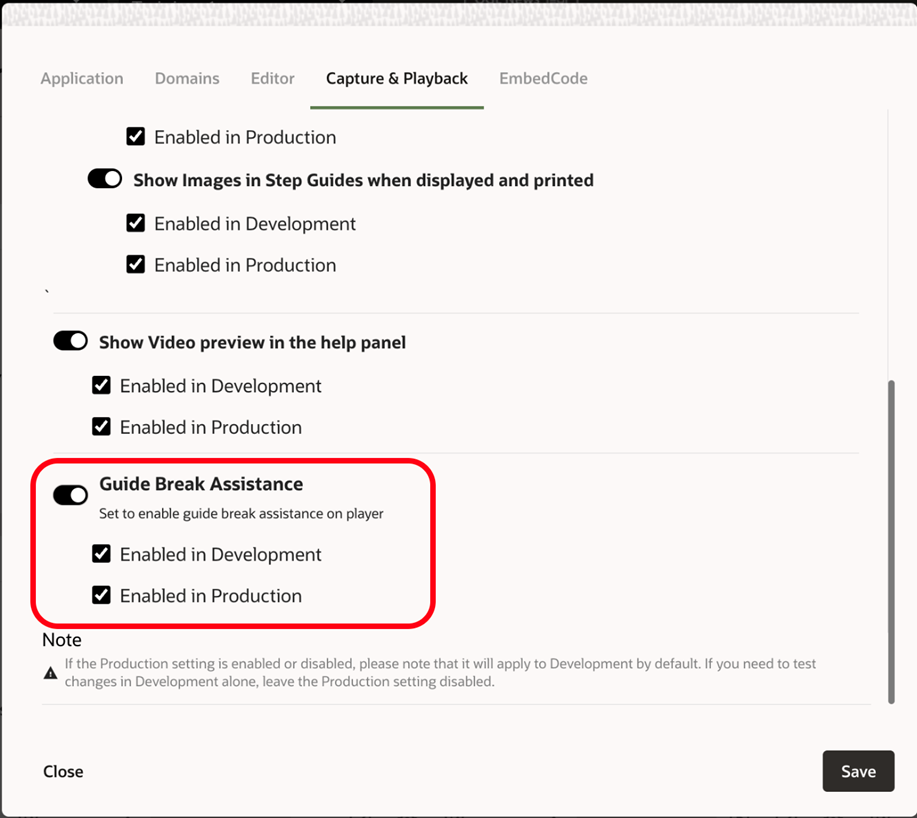
Realtime Assistance
Whenever a guide is running and an interruption occurs such as the tooltip not showing for the user because the element is not found or a step condition is not met, Oracle Guided Learning waits for the tooltip to appear for 3 seconds. If the tooltip does not appear within that time, it is assumed that there has been an issue with the guide run, and a pop-up guide break assistance modal is displayed to help the user
In cases where the tooltip appears after 3 seconds due to the user’s slow internet or other circumstances, the Guide Break Assistance modal is closed automatically, and the guide run resumes for the user from the same step.
When is Realtime Assistance applicable?
The Realtime Guide Break Assistance is applicable for the guide runs where:
- The user has not manually navigated to a different page where guide is not intended to run.
- If the step has multi-tips and none of the them have showed up.
- At least one step has been run on the page.
- For example:
- Consider a guide being run across 2 different pages.
- Let’s say that the guide has 3 steps in each page
- Page A – Steps 1, 2, 3
- Page B – Steps 4, 5, 6
- The Realtime Guide break assistance will be applicable for the steps 2, 3, 5 & 6 and not applicable for steps 1 & 4.
We have mentioned this as Realtime Assistance because the users would get help in the above-mentioned scenarios immediately.
Although this is not the case for the first steps of the guide in a page (Step 4 in the above example), we will be able to provide assistance even in those cases eventually when there is a guide health error created for those steps which would take at least a day.
Guide health error creation
- A guide run can be interrupted due to multiple reasons, and it does not necessarily mean that the guide is broken in all the cases.
- In some cases, it might just be that the user’s internet is slow or there has been a manual interference to break the guide.
- Hence, we must be cautious to create a guide health error saying that the guide is broken
- To make sure that the guide is broken, we observe its behavior for a day, and we consider a guide is broken when the guide breaks at a step for at least 5 times or 10% of the total times it was run for the day, whichever is the highest.
Once the guide health error is created, the assistance will be provided even for the first steps of any page.
NOTE: This is not applicable for the first step of guides i.e. Step 1 of any guide is not considered broken. So, all the steps of the guide are eventually provided with assistance except for the first step.
Fix Guide break
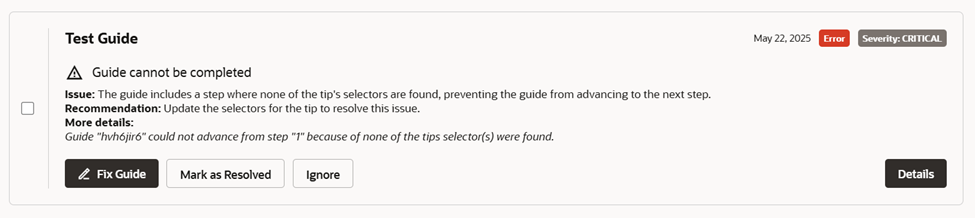
- Once the Guide health error has been created for a step of a guide, you can see it in the Guide Health Modal in the console.
- The error specifies the problematic step of the guide that needs to be fixed.
- The “Fix Guide” button of the error redirects the content developer to the Full editor of the guide highlighting the problematic step.
What else is cooking?
- Resume Guide: If the user manages to figure out from the assistance what must be done on the broken step of the guide and performs the action, we would like to resume the guide from the next step.
- Notify Content Developers: When there is a guide break identified, the respective creator/editor of the guide would be notified via email to bring it to their attention quicker.
More Information
– Oracle Guided Learning’s Website
– See a demo on Cloud Customer Connect