
Manage recurring maintenance windows, defer disruptive maintenance, and audit maintenance activity with a reusable Bash utility.
MySQL HeatWave on Oracle Cloud Infrastructure gives administrators control over when scheduled maintenance can occur and, with maintenance-disabled windows, the ability to temporarily defer non-critical maintenance that would cause downtime.
That flexibility is useful when a DB System supports workloads with known business blackout periods such as financial close, seasonal traffic, application launches, migrations, customer demonstrations, or other events where avoiding disruption is especially important.
In this post, I’ll show how to use the OCI Command Line Interface (CLI) to inspect and manage MySQL HeatWave maintenance and build an interactive Bash utility that can:
- Display the current maintenance configuration.
- Show the next scheduled maintenance event.
- Change the recurring maintenance day and time.
- Create or replace a maintenance-disabled window.
- Remove a maintenance-disabled window.
- Validate dates and times before sending changes to OCI.
- Re-prompt users when invalid information is entered.
- Generate OCI request IDs for troubleshooting.
- Review historical maintenance events.
- Report maintenance configuration for every DB System in a compartment.
Oracle performs MySQL HeatWave maintenance only when required. When maintenance is needed, it starts within approximately two hours of the weekly maintenance-window start time configured for the DB System. Maintenance can include database patches, operating-system updates, firmware updates, and other service maintenance.
What You’ll Learn
By the end of this article, you’ll understand the difference between these two important maintenance controls:
Recurring maintenance window
versus
Maintenance-disabled window
You’ll also have a reusable administration utility with the following menu:
============================================================
 What would you like to do?
============================================================
 1. Change recurring maintenance window
 2. Disable maintenance for a date/time range
 3. Re-enable maintenance / remove disabled window
 Q. Quit
Enter choice [1-3 or Q]:
How MySQL HeatWave Maintenance Works
Before automating the configuration, it is important to understand what the different maintenance values mean.
Recurring maintenance window
A DB System has a weekly maintenance window start time such as: SATURDAY 07:00
This defines the preferred weekly day and UTC start time for maintenance. It does not mean Oracle will perform maintenance every Saturday. Oracle states that maintenance is performed only when needed. If maintenance is required, it starts within approximately two hours of the configured weekly start time.
For example:
Recurring maintenance window: SATURDAY 07:00
Next scheduled maintenance: 2026-10-03T07:00:00+00:00
The first value is the recurring policy.
The second value is the actual maintenance event that Oracle has currently scheduled.
That distinction becomes important when scripting changes.
What Is a Maintenance-Disabled Window?
A maintenance-disabled window defines a temporary period during which MySQL HeatWave defers non-critical maintenance that causes downtime. Oracle currently allows a maintenance-disabled window of up to 90 days. Critical maintenance that can be applied without downtime, including eligible security updates, can still occur during that period.
For example:
Maintenance-disabled window:
Start: 2026-10-01 07:00 UTC
End: 2026-10-31 07:00 UTC
This does not mean OCI completely stops maintaining the service for October. Instead:
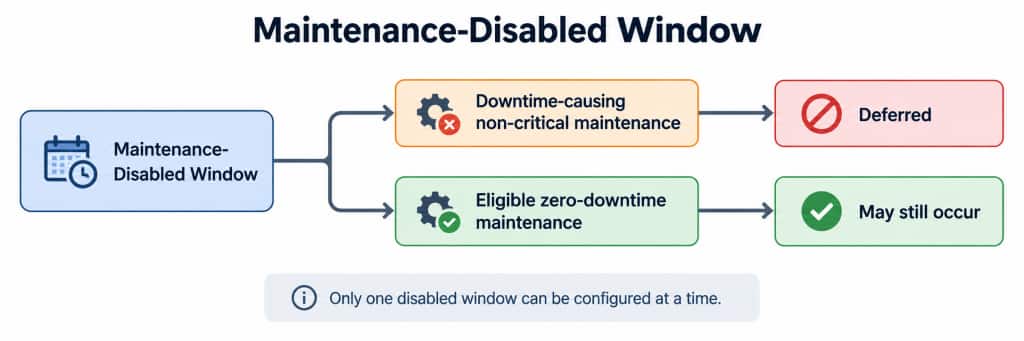
Oracle also supports only one configured maintenance-disabled window at a time.
Why the Next Scheduled Maintenance Date May Not Move
One point that can initially appear confusing is that a DB System might show:
Maintenance-disabled window: October 1 - October 31
Next scheduled maintenance: October 3
That does not necessarily indicate a problem. The scheduled event can remain visible because zero-downtime maintenance is still permitted during the disabled interval. Oracle specifically describes maintenance-disabled windows as preventing non-critical maintenance that causes downtime while allowing zero-downtime critical or security maintenance to continue.
The important distinction is: Next scheduled maintenance != Guaranteed downtime
Understanding the 90-Day Limit
The script in this article prevents a user from requesting a maintenance-disabled interval longer than 90 days. However, there is an additional service-side rule. Oracle states that the interval between consecutive scheduled maintenance events that impose downtime cannot exceed 90 days. As a result, this: “Requested disabled window = 90 days” does not guarantee that OCI will accept it.
Depending on the DB System’s previous maintenance history and upcoming schedule, OCI may require an earlier ending date. For this reason the script performs basic validation locally, while OCI remains the final authority.
Solution Architecture
The workflow is intentionally straightforward.
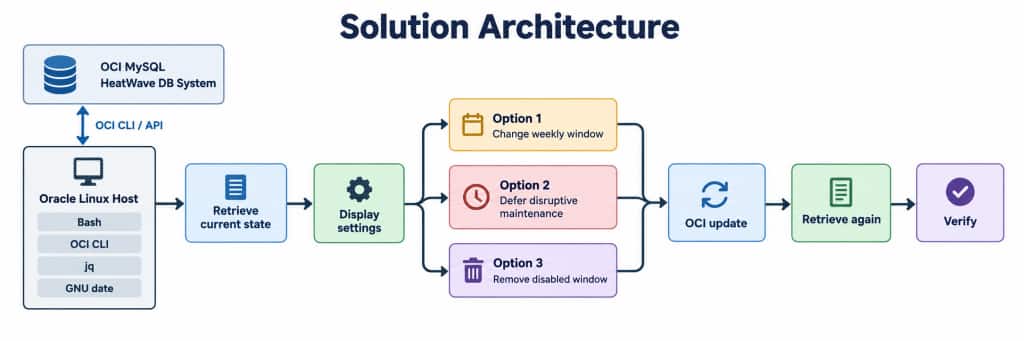
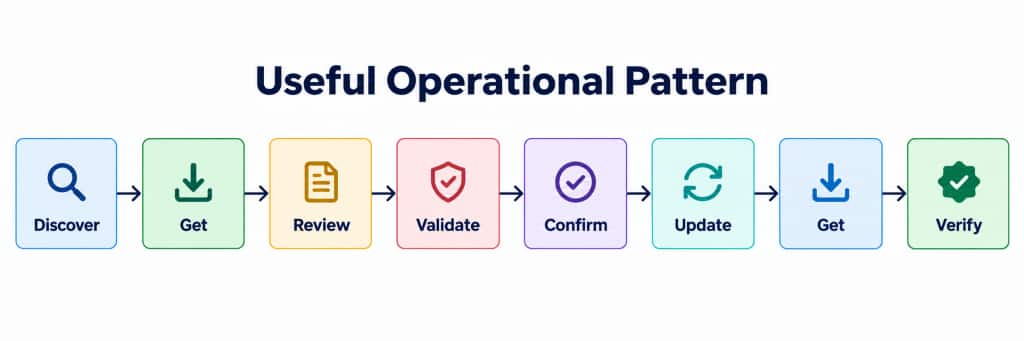
A useful operational pattern is:
Prerequisites
The utility requires:
- OCI CLI
- jq
- GNU date (GNU date is already installed by default on Oracle Linux 9 as part of the core system utilities)
- OCI authentication/configuration
- Permission to read and update the DB System
Verify the commands:
oci --versionjq --versiondate --version
The OCI CLI command used to modify the DB System is:
oci mysql db-system update
Its --maintenance parameter accepts a JSON maintenance object. OCI also provides --generate-param-json-input to generate the expected structure.
OCI Authentication
If OCI CLI authentication has not already been configured, run:
oci setup configThe default configuration is normally stored at:
~/.oci/config
Before using the maintenance utility, verify that the CLI can retrieve the DB System. (Note: Replace the <DB_SYSTEM_OCID> value with the DB System’s OCID.)
oci mysql db-system get \
 --db-system-id <DB_SYSTEM_OCID> \
 --region us-ashburn-1
IAM Permissions
The user or group running the utility must have permission to inspect and update MySQL HeatWave resources. Oracle uses the aggregate resource type: mysql-family for MySQL HeatWave resources. A broad administrative policy might look like:
Allow group MySQLAdmins to manage mysql-family in compartment Production
Oracle’s standard policy guidance also includes compartment and networking permissions where required. For production environments, use the narrowest permissions appropriate for the administrator or automation identity.
Inspect the Current Maintenance Configuration
To see the complete maintenance object:
oci mysql db-system get \
 --db-system-id <DB_SYSTEM_OCID> \
 --region us-ashburn-1 \
 --query 'data.maintenance' \
 --output json
A typical response might look like:
{
 "maintenance-disabled-windows": [
 {
  "time-end": "2026-10-31T07:00:00+00:00",
  "time-start": "2026-10-01T07:00:00+00:00"
 }
 ],
 "maintenance-schedule-type": "EARLY",
 "target-version": "9.7.0",
 "time-scheduled": "2026-10-03T07:00:00+00:00",
 "version-preference": "NEWEST",
 "version-track-preference": "INNOVATION",
 "window-start-time": "SATURDAY 07:00"
}
Some of the most useful values are:
window-start-time: Recurring weekly maintenance window.time-scheduled: Actual next scheduled maintenance start.target-version: Version expected to be targeted during maintenance.maintenance-disabled-windows: Configured period during which downtime-causing maintenance is deferred.
OCI documents time_scheduled as the expected start time of scheduled maintenance and window_start_time as the recurring maintenance-window start.
Reporting Maintenance Across a Compartment
For administrators managing multiple DB Systems, it can be useful to generate a single maintenance report. The following script retrieves every DB System in a compartment and displays:
- Name
- CurrentVersion
- TargetVersion
- MaintenanceWindow
- NextMaintenance
- DBSystemOCID
Note: Replace <COMPARTMENT_OCID> with the OCI compartment OCID. And, in this example, I am using the Ashburn region. If your instances are in a different region, change this value. You may find a list of the region names on this web page.
#!/bin/bash
COMPARTMENT_ID="<COMPARTMENT_OCID>"
REGION="us-ashburn-1"
{
 printf "Name\tCurrentVersion\tTargetVersion\tMaintenanceWindow\tNextMaintenance\tDBSystemOCID\n"
 oci mysql db-system list \
  --compartment-id "$COMPARTMENT_ID" \
  --region "$REGION" \
  --all |
 jq -r '.data[].id' |
 while read -r DB_ID; do
  oci mysql db-system get \
   --db-system-id "$DB_ID" \
   --region "$REGION" \
   --query 'data.[
   "display-name",
   "mysql-version",
   maintenance."target-version",
   maintenance."window-start-time",
   maintenance."time-scheduled"
   ]' \
   --output json 2>/dev/null |
  jq -r --arg dbid "$DB_ID" \
   '. + [$dbid] | @tsv'
 done
} | column -t -s $'\t'
Example script output: (Note: the full DB System OCID value is not shown here)

This can also become the basis for a scheduled fleet-level maintenance report.
Complete MySQL HeatWave Maintenance Manager script
In Appendix A at the end of this post, I have a link to a Bash script on GitHub which can help you to manage the maintenance windows for your MySQL HeatWave DB System. The script provides three maintenance options:
Option 1: Change the Recurring Maintenance Window
The first option in the script changes the weekly maintenance day and UTC time.
For example:
Current: SUNDAY 02:00
New: SATURDAY 07:00
The JSON sent to OCI is deliberately minimal:
{
 "windowStartTime": "SATURDAY 07:00"
}
The utility does not resend unrelated maintenance properties. This is an important design choice. Instead of reconstructing the entire maintenance policy, the script modifies only the property requested by the administrator. That avoids unnecessarily resubmitting values such as:
- maintenanceScheduleType
- versionPreference
- versionTrackPreference
- maintenanceDisabledWindows
Option 2: Defer Downtime-Causing Maintenance
The second option creates or replaces the maintenance-disabled window.
A typical payload is:
{
 "maintenanceDisabledWindows": [
 {
  "timeStart": "2026-10-01T07:00:00.000Z",
  "timeEnd": "2026-10-31T07:00:00.000Z"
 }
 ]
}
The script validates:
- Start date is valid
- Start time is valid
- End date is valid
- End time is valid
- End > Start
- End is in the future
- Requested duration <= 90 days
If any value is incorrect, the utility re-prompts the administrator instead of exiting.
For example:
Enter disable START date (YYYY-MM-DD): 2026-10-01
Enter disable START time in UTC (HH:MM): 07:00
Enter disable END date (YYYY-MM-DD): 2026-09-20
Enter disable END time in UTC (HH:MM): 07:00
results in:
ERROR:
The END date/time must be later than START.
Please enter the END date and time again.
and the script loops back so the user can re-enter the information.
An OCI CLI Timestamp Formatting Detail Worth Knowing
During validation of the CLI implementation, the following maintenance-disabled payload was rejected by the service:
{
 "maintenanceDisabledWindows": [
 {
  "timeStart": "2026-10-01T07:00:00+00:00",
  "timeEnd": "2026-10-31T07:00:00+00:00"
 }
 ]
}
The response was:
HTTP 400
InvalidParameter
Unable to process JSON input
The CLI debug trace confirmed that the JSON sent over the wire was structurally correct.
Using the following UTC representation instead: 2026-10-01T07:00:00.000Z
allowed the update to succeed. Therefore, the utility intentionally formats maintenance-disabled timestamps as:
YYYY-MM-DDTHH:MM:SS.000Z
For example:
2026-10-01T07:00:00.000Z
2026-10-31T07:00:00.000Z
Oracle documents these fields as RFC 3339 timestamps, so this should be viewed as a tested implementation detail of this CLI workflow, rather than a statement that other RFC 3339 representations are inherently invalid.
Option 3: Re-Enable Normal Maintenance
To remove the maintenance-disabled window (from option #2), the script sends:
{
 "maintenanceDisabledWindows": []
}
Before doing so, it displays the current configuration:
Current maintenance-disabled window:
Start : 2026-10-01T07:00:00+00:00
End : 2026-10-31T07:00:00+00:00
Remove the maintenance-disabled window? (yes/no):
If the user chooses no, nothing changes.
User-Friendly Validation
An administration utility should not require a complete restart because someone accidentally typed:
25:67
or:
2026-02-31
The script therefore loops on invalid input.
For example:
Enter disable START date (YYYY-MM-DD): 2026-02-31
ERROR: '2026-02-31' is not a valid date.
Please enter a real calendar date using:
 YYYY-MM-DD
Example:
 2026-10-01
Enter disable START date (YYYY-MM-DD):
The same approach is used for:
Dates
Times
Weekday menu choices
Main menu choices
Yes/no confirmations
Maintenance range validation
Request IDs for Troubleshooting
Every update generates an OCI request identifier and passes it using:
--opc-request-id "$OPC_REQUEST_ID"
For example:
OCI Request ID: 68e87016-dba8-46e4-91ae-2ef42e4eb32d
This is useful when correlating:
- Script logs
- OCI API calls
- Debug traces
- Support requests
If an update fails, preserve both the client-generated request ID and any opc-request-id returned by OCI.
Inspect Historical Maintenance Events
Configuration tells us what is planned. Maintenance-event history tells us what actually happened. MySQL HeatWave now records maintenance events, giving customers a historical record useful for auditing, operations, and impact analysis.
To retrieve maintenance events:
oci mysql db-system maintenance-event list \
 --db-system-id <DB_SYSTEM_OCID> \
 --region us-ashburn-1 \
 --all \
 --sort-by timeStarted \
 --sort-order DESC \
 --output json
The OCI CLI provides a dedicated maintenance-event list operation for a DB System. Results can include information such as:
- maintenance-action
- maintenance-status
- maintenance-type
- mysql-version-before-maintenance
- mysql-version-after-maintenance
- time-started
- time-ended
- time-mysql-switch-over-started
- time-mysql-switch-over-ended
A typical event might indicate:
Maintenance Action:  OS_UPDATE
Maintenance Type:  AUTOMATIC
Status:  SUCCEEDED
Started:  2026-08-30T02:00:53Z
Ended:  2026-08-30T02:30:30Z
This information is particularly useful when investigating application behavior around a maintenance period.
Troubleshooting JSON Errors
If OCI returns:
InvalidParameter
Unable to process JSON input
start by validating the JSON locally:
echo "$MAINTENANCE_JSON" | jq .
Then inspect the maintenance schema understood by the CLI:
oci mysql db-system update --generate-param-json-input maintenance | jq .OCI documents --maintenance as a complex JSON parameter and recommends --generate-param-json-input for generating its expected structure.
If necessary, run the update with:
--debug
and capture the result:
oci mysql db-system update \
 --db-system-id <DB_SYSTEM_OCID> \
 --region us-ashburn-1 \
 --maintenance "$MAINTENANCE_JSON" \
 --force \
 --debug \
 > oci-maintenance-debug.txt 2>&1
Then inspect:
grep -n "maintenanceDisabledWindows" oci-maintenance-debug.txtThis helps determine whether the problem exists:
Before the request reaches OCI
or
Inside OCI service validation
Version Policy Considerations
The maintenance object can also contain:
- maintenance-schedule-type
- version-preference
- version-track-preference
- target-version
For example:
maintenance-schedule-type: EARLY
version-preference: NEWEST
version-track-preference: INNOVATION
Oracle provides options for regular or early maintenance schedules and controls for selecting MySQL version preferences and tracks. Oracle specifically cautions against automatically moving between version tracks without careful planning because database behavior can differ significantly between major MySQL versions. This provides another reason to update only the maintenance property the administrator actually intends to change.
Maintenance Is More Than a MySQL Version Upgrade
Maintenance can include more than database software updates. Oracle describes maintenance as including:
- Database security and critical fixes.
- Underlying operating-system patching.
- Firmware updates.
- Hypervisor or infrastructure maintenance.
- MySQL version updates when appropriate.
MySQL HeatWave also distinguishes between automatic updates within a version and upgrades that occur when a version becomes unavailable.
Therefore, a target version that matches the current MySQL version does not mean there is nothing to maintain. An operating-system update, for example, can still generate a maintenance event.
Standalone Versus High Availability
For standalone MySQL HeatWave DB Systems, maintenance can involve a short period of downtime. Oracle describes the standalone maintenance process as launching updated resources, synchronizing data, moving endpoints to the replacement resources, and then allowing new connections.
High Availability can reduce the impact of maintenance and should be considered when designing workloads with stringent availability requirements. A maintenance-disabled window should complement a sound availability architecture rather than replace it.
Good Uses for Maintenance-Disabled Windows
Maintenance-disabled windows are especially useful around known business-critical periods such as:
- Quarter-end processing
- Financial close
- Holiday sales
- Product launches
- Application migrations
- Major data loads
- Customer demonstrations
- Marketing events
- Peak seasonal traffic
- Corporate maintenance blackouts
The intent should be: “Move disruptive maintenance away from sensitive periods” and not “Avoid maintenance indefinitely”.
Oracle continues zero-downtime security maintenance where appropriate, and downtime-causing maintenance cannot be deferred indefinitely.
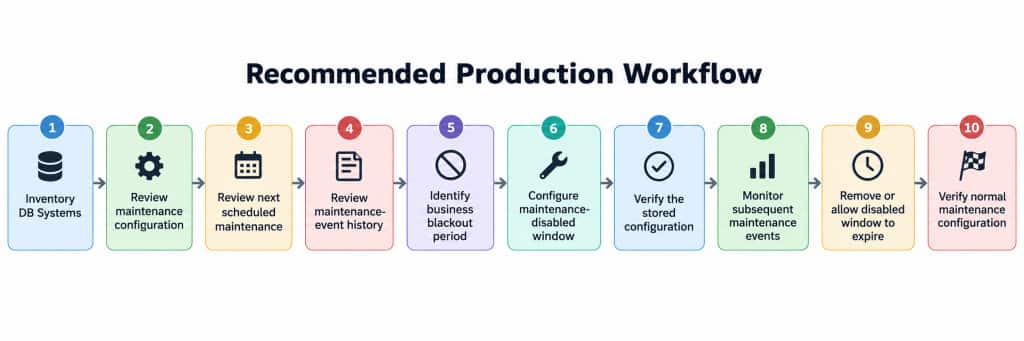
Recommended Production Workflow
A practical operational workflow is:
Additional Production Enhancements
The utility in this article is designed to be interactive and understandable. For larger environments, several additional improvements would be worth considering.
Save before-and-after configuration
Before an update:
oci mysql db-system get \
 --db-system-id "$DB_SYSTEM_ID" \
 --region "$REGION" \
 --query 'data.maintenance' \
 > maintenance-before.json
Afterward:
oci mysql db-system get \
 --db-system-id "$DB_SYSTEM_ID" \
 --region "$REGION" \
 --query 'data.maintenance' \
 > maintenance-after.json
Then:
diff maintenance-before.json maintenance-after.jsonThis provides a basic audit record.
Add dry-run mode
A future version could support:
- Execute
- Dry run
A dry run would display:
- DB System
- Current configuration
- Proposed configuration
- JSON request payload
- Region
without executing the change.
Central logging
For unattended automation, log the following and place into a file:
- UTC timestamp
- DB System OCID
- Display name
- Requested action
- Old value
- New value
- OCI request ID
- Result
For example:
/var/log/mysql-heatwave-maintenance.log
Concurrency protection
OCI supports conditional updates through ETag/If-Match mechanisms.
For fully-automated tooling, optimistic concurrency protection can prevent an update from overwriting configuration that changed between the initial read and subsequent update.
This is especially useful when multiple administrators or automation systems manage the same DB Systems.
Multi-region support
The current script defines:
REGION="us-ashburn-1"
A generalized version could prompt for or discover the region.
For organizations operating globally, the utility could iterate across:
- Compartments
- Regions
- DB Systems
- and produce an exception report showing systems with:
- Maintenance occurring soon
- Active disabled windows
- Expired disabled windows
- Unusual version policies
Key Takeaways
There are several concepts worth remembering when automating MySQL HeatWave maintenance.
1. The recurring window and the next scheduled maintenance event are not the same thing.
SATURDAY 07:00
is a recurring policy.
2026-10-03T07:00:00+00:00
is an actual scheduled event.
2. A maintenance-disabled window does not disable every kind of maintenance.
Downtime-causing non-critical maintenance is deferred, while eligible zero-downtime maintenance can still occur.
3. One maintenance-disabled window is supported at a time.
4. Ninety days is an upper bound, not a guarantee.
OCI also enforces the maximum interval between downtime-causing scheduled maintenance events.
5. Modify only the setting you intend to change.
For example:
{
"windowStartTime": "SATURDAY 07:00"
}
instead of reconstructing the complete maintenance policy.
6. Validate input before calling OCI.
A good administration utility should catch invalid dates, times, ranges, and selections locally.
7. Keep OCI request IDs.
They greatly simplify troubleshooting.
8. Review maintenance events as well as maintenance configuration.
The configuration tells you what OCI plans to do; the event history tells you what actually happened.
9. For this tested CLI workflow, using .000Z timestamps for maintenance-disabled windows was important.
The utility therefore generates:
YYYY-MM-DDTHH:MM:SS.000Z
for those values.
Conclusion
MySQL HeatWave provides more than a simple weekly maintenance schedule.
By combining recurring maintenance windows, maintenance-disabled periods, maintenance-event history, and the OCI CLI, administrators can align maintenance more closely with business requirements while still allowing Oracle to keep the platform secure and current.
The utility developed in this article provides a repeatable workflow to:
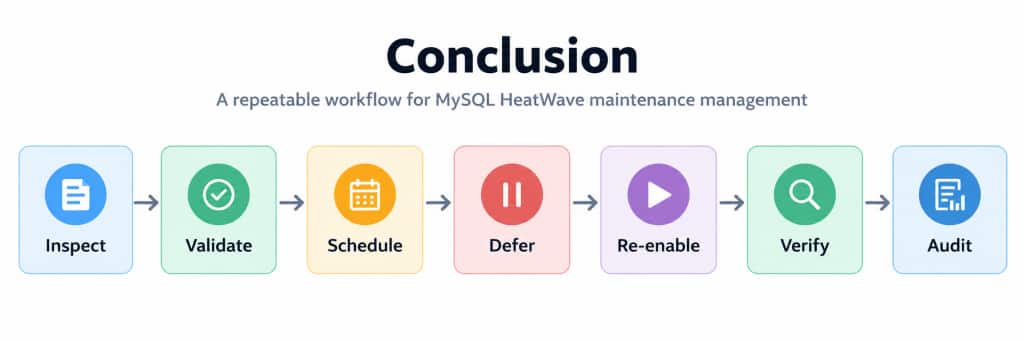
For an individual administrator, it removes much of the manual work associated with maintenance configuration.
For a larger organization, it provides a foundation that can be extended into multi-compartment reporting, change-management automation, fleet-wide maintenance governance, and operational monitoring.
Appendix A: Complete MySQL HeatWave Maintenance Manager script
Download the script from github – Save the following script as: mysql_maintenance_manager.sh
Make the script executable: chmod +x mysql_maintenance_manager.sh
Then run it: ./mysql_maintenance_manager.sh
Appendix B: Useful OCI CLI Commands
Display maintenance configuration
oci mysql db-system get \
--db-system-id \
 --region us-ashburn-1 \
 --query 'data.maintenance' \
 --output json
Display maintenance-event history
oci mysql db-system maintenance-event list \
 --db-system-id <DB_SYSTEM_OCID> \
 --region us-ashburn-1 \
 --all \
 --sort-by timeStarted \
 --sort-order DESC \
 --output json
Display the maintenance JSON schema expected by the CLI
oci mysql db-system update \
 --generate-param-json-input maintenance | jq .
Display OCI CLI version
oci --versionDebug an OCI maintenance request
oci mysql db-system update \
 --db-system-id <DB_SYSTEM_OCID> \
 --region us-ashburn-1 \
 --maintenance "$MAINTENANCE_JSON" \
 --force \
 --debug \
 > oci-maintenance-debug.txt 2>&1