
MySQL HeatWave telemetry is the built-in capability for exporting selected MySQL server logs to an observability destination. When telemetry is configured with OCI Log Analytics, it export MySQL log natively for search and analysis – supporting security investigations, database and operational errors troubleshooting, identification of costly SQL and performance bottlenecks, and centralized audit records for governance and compliance.
MySQL telemetry supports these MySQL log types for various activities:
- Error log: DB startup, shutdown, errors, warnings, and diagnostic messages.
- Slow query log: SQL statements exceeding the configured execution threshold.
- General log: client connections, disconnections, and received SQL statements.
- Audit log: client connections and actions, including database and table access.
Before you begin
You’ll need to confirm that the target DB System meets the following prerequisites:
- Your DB system is running MySQL 8.4.11 or later
- Your DB system is standalone – not configured for High Availability or Read Replicas
- Your DB system is not an Always Free DB System
- Your tenancy has OCI Log Analytics activated
Step 1. Create a Dynamic Group for MySQL DB Systems
A MySQL DB System uses a resource principal to send telemetry to OCI Log Analytics. Create a dynamic group in Identity & Security → Domains → <Your Domain> → Dynamic groups.
Edit the Matching rules of the Dynamic group you created, by including all current and future MySQL HeatWave DB Systems in the specified compartments.
Syntax:
ALL {resource.type = 'mysqldbsystem', resource.compartment.id = '<MYSQL_DB_COMPARTMENT_OCID>'}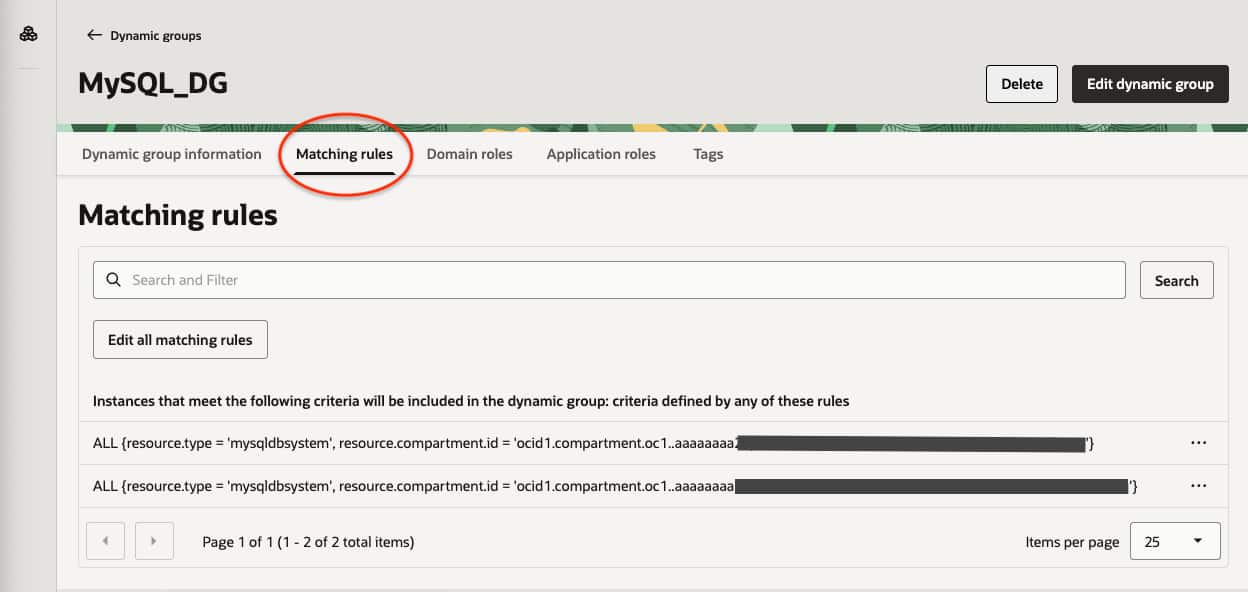
Step 2. Grant the required IAM policies
Create an IAM policy in your tenancy Identity & Security -> Policies -> Create Policy with the following Policy Statements.
Allow dynamic-group MySQL_DG to use metrics in compartment <compartment_name>
Allow dynamic-group MySQL_DG  to read management-saved-search in compartment <compartment_name>
Allow dynamic-group MySQL_DG  to {LOG_ANALYTICS_SOURCE_READ, LOG_ANALYTICS_LOOKUP_READ, LOG_ANALYTICS_QUERY_VIEW, LOG_ANALYTICS_QUERYJOB_WORK_REQUEST_READ} in tenancy
Allow dynamic-group MySQL_DG  to use loganalytics-ondemand-upload in tenancy
Allow dynamic-group MySQL_DG  to use loganalytics-lifecycle in tenancy
Allow dynamic-group MySQL_DG  to use loganalytics-log-group in tenancy
The resource type must be written as loganalytics-log-group, including the hyphen. Oracle resource-principal policy reference
Step 3. Create Log Groups in OCI Log Analytics
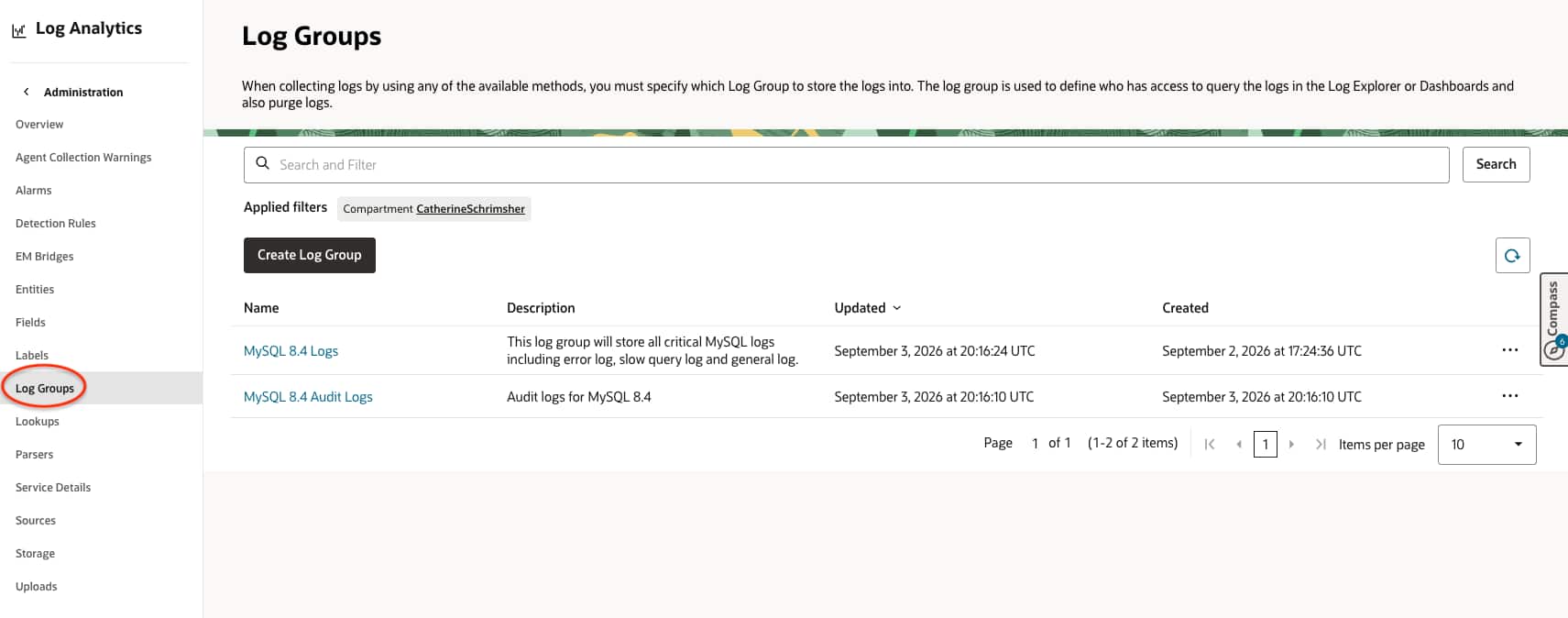
A Log Analytics Log Group is the OCI destination that organizes and stores exported MySQL logs. Create one before configuring telemetry:
- Open Observability & Management → Log Analytics → Administration.
- Select Log Groups and click Create log group.
- Choose the target compartment.
- Enter a descriptive name, such as ‘MySQL 8.4 Logs’. (Renaming a log group is not supported currently)
- Create the log group.
The dynamic group’s IAM policy must grant the MySQL DB System permission to use loganalytics-log-group in the same compartment or tenancy.
Step 4. Enable Audit records in MySQL
Audit logging is disabled by default. Connect as the MySQL HeatWave administrator, who has the AUDIT_ADMIN privilege, and define an audit filter.
Here are some common audit filter options:
| Option | Captures | Best |
|---|---|---|
| Connection events | Connect, disconnect, and user changes | Recommended baseline |
| Write activity | INSERT, UPDATE, DELETE | Data-change accountability |
| Table reads | SELECT type access | Sensitive-data monitoring; potentially high volume |
| General events | Queries and command status | Troubleshooting; often high volume |
| Per-user filters | Any of the above for selected accounts | Privileged/admin monitoring |
A practical baseline is connection events only:
SELECT audit_log_filter_set_filter(
  'log_connections',
  '{
    "filter": {
      "class": {
        "name": "connection",
        "event": [
          { "name": "connect" },
          { "name": "disconnect" },
          { "name": "change_user" }
        ]
      }
    }
  }'
);

SELECT audit_log_filter_set_user('%', 'log_connections');
For a privileged account only, assign a stronger filter selectively:
SELECT audit_log_filter_set_user('admin_user@%', 'log_data_changes');The MySQL Enterprise Audit component writes audit records in JSON format, so no separate audit_log_format=JSON setting is required.
Confirm that the MySQL audit filter is assigned:
SELECT * FROM mysql_audit.audit_log_filter;

SELECT * FROM mysql_audit.audit_log_user;
Important note: Use full SQL auditing carefully, as it can generate large volumes of data and may include sensitive SQL text. MySQL Enterprise Audit component documentation
Step 5. Configure the OCI Log Analytics export
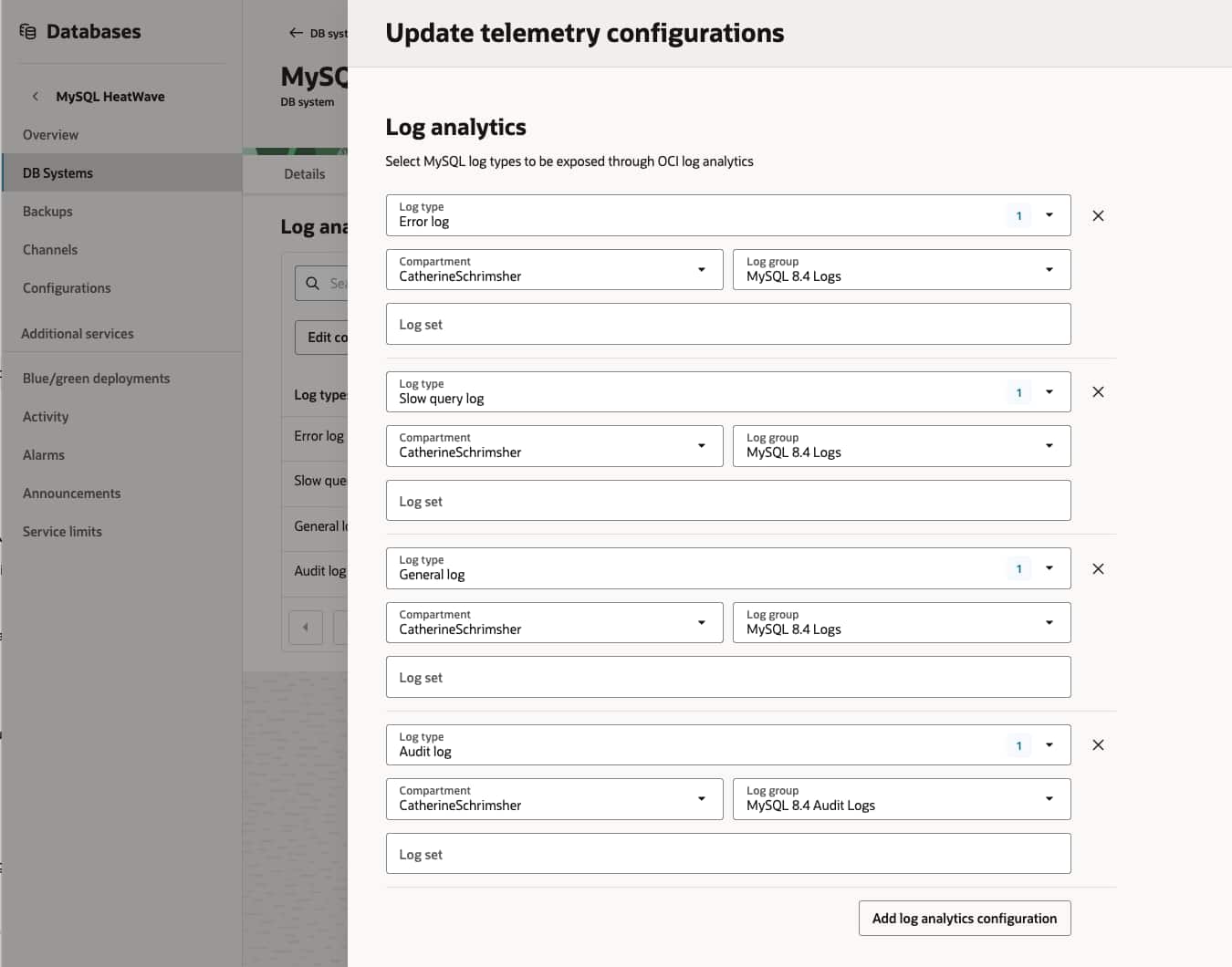
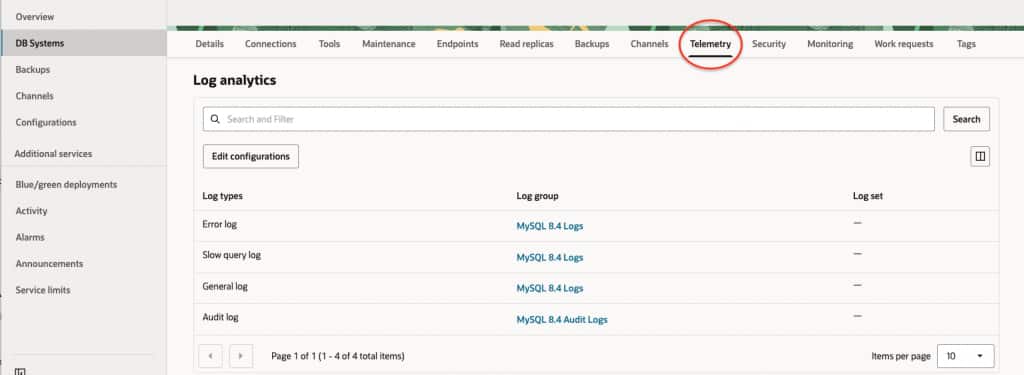
- Open MySQL HeatWave → DB Systems and select the DB System.
- Open the Telemetry tab.
- Select Edit Configurations.
- Choose Add log analytics configuration.
- Select Audit log and your Log Analytics Log Group.
- Save with Update telemetry configurations.
Step 6. Apply Log Segregation as a Security Control
A common industry practice is to separate logs by purpose, sensitivity, and retention requirement rather than storing all database activity in a single destination. Use a dedicated, restricted Log Analytics Log Group for audit logs, and separate log groups for operational data such as error, general, and slow-query logs.
Grant access to audit data only to authorized security, risk, and compliance personnel; give engineering teams access only to the operational logs required for troubleshooting. Apply retention periods that meet regulatory and internal-policy requirements, document the log owner for each group, and review access regularly. This approach supports least privilege, protects sensitive activity records, improves audit readiness, and makes log costs and investigations easier to manage.
Step 7. Analyze MySQL data in Log Explorer
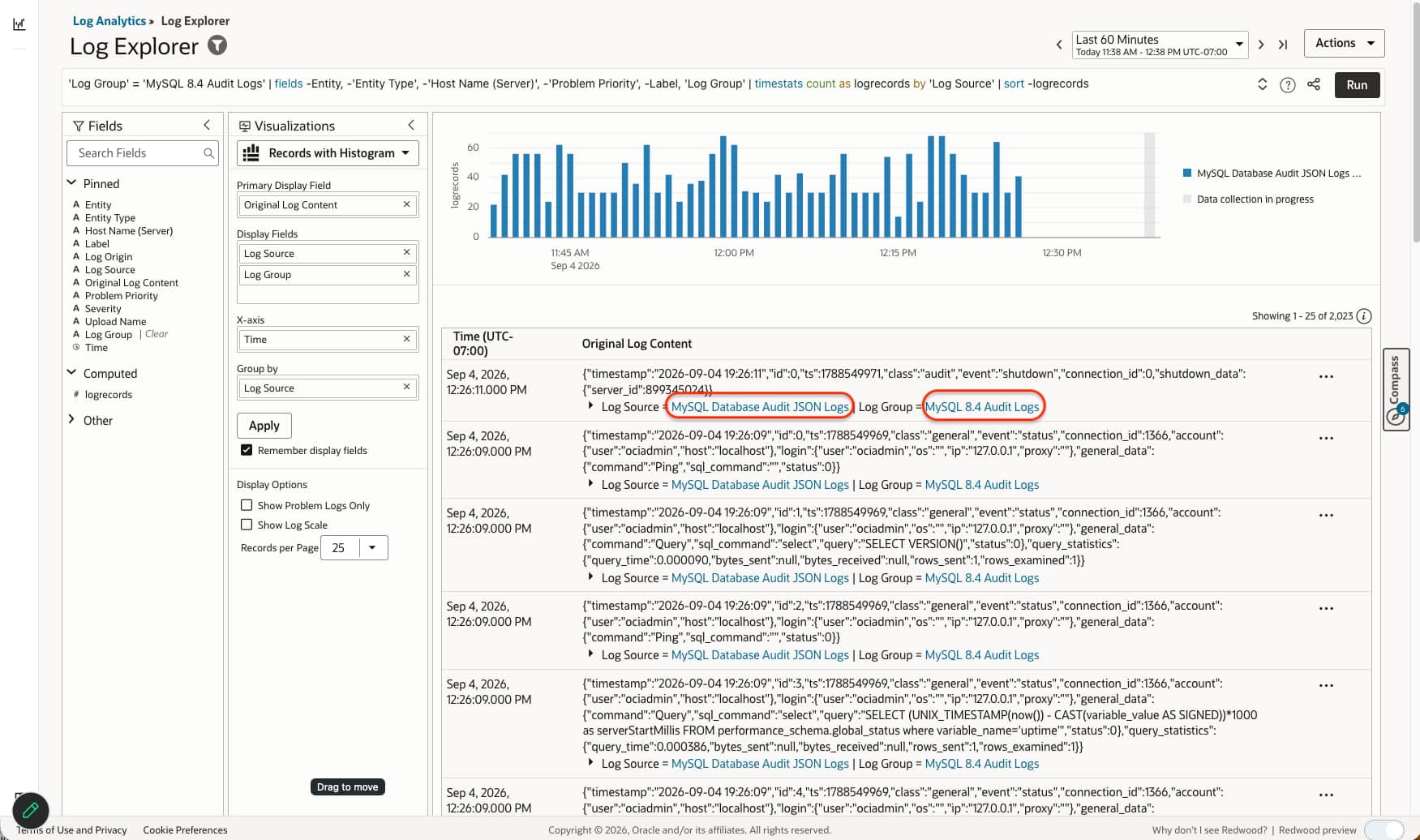
Open Observability & Management -> Log Analytics -> Log Explorer and select appropriate Log Group to filter the log data accordingly.
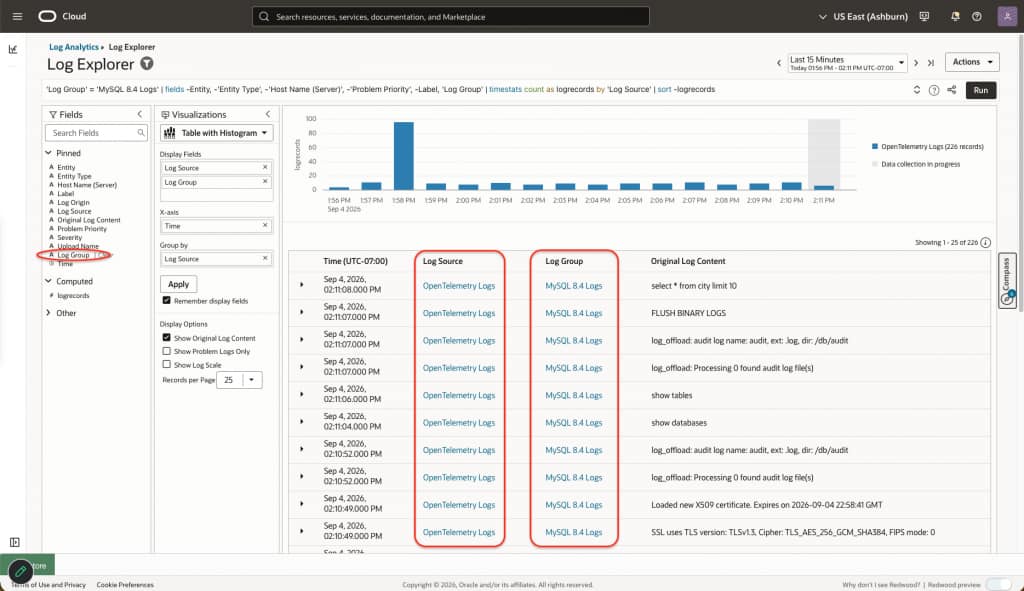
Audit events are available in Log Analytics → Log Explorer under the MySQL Database Audit JSON Logs source.
Step 8. Validation
Generate a test connection or query and search the selected compartment in Log Explorer. If logs do not arrive, first verify the DB System version, standalone status, dynamic-group rule, and IAM policies.
To generate audit logs and validate the configuration, establish client connections and perform activities that match the enabled audit filter, such as connecting, disconnecting, or executing monitored SQL operations.
Summary
MySQL HeatWave telemetry can export MySQL error, slow-query, general, and audit logs to OCI Log Analytics for centralized troubleshooting, security analysis, and compliance monitoring. Native Log Analytics export requires a standalone MySQL HeatWave DB System running MySQL 8.4.11 or later.
To configure the solution, create Log Analytics Log Groups, a dynamic group for MySQL DB Systems, and IAM policies that allow the DB System to send telemetry. Enable targeted MySQL Enterprise Audit filters, such as connection events or data changes, rather than log_all where possible to limit sensitive data exposure and ingestion volume.
Apply security best practices by separating audit logs from operational logs, selecting the appropriate Log Group for each telemetry configuration, restricting audit-log access to authorized teams, and defining retention based on business and compliance requirements. Finally, generate test connections and monitored database activities to validate that audit events are being delivered to OCI Log Analytics.