
MySQL HeatWave now offers more control and transparency around maintenance. With Deferred Maintenance and Maintenance Events, customers can better align database maintenance with their business schedules and operational processes to reduce disruption. Customers can now temporarily disable disruptive maintenance which requires system reboots. To ensure the ongoing security of customer environments, zero-downtime security patches will continue to be applied regularly.
Additionally, MySQL HeatWave on OCI now logs maintenance events to strengthen auditing and governance. Customers get an immutable historical record of when maintenance occurred, why it was performed, and how long MySQL HeatWave instances were impacted—supporting audit readiness, operational oversight, and faster impact assessments.
How Deferred Maintenance works
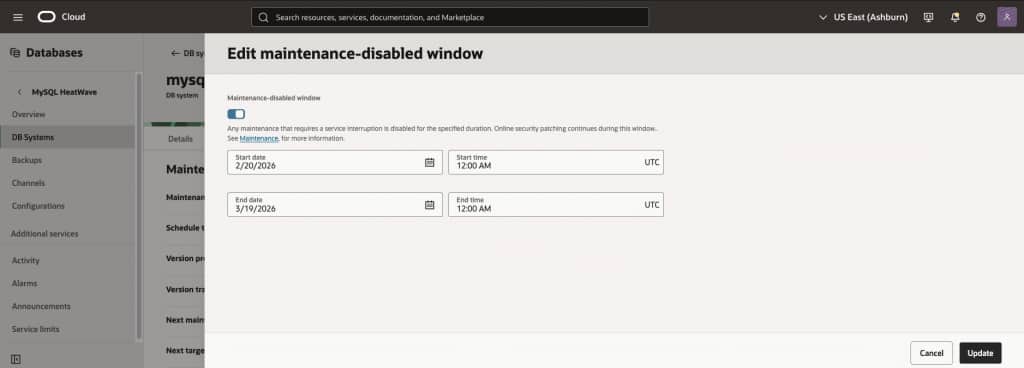
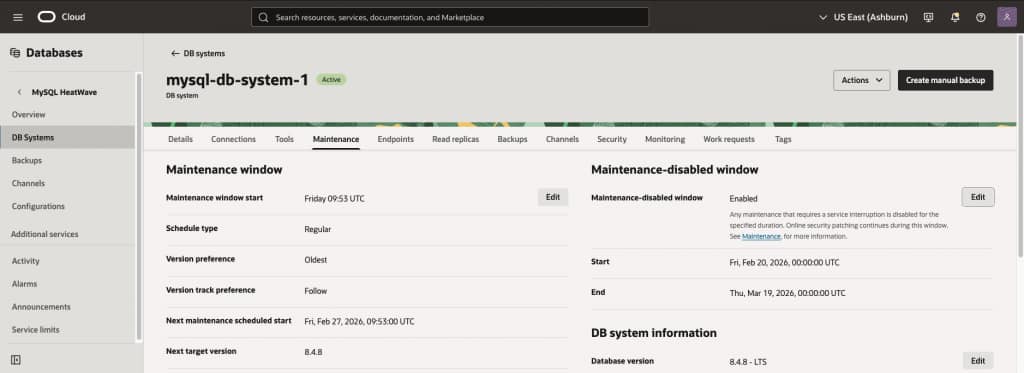
You configure a maintenance-disabled window for the period during which you want to avoid downtime for your MySQL HeatWave instance. If this period overlaps with a maintenance window, MySQL HeatWave Service will only apply zero-downtime maintenance, which includes security patches and other updates that do not cause downtime for your MySQL HeatWave instances. As a result, the MySQL database will remain online and accessible.
Just as with regular maintenance that imposes downtime, you will be notified about upcoming zero-downtime maintenance.
Maintenance-disabled windows may be configured for up to 90 days, as MySQL requires regular maintenance. However, the actual duration may be shorter, since there must be no more than 90 days between the last downtime-imposing maintenance before the window begins and the first such maintenance after the window ends.
Configuring a Deferred Maintenance
You can configure a maintenance-disabled window using the OCI Console, OCI CLI, or any OCI SDK of your choice.
In the OCI Console, simply enable the maintenance-disabled window and specify the start date, start time (UTC), end date, and end time (UTC). Review the Next maintenance scheduled start to ensure your maintenance-disabled window covers that date, which will help ensure that your MySQL HeatWave instance’s next maintenance is zero-downtime. Alternatively, you can configure a maintenance-disabled window that begins after the Next maintenance scheduled start.
What information maintenance events provide
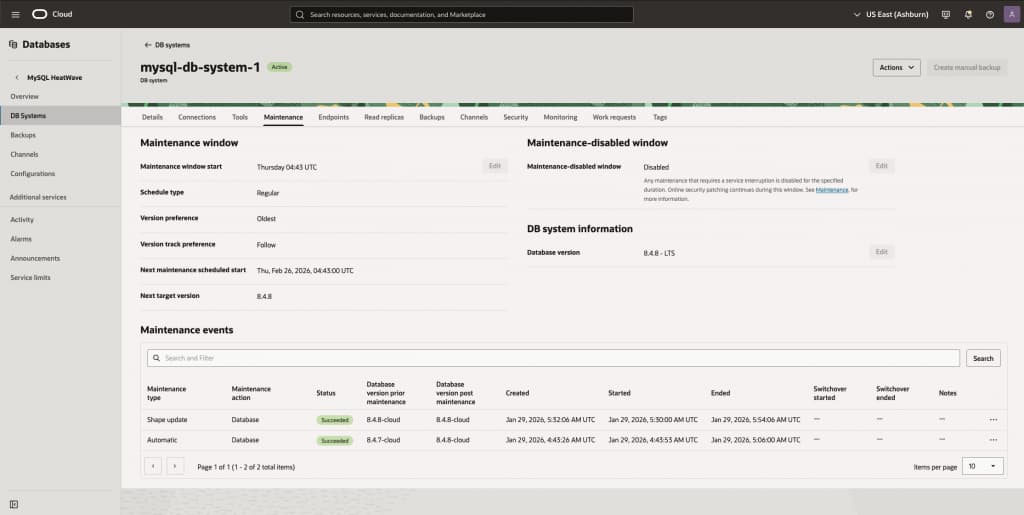
The following information is available right now:
- When maintenance started
- When maintenance completed
- MySQL versions before and after maintenance
- Whether maintenance was manually triggered by the customer or automatically by the MySQL HeatWave Service
- Whether maintenance affected the MySQL database, operating system, underlying hardware, or was an online zero-downtime maintenance
- Whether maintenance was successful or not
Planned enhancements include making additional information available:
- Exact downtime (switchover time in highly available system) during the maintenance, if any
Maintenance events will be emitted for both downtime-imposing maintenance as well as zero-downtime maintenance.
How to inspect maintenance events
You can inspect maintenance events using the OCI Console, OCI CLI, or any OCI SDK of your choice.
In the OCI Console, view the list of maintenance events associated with your MySQL HeatWave instance under the Maintenance tab.
Summary
Maintenance-disabled windows give customers greater control over when and how maintenance is applied to their MySQL HeatWave instances, helping minimize downtime during business-critical periods and keeping systems up and running.
Maintenance events improve customers’ understanding of past maintenance actions applied to their MySQL HeatWave instances.
View the documentation for more details.