
Oracle Integration is moving toward a more Project-centric operating model. Projects provide a better way to organize, secure, deploy, and operate integrations as complete business solutions rather than managing each integration as a standalone asset.
Many customers already have production integrations running in the global integration model. These integrations may be consumed by downstream applications and tied to existing runtime URLs, so moving them into projects must be handled as a controlled transition. With the 26.10 release, two major blockers are addressed: preserving existing runtime URLs and moving integrations at scale.
Why Move to Projects?
Customers should move existing integrations into Oracle Integration Projects to adopt the newer operating model for building, securing, deploying, observing, and exposing integrations for intelligent automation.
1. Adopt new AI and agentic capabilities
New AI-assisted and agentic capabilities are increasingly project-focused. Moving to projects prepares customers for intelligent integrations, AI-assisted development, agentic patterns, and smarter operations.
2. Enable MCP and agent-ready integrations
Projects provide a natural way to expose selected integrations as governed capabilities for AI agents through MCP. This helps customers make existing integrations agent-ready while keeping ownership, access, and lifecycle management aligned to the project model.
3. Improve security and access control
Projects help organize integrations by solution, team, application area, or customer implementation. This provides a cleaner model to control who can access, modify, deploy, and operate specific integrations.
4. Automate deployment and lifecycle management
Projects make it easier to manage related integrations as a deployment unit instead of handling each integration one at a time. This provides a stronger foundation for CI/CD, controlled promotion, dependency management, and repeatable releases.
5. Improve observability and operations
Projects give teams a solution-level view of related integrations and assets, making it easier to monitor, troubleshoot, and operate the full business flow. This becomes especially important as customers adopt intelligent operations and AI-assisted issue detection
6. Reuse shared assets more effectively
Projects make it easier to structure common assets such as shared connections, lookups, and libraries around solution ownership. A shared-connection project model can reduce duplication and improve consistency across multiple integration projects.
7. Prepare for future innovation
Customers who stay only on global integrations may miss or delay adoption of newer project-specific capabilities. Moving to projects positions them for future innovations across AI, MCP, intelligent observability, lifecycle automation, and governed operations.
Current Challenges
Even though projects provide clear benefits, customers have had two practical blockers.
1. Change in Runtime URL
Many existing integrations are already consumed by applications, partners, or downstream systems using the current runtime URL.
Customers are concerned that moving an integration into a project changes the URL and breaks existing consumers. This is especially important for production or production-like environments where endpoint changes require coordination across multiple teams.
2. No easy way to move hundreds of integrations
Many customers have hundreds of global integrations.
Moving each integration one by one is not practical for large environments. Customers need a scalable way to move multiple integrations into projects without a long manual migration effort.
What’s New in 26.10 for Project Migration?
With the 26.10 Release, both major blockers are addressed.
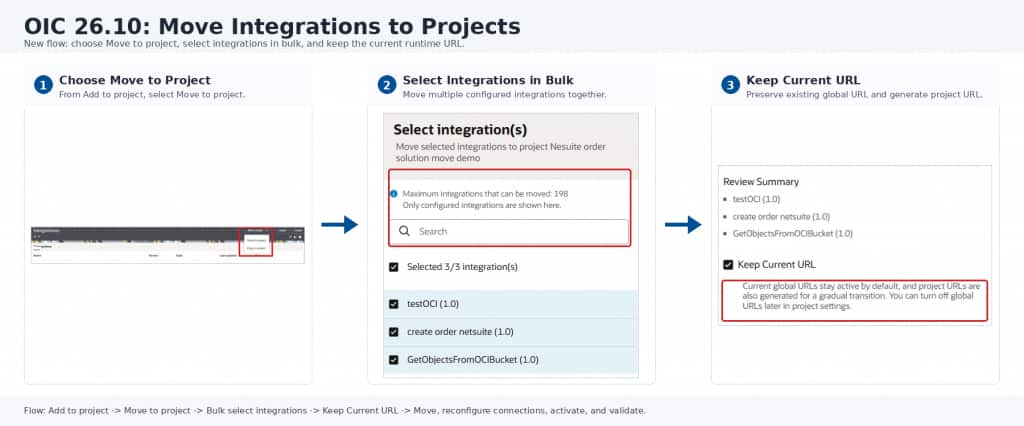
1. Keep Current URL
The Keep Current URL option allows customers to move integrations into projects without breaking existing consumers.
When this option is selected:
- The existing global runtime URL continues to work.
- A new project runtime URL is also created.
- Customers can validate the project-based integration safely.
- Consumers can continue using the existing URL during the transition.
This removes the need for a hard cutover and gives customers a safer migration path.
2. Bulk move to Project
The 26.10 release also supports moving multiple integrations into a project together.
Customers can select integrations in bulk and move them into the target project as a group. This makes the migration practical for large environments where hundreds of integrations need to be modernized.
Recommended Connection Strategy
Connections need to be reconfigured and validated the first time integrations are moved into projects or promoted to a higher environment.
To simplify connection management, we recommend creating a dedicated connection project. Commonly used connections can be added to this project and made shareable across projects, so multiple integration projects can reuse the same centrally-managed connections.
For example, a connection project may contain:
- ERP connection
- HCM connection
- NetSuite connection
- ATP connection
These shared connections can then be reused across multiple integration projects. This avoids duplicate connection setup, improves consistency, and makes credential or endpoint updates easier to manage centrally.
As connection support evolves, future releases will provide easier options to reuse existing connection configurations during migration. The goal is to help customers identify connections that were migrated from the global model, tag or distinguish them clearly, and replace them with the appropriate project-level shared connections where needed.
Recommended Path to Move to Projects
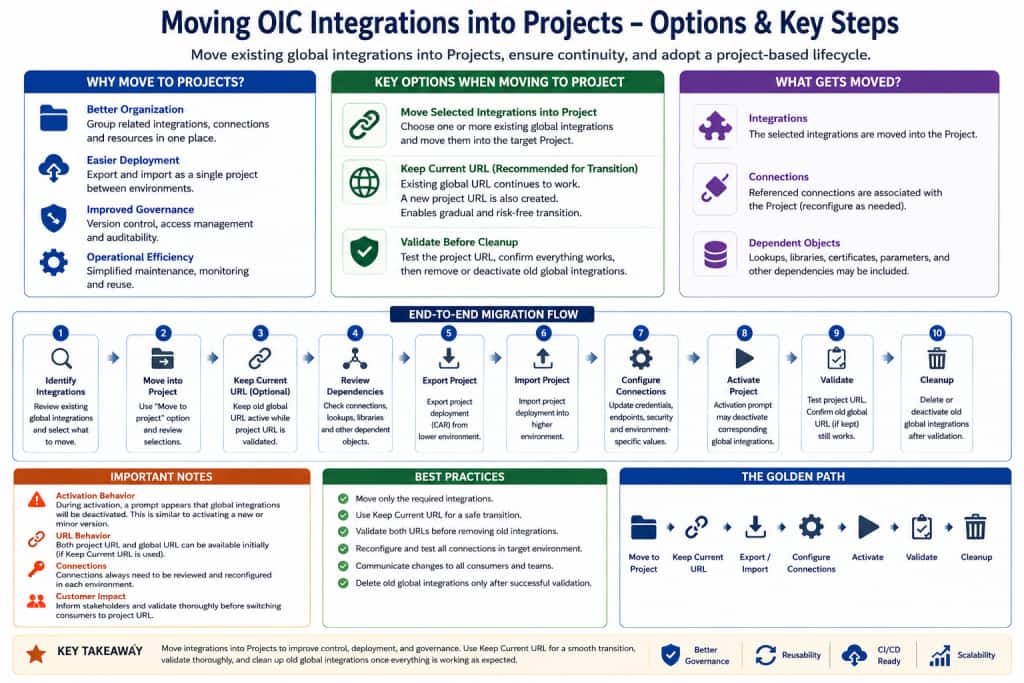
The recommended migration flow is:
- Identify integrations to move
Group integrations by business solution, application area, customer implementation, or team ownership. - Minor version movement
When an integration is moved into a project, all of its minor versions are moved together. This means users do not need to move each minor version individually. - Create a connection project
Add common connections and make them shareable across projects. - Select integrations in bulk
Choose the global integrations that should be moved into the target project. - Move to Project
Use the Move to Project action and review the selected integrations before confirming. - Enable Keep Current URL
Preserve the existing runtime URL so current consumers are not disrupted. - Reconfigure connections
Connections always need to be reconfigured after the move or after import into another environment. Use the shared connection wherever possible. - Activate and validate
Validate both the existing global URL and the new project URL, where applicable. - Continue with the preferred URL strategy
Customers can continue using the existing URL or gradually adopt the project URL based on their rollout plan. - Retire or delete the global integration
After validation is complete and the customer is ready, the old global integration can be retired or deleted.
Promotion to Higher Environment
Once integrations are moved into a project in the lower environment, they can be promoted to a higher environment using Project deployment.
The recommended promotion flow is:
- Create and export the deployment
Create a deployment for the integrations that need to be moved and export it from the lower environment. - Import into the higher environment
Import the deployment into the higher environment. During activation, the user will see a prompt that the corresponding global integration will be disabled. - Activate, validate, and delete global integration
Reconfigure the required connections, then activate the imported project deployment. During activation, if the integration was moved from the global model into a project, the corresponding global integration is automatically deactivated. After activation, validate the project integration, runtime URLs, connection configuration, and downstream consumer behavior. Once validation is successful, delete the old global integration if it is no longer required. - Adopt intelligent integrations
Once the migration is complete, customers can start taking advantage of Project-based innovation, including AI-assisted development, intelligent operations, agentic integration patterns, and improved lifecycle automation.
Final Takeaway
Moving to projects is an important step toward the future Oracle Integration operating model.
Projects help customers adopt new AI-assisted and agentic capabilities, improve security and access control, and automate deployment lifecycle management. With 26.10, customers can move at scale using bulk move and preserve existing runtime continuity using Keep Current URL.
This allows customers to modernize their integration landscape safely, promote integrations through Project deployments, and start taking advantage of the next generation of intelligent integration capabilities.
This is also the beginning of a broader project-first journey. Future improvements will continue to simplify migration and operations, including easier reuse of existing connection configurations, better identification of connections migrated from the global model, smoother replacement with project-level shared connections, and support for moving integrations across projects. As more innovation is delivered through projects, customers will be better positioned to adopt intelligent observability, MCP and agent-ready integrations, improved lifecycle automation, and future Oracle Integration capabilities.