
Oracle SOA Suite customers using B2B are approaching an important modernization decision.
Oracle Fusion Middleware 12c Premier Support ends in 2026, followed by Extended Support in 2027. In addition, Oracle SOA Suite 14c does not support B2B document protocols, including EDI, EDIFACT, HL7, and PFF.
For additional details on the applicable support timelines and guidance, refer to the relevant Oracle Support note: Oracle Support Note: 11757334.
Once B2B workloads have been transitioned from SOA B2B to Oracle Integration B2B, customers can proceed with upgrading their remaining SOA workloads to SOA Suite 14c.
For customers using these capabilities, Oracle Integration B2B provides a practical path forward.
There are two broad modernization approaches:
- Hybrid Transition — move the B2B edge to Oracle Integration while continuing to use existing SOA integrations.
- Re-platform to Oracle Integration — progressively move SOA integrations to Oracle Integration as part of broader platform modernization.
In this blog, we focus on the Hybrid Transition approach. We will cover re-platforming in more detail in a subsequent blog later point in time.
Hybrid Transition: Modernize B2B Without Rewriting Existing SOA Logic
The goal of the Hybrid Transition approach is simple:
Move B2B processing to Oracle Integration, while keeping existing SOA business logic unchanged.
This allows customers to modernize trading partner connectivity, translation, validation, agreements, and monitoring without immediately rewriting the SOA integrations that connect to backend applications.
Let’s look at how this works for both inbound and outbound processing.
Current SOA B2B Flow
Today, a typical inbound flow looks like this:
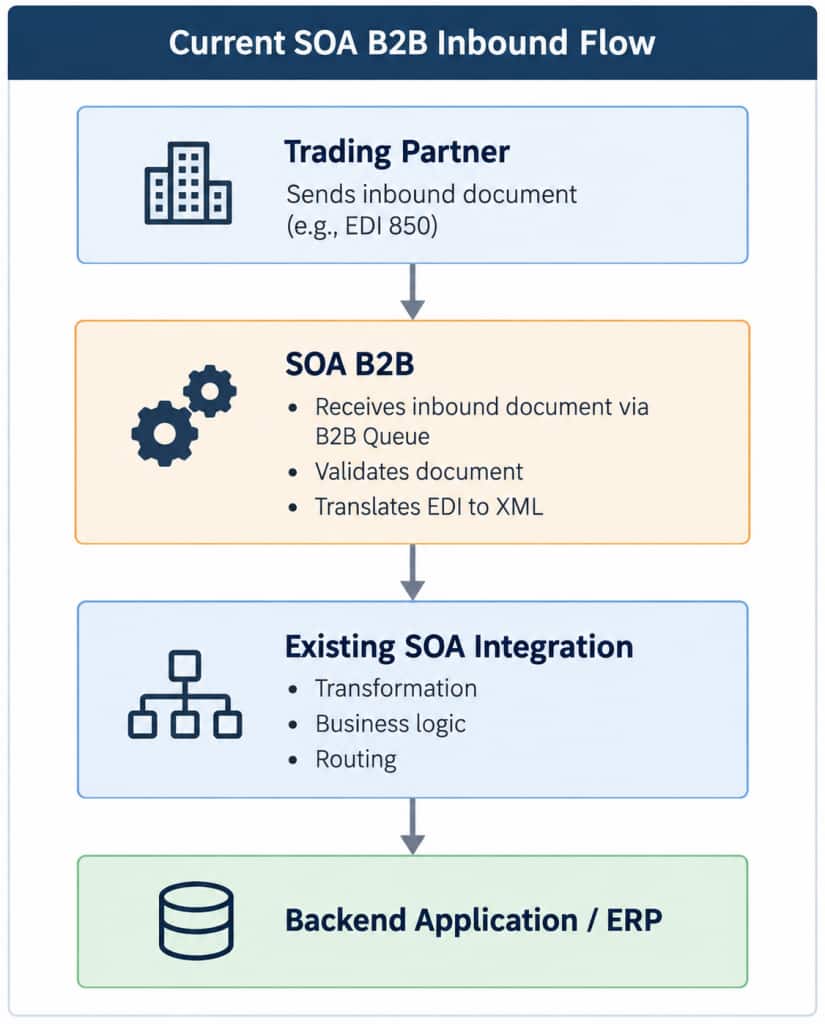
SOA B2B handles the partner-facing B2B processing, while the SOA integration performs the business transformation and communicates with the backend application.
The key objective of the Hybrid Transition is to move the B2B responsibility to Oracle Integration without changing the existing business logic in SOA.
Follow these steps move translation layer to Oracle Integration.
Set Up the B2B Foundation in Oracle Integration
Before configuring the inbound or outbound flows, export the required B2B artifacts from SOA B2B, including the trading partner, agreements, identifiers, documents/schemas, and related configuration.
Oracle provides a migration utility to move supported B2B artifacts into Oracle Integration:
Migrate B2B Artifacts from Oracle SOA Suite to Oracle Integration
The import creates the core B2B configuration in Oracle Integration, including the trading partner, agreements, document definitions, and transport-related setup.
After the import, review the migrated configuration and complete the required channel setup, such as AS2 or SFTP, including endpoints, credentials, and certificates where applicable.
Once this common B2B setup is complete, you can configure and validate the inbound and outbound hybrid flows.
Inbound Flow
Step 1: Create a lightweight BPEL gateway service
In the existing SOA B2B setup, inbound messages are commonly delivered to the SOA composite through an internal B2B/JMS queue using the B2B Adapter. While the accessibility of this queue can vary by deployment and configuration, it should not be relied on as the long-term integration endpoint for the hybrid architecture.
To decouple the existing SOA integration from the B2B runtime, create a lightweight BPEL gateway and expose it through a SOAP or REST endpoint that Oracle Integration can invoke. This also provides a cleaner transition path when B2B processing is moved out of SOA and the remaining SOA workloads are later upgraded to 14c, without depending on the existing B2B queue-based entry point.
Create a new BPEL process using the same schema as the existing SOA integration and expose it through a SOAP or REST endpoint.
This BPEL process acts as the gateway from Oracle Integration into the existing SOA implementation. It performs only minimal mediation:
- Receive the message from Oracle Integration.
- Assign/map the incoming root element to the root element expected by the existing SOA integration.
- Invoke the existing SOA integration.
All existing transformation, orchestration, routing, business rules, and backend processing remain in the current SOA integration. This significantly reduces migration risk.
Step 2 -Build the OIC Backend Integration
Oracle Integration B2B handles the partner-facing processing, including agreement resolution, validation, EDI-to-XML translation, and tracking.
Create a lightweight OIC backend integration to:
- Map the OIC-generated XML structure to the schema expected by SOA.
- Invoke the BPEL gateway service using the SOA Adapter created in Step 1.
The existing SOA business logic remains unchanged; OIC simply bridges the new B2B layer to the current SOA integration
Step 3 – Validate the End-to-End Inbound Flow
Once the OIC B2B configuration and backend integration are deployed, validate the complete flow with the selected trading partner.
Confirm that the X12 850 is received, translated, passed through the OIC backend integration, and successfully processed by the existing SOA integration and backend application.
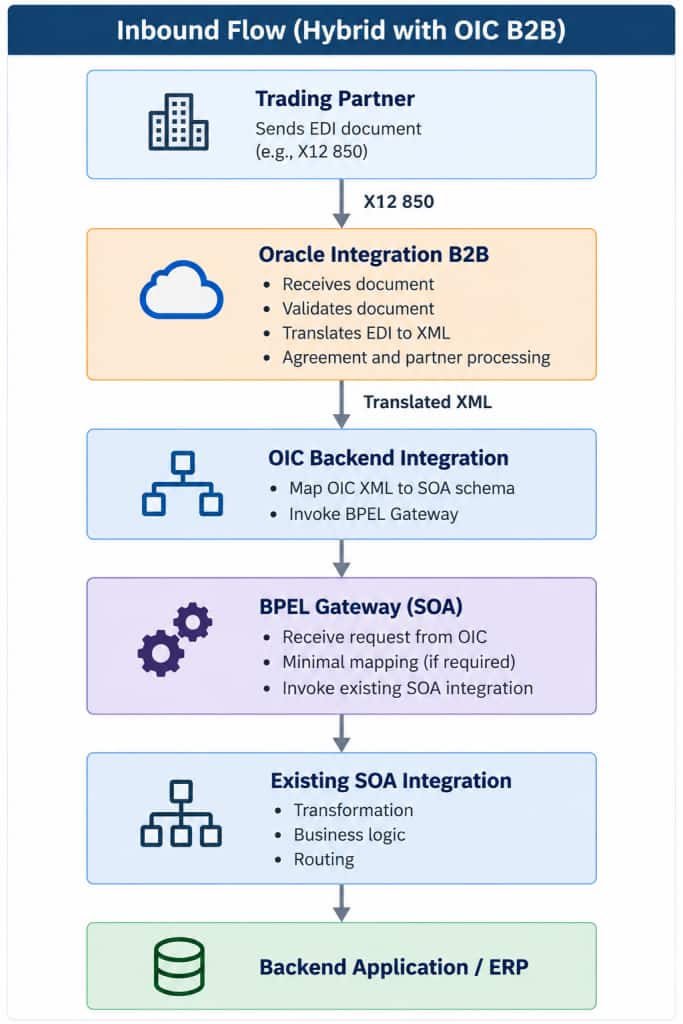
The key outcome is that B2B processing moves to Oracle Integration B2B while the existing SOA business logic remains unchanged.
Outbound Flow
For outbound processing, the existing SOA integration continues to prepare the business document. The change is that SOA now sends the outbound transaction to Oracle Integration B2B instead of SOA B2B.
Step 1 – Create the OIC Outbound Integration
Create a lightweight OIC outbound integration that accepts the document from the existing SOA integration.
- Use the same schema that SOA currently sends to SOA B2B, so no additional transformation is required in SOA.
- Use the B2B action in OIC to translate the message into the format defined by the trading partner agreement.
- Send the translated document through Oracle Integration B2B for delivery to the trading partner.
This keeps the OIC integration simple and allows the existing SOA business logic to remain unchanged.
Step 2 – Update the SOA Outbound Configuration
Update the existing SOA integration so that it invokes the new OIC outbound integration instead of SOA B2B.
- Add a new target/reference in the existing SOA integration.
- Configure the target to invoke the OIC outbound integration created in Step 1.
- Keep the existing SOA transformation, orchestration, and business logic unchanged.
Step 3 – Test and Validate the Outbound Flow
Deploy the OIC outbound integration and validate the complete flow with the selected trading partner.
Confirm that the transaction is generated by the existing SOA integration, received by OIC, translated by Oracle Integration B2B, and successfully delivered to the trading partner.
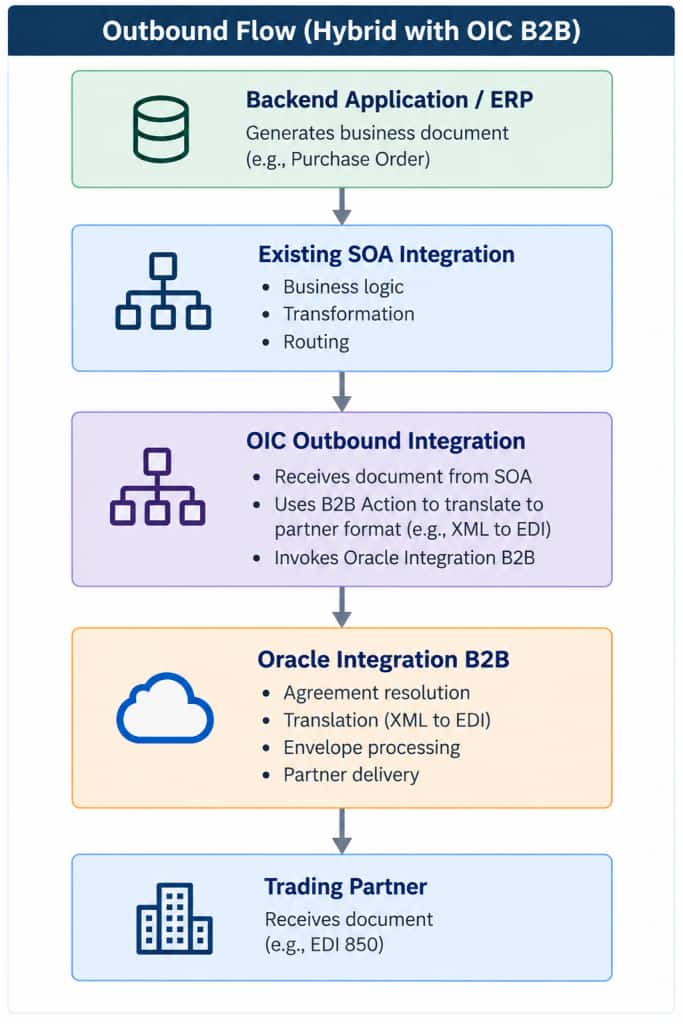
The key outcome is that the existing SOA business logic remains unchanged while outbound B2B processing moves to Oracle Integration B2B.
Scale the Migration Across Trading Partners
Once the inbound and outbound flows are successfully validated for the first trading partner, use the same migration pattern for the remaining partners.
Customers can migrate additional trading partners in phases based on their business priority, partner readiness, transaction volume, protocol, or operational needs.
For each trading partner:
- Configure or migrate the B2B setup in Oracle Integration B2B.
- Apply the same inbound pattern where required.
- Apply the same outbound pattern where required.
- Test and validate end to end with the trading partner.
- Move to production after successful validation.
This allows customers to migrate at their own pace while reusing a proven inbound and outbound pattern.
Key Takeaway
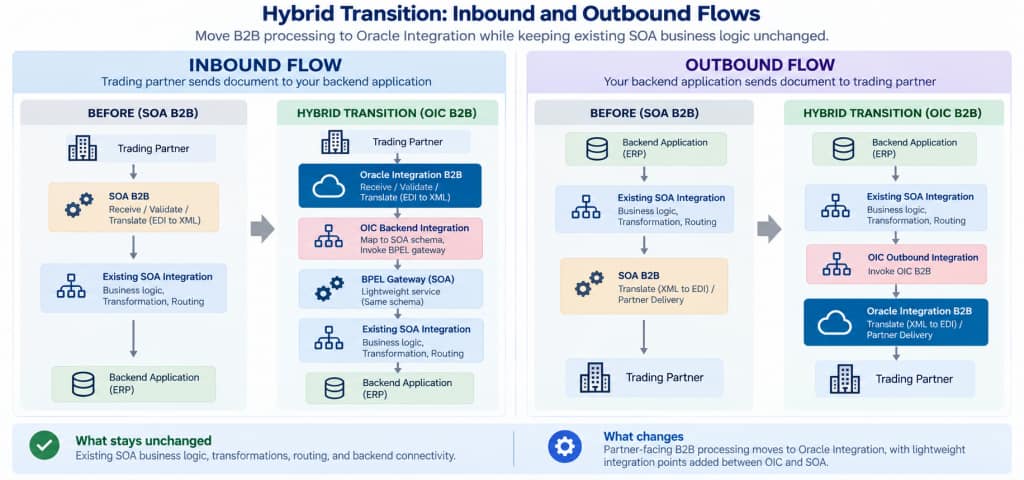
The Hybrid Transition approach allows customers to move B2B processing to Oracle Integration B2B while preserving their existing SOA business logic and backend connectivity.
- Inbound: OIC B2B receives, validates, and translates the partner document. A lightweight OIC integration then invokes the new BPEL gateway, which passes the message to the unchanged SOA integration.
- Outbound: The existing SOA integration continues to prepare the business document, but now invokes an OIC outbound integration, which hands the document to OIC B2B for translation and partner delivery.
- This reduces migration risk, avoids an immediate rewrite of existing SOA logic, and provides a practical path to modernize trading partners incrementally.
For a complete walkthrough of the Hybrid Transition approach, including the inbound and outbound flows, SOA changes, and Oracle Integration configuration, watch the video below for the full end-to-end details.