
Every build follows the same lifecycle: discover, review the plan, sync, build, validate, test, and publish. Learn it once and every later example in this series reads the same way.
Terms used in this post
- Material edit: A change that alters what an artifact does, such as a new node, a changed condition, a new panel, or a different prompt. Renaming a label isn’t material.
- Test sync: The check that compares a changed workflow or app with its tests, creates or updates the tests it needs, and runs them.
- Test Impact: A short block the CLI prints after validation that says which tests a change affects.
- DRAFT: The unpublished version of an artifact on the server. Saving updates the DRAFT; it never publishes.
Step by step
Every build goes through seven stages. The assistant does the work; you describe the outcome, approve the plan, and decide when anything is published.
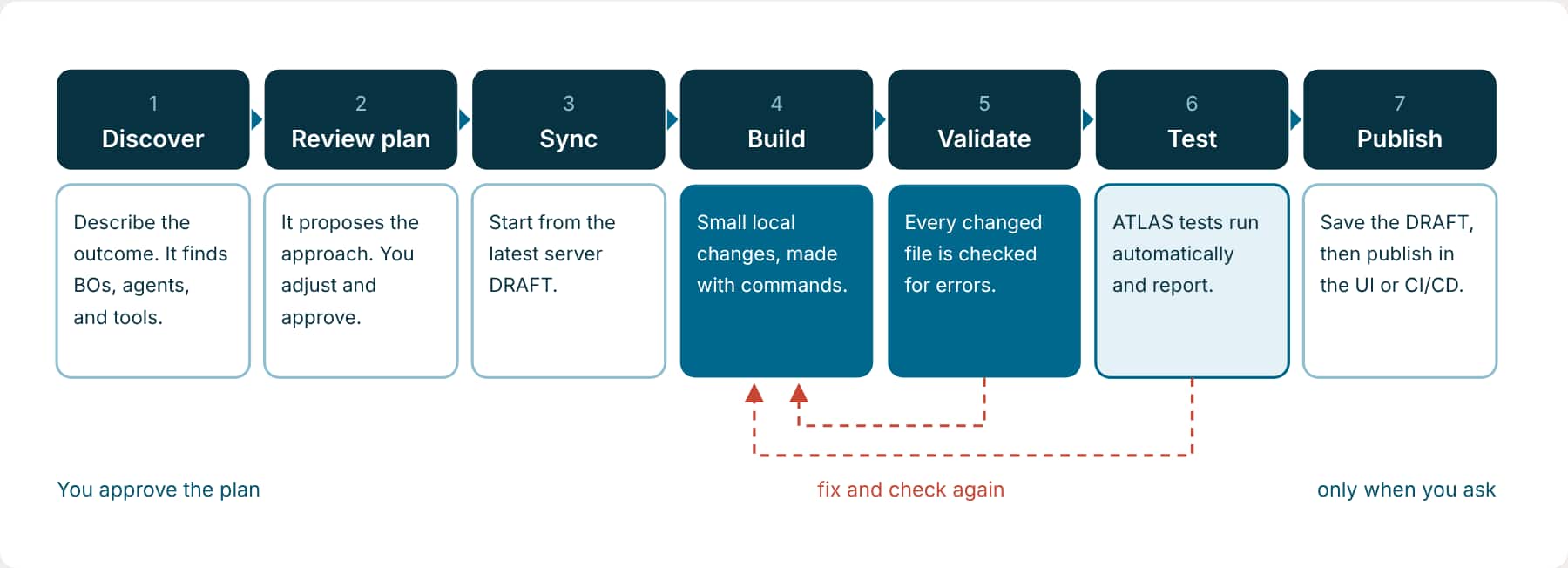
| Stage | What you do | What the assistant does |
|---|---|---|
| Discover | Describe the business outcome, not the implementation. | Looks for the Business Objects, workflow agents, tools, and knowledge sources that can deliver it, and checks they return the data you need. |
| Review plan | Check the scope, dependencies, design, and test approach. Adjust, then approve. | Proposes what it will change and how. For apps, it waits at the pre-build checkpoint. |
| Sync | Ask it to pull the latest DRAFT when teammates may have changed it. | Fetches the server version and tells you if your local copy differs. |
| Build | Keep each request to one change. | Makes the change locally with CLI commands. |
| Validate | Nothing; it’s automatic. | Validates every changed artifact and fixes what fails. |
| Test | Read Validation and Insights. | Creates or updates the relevant tests, runs them, and reports the results. See Part 10. |
| Publish | Ask it to save the DRAFT, then publish through your release process. | Saves the DRAFT. It never publishes workflows from the CLI. |
Words that change what the assistant does
The skill reads certain words as instructions about scope. Use them on purpose.
| If you say | The assistant |
|---|---|
| show, inspect, preview, what would be generated, get the sync plan | Reads only. Nothing is created, changed, or run. |
| run, execute, generate, sync, create the tests, complete the plan | Carries the work through to the end, including tests and a summary. |
| local only | Keeps every change on your machine. No DRAFT save, no runtime execution. |
| skip tests, defer tests, impact only | Reports the Test Impact but doesn’t run the test sync. |
| dry run | Shows the exact file diff a command would make, without writing it. |
| save, push, publish, fetch, pull, refresh from server | Is allowed to touch remote state, within the skill’s rules. |
The guardrail request
Open every assistant session with a request that sets the ground rules. Paste it once at the start; every later request inherits it.
Try it: Start every session with this
Use the aistudio skill and the AI Studio CLI from the project root.
Look at the project and the files involved before changing anything.
Make changes with CLI commands, not by hand-editing artifact files.
Keep all changes local.
Validate everything you change.
Let the workflow and app tests run after any meaningful change.
Don't save, publish, delete, or pull anything from the server unless I ask.
When you're done, tell me what changed, what was validated, the test results, and anything still blocking.
Tests run automatically
You don’t need to ask for tests separately. After a material workflow or app change, the skill checks which tests the change needs, creates or updates them, saves a DRAFT once if the tests have to run against it, runs them, and ends with Validation and Insights. The test line in the request above simply makes that explicit. Say “skip tests” or “local only” when you don’t want it.
Part 10 explains what happens and how to read the reports.
What a finished change looks like
A list of what moved
The artifacts created or modified, with their files, and the nodes, panels, or functions touched.
Proof, not a claim
The validation result from the command output. The skill won’t say validation passed unless the output shows it.
Validation and Insights
For material workflow and app edits: test counts, report links, Metrics, and Optimization from the test run.
Key takeaways
- Inspect, change with commands, validate, test, review, and only then touch the server.
- Words like “show”, “local only”, and “dry run” change the scope of what the assistant does.
- Open each session with the guardrail request so the rules hold for everything that follows.
Previous: Work in VS Code with the Fusion AI Studio Extension | Next: Write a Request That Builds the Right Thing
Back to the Learning Path for Fusion AI Agent Studio CLI