
The aistudio skill is the package your coding assistant loads to work on AI Agent Studio projects. It holds three things: routing rules that decide what kind of artifact you’re asking about, a library of reference prompts for each artifact type, and the bundled CLI that does the work.
Terms used in this post
- Skill: The aistudio skill: the package a coding assistant loads to work with the AI Studio CLI. It lives in your project at
.agents/skills/aistudio/. - Artifact: Anything you build in AI Agent Studio: a workflow, app, agent, Business Object, tool, topic, and so on. Locally, each artifact is a file.
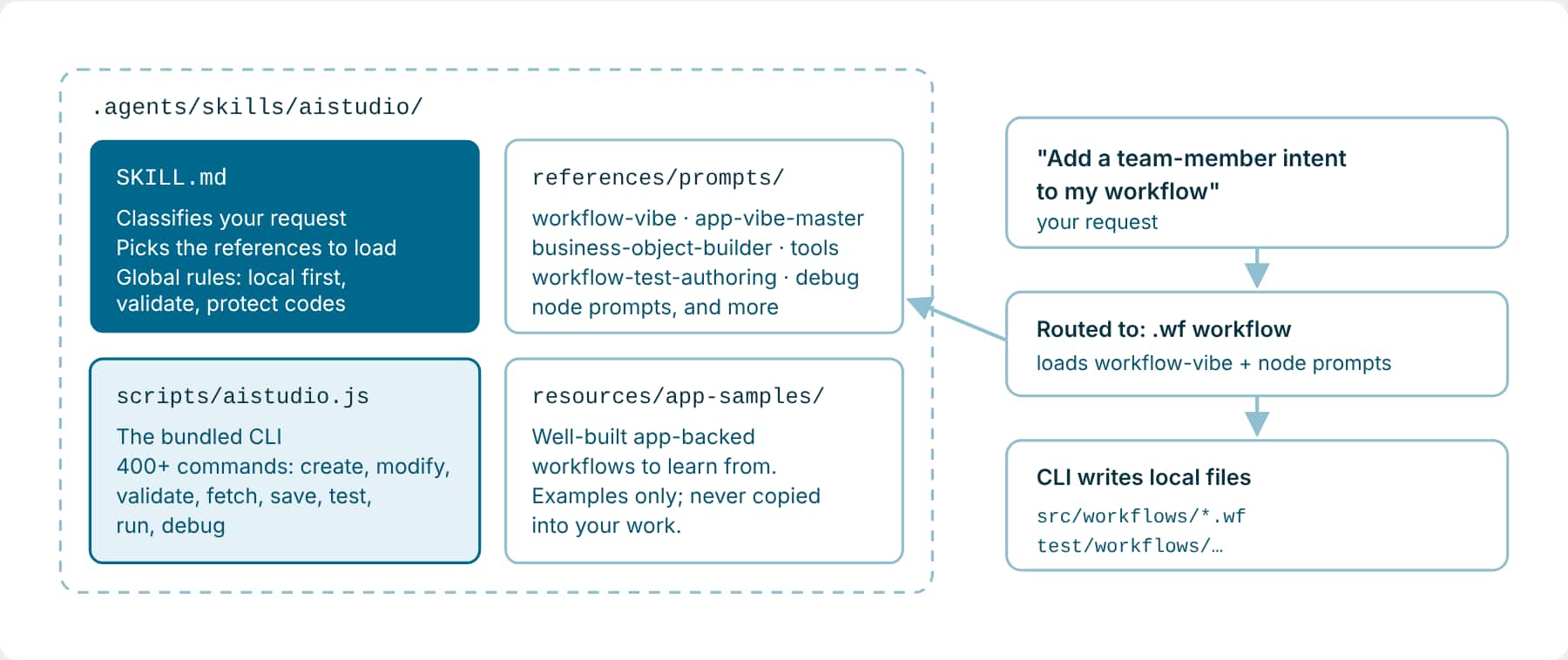
How the skill routes your request
The first thing the skill does is classify what you’re asking for. Natural-language phrases decide the artifact; file extensions, paths, and command names override them. If your wording could mean more than one thing, it asks one question, typically: Tool artifact, source artifact, or workflow node?
| When you say… | It builds or works on |
|---|---|
| workflow, node, step, edge, wire, add a tool to a workflow | .wf workflow |
| app, Agentic App, panel, communication, template, action | .app app |
| business object | .bo |
| BO tool, deeplink tool, document, email, external REST, or MCP tool | .tool |
| agent · topic · deeplink | .agent · .topic · .dl |
| approval process · policy · document schema · function | .approval · .policy · .documentSchema · .function |
| connector definition or instance | .connectorDefinition · .connectorInstance |
| Ask Oracle plugin | .aoplugin |
| test, sync plan, coverage | workflow or app tests |
| debug a run | debugger sidecar |
Standalone or app-backed?
Before touching a workflow, the skill decides whether it’s standalone or backs an Agentic App. If you mention an app, a panel, InitDisplay, or similar app terms, it treats the workflow as app-backed: it also loads the app references and routes app stages on $context.$app.$OraMessageHint, usually with a SWITCH node. If you don’t, it builds a standalone workflow and leaves app-stage routing out. Say which one you mean, and you skip a round of questions.
Rules the skill always follows
- Identity: An artifact’s code never changes during an edit, rename, or regeneration. Renaming the display name doesn’t change the code or the file name. Only an explicit request to change the code does.
- Commands: Use a CLI command over a direct JSON edit whenever one supports the change.
- Local: Keep artifacts local unless you ask to save, publish, fetch, or delete. The one exception: after a workflow or app is created or materially changed, it may save a DRAFT once so its tests can run.
- Publish: Never publish a workflow from the CLI, even when asked. Workflows reach production through AI Agent Studio or your CI/CD path.
- Serial: Run changing commands one at a time against the same file, and treat the updated file as the truth before the next one.
- Evidence: Don’t invent schemas or example payloads to get past validation. If a contract isn’t clear from the CLI, the references, and your files, stop and ask.
Two ways to organize local files
The skill supports two project layouts. You can work directly with files under a root src folder, or use an app package that groups files by package and module. Both layouts support local editing, validation, tests, and source control. Choosing a layout changes where files live in your project; it does not change what an Agentic App or workflow does in Fusion.
Direct src project |
App package | |
|---|---|---|
| Where files go | src/ for artifacts, test/ for tests, and test-reports/ for generated reports. |
<package>/sources/, tests/, and test-reports/, organized under one or more modules. |
| Good fit | An existing src workspace, a focused project, or the VS Code examples in this learning path. |
A new repository that needs explicit package and module boundaries for related apps, workflows, and tests. |
| Main advantage | Short, easy-to-browse paths. You can fetch, edit, and validate project files directly without setting up a package. | Keeps each package’s sources and tests together, which helps teams review changes and run package-scoped CI/CD. |
| Consideration | If one repository grows to hold several independent solutions, their files share the same root folders. | Paths are deeper; when several packages or modules exist, you must identify the target before creating files. |
The direct src layout is sometimes called the legacy layout in CLI guidance, but it remains supported. You can keep it in Git too. You do not need to migrate an existing src workspace just to follow this learning path.
Direct src layout: common artifact paths
| Artifact | Default location |
|---|---|
| Workflow | src/workflows/*.wf |
| App | src/apps/*.app |
| Agent | src/agents/*.agent |
| Business Object | src/businessObjects/*.bo |
| Deeplink | src/deeplinks/*.dl |
| Topic | src/topics/*.topic |
| Tool | src/tools/*.tool |
| Connector Definition | src/connectorDefinitions/*.connectorDefinition |
| Connector Instance | src/connectorInstances/*.connectorInstance |
| Approval Process | src/approvals/*.approval |
| Policy Store | src/policies/*.policy |
| Policy Template | src/policyTemplates/*.policyTemplate |
| Document Schema | src/documentSchemas/*.documentSchema |
| Function Template | src/functions/*.function |
| Ask Oracle Plugin | src/askOracle/*.aoplugin |
An app package is the other local layout. The skill recognizes it by sources/app-package.json. A package is a home for related artifacts and tests; it is not the same thing as a single Agentic App. One package can contain multiple modules. The package often sits under app-pkg/, although the package can also be at the repository root.
App-package layout
app-pkg/<package>/
  sources/app-package.json            # marks this folder as an app package
  sources/ai/self/<module>/
    workflows/<workflow_code>/*.wf
    applications/<app_code>/*.apps
    businessObjects/<object_code>/*.bo
    …
  tests/ai/self/<module>/             # workflow and application tests
  test-reports/                       # generated; not source-controlled
If you start a new source-controlled package project, the CLI’s init-app-package --app-package <name> command creates this layout. It only prepares local folders; it does not fetch an app or its dependent workflows. If your repository contains several packages, name the one you want in your request. If that package has several modules and you are creating a new artifact, name the module too.
Once you recognize these folders, see Work in VS Code with the Fusion AI Studio Extension to fetch and open artifacts in the same workspace.
Key takeaways
- The aistudio skill holds routing rules, one reference per artifact type, and the bundled CLI.
- It works out what you’re asking for first. Saying “workflow”, “app panel”, or “business object” clearly saves a clarifying question.
- Both direct
srcprojects and app packages are valid. Use the layout already in your workspace unless your team needs a different repository structure. - Artifact codes are protected, work stays local by default, and workflows are never published from the CLI.
Previous: Why Build with the AI Studio CLI and a Coding Assistant | Next: Access Fusion AI Agent Studio using OAuth
Back to the Learning Path for Fusion AI Agent Studio CLI