
This article continues the series on API Authentication in Fusion AI Agent Studio using OCI Identity (OAuth2 JWT Bearer flow). Recall the main actors: the End User, the Client Application, the Authorization Server (OCI Identity), and the Resource Server (your Oracle Fusion application environment).
In this step, the Client Application creates a signed user assertion (JWT) and exchanges it with OCI Identity (Authorization Server), which mints an OAuth 2.0 access token representing the end user.
OCI Identity supports multiple OAuth grant types (see official docs). For purposes of this article, I will cover just two of those approaches. First one is when Client authenticates using a signed JWT (more secure, certificate-based and my preferred route). Second one will be when Client authenticates using client ID and secret (basic auth, simpler…but less secure).
Overall Flow:
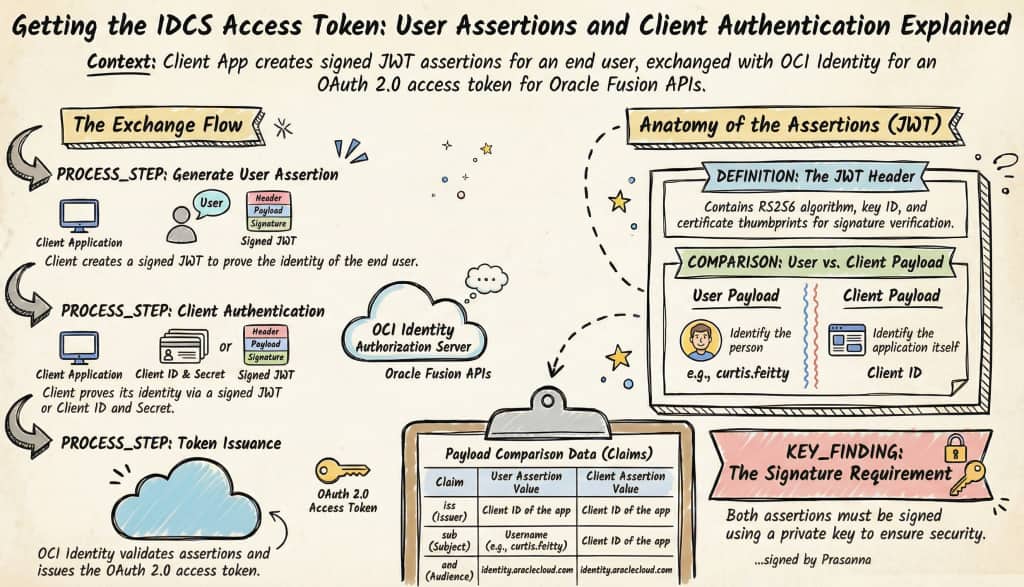
Simple JWT Format for User Assertion
HEADER:
{
  "alg": "RS256",
  "typ": "JWT",
  "kid": "key-id",
  "X5t": "certificate-thumbprint",
  "x5t#S256": "certificate-thumbprint-sha256"
}

PAYLOAD:
{
  "iss": "client-id of the oAuth app from Part3",
  "sub": "userName/ID of the end user. for e.g. curtis.feitty",
  "prn": "userName/ID",
  "jti": "unique-id",
  "iat": time when token is created,
  "exp": time when token expires,
  "aud": [
    "oauth.idm.oracle.com",
    "https://identity.oraclecloud.com/"
  ],
  "user.tenant.name": "tenant-name for e.g. idcs-a230b19f17974f4c8843ead119034231"
}

SIGNATURE:
Signed using private key (for e.g. CoE_oAuth_private_key.pem from Part2)
Simple JWT Format for Client Assertion
HEADER:
{
  "alg": "RS256",
  "typ": "JWT",
  "kid": "key-id",
  "X5t": "certificate-thumbprint",
  "x5t#S256": "certificate-thumbprint-sha256"
}

PAYLOAD:
{
  "iss": "client-id of the oAuth app from Part3",
  "sub": "client-id of the oAuth app from Part3",
  "jti": "unique-id",
  "iat": time when token is created,
  "exp": time when token expires,
  "aud": [
    "oauth.idm.oracle.com",
    "https://identity.oraclecloud.com/"
  ]
}

SIGNATURE:
Signed using private key for e.g. CoE_oAuth_private_key.pem from Part2
Option 1: Client Assertion (JWT with Certificate) – Preferred
| Attribute | Details |
|---|---|
| Auth Type | Client Assertion (JWT signed with certificate/private key) |
| How it works | The client authenticates by presenting a short-lived signed JWT (client_assertion) instead of a shared secret. The signature is verified using the public key or certificate uploaded to the app. |
| Credentials used | Client ID + JWT certificate/private key |
| CURL | curl -i -X POST “$TOKEN_URL” -H “Content-Type: application/x-www-form-urlencoded; charset=UTF-8” –data-urlencode “grant_type=urn:ietf:params:oauth:grant-type:jwt-bearer” –data-urlencode “client_id=${CLIENT_ID}” –data-urlencode “client_assertion_type=urn:ietf:params:oauth:client-assertion-type:jwt-bearer” –data-urlencode “scope=${SCOPE}” –data-urlencode “client_assertion=${JWT_ASSERTION}” –data-urlencode “assertion=${USER_ASSERTION}” |
Client authenticates using a signed JWT (more secure, certificate-based and my preferred option). Token Request Using curl:
The client application authenticates by sending a signed client_assertion JWT in the token request, using the client_assertion_type = urn:ietf:params:oauth:client-assertion-type:jwt-bearer. This JWT is signed with the client’s private key and validated by OCI Identity to establish trust. The user assertion JWT (for example, representing curtis.feitty) remains unchanged and follows the same structure as in other OAuth grant flows. OCI Identity validates both assertions and then issues an access token representing the end user.
# For demo purposes only. Not intended for production use.
# Please review and modify according to your company’s policies before deployment.
# ------------------------------------------------------------------
# NOTE ON AUTHENTICATION APPROACH
# ------------------------------------------------------------------
# This snippet demonstrates how to request an OAuth 2.0 access token
# from OCI Identity using the JWT Bearer Token flow.
#
# The client application generates a signed JWT (user assertion and/or
# client assertion) using its private key and submits it to OCI Identity.
# OCI Identity validates the JWT (signature and claims) and issues an
# access token representing the end user.
#
# This example is intended to help you understand and test the flow
# end-to-end using simple tools.
#
# RECOMMENDATION:
# For production implementations, ensure proper key management,
# secure storage of private keys, and adherence to your organization’s
# security and OAuth best practices.
#
# ------------------------------------------------------------------
# Thx, Prasanna
# ------------------------------------------------------------------

#!/usr/bin/env bash
set -euo pipefail

# For demo purposes only. Not intended for production use.
# Please review and modify according to your company’s policies before deployment.

# ---- Inputs you should change ----
ALG="RS256"
KID="COE_Demo"

# OAuth Client ID (dummy value)
ISS="a9f3c2d4e7b8412f9c0a6d1e3b5f8a72"
CLIENT_ID="$ISS"

# End user
USER_SUB="Curtis.Feitty"
PRN="$USER_SUB"

# Oracle OCI IAM / IDCS tenant (dummy value)
TENANT_NAME="idcs-a1b2c3d4e5f67890123456789abcdef0"

# Certificate and private key files
CERT_FILE="./CoE_oAuth_client_cert.crt"
KEY_FILE="./CoE_oAuth_private_key.pem"

# Token request settings
SCOPE="urn:opc:resource:fusion:FA-CoETS-Dev5:fusion-ai/"
TOKEN_URL="https://${TENANT_NAME}.identity.oraclecloud.com/oauth2/v1/token"

# ---- Helpers ----
base64url() {
  openssl base64 -A | tr '+/' '-_' | tr -d '='
}

build_jwt() {
  local header_json="$1"
  local payload_json="$2"
  local unsigned sig

  unsigned="$(printf '%s' "$header_json" | base64url)"
  unsigned="$unsigned.$(printf '%s' "$payload_json" | base64url)"

  sig="$(printf '%s' "$unsigned" | openssl dgst -sha256 -sign "$KEY_FILE" | base64url)"

  printf '%s.%s' "$unsigned" "$sig"
}

# ---- Derive thumbprints from the certificate ----
X5T="$(openssl x509 -in "$CERT_FILE" -noout -fingerprint -sha1 \
  | cut -d'=' -f2 \
  | tr -d ':' \
  | xxd -r -p \
  | base64url)"

X5T_S256="$(openssl x509 -in "$CERT_FILE" -outform DER \
  | openssl dgst -sha256 -binary \
  | base64url)"

# ---- Generate unique JTI values ----
USER_JTI="$(uuidgen | tr -d '-' | tr '[:upper:]' '[:lower:]')"
CLIENT_JTI="$(uuidgen | tr -d '-' | tr '[:upper:]' '[:lower:]')"

NOW="$(date +%s)"

# USER_EXP = User assertion expiration
USER_EXP="$((NOW + 3600))"

# CLIENT_EXP = Client assertion expiration
CLIENT_EXP="$((NOW + 300))"

# ---- Build JWT header ----
HEADER="$(printf '{"alg":"%s","typ":"JWT","kid":"%s","X5t":"%s","x5t#S256":"%s"}' \
  "$ALG" "$KID" "$X5T" "$X5T_S256")"

# ---- Build user assertion ----
USER_PAYLOAD="$(printf '{"iss":"%s","sub":"%s","prn":"%s","jti":"%s","iat":%s,"exp":%s,"aud":["oauth.idm.oracle.com","https://identity.oraclecloud.com/"],"oracle.oauth.sub.id_type":"LDAP_UID","oracle.oauth.prn.id_type":"LDAP_UID","user.tenant.name":"%s"}' \
  "$ISS" "$USER_SUB" "$PRN" "$USER_JTI" "$NOW" "$USER_EXP" "$TENANT_NAME")"

USER_ASSERTION="$(build_jwt "$HEADER" "$USER_PAYLOAD")"

echo "JWT user assertion:"
printf '%s\n' "$USER_ASSERTION"
echo

# ---- Build client assertion ----
CLIENT_PAYLOAD="$(printf '{"iss":"%s","sub":"%s","jti":"%s","iat":%s,"exp":%s,"aud":["oauth.idm.oracle.com","https://identity.oraclecloud.com/"]}' \
  "$CLIENT_ID" "$CLIENT_ID" "$CLIENT_JTI" "$NOW" "$CLIENT_EXP")"

JWT_ASSERTION="$(build_jwt "$HEADER" "$CLIENT_PAYLOAD")"

echo "JWT client assertion:"
printf '%s\n' "$JWT_ASSERTION"
echo

echo "Requesting access token..."
curl -i -X POST "$TOKEN_URL" \
  -H 'Content-Type: application/x-www-form-urlencoded; charset=UTF-8' \
  --data-urlencode 'grant_type=urn:ietf:params:oauth:grant-type:jwt-bearer' \
  --data-urlencode "client_id=${CLIENT_ID}" \
  --data-urlencode 'client_assertion_type=urn:ietf:params:oauth:client-assertion-type:jwt-bearer' \
  --data-urlencode "scope=${SCOPE}" \
  --data-urlencode "client_assertion=${JWT_ASSERTION}" \
  --data-urlencode "assertion=${USER_ASSERTION}"
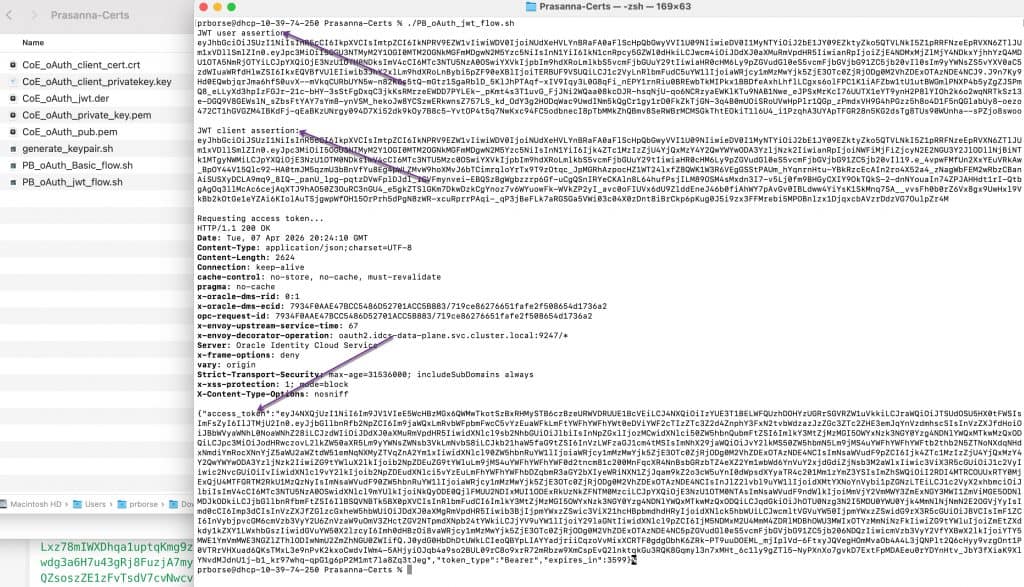
As I said earlier, this is a sample script intended for demo and PoC purposes, so feel free to modify it as needed but don’t use it in production as-is. Below, I’ve included the screenshot showing how the user assertion and client assertion are generated, along with the curl command output that returns the access token.
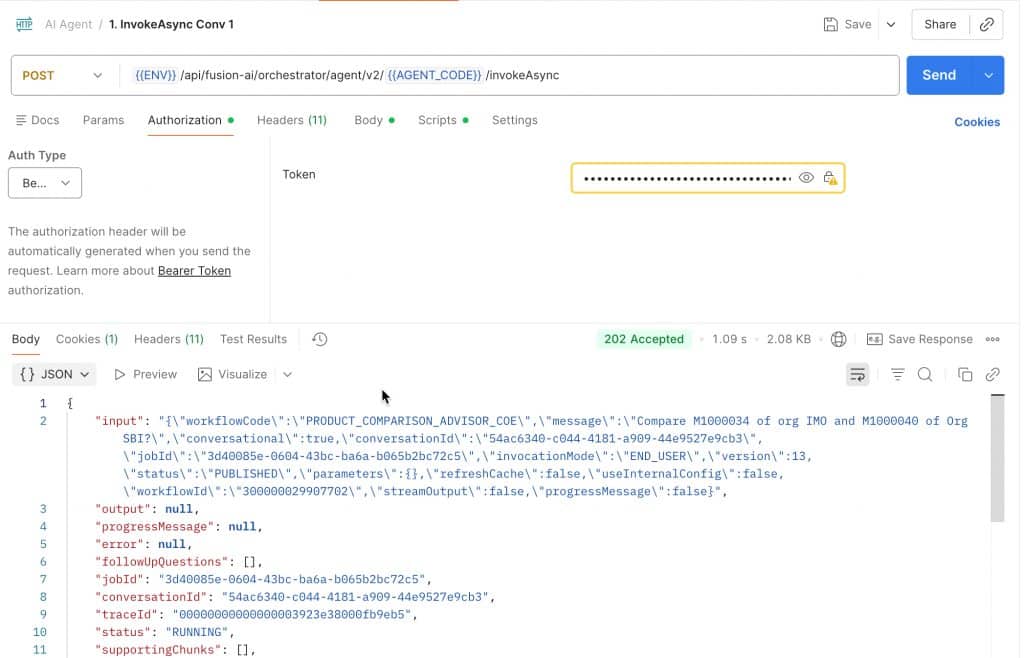
You can then use this access token to invoke Fusion AI Agent Studio APIs – for example, by testing it in Postman.
Option 2: Basic Auth (Client ID + Secret)
| Attribute | Details |
|---|---|
| Auth Type | Basic Auth (client id and secret) |
| How it works | The client authenticates using a shared secret issued when the OAuth app was created. The secret is sent using HTTP Basic Authentication. |
| Credentials used | Client ID + Client Secret (Authorization: Basic BASE64(client_id:client_secret)) |
| CURL | curl -i -X POST “$TOKEN_URL” -H “Content-Type: application/x-www-form-urlencoded; charset=UTF-8” -H “Authorization: Basic ${BASIC}” –data-urlencode “grant_type=urn:ietf:params:oauth:grant-type:jwt-bearer” –data-urlencode “assertion=${USER_ASSERTION}” –data-urlencode “scope=${SCOPE}” |
Client authenticates using client ID and secret (simpler, but less secure). Basic Auth. Token Request Using curl:
# For demo purposes only. Not intended for production use.
# Please review and modify according to your company’s policies before deployment.
# ------------------------------------------------------------------
# NOTE ON AUTHENTICATION APPROACH
# ------------------------------------------------------------------
# This example uses Basic Authentication (client_id + client_secret)
# to obtain an OAuth access token.
#
# Basic Auth is NOT the most preferred or most secure method for
# production use because it relies on a shared secret that must be
# stored and protected.
#
# This script is provided for demonstration purposes only so you
# have a working example of this approach.
#
# RECOMMENDATION:
# It is strongly recommended to use a signed client assertion
# (private key JWT) instead of client_id and client_secret.
# This provides a more secure, certificate-based authentication model
# and aligns better with modern OAuth security best practices.
# Thx. Prasanna
# ------------------------------------------------------------------

set -euo pipefail

# ---- Inputs you should change ----
ALG="RS256"
KID="COE_Demo"

# OAuth Client ID
CLIENT_ID="a1b2c3d4e5f6478890ab12cd34ef56a7"

# OAuth Client Secret
# Basic Auth (client secret) is used here.
# The client authenticates using a shared secret issued when you created the OAuth app.
CLIENT_SECRET="idcscs-3f2a9b1c-7d4e-4a8f-9c2d-5e6f7a8b9c10"

# End user
USER_SUB="Curtis.Feitty"
PRN="$USER_SUB"

# Oracle OCI IAM / IDCS tenant
TENANT_NAME="idcs-9b7c4d2e1f6a4c3b8d0e5f7a1c2b3d4e"

# Certificate and private key files
CERT_FILE="./CoE_oAuth_client_cert.crt"
KEY_FILE="./CoE_oAuth_private_key.pem"

# OAuth scope
SCOPE="urn:opc:resource:fusion:FA-CoETS-Dev5:fusion-ai/"

# Token endpoint
TOKEN_URL="https://${TENANT_NAME}.identity.oraclecloud.com/oauth2/v1/token"

# ---- Helpers ----
base64url() {
  openssl base64 -A | tr '+/' '-_' | tr -d '='
}

build_jwt() {
  local header_json="$1"
  local payload_json="$2"
  local unsigned sig

  unsigned="$(printf '%s' "$header_json" | base64url)"
  unsigned="$unsigned.$(printf '%s' "$payload_json" | base64url)"

  sig="$(printf '%s' "$unsigned" | openssl dgst -sha256 -sign "$KEY_FILE" | base64url)"

  printf '%s.%s' "$unsigned" "$sig"
}

# ---- Derive thumbprints from the certificate ----
X5T="$(openssl x509 -in "$CERT_FILE" -noout -fingerprint -sha1 \
  | cut -d'=' -f2 \
  | tr -d ':' \
  | xxd -r -p \
  | base64url)"

X5T_S256="$(openssl x509 -in "$CERT_FILE" -outform DER \
  | openssl dgst -sha256 -binary \
  | base64url)"

# ---- Generate a unique JTI (JWT ID) ----
# Uses macOS uuidgen -> removes dashes -> converts to lowercase
USER_JTI="$(uuidgen | tr -d '-' | tr '[:upper:]' '[:lower:]')"

# ---- Build header ----
HEADER="$(printf '{"alg":"%s","typ":"JWT","kid":"%s","X5t":"%s","x5t#S256":"%s"}' \
  "$ALG" "$KID" "$X5T" "$X5T_S256")"

# ---- Build payload ----
NOW="$(date +%s)"

# USER_EXP = User assertion expiration (in seconds since epoch)
# This is just for demo purposes. Adjust these values based on your security policy.
# Best practice is to keep tokens short-lived for better security posture.
USER_EXP="$((NOW + 3600))"

PAYLOAD="$(printf '{"iss":"%s","sub":"%s","prn":"%s","jti":"%s","iat":%s,"exp":%s,"aud":["oauth.idm.oracle.com","https://identity.oraclecloud.com/"],"oracle.oauth.sub.id_type":"LDAP_UID","oracle.oauth.prn.id_type":"LDAP_UID","user.tenant.name":"%s"}' \
  "$CLIENT_ID" "$USER_SUB" "$PRN" "$USER_JTI" "$NOW" "$USER_EXP" "$TENANT_NAME")"

# ---- Build JWT user assertion ----
USER_ASSERTION="$(build_jwt "$HEADER" "$PAYLOAD")"

echo "JWT user assertion:"
printf '%s\n' "$USER_ASSERTION"
echo

# ---- Build Basic Auth header ----
# Basic Auth (client secret):
# Client authenticates using a shared secret issued when the OAuth app was created.
# Format: base64(client_id:client_secret)
BASIC="$(printf '%s:%s' "$CLIENT_ID" "$CLIENT_SECRET" | base64 | tr -d '\n')"

echo "Basic auth token:"
printf '%s\n' "$BASIC"
echo

# Request an access token from Oracle Identity (IDCS successor) using the JWT Bearer Token flow.
# We want to exchange the signed JWTs for an OAuth access token.
# OAuth access token will be used to access Fusion APIs.
echo "Requesting access token..."
curl -i -X POST "$TOKEN_URL" \
  -H 'Content-Type: application/x-www-form-urlencoded; charset=UTF-8' \
  -H "Authorization: Basic ${BASIC}" \
  --data-urlencode 'grant_type=urn:ietf:params:oauth:grant-type:jwt-bearer' \
  --data-urlencode "assertion=${USER_ASSERTION}" \
  --data-urlencode "scope=${SCOPE}"
The end result with this approach is the same- we obtain an access token on behalf of the end user. The difference is that this flow uses Basic Authentication to authenticate with Oracle Identity. This isn’t my preferred approach, but it’s included here for completeness so you’re aware of the available options.
I hope you found this series useful – there’s definitely a lot to take in across these 4 parts! We will continue to build on this topic with more content and also cover it live on Oracle Cloud Customer Connect through “Let’s Talk Tech” webinars. Feel free to join us on LinkedIn:
Oracle AI Agent Studio Builders | Agentic Apps & Workflows with Product Development CoE
Good luck with your implementation!
Full Series Navigation
- Part 1: API Authentication in Fusion AI Agent Studio with OCI Identity (OAuth2 JWT Bearer Explained)
- Part 2: Generating Self-Signed Certificates using OpenSSL
- Part 3: Configuring an OAuth Client App in Oracle Cloud Identity for Your Fusion Environment
- Part 4: Getting the IDCS Access Token: User Assertions and Client Authentication Explained