
How do you call Fusion AI agent APIs as the real end user instead of a shared service account? That is the core problem this series solves. Service accounts are easy, but they hide the user context – making auditing, authorization, and traceability harder.
In this blog series, I will walk you through a practical, end-to-end approach to:
- Generate user assertions using basic commands and
curl - Exchange them for an OAuth2 access token
- Validate everything using Postman
The goal is simple: make your integration act like the user – not just another system.
Why This Matters
This approach enables:
- User-level authorization (instead of shared accounts)
- Accurate auditing and traceability
- Role-based data access aligned with Fusion
- AI agents that behave like real users
Bottom line: If your system doesn’t act like the user, it’s not truly integrated.
💡 One important note
The approach here is meant for learning and validation – so you can understand the mechanics and prove your setup works. Once you’ve got it nailed: Make sure to implement it using the approved authentication patterns and security practices defined in your organization.
What This Series Covers
Since this is a broader topic, I will split it into a focused, easy-to-follow series with simple, step-by-step guidance:
- API Authentication in Fusion AI Agent Studio with OCI Identity (OAuth2 JWT Bearer Explained (… this article)
- Generating Self-Signed Certificates using OpenSSL
- Configuring an OAuth Client App in Oracle Cloud Identity for Your Fusion Environment
- Getting the IDCS Access Token: User Assertions and Client Authentication Explained
Use Case
Enable a trusted backend application to call Oracle Fusion Applications REST APIs using an OAuth 2.0 access token that represents a real Fusion user (on-behalf-of).
- Token issued by OCI Identity Domains (IDCS successor)
- Domain: FA-CoETS-Dev5 (Fusion POD Name)
- Grant type:
urn:ietf:params:oauth:grant-type:jwt-bearer
This approach is typically used when you need Fusion’s authorization, auditing, and data access controls to apply as the end user, not as a shared integration account.
Who plays which role in our use case
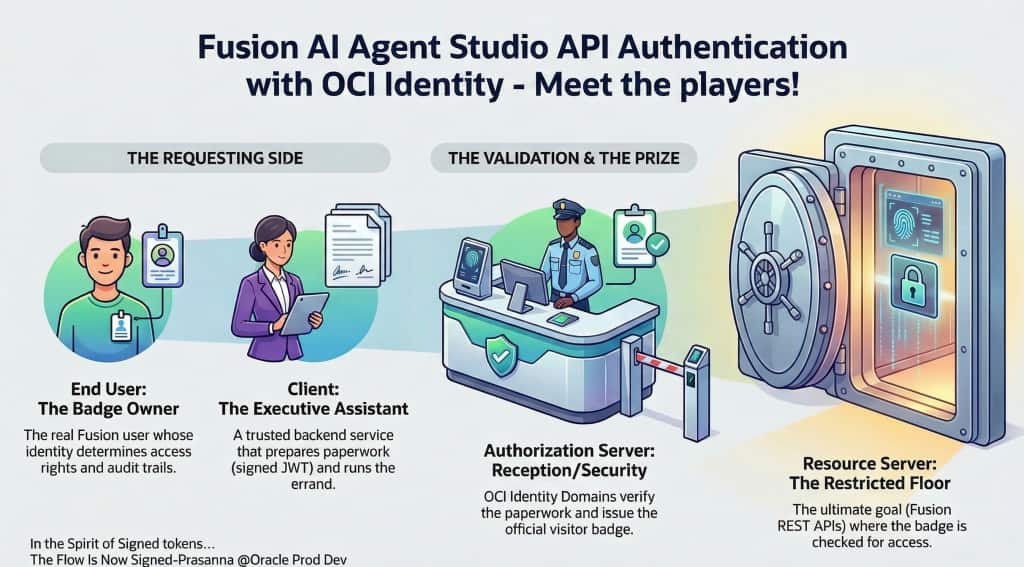
1) End User (Resource Owner)
- Who: The real Fusion Applications user you want to impersonate (the “on-behalf-of” user).
- Why: Their identity must be represented in the resulting access token so Fusion authorizes and audits as that user.
2) Client
- Who: Your trusted backend application/service (the integration/service layer you control).
- Why: It creates the signed JWT assertion and requests an access token from Identity Domains. It then calls Fusion REST APIs using that token.
- Key point: The client must be treated as highly privileged because it can request tokens “as a user.”
3) Authorization Server
- Who: OCI Identity Domains in tenancy/domain (IDCS successor).
- Why: It validates the JWT assertion (signature + claims) and mints the OAuth 2.0 access token.
4) Resource Server
- Who: Oracle Fusion Applications REST APIs (your Fusion pod endpoints). For sake of discussion we will use Agent studio API – /api/fusion-ai/orchestrator/agent/v2/{{AGENT_CODE}}/invokeAsync
- Why: Fusion validates the access token issued by OCI Identity (for the specific pod\fusion instance) and enforces access based on the impersonated user’s Fusion roles/privileges.
Next Steps in This Series
Continue the series to implement the full flow: