
Blog 11 · When the agent changes
Writing the first tests is the easy part. Agents keep changing: a new node, a changed condition, an updated prompt, a different LLM. Each change can add paths, move existing ones, or leave tests behind. The suite has to follow.
Key terms in this post
- Test Impact: The summary the assistant shows right after an edit, listing which tests the change affects.
- Test sync: Carrying out the sync plan: creating and updating tests, preparing their data, running them, and judging the results.
- Regression: Something that used to work and stopped working after a change. A regression run reruns existing tests to catch it.
- CI/CD pipeline: The automated build, deploy, and test process (continuous integration and continuous delivery) that every change goes through before release. In this series, CI never means Content Intelligence.
Other terms are defined in the ATLAS glossary.
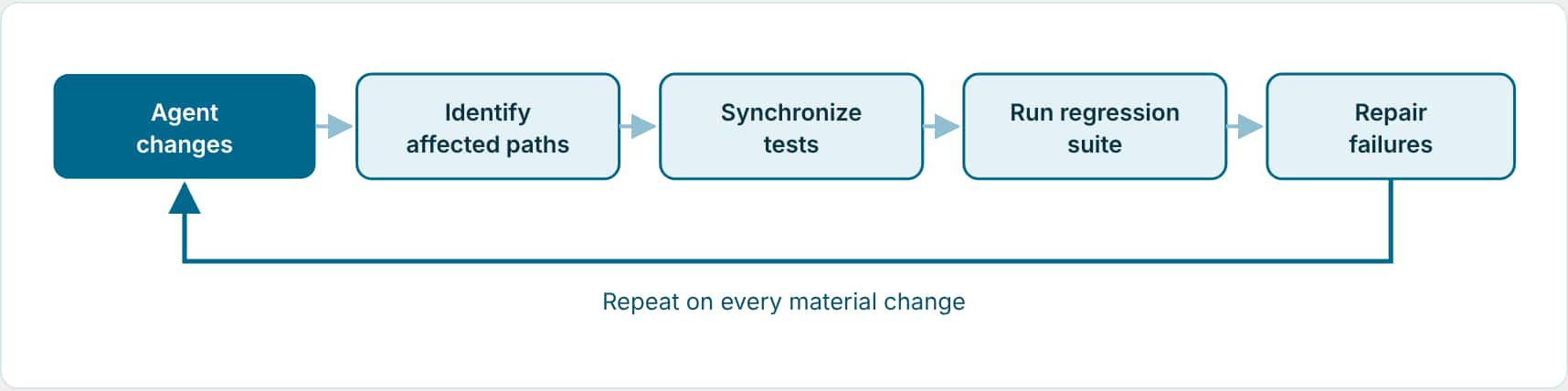
What happens automatically when you edit with your assistant
With the AI Studio skill, testing is part of the same job as the edit. After you create or materially change a workflow or app, the assistant validates it, shows the Test Impact, saves the remote DRAFT once if tests need to run against it, completes the test sync, and ends with Validation and Insights. It never publishes and never rewrites your custom tests. Say preview, skip, defer, or local only if you don’t want that to happen this time. Blog 7 compares this with pulling an existing agent, where nothing runs on its own.
| When you… | ATLAS… |
|---|---|
| Add a branch, route, or app stage | Creates a test for the new path. |
| Change a condition, input, or output contract | Updates only the fields the change affects, keeps your tags and other assertions, and reruns the test. |
| Change something that doesn’t alter the contract | Reruns the existing test unchanged to refresh its path evidence. |
| Remove a branch | Flags the old test for your review instead of deleting it. |
| Change a prompt or model | Reruns the suite; judges catch a drop in answer quality even when routes still pass. |
Ask after a change
I added a new escalation route to Help Ticket Resolver. Update the existing tests, create a test for the new route, flag any deleted route tests for review, run the suite, and summarize what changed.
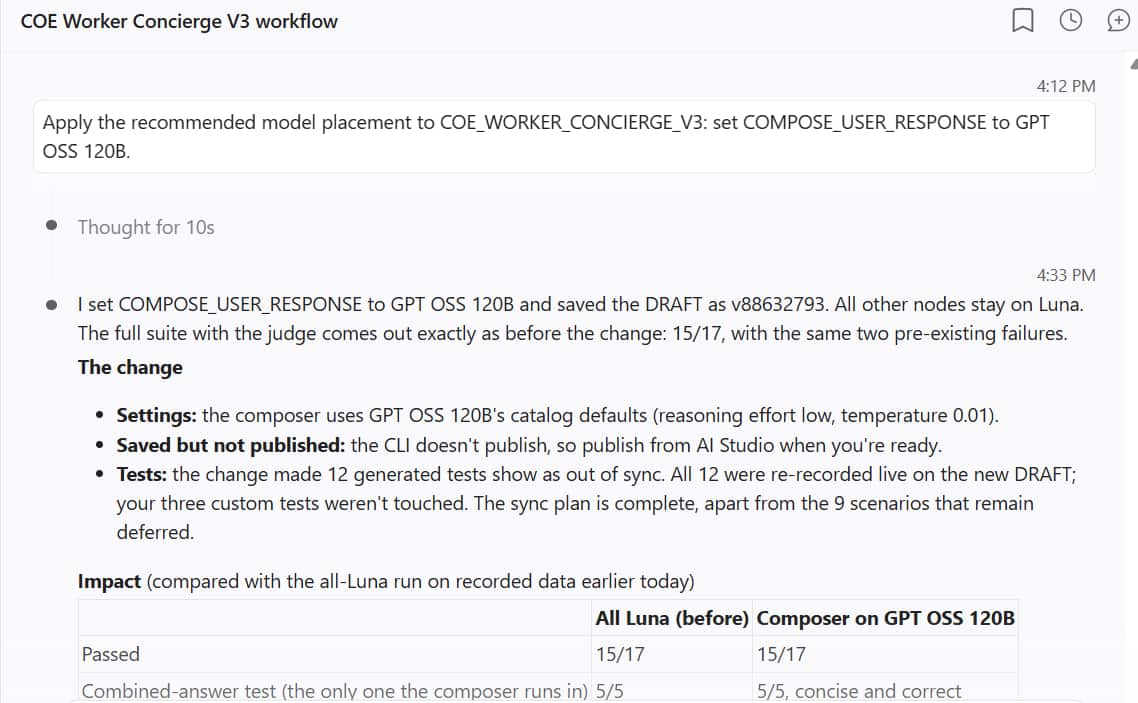
Repair without weakening the test
A suite that “fixes” every failure by relaxing what it expects will eventually pass everything and prove nothing. ATLAS works the other way: it finds where the problem actually is and repairs the smallest thing that’s wrong.
| If the cause is… | Fix… |
|---|---|
| Saved data that’s out of date | The data. Re-record it or regenerate it. |
| A check that’s needlessly strict | That check, and only if the workflow’s current contract supports the new value. |
| The workflow behaving wrongly | The workflow. Never teach the test to accept the defect. |
Ask
Explain why this test failed. Tell me whether the problem is in the workflow, the test input, the saved data, or an assertion, then fix only that. Don't loosen any check unless you can show the workflow's current behavior is correct.
Running regression on purpose
- Recorded data: The normal regression run. Same data every time, so a failure means behavior changed.
- Live data: When the current environment is what you want to check, for example after a deployment.
- DRAFT or PUBLISHED: Choose the target at run time. Running against PUBLISHED doesn’t publish anything.
Ask
Mark the Help Ticket Resolver tests as smoke and control-flow, then run only the smoke tests from recorded data and summarize the suite report.
Bring it into CI/CD
CI/CD stands for continuous integration and continuous delivery: the automated pipeline that builds, deploys, and tests every change before it is released. Because tests and their replay data are source-controlled, they travel with the change through review and deployment.
- Prepare the change: Branch, update sources, validate, and run the applicable tests before review
- Submit for review: Merge request with the change, validation results, and test report links
- Build and deploy: Run the pipeline for the approved revision
- Validate the deployment: Run representative app and workflow scenarios in the target environment
| Pipeline target | Runs | Data | Judge |
|---|---|---|---|
npm run test | Workflow and app tests against PUBLISHED | Recorded | Remote |
npm run test:workflows · test:apps | One side only | Recorded | Remote |
…:live | Same, against live data | Live | Remote |
These npm targets are for pipelines.
On your machine, the assistant runs the bundled AI Studio CLI directly and judges locally. Record the source revision, deployment reference, and test report links with each change, and check runtime behavior even when the pipeline reports success.
What stops a pipeline run from qualifying
- Any failed assertion, or a workflow run that ends in an error.
- A judgment the test needs that’s still pending.
Pipeline runs only execute the committed tests. They never repair a test or start recommendations to get a pass; that happens in your own sessions, where you can see and approve it.
Key takeaways
- With the AI Studio skill, test sync is part of every edit, unless you say preview, skip, defer, or local only.
- A change creates, updates, or refreshes tests, and flags removed paths for review; nothing is silently deleted.
- Run recorded-data regression in your CI/CD pipeline against PUBLISHED, and live runs when the environment itself is in question.
Part 11 of the ATLAS learning path.
Previous: Test an Agentic App and its agents
Next: Improve cost and quality
Back to the Learning Path for ATLAS