
Blog 12 · After the tests are stable
The scenarios you built to prove the agent works are also the fairest way to choose its models. Every candidate sees the same inputs and the same replayed data, so differences in the results come from the model, not from the environment. Your regression suite doubles as an evaluation set built for your own application.
Key terms in this post
- Optimization sweep: Running the same tests with different models on each LLM node to find cheaper or faster choices that keep quality.
- Candidate: One alternative model setting a sweep tries on one node, run against the same tests as the current setting.
- Latency gate: A sweep rejects any candidate that makes the workflow more than 20% slower.
- Recommended Placement Plan: The set of model changes a sweep found safe, validated together before you decide to apply them.
Other terms are defined in the ATLAS glossary.
What Oracle’s documentation recommends
Once the tests are stable, ask the coding assistant to compare model choices for selected workflow nodes. It tests the alternatives without changing the saved production workflow, and recommends a model placement only when the relevant end-to-end tests still pass. See Improve Cost and Quality through Testing.
Worked example: choosing models for the Worker Concierge agent
The Worker Concierge agent from Blog 8 has nine model steps. We asked for a node-level sweep comparing three models on every step: GPT-5.6 Luna (the current model), GPT OSS 120B, and Gemini 3.1 Flash Lite. You can name the models you want compared: the assistant looks up their configuration codes in your environment and pins them in the sweep setup.
Ask
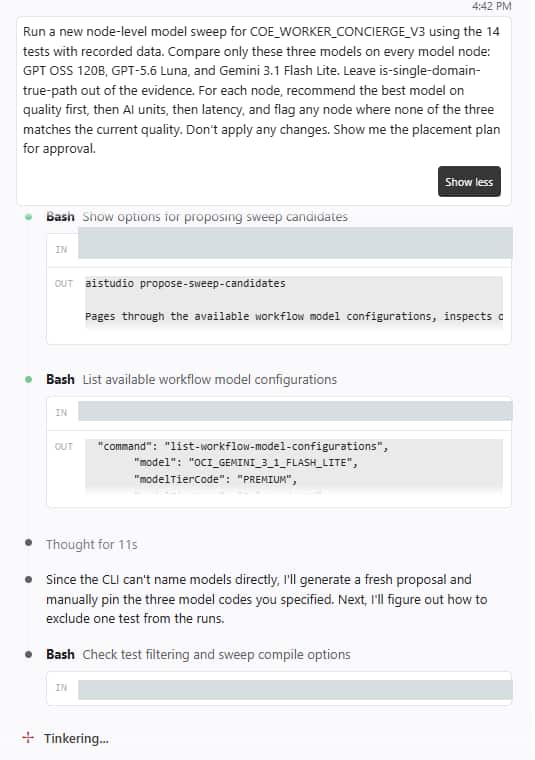
Run a new node-level model sweep for COE_WORKER_CONCIERGE_V3 using the 14 tests with recorded data. Compare only these three models on every model node: GPT OSS 120B, GPT-5.6 Luna, and Gemini 3.1 Flash Lite. Leave is-single-domain-true-path out of the evidence. For each node, recommend the best model on quality first, then AI units, then latency, and flag any node where none of the three matches the current quality. Don't apply any changes. Show me the placement plan for approval.
The assistant runs: list-workflow-model-configurations · propose-sweep-candidates --file src/workflows/coe_worker_concierge_v3.wf --mode node-level · run-optimization-sweep --sweep-config …/sweep.json
The sweep ran the test suite 19 times: once as the baseline, then once per candidate model per step, changing one step at a time. Every answer was judged. One test with a known bug was left out of the evidence so it couldn’t skew the scores.
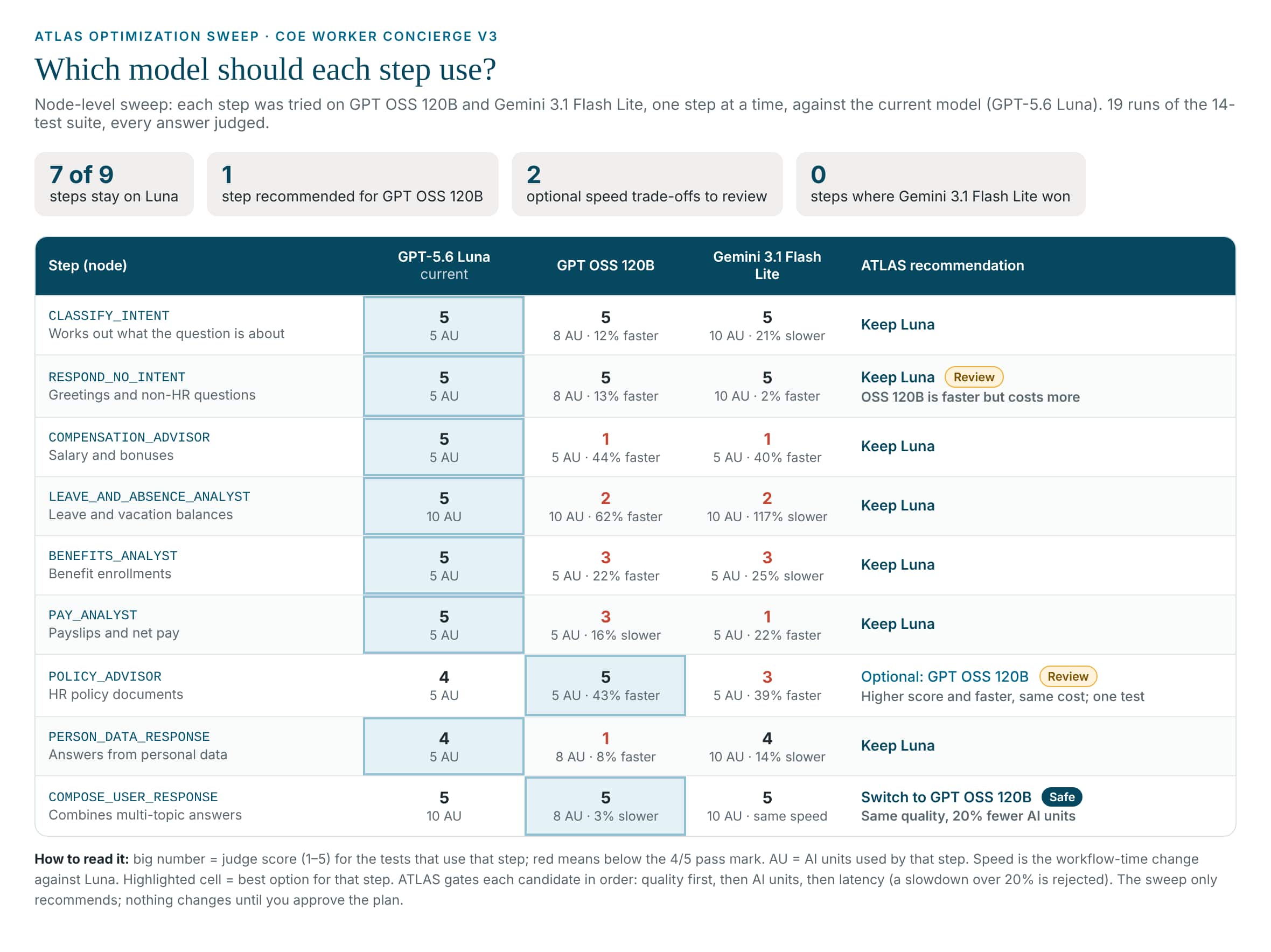
- The specialists need the stronger model: On compensation, leave, benefits, and pay, both cheaper candidates dropped to 1–3 out of 5. These steps read enterprise data and work with amounts and dates, and that’s where quality fell apart.
- Simple steps are a cost question: Classifying, greeting, and combining answers held 5/5 on every model. Only one was cheaper: combining multi-topic answers on GPT OSS 120B kept 5/5 at 8 AI units instead of 10, ATLAS’s one safe-to-downgrade.
- A promising maybe: The Policy Advisor scored higher (5 vs 4) and ran 43% faster on GPT OSS 120B at the same cost, but from a single test. ATLAS marks it for review rather than recommending it.
- A cheaper label isn’t always cheaper: Gemini 3.1 Flash Lite won no step. Where it held quality, it used more AI units, not fewer. Measure, don’t assume.
The sweep changed nothing in the workflow. The next step is to validate the chosen placements together as one run, then apply them only on your approval.
Validate the plan
Validate the placement plan as a fresh run under a new label: COMPOSE_USER_RESPONSE on GPT OSS 120B, every other node on GPT-5.6 Luna. Run all tests with the judge and show me the result. Don't apply any changes.
Applying the change
We applied the one safe change, combining multi-topic answers on GPT OSS 120B. Because it was an edit, the assistant retested it on its own (see Blog 7). The result matched the sweep:
| Measure | All Luna (before) | Composer on GPT OSS 120B |
|---|---|---|
| Tests passed | 15/17 | 15/17 (same two known failures) |
| Combined-answer test (the only one the composer runs in) | 5/5 | 5/5, concise and correct |
| AI units for the suite | 90 | 88 |
The saving is small because the composer only runs when a question covers two topics, and here it’s measured on a single test. The suite’s workflow time also dropped, from 167.4 s to 151.9 s, but most of that is normal run-to-run variation in the other steps: the composer itself takes about a second either way. Read time differences across runs with care.
Check that the plan validation belongs to this sweep.
In this run, the report’s “Validated Recommended Placement Plan” section showed numbers carried over from an older validation. If the AI units or workflow time there don’t match today’s sweep, ask for a fresh validation before you apply anything.
The documented example: Opportunity Manager
In the Opportunity Manager sessions, this approach reduced reported AI units while every test kept passing. The model placement moved node by node: the step that needs real reasoning kept its premium model, and the steps that only format or classify moved to a basic one.
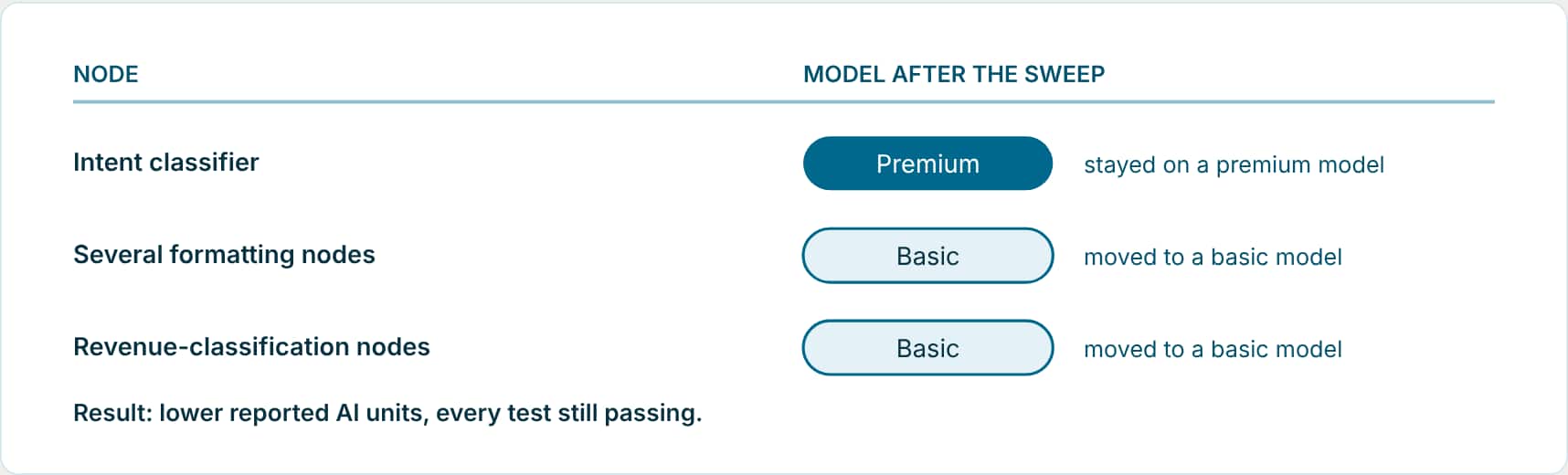
The lesson is the shape of the answer, not the specific models. One model for the whole workflow can’t express that split; testing each node separately can.
When to run it
- The suite passes: Optimize from a stable baseline. If some tests are still failing, the evidence comes only from the passing model-backed tests, and the agent isn’t fully validated yet.
- The workflow uses models: A sweep needs LLM, Agent, or other model-configurable nodes. A control-flow-only workflow has nothing to sweep, and ATLAS says so.
- ATLAS offers it: Validation and Insights ends with an Optimization line when a sweep is available. Replying “yes, run it” starts a fresh node-level sweep.
How a candidate is judged
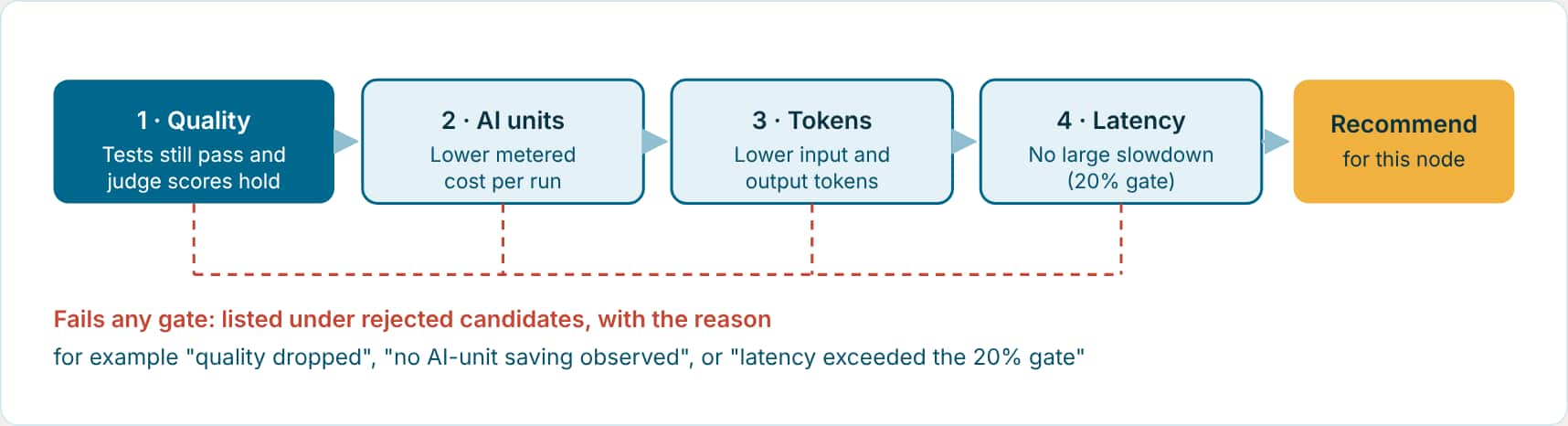
What happens during a sweep
- A fresh proposal. ATLAS proposes candidate models for each LLM or agent node and writes a new sweep configuration with its own run labels. Old reports are never reused for a new sweep.
- Every candidate runs the suite. Each candidate profile runs your tests from recorded data, and semantic results are judged before the next profile starts. Nothing in the saved workflow changes; the model swaps exist only for these runs.
- The sweep report is compiled. It shows the recommended model per node, rejected candidates and why, and a Recommended Placement Plan that combines the safe choices.
- The combined plan is validated. Changes that are safe one at a time are not assumed safe together, so the whole plan runs the suite once more as a single profile.
- You decide. Only after you approve does the assistant apply the validated plan in one workflow edit, rerun the full suite, and report the final quality, AI-unit, token, and latency impact.
Reading the sweep report
| Look for | What it tells you |
|---|---|
| Recommended model per node | Which nodes can move, and to what. If nothing passed the gates, the report says there are no recommended placements. |
| Quality score change | How judge scores moved for each candidate. Pass/fail status must not change. |
| AI units and tokens | The cost effect of each recommended change. |
| Latency | Response-time effect. If the runtime didn’t report it, you’ll see “latency not reported” rather than a blank. |
| Recommended Placement Plan | Whether the combined plan was validated, and is ready to apply on your approval. |
| Rejected candidates | Models that were tried and not recommended, with the reason. A model that held quality but saved nothing is listed here too. |
Choosing the right kind of comparison
- Node-level sweep · The default: Finds the right model for each node. This is what produced the Opportunity Manager split.
- Workflow-wide sweep · A broad first look: Tries one model across every eligible node. If it looks promising, drill down to node level, because simple nodes often tolerate lighter models while harder ones don’t.
- Manual comparison · You already know the candidate: Run the suite with the current model and with one named candidate under separate labels, then compare: improved, regressed, changed, or unchanged per test.
Keep model changes separate from everything else.
Outside a validated placement plan, apply one model change at a time and rerun after each. Don’t combine a model change with prompt edits, Business Object changes, or rewiring in the same edit, or you won’t know which change moved the results.
Ask
Check a model-cost change
Compare lower-cost model options for the formatting nodes in this workflow. Do not change the saved workflow. Recommend a model only if the relevant tests still pass.
Run a node-level sweep
Run a fresh node-level model optimization sweep for this workflow from recorded data. Summarize the recommended model per LLM node, the quality, AI-unit, token, and latency impact, and the rejected candidates with reasons.
The assistant runs: propose-sweep-candidates --file <workflow>.wf · run-workflow-tests --run-label <profile> --model-overrides @<profile-overrides> · attach-workflow-test-judge-results --run-label <profile> · run-optimization-sweep --sweep-config …/sweep.json
Validate and apply the plan
Validate the Recommended Placement Plan as one combined run. If it passes, apply it to the workflow, rerun the full test suite, and report the final quality, AI-unit, token, and latency impact.
Manual comparison
Run the existing tests for this workflow from recorded data with the current model as the baseline, then with the candidate model I name, using separate run labels. Compare the two reports and summarize regressions, improvements, output changes, AI-unit changes, and duration differences.
The assistant runs: run-workflow-tests --data-source file --run-label baseline · run-workflow-tests --data-source file --model-configuration-code <candidate> --run-label candidate · compare-workflow-test-runs --baseline baseline --candidate candidate
Smaller test data doesn’t mean a cheaper agent.
Sweeps and tests often run on trimmed recorded data. Lower AI units in a test show the difference between models on the same input; they don’t prove the production workflow sends less context or costs less per run. For that, use the cost guardrails in Blog 13.
Two related controls, an AI-unit budget on a single test and economic regression testing for a whole workflow, are covered in Blog 13.
Key takeaways
- Optimize only from a passing suite, so every candidate is compared under the same conditions.
- Sweep node by node, quality first; a candidate that slows the workflow by more than 20% is rejected.
- Validate the combined plan, then apply it only after you approve and rerun the full suite.
Part 12 of the ATLAS learning path.
Previous: Keep tests in sync
Next: Cost guardrails and ATLAS recommendations
Back to the Learning Path for ATLAS