
Blog 7 · Before you test an agent
How an agent reaches your project decides how much testing happens on its own. Build it or edit it with your coding assistant, and ATLAS tests it as part of the same job. Pull an existing agent from Fusion, and nothing runs until you ask. Knowing the difference saves you from trusting a suite that never ran.
Key terms in this post
- Test Impact: The summary the assistant shows right after an edit, listing which tests the change affects.
- Test sync: Carrying out the sync plan: creating and updating tests, preparing their data, running them, and judging the results.
- DRAFT and PUBLISHED: The two versions of a workflow in AI Agent Studio. Tests can run against either; running against PUBLISHED doesn’t publish anything.
Other terms are defined in the ATLAS glossary.
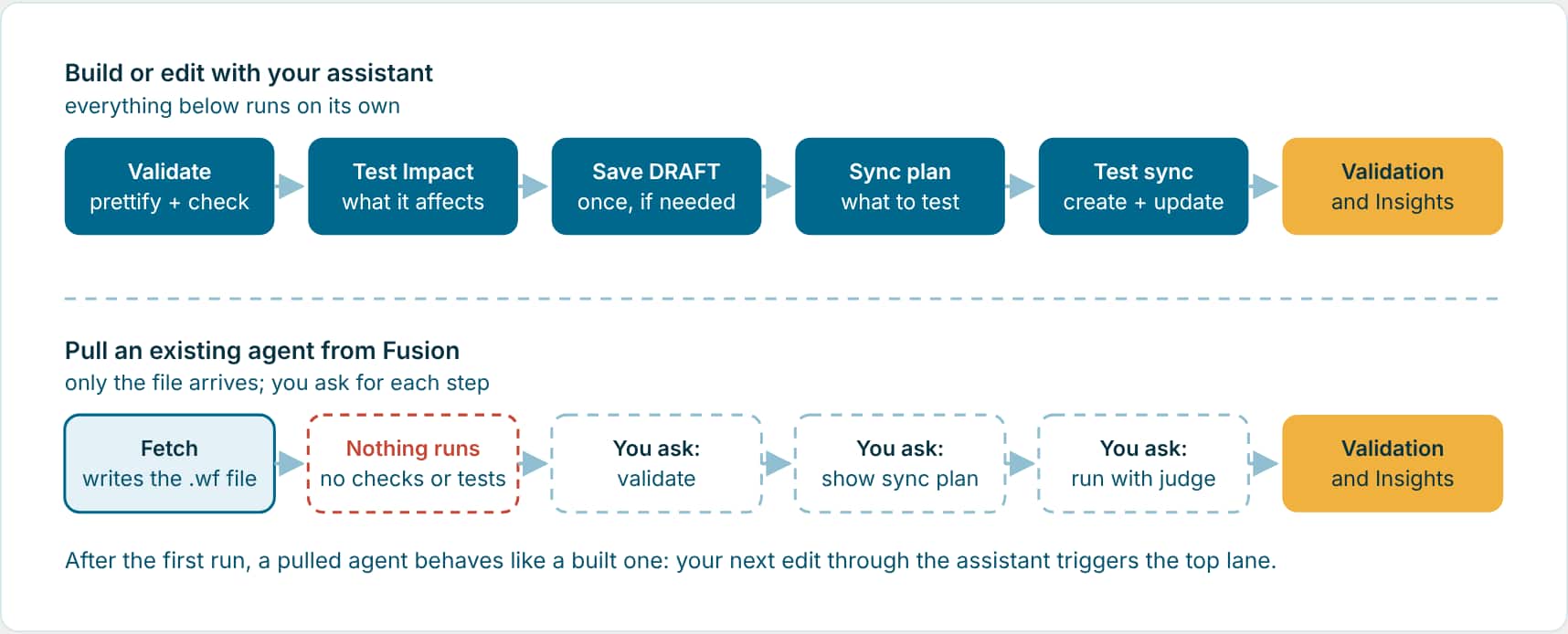
When you build or edit with your assistant
With the AI Studio skill, testing is part of the job, not a separate step. After the assistant creates a workflow or makes a material change to one, it carries on without being asked:
| Step | What happens | The assistant runs |
|---|---|---|
| 1 · Validate | Formats the file and checks expressions, references and schema. | do-prettify-workflow · validate-workflow |
| 2 · Test Impact | Works out which scenarios the change adds, moves or breaks. | part of the sync plan |
| 3 · Save DRAFT once | Saves the remote DRAFT a single time, only because the tests need to run against it. Never publishes. | DRAFT save |
| 4 · Sync plan | Lists every scenario as covered, to create, to update, or to review. | get-workflow-test-sync-plan |
| 5 · Test sync | Creates tests for new paths, updates only what the change touched, reruns the rest, and flags removed paths for review. Your custom tests are kept as they are. | do-generate-workflow-test · run-workflow-tests |
| 6 · Validation and Insights | Ends with the summary: results, report links, anything that needs action, metrics and optimization. | get-workflow-test-final-summary |
For an Agentic App the same thing happens app-wide: the backing workflows are synced first, then the panels. If you don’t want it this time, say so in the request: preview, skip, defer, impact only, or local only.
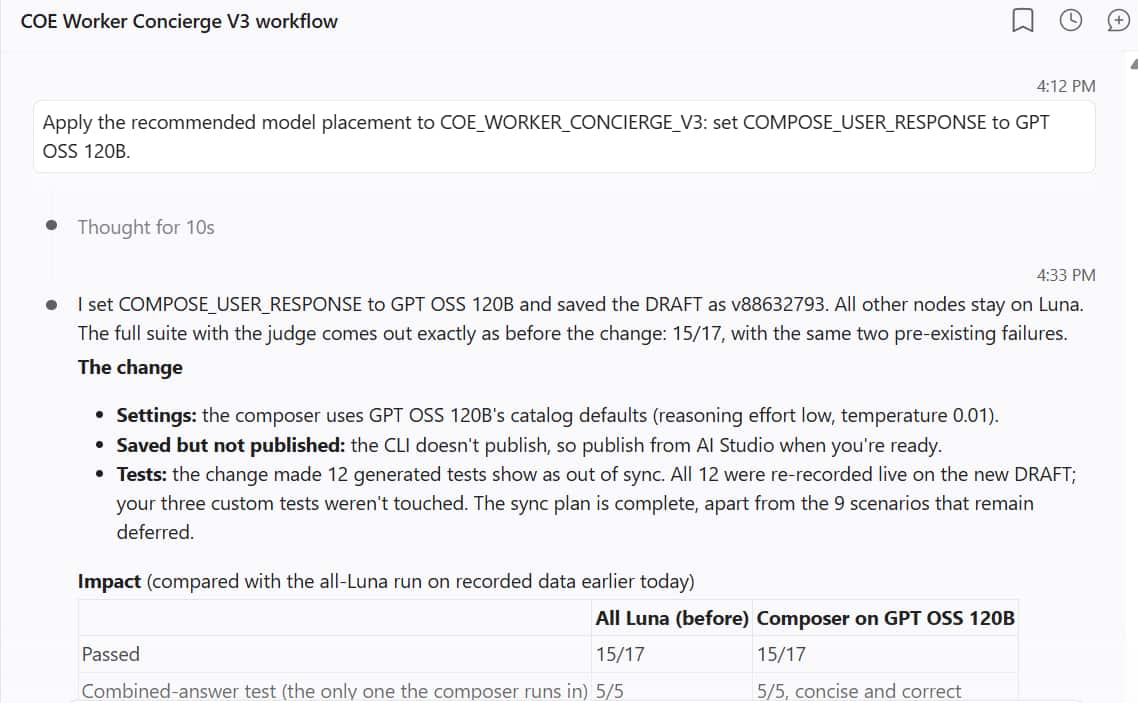
Example: What the assistant did after one edit (Worker Concierge agent)
| Step | What happened |
|---|---|
| The edit | Set COMPOSE_USER_RESPONSE to GPT OSS 120B. Every other step stayed on GPT-5.6 Luna. |
| Save | Saved the DRAFT once, as a new version. Not published: the CLI never publishes. |
| Test Impact and sync | 12 generated tests were out of sync with the changed workflow, so all 12 were re-recorded on the new DRAFT. The three custom tests weren’t touched. |
| Run and judge | Full suite with the judge: 15 of 17 passed, the same two known failures as before the change. |
| Report | A before-and-after impact table, then Validation and Insights. |
When you pull an existing agent
Pulling copies an agent from your Fusion environment into your local project so you can test and improve it. The assistant only fetches when you ask for server state, and it protects your local work: if your copy differs from the server, it stops and asks before overwriting anything.
Ask
Use $aistudio to fetch the DRAFT of COE_WORKER_CONCIERGE_V3 from the server into my project, along with any workflows it calls. If my local copy is different, tell me what differs before you overwrite it.
The assistant runs: search-workflows · do-fetch-workflow --code COE_WORKER_CONCIERGE_V3
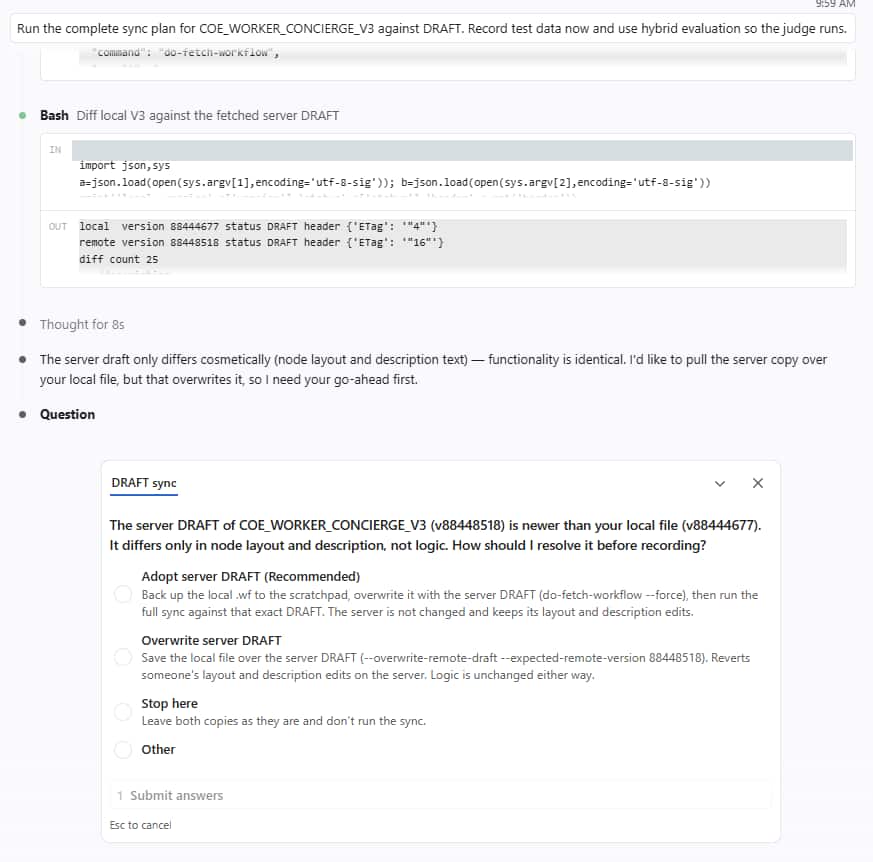
And then nothing else happens. The file is in your project, but no validation, no Test Impact and no tests have run. Any tests already in the project are exactly as they were, which may be out of date. With the Worker Concierge agent, the first validation after the pull found that its five existing tests had all passed, but only because they never checked the answers. Blog 8 walks through that agent end to end.
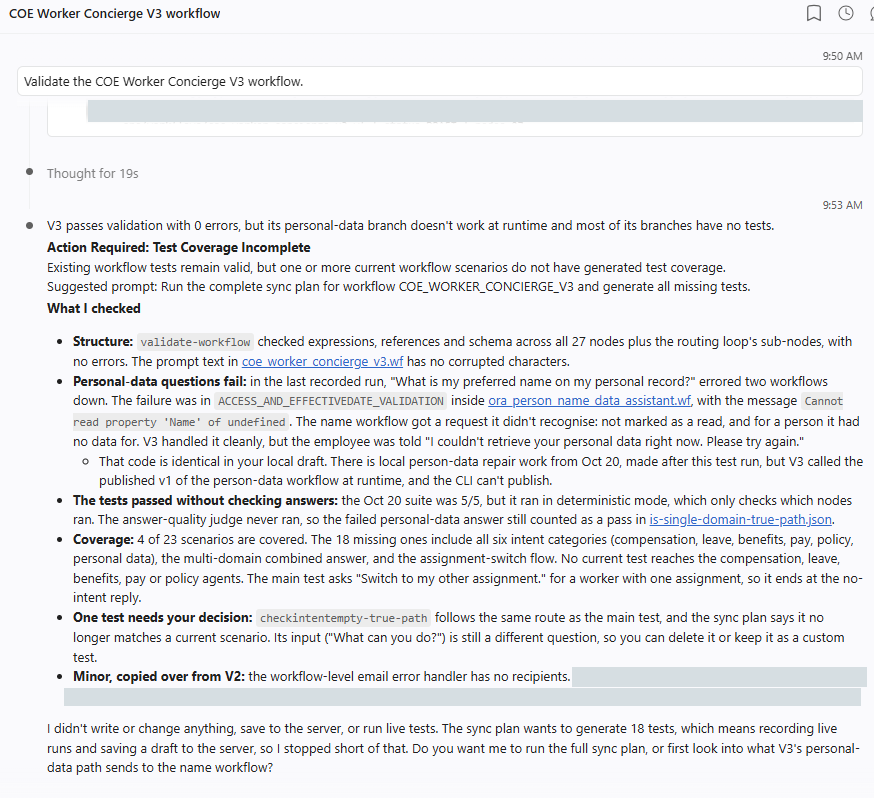
The same applies to edits the assistant didn’t make.
If you change the workflow by hand in VS Code, or in AI Agent Studio and then pull it, the assistant didn’t make the edit, so nothing runs on its own. Treat it like a pull and ask for the Test Impact and the sync plan.
The first three asks after a pull
- Validate. “Validate the COE Worker Concierge V3 workflow.” Structure first, so a broken reference isn’t mistaken for a failing test.
- Show the sync plan, read-only. “Show me the test sync plan for COE Worker Concierge V3. Don’t run anything yet.” You see what’s covered, missing and out of date before anything changes.
- Run it with the judge. “Run the complete sync plan for COE_WORKER_CONCIERGE_V3 against DRAFT. Record test data now and use hybrid evaluation so the judge runs.” Asking for hybrid evaluation makes sure the answers are scored, not only the paths.
What never runs on its own
Whether you built or pulled, some things always wait for you, because they change something outside the test suite or cost real time and AI units.
- Publishing: Never from the CLI, even if you ask. Publish through your approved path in AI Agent Studio.
- Overwriting the server: A newer server DRAFT is never overwritten silently, and a fetch never replaces a changed local file without asking.
- Runs against PUBLISHED or live data: Normal runs replay recorded data against DRAFT. A PUBLISHED or full live-data run happens when you request it.
- Model sweeps and model changes: The sweep is offered, not started. It only recommends, and applying a model change needs your approval.
- Your custom tests: Never rewritten or deleted by a sync. Tests for removed paths are flagged for review, not removed.
- Remote judging and pipelines: Judging is local by default. Remote judging and the CI/CD pipeline targets are for pipelines, not your local runs.
What to do in each case
| How the agent changed | Runs automatically | What you should ask for |
|---|---|---|
| Built new with the assistant | Everything through Validation and Insights | Read the suite report, then add the business journeys and guardrail tests only you know about. |
| Edited with the assistant | Validation, Test Impact, test sync, summary | Review tests flagged for review, and rerun your custom tests if the edit touched their path. |
| Pulled from Fusion | Nothing | Validate, show the sync plan, run it with the judge, then add custom tests. |
| Edited by hand or in AI Agent Studio | Nothing | Ask for the Test Impact and the sync plan, then run it. |
| About to release | Nothing | Run the full suite on recorded data against PUBLISHED, and a live run of the tests that can pass on live data. |
Key takeaways
- Build or edit through the assistant and ATLAS tests the change in the same job, ending with Validation and Insights.
- A pull, or an edit the assistant didn’t make, runs nothing. Validate, show the sync plan, and run it with the judge yourself.
- Publishing, overwrites, live and PUBLISHED runs, sweeps and model changes always wait for you.
Part 7 of the ATLAS learning path.
Previous: Test data
Next: Test the Worker Concierge agent
Back to the Learning Path for ATLAS