
Blog 10 · Worked example
An app test checks the panel experience: the app starts the panel, calls the backing workflow, checks the response, and confirms the expected widget appears. The workflow behind each panel gets its own, deeper suite. A thorough app suite covers both, in that order.
Key terms in this post
- App stage: The kind of request an app sends its workflow: InitDisplay when a panel first loads, Query for a typed question, Summary, and others.
- Panel test: One test per top-level app panel, checking that the panel loads through its workflow and shows the expected widget.
- Widget contract: The widget types a panel may or must show, such as a record table or a card list.
- App sync plan: The same checklist for an app: each panel, the state of its panel test, and the workflow tests that must be finished first.
Other terms are defined in the ATLAS glossary.
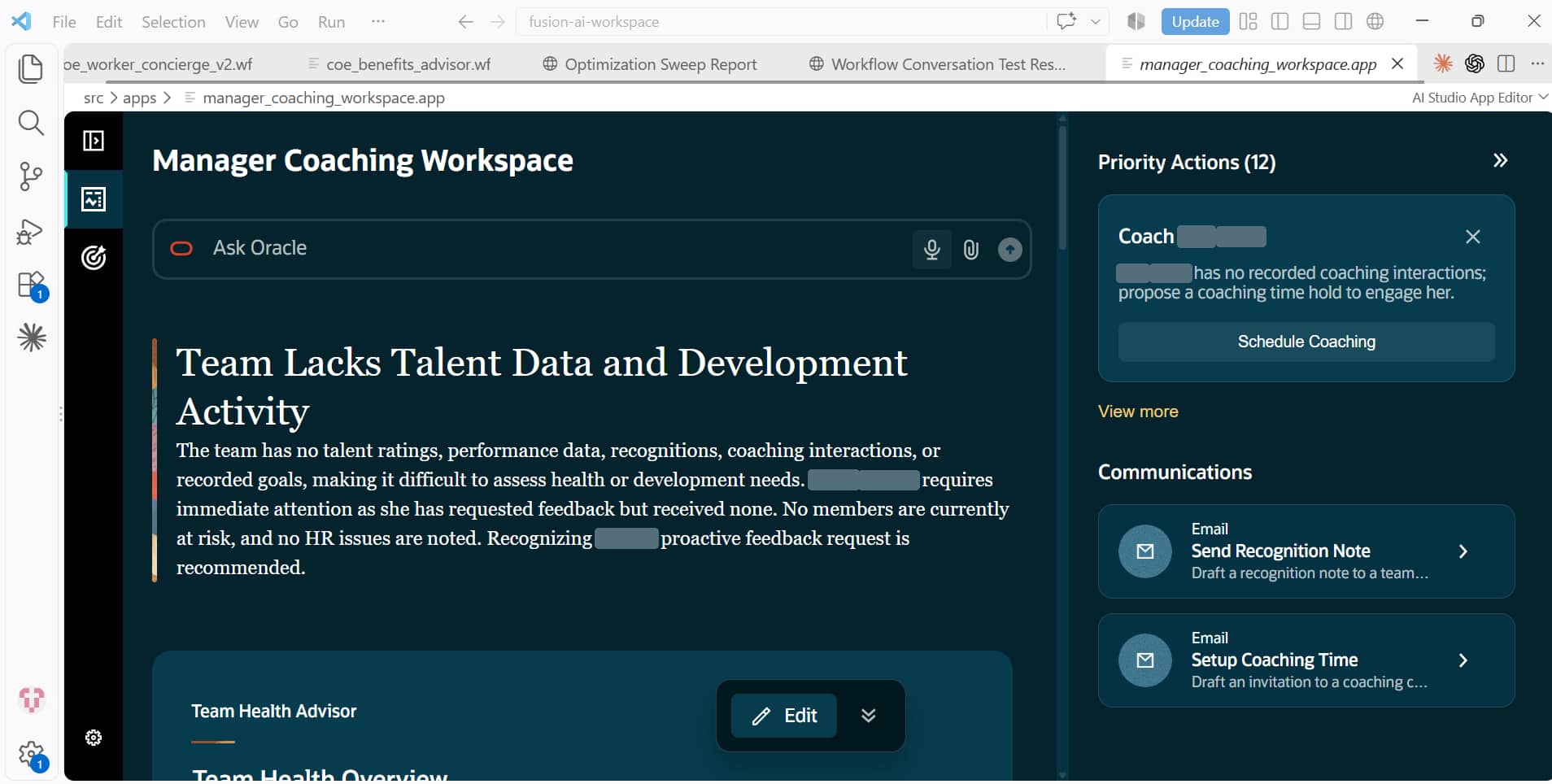
The example is the Manager Coaching Workspace, an app with four panels. Each panel is backed by its own workflow, and each workflow answers several app stages: the panel’s first display, suggested actions, suggested communications, a free-text question, a summary, and in two cases filling in email parameters.
Step 1: Complete the backing-workflow tests first
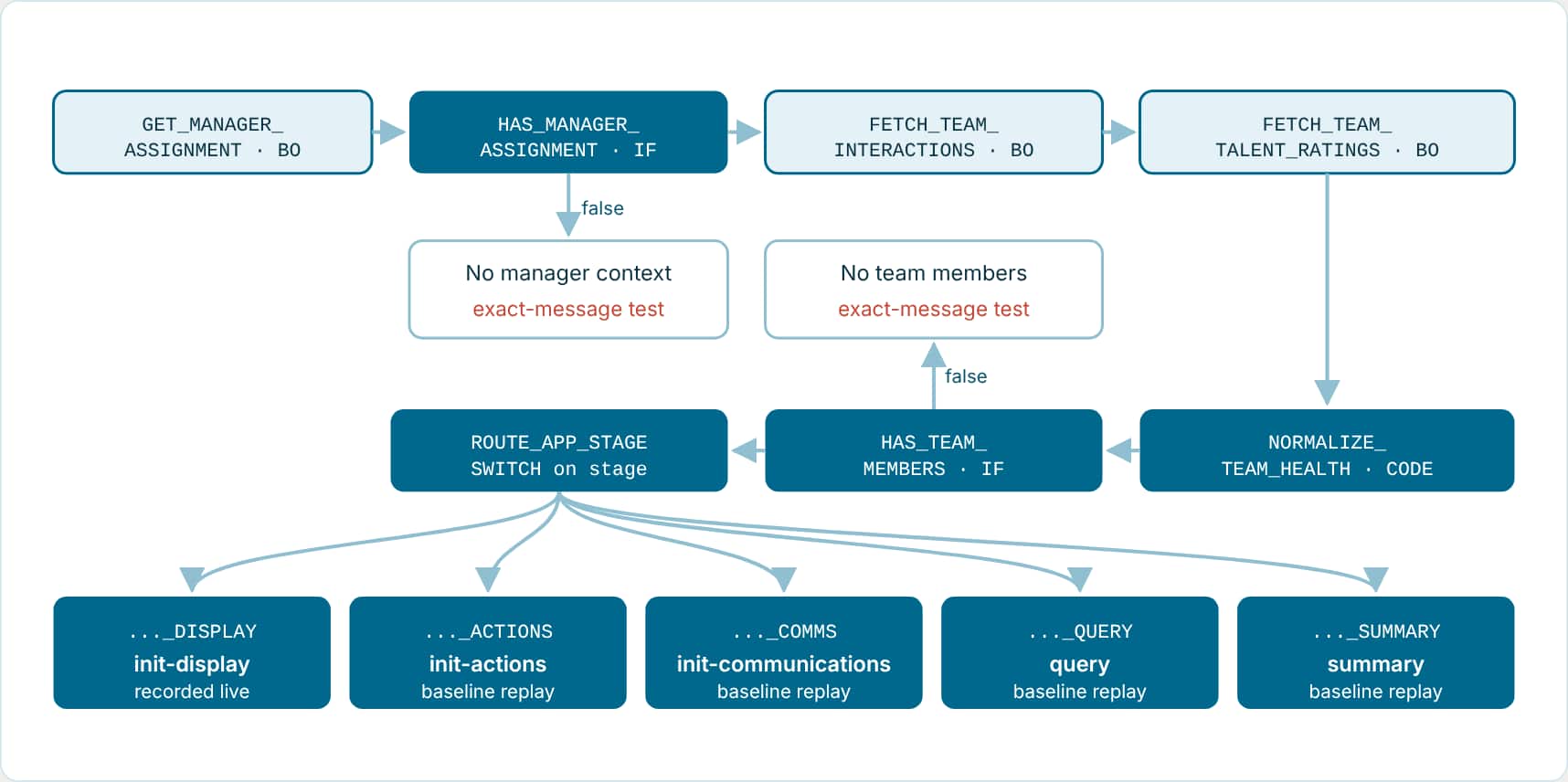
Here is the Team Health workflow with each of its seven tests placed on the path it proves. Notice the shape, because most app-backed workflows look like this: shared data fetching and guard checks first, then a router on the app stage, then one model node per stage.
| Test | Input | Data | Checks |
|---|---|---|---|
init-display | InitDisplay stage | Recorded live | Path, plus a 7-criterion judge: one ranked team table, agreed columns, rows only from retrieved data, people needing attention first |
init-actions | InitActions stage | Baseline replay | Path, plus a judge: at most four actions, each naming a real team member and the evidence behind it |
init-communications | InitCommunications stage | Baseline replay | Path, plus a judge: emails only to people in the roster, or nothing when no outreach is justified |
query | “Who on my team should I be most worried about right now, and why?” | Baseline replay | Path, plus a judge: direct answer first, named evidence, says plainly what isn’t on record |
summary | Summary stage | Baseline replay | Path, plus a judge: at most two sentences naming the top concern |
team-health-is-unavailable-… | InitDisplay, no manager assignment | Generated | Exact message and path only. No judge needed. |
no-reporting-team-members-… | InitDisplay, empty team | Generated | Exact message and path only. No judge needed. |
Thoroughness lives in the edge cases.
The Recognition and Communications workflows add a FillParameters test (“Send a recognition note to <team member> for the work she has been putting in”) and a matching no-match test where the generated roster has no names. Its judge expects an empty greeting and no invented person. That second test is the one that catches a model making someone up.
Ask
Complete the workflow test sync plan for the Team Health workflow behind the Manager Coaching Workspace. Cover every app stage the workflow handles, record InitDisplay with real data, reuse it for the other stages, and use small generated data for the no-manager and no-team fallbacks.
The assistant runs: get-workflow-test-sync-plan · do-generate-workflow-test --data-capture-policy record-now | baseline-replay | model-generated · run-workflow-tests --workflow-code MANAGER_COACHING_TEAM_HEALTH --data-source file
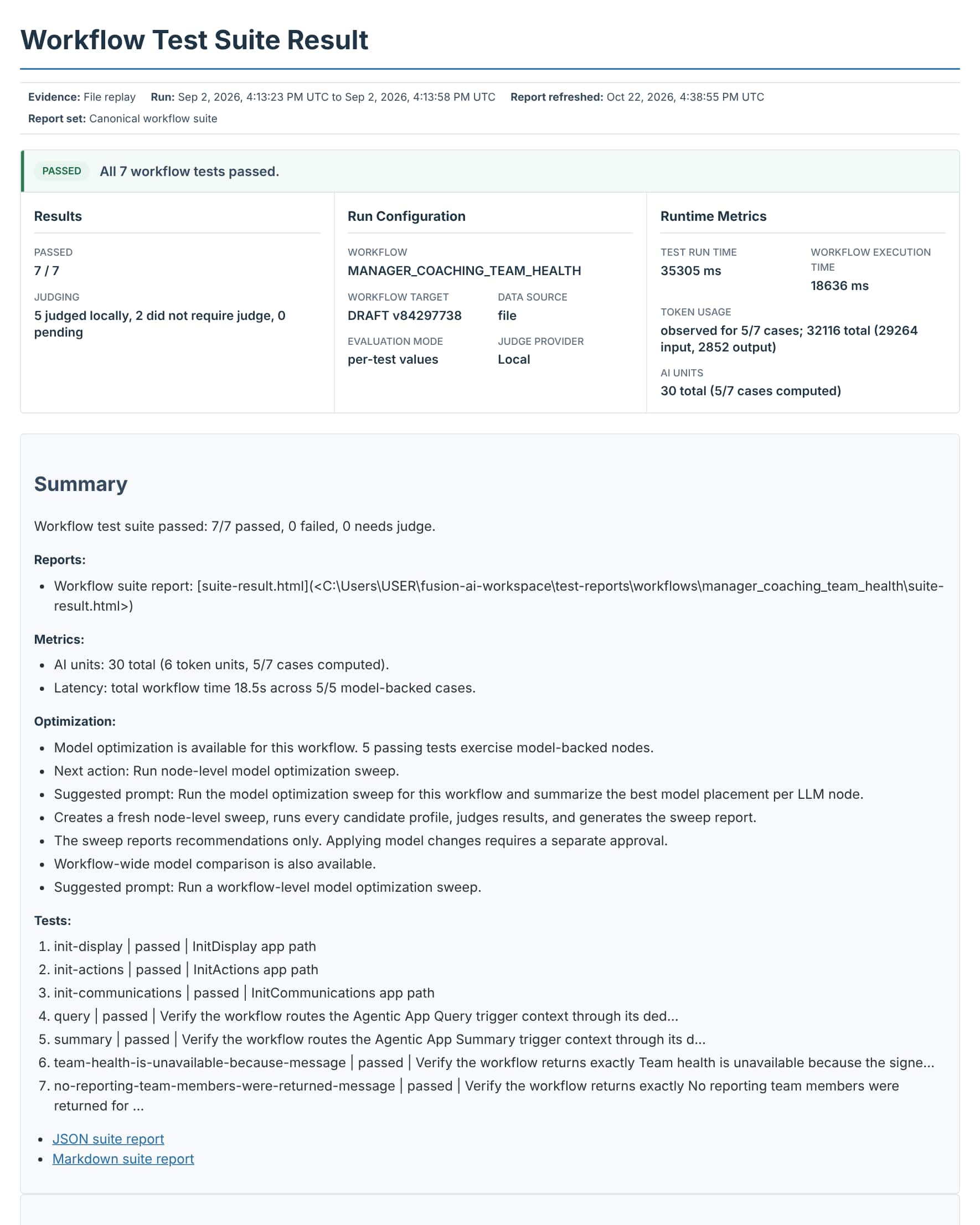
Example: The real Team Health suite result
Workflow test suite passed: 7/7 passed, 0 failed, 0 needs judge.   Data source: file
Metrics:
  AI units: 30 total (6 token units, 5/7 cases computed).
  Latency: total workflow time 18.5s across 5/5 model-backed cases.
Optimization:
  Model optimization is available for this workflow. 5 passing tests exercise model-backed nodes.
  Next action: Run node-level model optimization sweep.
Only 5 of the 7 tests count toward AI units because the two fallback tests never reach a model. That is expected, and a quick sanity check that the fallbacks really skip the LLM.
Step 2: Inspect which panel tests are missing or out of date
Ask
Show me the app test sync plan for the Manager Coaching Workspace, including required backing workflow coverage. Do not run anything yet.
The assistant runs: get-app-test-sync-plan --file src/apps/<manager-coaching-workspace>.app
The app sync plan is the app-level version of the workflow sync plan: a checklist that lists each top-level panel, whether its panel test is missing or out of date, and which backing-workflow tests must be finished first.
Example: The real app test sync plan (read-only, nothing run)
| Panel | Panel test | Status |
|---|---|---|
| Team Health Advisor | init_display_team_health_advisor | [update] |
| Recognition and Coaching Advisor | init_display_recognition_and_coaching_advisor | [update] |
| Development Goals Advisor | init_display_development_goals_advisor | [covered] |
| Communications and HR Review Advisor | init_display_communications_and_hr_review_advisor | [covered] |
| Backing workflow | Missing | Out of sync | Needs review | Up to date |
|---|---|---|---|---|
manager_coaching_comms_hr | 0 | 9 | 0 | 0 |
manager_coaching_goals_wf | 0 | 7 | 0 | 0 |
manager_coaching_recognition_pw | 1 | 7 | 2 | 0 |
manager_coaching_team_health | 3 | 5 | 2 | 0 |
This plan was taken a few weeks after the suite in step 1 passed 36 of 36. The workflows had changed since, so two panel tests and every backing-workflow test were out of sync: the recorded paths no longer matched the current workflows. That’s exactly what the plan is for. It also says what a full sync would do, in order:
- Sync each backing workflow first. For each of the four workflows: its own sync plan, create or update tests one at a time, run the full workflow suite, attach the judge results.
- Then refresh the panel tests. Only once the workflows are current does it update the two out-of-date panel tests.
- Run the app suite and produce the final summary.
It also flagged steps that change data (one in Recognition, two in Team Health). The sync handles those separately, and they’re never replayed like an ordinary lookup.
How you phrase the follow-up sets the scope:
- App-wide: “Run the complete app sync for Manager Coaching Workspace” or “Run all panel tests.” Every backing workflow loop runs, then every panel test.
- Targeted: “Regenerate the Team Health workflow and its panel test” or “Run the Team Health Advisor panel test.” Only that workflow and panel run.
An app that is still an empty shell, with no panel wired to a workflow, has nothing to test yet. Tests become available once a top-level agent container exists.
Step 3: Create and record the panel tests
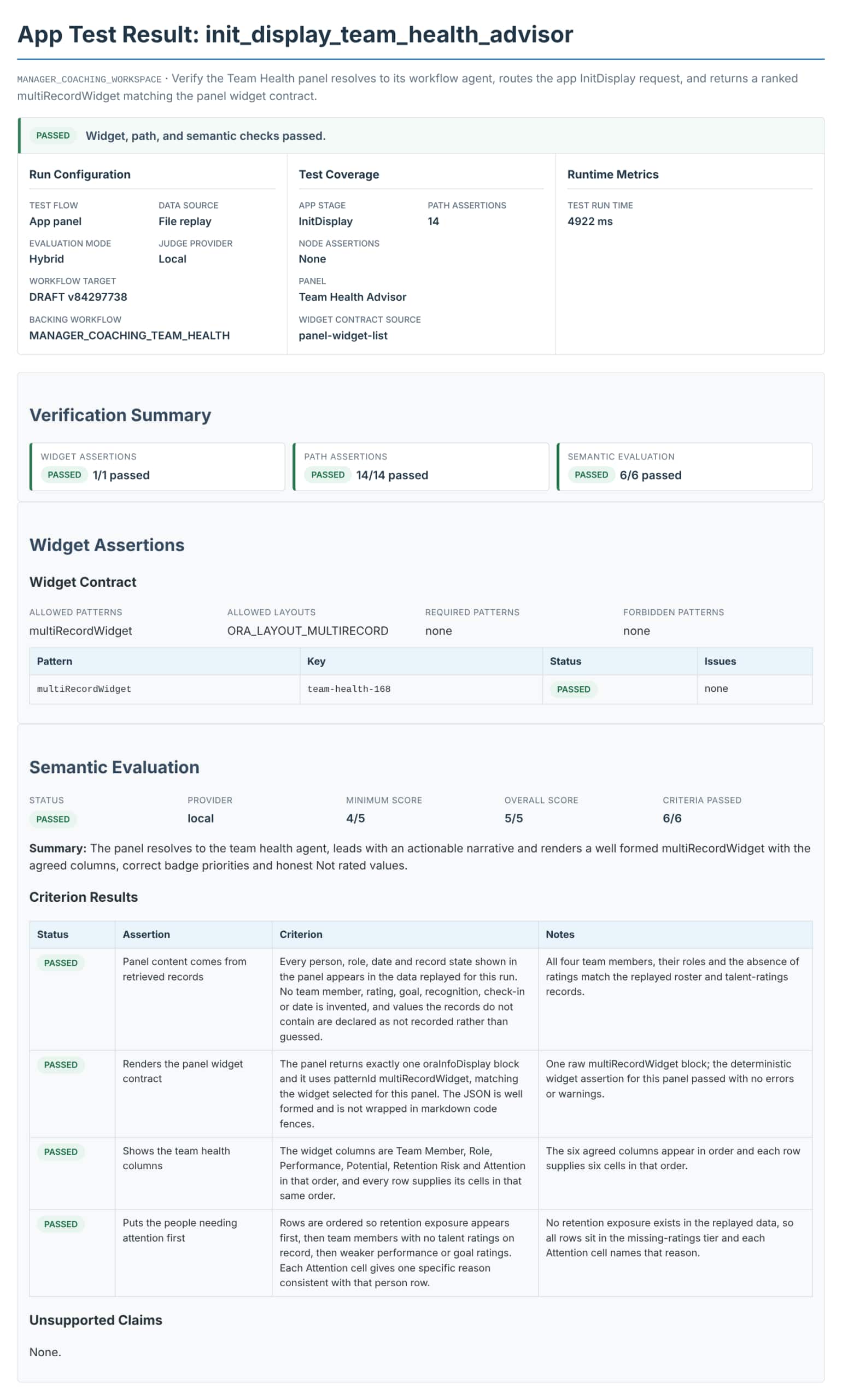
There is one InitDisplay test per top-level panel. Each one proves that:
- the panel resolves to the intended workflow, and that workflow has an InitDisplay route;
- the request uses the app-stage input shape and the expected path runs;
- recordable nodes replay from stored data;
- the returned widgets match the panel’s widget contract, and malformed widget JSON fails the test.
Example: From init_display_team_health_advisor.json (trimmed)
"scenario": { "kind": "app-panel", "appStage": "InitDisplay",
              "intent": "Verify the Team Health Advisor panel InitDisplay response and widget contract." },
"widgetAssertions": { "source": "panel-widget-list",
                      "allowedLayoutIds": ["ORA_LAYOUT_MULTIRECORD"], "allowedPatternIds": ["multiRecordWidget"] },
"judge": { "rubric": [ { "name": "Panel content comes from retrieved records" },
                       { "name": "Renders the panel widget contract" },
                       { "name": "Shows the team health columns" },
                       { "name": "Puts the people needing attention first" },
                       { "name": "Uses only supported badge priorities" },
                       { "name": "Leads with a short actionable narrative" } ] }
The assistant runs: do-generate-app-test --panel-segment team_health_advisor --data-capture-policy record-later · do-record-app-test-data · run-app-test --test-file test/apps/manager_coaching_workspace/init_display_team_health_advisor.json
Widget expectations come from the panel’s widget list first, then from the workflow’s output layout. If neither declares widgets, the test still runs with structural checks and no invented widget contract.
Step 4: Run the app tests and read the summary
For an app, Validation and Insights lists the app test counts, the consolidated report, the app suite report, and for every backing workflow its own suite report, Metrics, and Optimization.
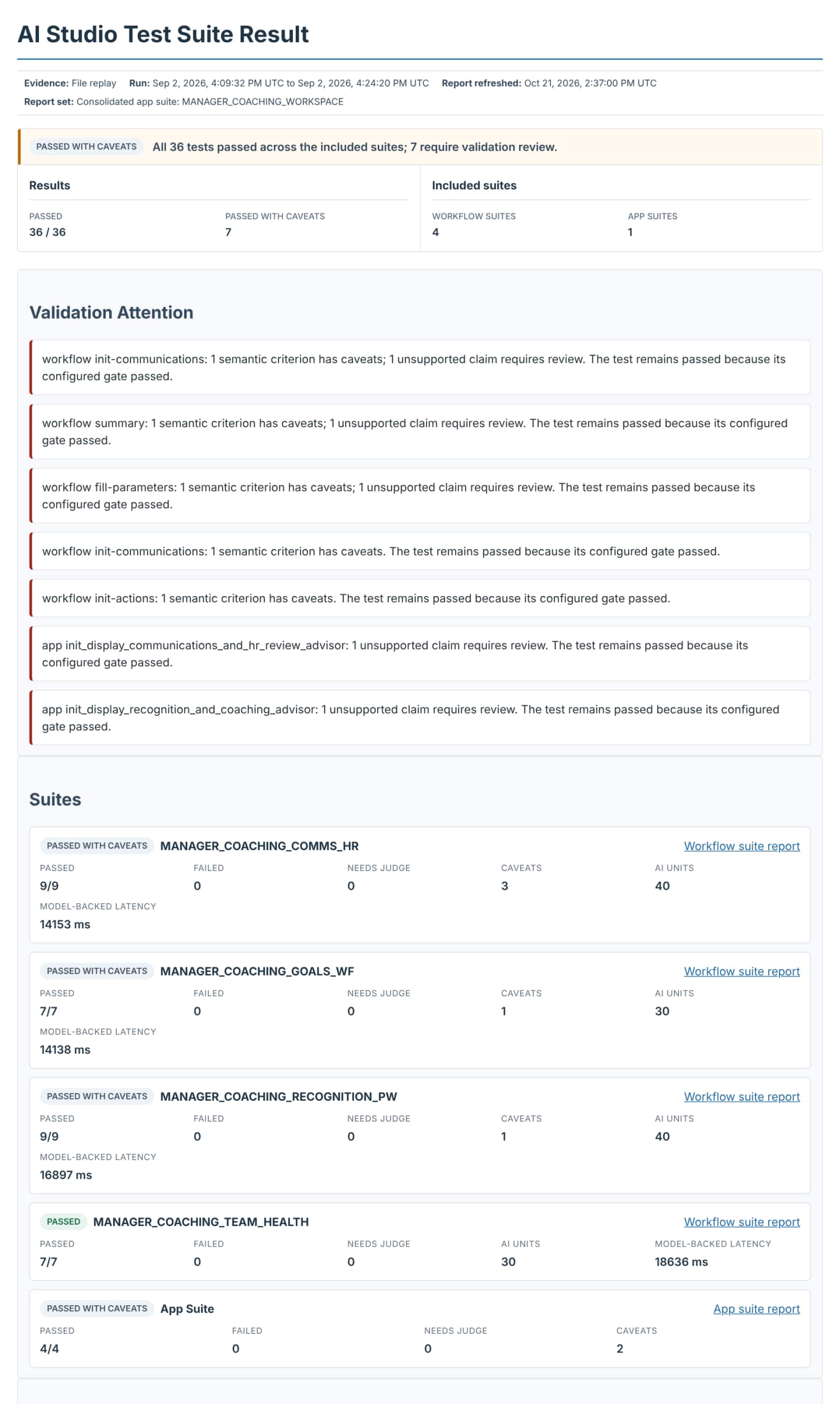
Example: The real consolidated result: 36 of 36 passed
| Panel test | Widget returned | Judge |
|---|---|---|
| Team Health Advisor | multiRecordWidget passed | 5/5 |
| Development Goals Advisor | multiRecordWidget passed | 5/5 |
| Recognition and Coaching Advisor | messageListWidget passed | 4/5 |
| Communications and HR Review Advisor | multiCardWidget passed | 4/5 |
| Backing workflow | Tests | AI units | Workflow time |
|---|---|---|---|
| Communications and HR Review | 9/9 | 40 | 14.0 s |
| Development Goals | 7/7 | 30 | 14.0 s |
| Recognition and Coaching | 9/9 | 40 | 16.7 s |
| Team Health | 7/7 | 30 | 18.5 s |
Ask
Test the Opportunity Details panel and its backing workflow. Verify that the panel opens, returns the correct information, and displays the expected layout. Create or update the needed tests and provide a concise report.
The assistant runs: do-sync-app-tests · run-app-tests --app-code <APP_CODE> · do-attach-app-test-judge-results · get-app-test-final-summary
A thorough app suite, at a glance
- For every backing workflow: Every app stage it handles: InitDisplay, InitActions, InitCommunications, Query, Summary, FillParameters, InvokeAction Query with a real user question, not an empty message Every guard and fallback message No-match and missing-data cases for anything that resolves people or records Loop coverage where a stage loops over records
- For the app: One InitDisplay test per top-level panel Widget contract checks A run against PUBLISHED backing workflows before release Conversation tests in the workflow suite for anything that pauses for a person
Key takeaways
- Test the agents behind the panels first, then the panels themselves.
- Record live data once for InitDisplay, reuse it for the other app stages, and use small generated data for fallbacks.
- One panel test per top-level panel proves the panel renders its widget contract; the workflow suites prove every stage and edge case behind it.
Part 10 of the ATLAS learning path.
Previous: What “thorough” means for each kind of node
Next: Keep tests in sync
Back to the Learning Path for ATLAS