
Monday morning is when the requests start arriving.
One developer needs a database for a new feature. Another is investigating a production issue that only appears with production-sized data. QA wants a clean environment for regression testing, and the CI pipeline is about to kick off another round of automated tests.
Everyone needs their own database copy.
Creating these databases is only the first step. The real challenge is creating them quickly, keeping them consistent, and avoiding a growing collection of full copies to refresh, back up, and manage.
That’s exactly the problem Exadata Exascale PDB thin clones are designed to solve.
This post follows a typical development workflow using the companion lab for this series. Rather than covering every command and option, it focuses on the decisions along the way and how Exadata Exascale simplifies them.
It Starts with a Trusted Source
Before your development databases start to proliferate, one question matters.
Where should everyone start?
If every developer starts with a slightly different database, reproducing problems is difficult and comparing test results becomes guesswork. Everyone needs to start from the same baseline.
Here, production has already been refreshed into development and sensitive data masked to meet security and privacy requirements. The refreshed PDB, SALES_MAIN, is the trusted source for this development cycle.
Nobody connects directly to SALES_MAIN.
It exists solely as the known-good starting point for every development and test environment.
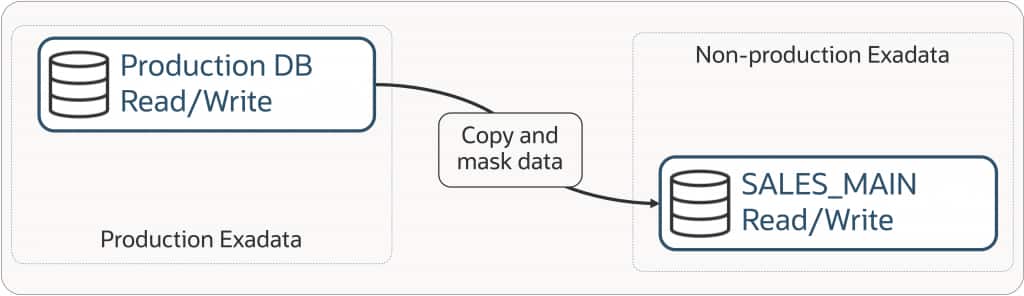
[Figure 1: Production → Refresh & Mask → SALES_MAIN]
The companion lab first verifies the environment and confirms that SALES_MAIN is available.
With a trusted starting point established, the next question is how to give everyone the same copy.
Capture the Starting Point
One developer receives a database now; the next is provisioned half an hour later. The problem is straightforward: both need the same baseline.
If changes have already been made, the environments no longer share the same starting point. To resolve this challenge, start by capturing a point in time before anyone starts work so every clone has that baseline.
This walkthrough uses a regular snapshot because the development environments are short-lived and easy to recreate.
ALTER PLUGGABLE DATABASE SNAPSHOT SALES_WEEKLY_SNAP;If the snapshot will be retained longer or reused repeatedly as a clone source, add `CONSISTENT`. The workflow stays the same.
ALTER PLUGGABLE DATABASE SNAPSHOT SALES_WEEKLY_SNAP CONSISTENT;A regular snapshot captures the point in time immediately. A `CONSISTENT` snapshot applies the required redo during creation, making it better for snapshots retained or reused over longer periods.
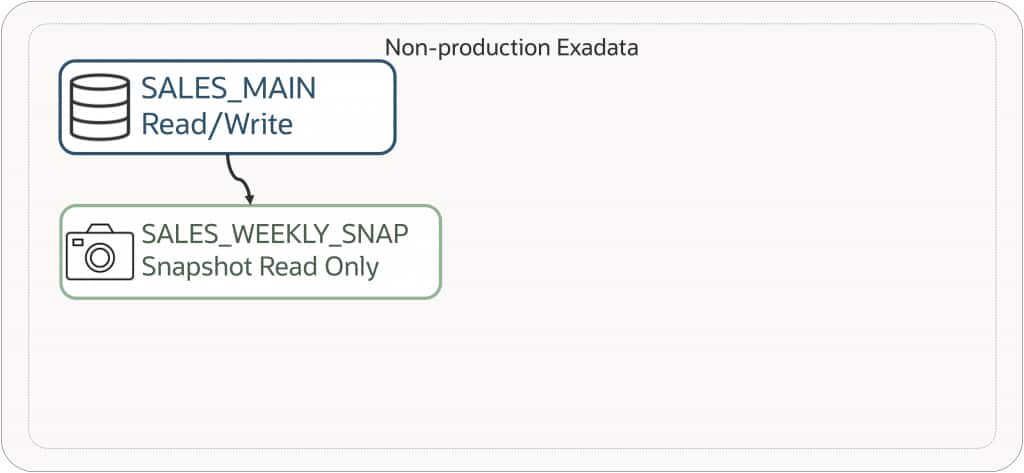
[Figure 2: SALES_MAIN → SALES_WEEKLY_SNAP]
Nothing has changed for development teams: there is still one development database. It now has a stable point in time that every new environment can share.
That is when the individual copy requests can start being addressed.
The Requests Start Arriving
The snapshot is ready, and the database copy requests are arriving.
Alex needs a database for a new feature. Sarah is investigating a production issue. QA needs a clean regression environment, and the CI pipeline is waiting for another automated test run.
Not long ago, that meant four separate database copies.
With Exadata Exascale, you provision four thin clones of SALES_MAIN, each using SALES_WEEKLY_SNAP as its point-in-time source.
CREATE PLUGGABLE DATABASE DEV_ALEX
    FROM SALES_MAIN
    USING SNAPSHOT SALES_WEEKLY_SNAP
    SNAPSHOT COPY;
The same command is repeated for DEV_SARAH, QA, and CI_PIPELINE, changing only the PDB name.
CON_ID  NAME          OPEN_MODE
------  ------------  ----------
5       DEV_ALEX      READ WRITE
6       DEV_SARAH     READ WRITE
7       QA            READ WRITE
8       CI_PIPELINE   READ WRITE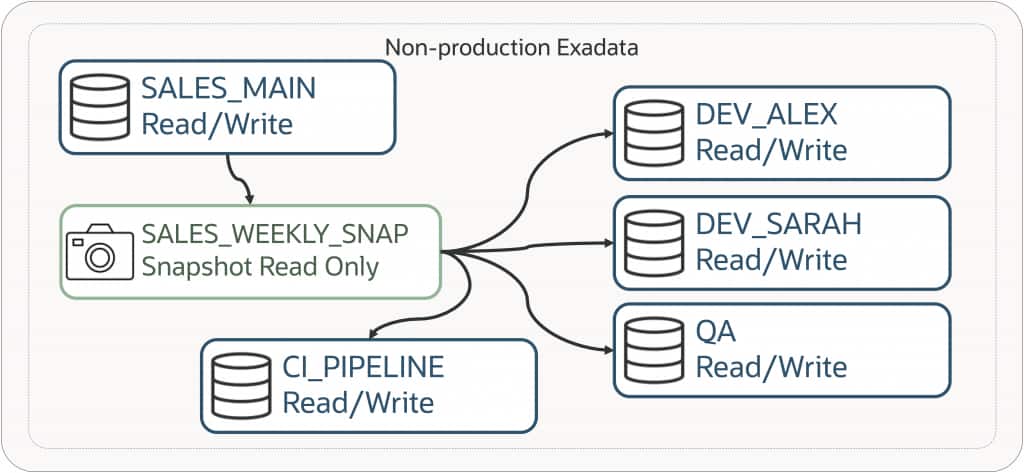
[Figure 3: SALES_WEEKLY_SNAP provisioning four thin clones]
To developers, these are simply Oracle databases. They connect, create objects, load data, and run tests as they would with any other PDB.
Behind the scenes, Exadata Exascale provisions independent thin clones rather than four full copies. They initially consume effectively no additional storage; as teams make changes, only modified data consumes more space.
Choosing the Right Starting Point
Several environments needed databases with the same point in time, so the walkthrough used a named snapshot. That is the right source when a shared baseline matters.
That’s a common choice, but it is not the only workflow.
For a single environment, create a thin clone from the PDB that should be its starting point.
For example, you can create a thin clone directly from SALES_MAIN.
CREATE PLUGGABLE DATABASE DEV_SANDBOX
    FROM SALES_MAIN
    SNAPSHOT COPY;
Or, a few days later, Alex has configured additional schemas, application software, and test data, and a second developer joins the project.
Instead of repeating that work, create another thin clone using DEV_ALEX as the starting point.
CREATE PLUGGABLE DATABASE DEV_BOB
    FROM DEV_ALEX
    SNAPSHOT COPY;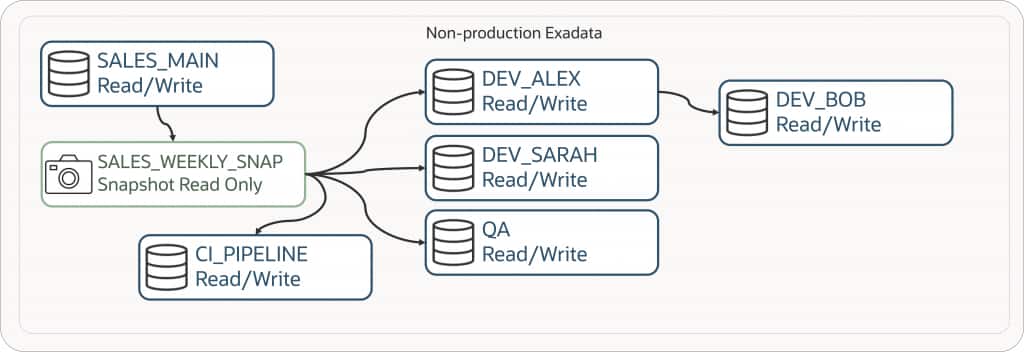
[Figure 4: SALES_MAIN → SALES_WEEKLY_SNAP → DEV_ALEX → DEV_BOB]
The workflow is the same in both cases. Only the source PDB changes.
Once the source is chosen, the next operational question is whether the clones remain isolated.
Does It Really Work?
After several clones share a starting point, the operational question is whether a change in one affects the others.
The quickest answer is to test it.
The companion lab inserts a unique marker row into each clone before querying the results.
Results from DEV_SARAH

CLONE_NAME   MARKER_TEXT               CREATED_AT
-----------  ------------------------  --------------------------
DEV_SARAH    Sarah clone local change  12-JUL-26 06.21.12 PM


Results from DEV_ALEX

CLONE_NAME   MARKER_TEXT              CREATED_AT
-----------  -----------------------  --------------------------
DEV_ALEX     Alex clone local change  12-JUL-26 06.20.50 PM
Each clone sees only its own marker row. Although both started from the same snapshot, changes remain isolated.
For developers, it is their own Oracle database. And that’s the experience Exadata Exascale is designed to provide.
A Week Later…
By the end of the week, test data has been loaded, schemas have evolved, objects and even databases have come and gone, and one-off configuration changes have accumulated.
Then comes the inevitable question.
“Can we just refresh the environment?”
With Exadata Exascale, the answer is yes.
Rather than unwinding every change, it is often quicker to recreate the environment from the same snapshot.
The companion lab demonstrates this by dropping and reprovisioning DEV_ALEX with SALES_WEEKLY_SNAP.
This refresh is local to DEV_ALEX. Downstream thin clones created from it, such as DEV_BOB, don’t need to be dropped first and remain available while DEV_ALEX is recreated. Bob and other downstream users can continue working without interruption.
Within moments the environment is back to exactly the same state it was in when the snapshot was created.
For many teams, this becomes the preferred refresh workflow: faster, simpler, and more predictable than repairing an environment that has drifted.
What’s Next?
After a typical development week, the process is clear: start with a refreshed, masked database; capture a point in time; provision thin clones; choose the appropriate source; verify isolation; and refresh by recreating from the original snapshot.
The companion GitHub repository contains the SQL scripts used in the walkthrough.
In the next post we’ll look at Exadata Exascale PDB Snapshot Carousels and how they automate snapshot creation and retention for continuously refreshed development environments.
- Why Database Cloning Needed Reimagining
- Exascale Snapshots and Clones: Core Concepts
- PDB Thin Clones (this post)
- PDB Snapshot Carousels
- Cloning Between CDBs
- Cloning Full CDBs with gDBClone
- Using Standby Databases as Clone Sources
- Best Practices and Reference Architectures for Exascale Cloning