
In the first post, we looked at why database cloning needed reimagining.
Enterprise teams need realistic database environments more often than ever, but traditional full-copy approaches can be slow, storage-heavy, and operationally complex. Exadata Exascale changes that model by making snapshots and thin clones part of the storage architecture and integrating them with Oracle Database operations and utilities.
This post explains the core concepts behind that model. Rather than focusing on commands (we’ll get to this in the next post), it explains the concepts that underpin Exascale snapshots and clones.
The problem with “just make a copy”
Database copies sound simple until the source database is large, active, and mission-critical.
If every new development or test environment requires a full physical duplicate, teams pay the cost upfront: storage, data movement, provisioning time, validation, and lifecycle management. That might be acceptable for an occasional copy. It becomes a problem when many teams need multiple copies from the same source.
The key inefficiency is that many copies do not need to be full physical duplicates on day one.
A QA team may only change a subset of the data. A developer may modify a few schemas or tables. A troubleshooting clone may exist for a short period and then be discarded. In those cases, making a complete physical duplicate of every block before the team can start working adds cost and delay.
Exascale snapshots and clones address that inefficiency by separating the logical copy from the physical duplication of changed data.
Now let’s look at some of the core concepts of Exascale snapshots and clones.
Point-in-time copies
The first concept is the point-in-time copy.
A point-in-time copy gives you a view of a source at a specific moment. That matters because a database is not static. Data changes constantly. Users insert rows, applications update records, batch jobs run, indexes are maintained, and maintenance tasks occur.
When you create a snapshot or clone, you need a stable baseline.
Source at time T1
        |
        v
Point-in-time copy based on T1
The copy starts from the source’s state at that moment. What happens afterward depends on whether the copy is a snapshot or a clone.
Snapshot versus clone
A snapshot is a read-only, point-in-time copy. They are useful when you want to preserve or inspect a specific state without allowing changes to that copy. You can think of it as a stable reference point. Because it is read-only, it is useful for workflows where consistency and preservation matter more than experimentation. Importantly, snapshots are not used directly. To access data at the point-in-time represented by a snapshot, you need to create a clone based on that snapshot.
A clone is a readable and writable, point-in-time copy.
It starts from a source point-in-time snapshot, but it can change independently after it is created. That makes it useful for development, testing, troubleshooting, and validation because teams can modify the clone without changing the source. Clones implicitly create snapshots if a snapshot is not specified at the time of creation.
e.g. ‘alter pluggable database pdb_clone from pdb1 snapshot copy;’
SNAPSHOT COPY create a thin-clone of pdb1 and implicitly creates a snapshot of the pdb1 datafiles.
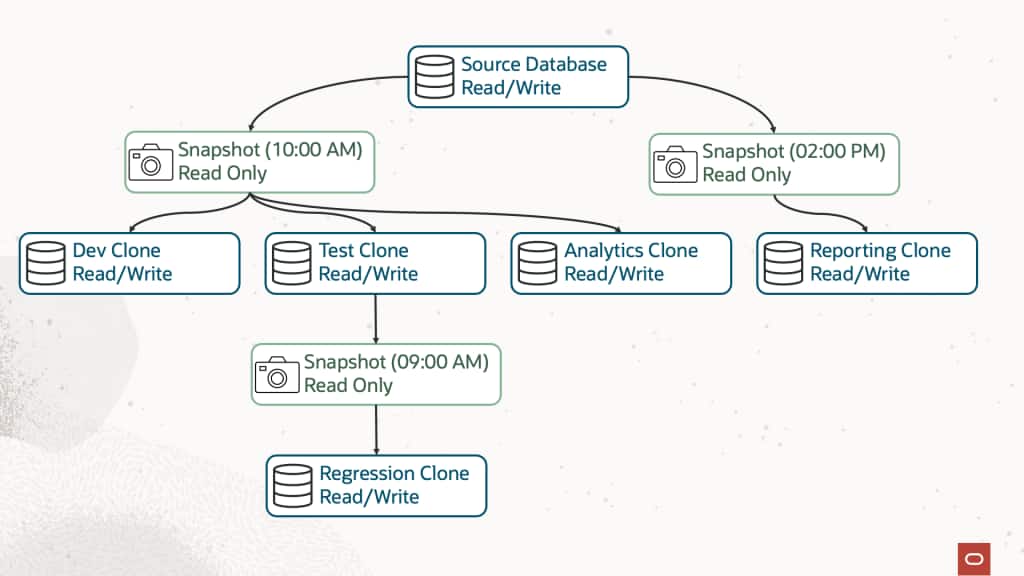
The practical distinction is simple:
| Concept | Readable | Writable | Common use |
| Snapshot | Indirectly | No | Preserve or reference a point in time |
| Clone | Yes | Yes | Create an independent working copy |
For development and test workflows, clones are usually the more visible capability because teams need writable environments. Snapshots still matter because they can provide stable points in time that are useful for repeatable refreshes, snapshot carousels, and clone creation workflows.
Snapshots created with the default behavior versus CONSISTENT
Snapshots also have an important creation-time choice. A snapshot created with the default behavior captures the point in time quickly, while a snapshot created with the CONSISTENT keyword applies redo during snapshot creation. The default approach makes snapshot creation as fast as possible. Using the CONSISTENT keyword shifts the database recovery work to snapshot creation time, which reduces the work required when later creating clones and makes the snapshot better suited for long-term retention.
The difference is when the database recovery work is performed.
By default, an Exascale snapshot is created very quickly. The snapshot captures the point-in-time file relationship immediately, but the database files may still require redo to be applied later when a clone is created from that snapshot. This is useful when the priority is to capture a point in time with minimal delay but requires redo to be retained to allow clones to be made consistent when they are created.
E.g. ‘alter pluggable database pdb1 snapshot;’
When the CONSISTENT keyword is used during snapshot creation, redo is applied at snapshot creation time. The snapshot takes longer to create because the necessary recovery processing is done upfront. In return, a later clone created from that snapshot does not need to perform that same redo-application step during clone creation. Because redo is applied at snapshot creation time, future clones can be created without requiring the original redo to be retained, making CONSISTENT snapshots better suited for long-term retention.
E.g. ‘alter pluggable database pdb1 snapshot consistent;’
The practical choice is:
| Snapshot choice | Creation behavior | Clone creation behavior | Best fit |
| Snapshot with default behavior | Created very quickly | Redo may need to be applied when a clone is created | Capturing points in time quickly |
| Consistent snapshot | Redo is applied during snapshot creation avoiding work at clone creation time | Created very quickly | Preparing ready-to-clone baselines |
The key point is that CONSISTENT does not change the logical purpose of the snapshot. It changes when the redo is applied.
Use the default snapshot behavior when the priority is fast point-in-time capture. Use CONSISTENT when the snapshot is being prepared as a ready-to-clone baseline and it is better to perform the redo work upfront.
Thin provisioning
With a traditional full copy, the target environment starts by consuming storage for a complete copy of the source data. If the source is large, the copy starts large too.
With a thin copy, the target does not need to duplicate all source data immediately. It starts from shared source data and allocates additional storage only as changes occur.
Thin provisioning does not mean the clone uses no storage. It means the system avoids unnecessary upfront data duplication. Changed data still consumes storage. A clone that changes a lot can consume more storage over time. A clone that changes very little remains highly space-efficient.
Redirect-on-write
To maintain space efficiency, Exascale uses redirect-on-write techniques. At a high level, redirect-on-write means that when data changes, Exascale writes the new version separately instead of overwriting data needed by another point-in-time view, such as another snapshot or clone. This keeps each view independent while avoiding unnecessary duplication.
The important point is the behavior, not the internal mechanics of every block operation:
- The clone starts from a known point in time
- Writes to the clone do not change the source
- Writes to the source do not change existing clones
- Storage consumption increases as changed data accumulates
- Snapshots and clones preserve independent views over time
Why native Exascale integration matters
Many platforms provide snapshot and cloning capabilities. For Exadata customers, the key difference is that Exascale integrates those capabilities directly into the platform and Oracle Database workflows.
Exascale snapshots and clones are part of the Exadata architecture and are used directly by Oracle Database.
This integration eliminates the need to assemble storage-level processes into something that behaves like a database environment. A database copy is not just a set of files. It has identity, metadata, state, services, application connectivity, security controls, and operational and performance requirements.
Native integration helps make thin cloning more consumable:
| Area | Why integration matters |
| Database workflow | DBAs can use familiar Oracle Database operations where supported |
| Storage efficiency | Exascale handles space-efficient file management |
| Operational consistency | Clones fit into platform workflows instead of becoming one-off storage artifacts |
| Performance realism | Thin clones are real database environments running on and able to utilize the full power of Exadata |
| Lifecycle management | Snapshots and clones can be listed, monitored, and cleaned up as managed resources |
This is the difference between “we copied some files” and “we provisioned a usable database environment.”
A simple example
In a traditional model, creating APP_TEST1 may require a full physical copy of APP_PROD, consuming substantial storage immediately.
In an Exascale thin-clone model, APP_TEST1 starts as a writable point-in-time copy of APP_PROD. As the test team makes changes, Exascale stores only the additional data required by the clone.
APP_PROD at T1
     |
     v
APP_TEST1 thin clone

APP_TEST1 view = APP_PROD at T1 + APP_TEST1 changes
As APP_PROD continues to change after T1, APP_TEST1 does not automatically get updated. It remains anchored to its own point-in-time baseline.
That stable baseline is valuable for testing. The test team knows what version of the data it started from. If they need a newer version, the DBA can create a new clone from a more recent point in time.
What this means for customers
Instead of treating every copy request as a large provisioning task, development, DBA, and operational teams can think in terms of reusable patterns:
- Create a point-in-time copy
- Use it for a defined development, test, or validation purpose
- Monitor how much it changes
- Drop it when the work is complete
Simplifying clone creation and management lets teams provision realistic database environments faster and with less manual effort.
Development teams get environments faster. QA teams can test against more realistic data. DBAs can reduce repetitive copy work. Platform teams can offer a more scalable database copy service.
Exadata and Exascale change how quickly teams can create realistic database environments and how much effort they require.
Before closing out this post, let’s revisit a few of the key points.
Snapshots and clones are related, but are not the same
A snapshot is read-only. A clone is writable. Clones can be created from snapshots. If a snapshot is not used when a clone is created, a snapshot is created implicitly.
Snapshots optimize different moments in the workflow
A snapshot is optimized for fast creation. A consistent snapshot performs redo work during snapshot creation, which enables longer term retention for later clone creation without ongoing storage for redo.
Thin provisioning reduces upfront duplication, not all storage usage
Changed data still consumes storage. Thin clones are most efficient when the changed data is smaller than the full source.
A clone is not a toy environment
A thin clone is a real database running on Exadata. It uses all of the performance, availability, security, and manageability optimizations and capabilities of Exadata enabling customers to get even more value from their Exadata investment!
Wrap-up
Exascale snapshots and clones are simple concepts with important operational consequences.
A snapshot gives you a read-only point-in-time view. A clone gives you a readable and writable point-in-time copy. Snapshot creation options give DBAs a choice about when redo is applied for consistency. Thin provisioning changes the storage model by avoiding unnecessary full duplication at creation time. Redirect-on-write allows source and clone timelines to diverge while preserving the correct view for each environment.
Together, these capabilities make creating copies of databases faster, more space-efficient, and easier to operationalize.
In the next post, we will look at the first concrete use of Exascale snapshots and clones using PDBs. We’ll create snapshots, clones, and prove that dropping the source of a clone or snapshot doesn’t affect downstream PDBs.
- Why Database Cloning Needed Reimagining
- Exascale Snapshots and Clones: Core Concepts (this post)
- Exadata Exascale PDB Thin Clones
- PDB Snapshot Carousels
- Cloning Between CDBs
- Cloning Full CDBs with gDBClone
- Using Standby Databases as Clone Sources
- Best Practices and Reference Architectures for Exascale Cloning