
Every application team wants fast access to realistic data.
Every database team knows that providing it is harder than it sounds.
Enterprise databases are large, mission-critical systems governed by strict operational controls. Creating copies for development and testing often requires significant time, storage, and administrative effort. A full database copy may require large amounts of capacity. Refreshing a test environment can take hours or days. Keeping multiple copies current can become operationally expensive. And when developers or testers cannot get realistic data quickly, release cycles slow down.
That is the problem Exadata Exascale snapshots and clones are designed to address.
The old problem: database copies are valuable, but expensive
Database copies are foundational to enterprise IT. Teams use them for application development, functional testing, performance testing, patch validation, schema changes, troubleshooting, reporting, user acceptance testing, training, and demos.
The value is clear. A realistic database copy helps teams test production-like data, reproduce issues more accurately, and validate changes before they reach production.
The challenge is scale
As database size grows, traditional cloning approaches create friction in several ways.
First, full copies consume substantial storage. A 50 TB source database can require another 50 TB for each full clone. Multiply that by development, QA, staging, reporting, and release validation environments, and the storage footprint grows quickly.
Second, copies can take time. Moving or duplicating large volumes of data is not instantaneous. Even when automation exists, teams may still wait for provisioning, restore, refresh, validation, and handoff steps.
Third, operational complexity accumulates. DBAs need to manage source copies, clone lifecycles, refresh windows, naming conventions, access controls, space growth, cleanup, and recovery expectations.
Fourth, stale data reduces test quality. When refreshing environments is expensive or slow, teams often use older copies. That can lead to defects escaping later in the release process because testing was not performed against current data, schema, or configuration.
In short: the business wants more copies, faster. The infrastructure team wants to control cost, risk, and complexity. Traditional approaches often force a tradeoff.
Why this matters more now
The pressure on database copy workflows has increased.
Development teams are expected to move faster. Release cycles are shorter. Test coverage requirements are higher. Security reviews are more rigorous. Production databases continue to grow. AI and analytics initiatives further increase demand for realistic data environments.
At the same time, organizations want standardized, governed, repeatable database-copy workflows rather than project-specific processes.
The result is a clear requirement: database copies must be fast to create, efficient to store, and simple to manage.
Space-efficient snapshots and clones
A snapshot or clone changes the economics of database copies.
Instead of creating a complete physical duplicate of every block at the time the copy is created, a space-efficient copy can initially reference the source data and allocate additional space as changes occur. This is the key idea behind thin provisioning.
Exascale snapshots are read-only point-in-time copies. Exascale clones are readable and writable point-in-time copies. Exascale uses redirect-on-write techniques to maintain these copies efficiently.
The distinction between snapshots and clones in Exascale is important to understand:
- A snapshot is typically used when you need a reference to data at a point in time
- A clone is used when you need an independent, writable copy that can diverge from the source
Exascale snapshots and clones enable much more efficient use of Exadata resources. Teams can create database copies faster, use less incremental storage at creation time, and support more concurrent development and test environments without multiplying the full storage footprint for every copy.
Why general-purpose cloning is not enough for Oracle databases
Many infrastructure platforms offer some form of copy, snapshot, replication, or virtual cloning capability. These technologies can be valuable for generic storage, virtual machines, file systems, and some application environments. But Oracle databases are different.
An Oracle database is not just a set of files that can be copied independently. It is an active, transactional system with data files, control files, redo, undo, archive logs, recovery semantics, RAC, and, in modern deployments, CDBs and multiple PDBs—often numbering in the hundreds or even thousands. Simply copying files quickly in the storage tier does not automatically create a database clone.
A general-purpose clone may still require additional DBA work to establish database consistency by applying redo, resolving identity and naming conflicts, handling services, and validating that the copy is safe to use. In RAC environments, the workflow can also involve cluster, instance, service, and storage coordination. In multitenant environments, the clone workflow needs to understand whether the desired unit of copy is a CDB or a PDB and manage the related data dictionary metadata.
Performance matters too. A clone is only valuable if it behaves like a production database once users begin working against it. For Exadata customers, that means preserving the platform’s performance characteristics and operational model. A generic copy mechanism may create a usable copy while still introducing integration, management, performance, or recovery gaps.
The goal is not simply to create another copy of database files. The goal is to create a database clone that utilizes all of the capabilities of Oracle AI Database and Exadata.
What Exascale changes
Exadata has supported snapshots and clones before, but Exascale changes the experience by making these capabilities native to the Exascale storage architecture and integrated with Oracle AI Database 26ai.
When Oracle AI Database 26ai uses Exascale storage, PDB snapshot copy operations can automatically use native Exascale cloning functionality to thinly provision the underlying database files. Cloning whole CDBs including their PDBs is as simple as using the gDBClone utility to not only thin-clone the database files but also manage and start instances leaving you with a fully functional database clone with a single command.
The practical implication is simple: customers continue using familiar Oracle Database operations and utilities while Exascale transparently handles the space-efficient copy mechanics.
That is what turns capability into value
DBAs should not need fragile, separate, storage-specific workflows to create database copies. Developers should not need to understand every layer of storage implementation to get a test environment. Platform teams should be able to offer database copy workflows that are standardized, repeatable, and aligned with Oracle Database.
The value for development and test
The most obvious use case is development and test.
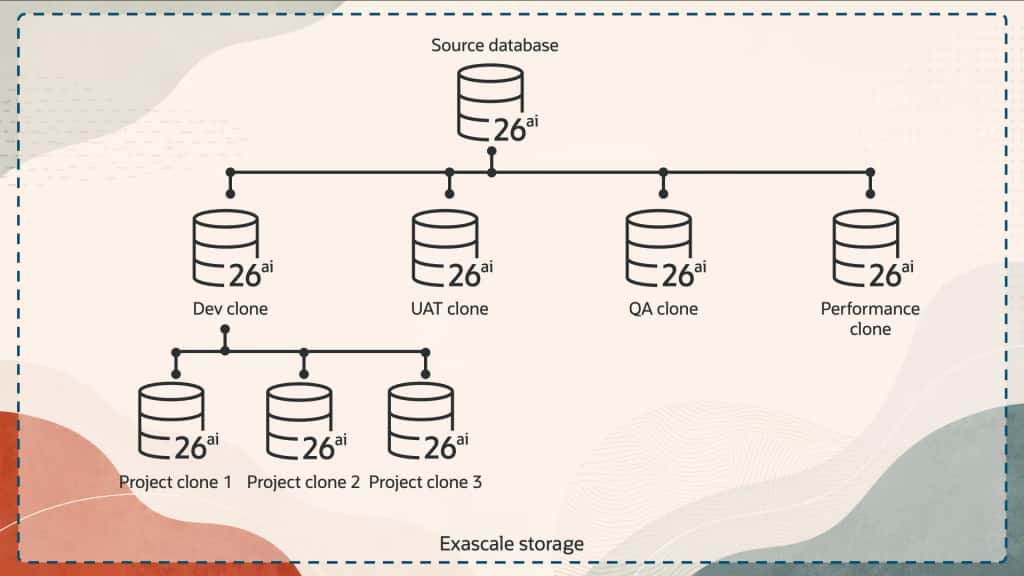
Consider a team preparing for a major application release. They may need multiple environments: one for active development, one for QA, one for performance validation, one for user acceptance testing, one for troubleshooting defects, and one for integration testing with other systems.
With traditional full-copy approaches, each environment can represent a significant provisioning and storage commitment.
With Exascale thin clones, teams can create writable, point-in-time database copies more efficiently. That helps development and test teams work with more realistic environments while reducing the cost and delay normally associated with creating large database copies.
This does not just improve infrastructure utilization. It can improve engineering velocity.
When teams wait less for environments, they can test earlier. When they test with better data, they can find issues sooner. When copies are easier to refresh, teams are less likely to rely on stale environments. When DBAs spend less time managing repetitive copy operations, they can focus on higher-value work.
The value for operations
Snapshots and clones are not only about developer productivity. They also help operational teams.
A fast, space-efficient clone can help reproduce a production issue without directly experimenting on production. A point-in-time copy can support investigation of application behavior, schema changes, or data-related defects. Multiple teams can work in parallel from a consistent starting point. QA can validate fixes while developers continue building.
For database operations, the key benefit is control. Exascale snapshots and clones make database copies easier to manage and safer to use. They help teams move faster without losing visibility, governance, or consistency.
A better fit for modern database platforms
Modern platforms need to support speed and governance at the same time.
Fast copies without lifecycle management can create sprawl. Strict controls without efficient provisioning can slow delivery. The goal is to combine both: rapid access to realistic database environments with operational visibility, security, and cleanup discipline.
Exascale snapshots and clones are a strong fit for that model because they are designed as part of the Exadata platform, not as an afterthought. They bring space-efficient copy capabilities closer to the database workflows customers already use.
This is especially important for Oracle Multitenant environments, where pluggable databases are a natural unit of isolation and lifecycle management. PDB-level thin cloning can give teams a practical way to provision copies for specific applications, projects, or test cycles without cloning more than they need.
What this series will cover
This post introduced the problem: database copies are essential, but traditional cloning approaches can be slow, storage-intensive, and operationally complex.
The rest of this series will go deeper into the Exascale capabilities that address that problem:
- Why Database Cloning Needed Reimagining (this post)
- Exascale Snapshots and Clones: Core Concepts
- Exadata Exascale PDB Thin Clones
- PDB Snapshot Carousels
- Cloning Between CDBs
- Cloning Full CDBs with gDBClone
- Using Standby Databases as Clone Sources
- Best Practices and Reference Architectures for Exascale Cloning
Database cloning should not be a bottleneck.
It should be a platform capability: fast, efficient, governed, and easy to consume. Exascale snapshots and clones move Exadata in that direction by making space-efficient database copies a native part of the architecture.
For teams that need production-like environments without production-sized lead times and storage for every copy, that is a meaningful shift.
In the next post, we will look at the foundation: what Exascale snapshots and clones are, how they differ, and why the architecture matters.