
A developer guide to controlled Oracle AI Database workflows with the Oracle SQLcl MCP server, Codex, Cursor, Antigravity, Claude, and Oracle AI Agent Memory.
Companion articles and notebooks:
- Codex workflow: How to Build a Controlled MCP Workflow for Codex and Oracle AI Database, Companion Codex notebook
- Cursor workflow: Build a Controlled Cursor MCP Workflow with Oracle AI Database, Companion Cursor notebook
- Antigravity workflow: How to Build an Antigravity Workflow with the Oracle SQLcl MCP Server and Oracle AI Database, Companion Antigravity notebook
- Claude workflow: When to use Claude memory, Oracle AI Agent Memory, and LangChain together, Companion Claude notebook
Key takeaways
- The Oracle SQLcl MCP server gives an AI client an explicit tool path to Oracle AI Database, so the assistant can inspect approved database context instead of relying only on schema details copied into a prompt.
- Codex, Cursor, Antigravity, and Claude offer different developer experiences, but the database boundary can stay consistent: approved SQLcl connections, database privileges, inspectable tool calls, and validation before broader access.
- Oracle AI Agent Memory is a separate application layer. Add it when a workflow needs durable threads, scoped retrieval, reusable context, or continuity across sessions. Do not add memory simply because MCP is present.
- The companion notebooks are build and validation harnesses. They help prove configuration, storage, retrieval, and memory patterns, but they are not a substitute for live client validation or production telemetry.
- Start small, validate the database path, and expand access only when the workflow is explainable.
Your AI assistant can write SQL. But does it know your database?
A developer pastes a table definition into a prompt and asks for a query. The assistant returns something that looks right. Then the query fails because a column was renamed last week, the object lives in another schema, the current database user cannot see it, or the application has a rule that never made it into the prompt.
The issue is not that the assistant cannot generate SQL. The issue is that the assistant is reasoning from the context it was given. If the context is incomplete, stale, or simplified, the answer can be perfectly plausible and still be wrong for the environment in front of you.
That is what the title of this guide means by guessing. The goal is not to remove reasoning from the assistant. The goal is to stop making prompt text carry responsibilities that belong to tools, database permissions, and runtime validation.
Across this Oracle Database MCP series, the same pattern appeared in several developer environments. Codex, Cursor, Antigravity, and Claude can all sit at the front of a workflow. The Oracle SQLcl MCP server provides the tool boundary to Oracle AI Database, using approved SQLcl connection profiles instead of database details copied into a prompt. Oracle AI Agent Memory becomes relevant when an application needs durable context beyond the current interaction. LangChain can help with retrieval orchestration when that extra application layer is useful.
This final article brings those pieces together. Think of it as the map for the series: what each layer is responsible for, what changes between clients, what should stay the same, and how to decide when a simple MCP workflow has grown into a memory and retrieval architecture.
This article is the final guide in the Oracle Database MCP series. The earlier posts cover the hands on workflows for Codex, Cursor, Antigravity, and Claude with Oracle AI Agent Memory. Use this guide as the map, then follow the individual article and notebook links when you are ready to run a specific workflow.
What Changes When AI Can Inspect the Database Instead of Relying on the Prompt?
There is a practical difference between describing a database to an assistant and letting the assistant inspect approved database context through a tool. In the first case, the model sees whatever the developer remembered to paste into the prompt. In the second case, the model can ask a declared tool for information at runtime, within the permissions and connection boundaries you configured.
That distinction matters during normal development. Schemas evolve. Grants differ between environments. Object names are similar. Views hide implementation details. Data quality problems show up only when a query actually runs. Once a workflow can check those facts instead of assuming them, the assistant becomes easier to use for real database work and easier to debug when something goes wrong.
This is where context engineering for AI agents becomes practical. The goal is not to paste more and more database detail into the prompt. The goal is to decide which context should come from runtime database inspection, which context should come from retrieved memory, and which context should stay outside the model call entirely.
MCP does not make the model authoritative, and it does not replace database security. It gives the client a standard way to call tools. The Oracle SQLcl MCP server turns that protocol into a tool path for Oracle AI Database. The database still decides what the configured user can do, and the developer still decides which workflows should be automated, reviewed, or blocked.
What MCP Does, and What It Does Not Do
MCP gives an AI client a standard way to discover and call tools, and the Oracle SQLcl MCP server applies that pattern to Oracle Database workflows.
MCP does not replace database privileges. It does not automatically provide durable memory. It does not decide which operations an application should allow. Oracle AI Database still controls what the configured database identity can access and execute.
Agent Memory solves a different problem. It becomes useful when an application needs useful context to survive beyond the current interaction. Keeping tool access, database security, and durable memory as separate concerns makes the architecture easier to test and easier to operate.
One architecture, multiple developer experiences
The most useful way to read the series is to separate the developer experience from the shared foundation. Codex, Cursor, Antigravity, and Claude differ in how they fit into a developer workflow, but the architecture underneath does not need to be reinvented for every client.
| Layer | Primary job | Developer validation |
| AI client | Turns developer intent into plans and tool requests. | Can the developer inspect the client’s tool request and result? Are discovered tools documented separately from the operations allowed by SQLcl MCP configuration and database privileges? |
| SQLcl MCP | Exposes declared Oracle tools through MCP and uses approved SQLcl connection profiles. | Does the server start cleanly? Does it use the expected saved connection? Which SQLcl commands are allowed by the server configuration, and which actions are still governed by database privileges? |
| Oracle AI Database | Executes SQL, enforces privileges, stores application data, and can support vector search, memory records, traces, and retrieval evidence. | Which database identity ran the action? Which objects were accessible? Can you verify the result and activity trail? |
| Oracle AI Agent Memory | Provides application APIs for users, agents, threads, durable memories, scoped retrieval, and context assembly. | Is the memory scoped to the right user or workflow? Can records be retrieved, corrected, expired, or removed according to application policy? |
| LangChain | Provides application side orchestration and reusable retrieval patterns around the Oracle backed memory path. | Does it simplify the application, or is it adding another layer before the underlying database and retrieval path are proven? |
Tool discovery and operation control are related, but they are not the same thing. A client may discover a tool, while SQLcl MCP configuration and Oracle Database privileges still determine which operations are allowed to execute.
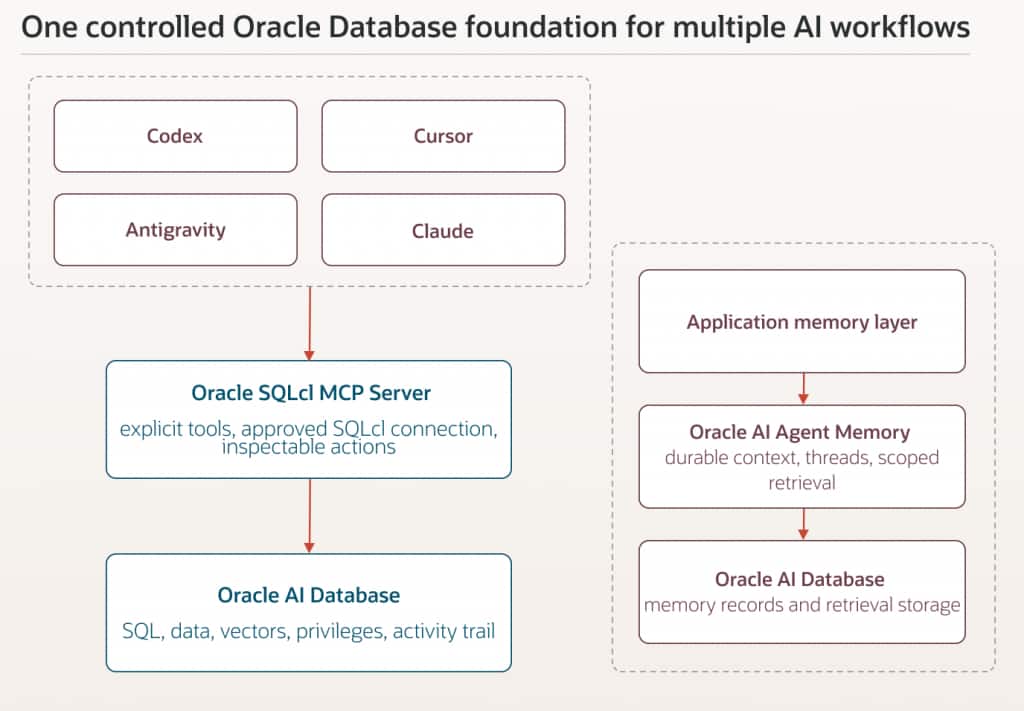
Core idea: SQLcl MCP controls how assistants act through tools. Oracle AI Agent Memory controls what applications remember over time. They can both use Oracle AI Database, but they solve different parts of the architecture.
The Oracle SQLcl MCP Server Is the Execution Boundary
In these workflows, the Oracle SQLcl MCP server is the bridge between an MCP capable client and Oracle AI Database. SQLcl runs in MCP mode and exposes a declared set of tools. The client does not need direct database credentials in the prompt. It uses the MCP server, and the server works through SQLcl connection profiles that the developer has already created and validated.
That sounds like a small implementation detail, but it changes how you reason about the workflow. The assistant is no longer being trusted because a prompt says to behave safely. The database path has an identity, a set of privileges, a known connection, and observable actions. If a query is denied, that can be the correct outcome. If a tool is not exposed, the assistant cannot simply wish it into existence.
For developers, this turns a vague safety discussion into a set of concrete questions. Which saved connection is in use? Which database user owns that connection? What can that user read or change? Which SQLcl MCP capabilities are available? What activity can be inspected afterward? Those questions are much easier to test than a general instruction such as “only do safe things.”
The earlier articles walk through the concrete setup for each client. The important point for this capstone is that the control model belongs below the client. You should be able to swap the developer interface without rebuilding the database permission model from scratch.
One Foundation, Four Developer Experiences
The series uses several clients because developers do not all work in the same place. Some want an agent in the terminal. Some want the workflow inside an editor. Some are evaluating a newer agentic development environment. Some are exploring a general assistant together with application memory. The client changes the ergonomics, not the underlying responsibility model.
Codex: useful when the agent sits close to the implementation loop
The Codex workflow is a good fit when the agent is already working with files, commands, configuration, notebooks, and implementation details. Database access then becomes one more tool in a broader development loop. That proximity is useful because the agent can relate database findings back to code changes, but it also raises the importance of an explicit database boundary.
The companion Codex notebook acts as a validation harness for prerequisites, the SQLcl connection path, memory storage, retrieval, and Agent Memory integration. Keeping those checks separate makes it easier to identify whether a failure comes from MCP discovery, the database connection, privileges, memory, or retrieval.
Cursor: useful when database context belongs inside the editor loop
Cursor keeps the database workflow close to the code editing experience. That can be especially useful when a developer is changing application code and needs to inspect the schema or validate assumptions without leaving the working loop. The same caution applies: convenience should not turn into broad, implicit access.
The Cursor notebook also makes an important distinction: its operational rows are simulated teaching data, not live Cursor telemetry. The notebook demonstrates the database backed pattern without presenting sample data as evidence of live client activity.
Antigravity: useful for testing the same pattern in another agentic environment
The Antigravity article is valuable because it shows that the architecture is portable. The client interface changes, but the workflow still benefits from the same separation: developer facing agent, SQLcl MCP tool boundary, Oracle AI Database, Oracle AI Agent Memory when needed, and optional retrieval orchestration.
The Antigravity notebook follows the same principle. It can validate the memory substrate, retrieval, and Agent Memory path, while live MCP behavior still needs to be verified through the actual client and SQLcl MCP workflow.
Claude: useful for seeing where assistant context ends and application memory begins
The Claude article adds a different question to the series. Once the assistant can use database tools, what should happen when useful context needs to survive the current interaction? The answer is not to make MCP carry memory responsibilities. Tool access and durable application memory are separate concerns, even when they use the same Oracle platform underneath.
That separation is one of the most important ideas in the whole series. An assistant can have useful working context and still need an application memory layer. Likewise, an application can maintain durable memory without giving an assistant unrestricted database access. Keeping those responsibilities separate gives developers clearer tests, clearer ownership, and fewer hidden assumptions.
AI Agent Memory Belongs After the Workflow Has Something Worth Remembering
It is tempting to add memory as soon as an agent demo starts working. In practice, that is often too early. Memory adds value when the workflow has a real continuity problem: a user returns later and expects the application to recall a preference, a developer wants prior tool outcomes available in a new session, or an agent needs to retrieve relevant context from earlier work without replaying an entire conversation.
In this series, AI agent memory refers to Oracle AI Agent Memory, which provides durable memory APIs backed by Oracle AI Database. Oracle AI Agent Memory sits in the application layer on top of Oracle AI Database. It gives Python applications an API for threads, durable memory records, scoped retrieval, and context assembly. Oracle AI Database remains the storage and enforcement layer underneath. That means memory can participate in the same kinds of engineering decisions developers already understand: identity, retention, access control, observability, data quality, and lifecycle.
For Python applications, the oracleagentmemory package provides the application API used to create users, agents, threads, memory records, and retrieval flows.
A useful rule is to ask what failure you are solving. If the problem is “the client cannot inspect the current schema,” add or fix the MCP tool path. If the problem is “the application loses useful context between sessions,” evaluate Agent Memory. If the problem is “we need a reusable retrieval pipeline around that memory,” then LangChain or another orchestration layer may help. Each addition should answer a concrete need.
Thinking in two execution loops
The architecture becomes easier to reason about when you separate the live interaction loop from the durable context loop. They can share Oracle AI Database, but they run for different reasons.
The live interaction loop is immediate. A developer asks a question or requests a task. The client decides that a database tool is needed. SQLcl MCP invokes the approved database path. Oracle AI Database returns a result. The client uses that result to continue the task.
The durable context loop is different. Application code stores selected conversation history, tool outcomes, memory records, metadata, or embeddings. Later, the application retrieves only the context that is useful for the current user or task. That context can then be assembled before the next model call. The point is not to replay everything. The point is to make useful context queryable and scoped.
Scoped retrieval for agents is what keeps this useful. A memory system should retrieve records for the right user, agent, thread, or workflow rather than treating all stored context as equally available. That scope is what helps memory stay relevant and prevents old or unrelated context from being added to the next model call.
| Loop | What happens | What to verify |
| Live interaction | Client calls SQLcl MCP tools and receives current database results. | Tool discovery, saved connection, database identity, privileges, returned result, and activity trail. |
| Durable context | Application stores and retrieves memory records, traces, metadata, or vectors for later use. | User and thread scope, retrieval quality, retention, correction, deletion, and whether retrieved context is appropriate for the next task. |
The notebooks are validation harnesses, not the product
Every hands-on article in the series includes a companion notebook because a notebook is a practical place to make the moving parts visible. It can check local prerequisites, show sanitized configuration, create teaching tables, insert sample records, exercise lexical and vector retrieval, initialize Agent Memory, and finish with a validation snapshot.
That is useful, but it is important to keep the notebook in the right role. The final user experience happens in Codex, Cursor, Antigravity, or Claude. The notebook helps prove the surrounding database and memory path before or alongside that client. It is not automatically the source of live telemetry, and simulated teaching data should not be presented as proof that a live client action occurred.
Keeping the Database Boundary Consistent
The client can change. The database rules should not.
Codex, Cursor, Antigravity, and Claude all provide different ways for a developer to work with an AI assistant, but changing the client should not mean redesigning database access every time. The SQLcl connection, database identity, permissions, and validation path should remain predictable underneath.
A good starting point is a purpose specific database identity with only the privileges required for the workflow. During development, that usually means beginning with a small, read focused surface and expanding access only when there is a clear reason to do so.
The saved SQLcl connection also becomes part of the application architecture. Developers should know which connection alias is being used, which database user it represents, and which environment that user can access. When something behaves unexpectedly, those details are often more useful than changing the prompt.
The same principle applies to MCP tools. Expose the capabilities the workflow actually needs. A smaller tool surface is easier to understand, test, and troubleshoot than a large collection of tools that nobody has reviewed closely.
Database activity should also remain inspectable. When a client invokes a tool, the team should have a way to understand what was requested, which database identity executed it, and what happened as a result. Write operations and other higher impact actions deserve stronger controls than ordinary inspection or read queries.
Agent Memory introduces another boundary. Memory can help an application retain useful context, but it should not become a second source of truth for information that already belongs in an authoritative system. As the amount of memory grows, retrieval quality also becomes part of the application contract. Returning confident but irrelevant context is still a failure, even if the underlying retrieval system technically worked.
The goal is simple: let developers choose the client experience that works for them while keeping the database access model understandable, controlled, and consistent underneath.
A developer friendly rollout path
The easiest way to make an agent workflow hard to debug is to enable too much at once. A better path is to grow capability only after the previous layer has a clear acceptance check.
- Prove the runtime. Start SQLcl in MCP mode locally and confirm the expected client can discover the SQLcl tools.
- Prove the connection. Use one approved saved SQLcl connection and run a bounded read query against the expected schema.
- Prove the permission boundary. Confirm that allowed queries succeed and that disallowed operations fail because of the database role or configured restrictions.
- Prove observability. Check the available database side activity trail and document what the team will inspect when a workflow fails.
- Only then add durable memory. Store a small set of useful records, retrieve them in a second session, and verify identity and scope.
- Add semantic retrieval when exact filters are no longer enough. Evaluate retrieval quality with representative developer questions, not only a single happy path.
- Expand tool or write access last. Treat each new capability as a change to the operational surface, not as a prompt tweak.
Which workflow should you start with?
There is no universal “best” client in this series. The better question is which developer loop you already use and what you need to validate next. Use the table below as the quick route into the detailed articles and notebooks.
| Your goal | Start here | What this path emphasizes | Next hands on step |
| Work from a terminal oriented coding agent | Codex | Agentic implementation work close to files, commands, and validation. | Read the Codex MCP article, then run the companion Codex notebook. |
| Keep database context inside the editor loop | Cursor | Editor native coding with explicit Oracle Database tool access. | Read the Cursor MCP article, then run the companion Cursor notebook. |
| Test the same Oracle pattern in another agentic environment | Antigravity | Portability of the architecture and clear validation boundaries. | Read the Antigravity SQLcl MCP article, then run the companion Antigravity notebook. |
| Connect an assistant and then add durable application context | Claude plus Agent Memory | The boundary between assistant context, MCP tool access, durable memory, and retrieval orchestration. | Read the Claude, Oracle AI Agent Memory, and LangChain article, then run the companion memory notebook. |
| Understand the architecture before choosing a client | This guide | The shared foundation, rollout path, and decision points across the series. | Use this guide to choose one client, then validate the shared Oracle SQLcl MCP server path before adding memory. |
The recommended path through the series
If you are discovering the series from this article, do not try to reproduce every client. Pick the environment that matches your work, prove the shared SQLcl MCP path once, and then add complexity only when the use case demands it.

The order matters because each step narrows the next problem. If SQLcl MCP cannot start, memory is irrelevant. If the connection is wrong, retrieval is irrelevant. If the database identity is too broad, a better prompt will not fix the permission model. When the lower layers are proven first, the remaining failures become easier to diagnose.
What I would carry from demo to production
The articles in this series are developer examples, but the architectural lessons are broader. Production readiness comes from making the workflow explainable when everything is not going well. A team should be able to answer simple questions quickly: what did the client ask for, which tool ran, which database identity executed it, what result came back, what memory was retrieved, and why a sensitive action was allowed or blocked.
That means keeping environment boundaries clear, reviewing tool surfaces, and treating write access as a deliberate capability. Failure paths matter too. A denied query can show that least privilege is working. An empty retrieval result can be safer than inventing context. A client that cannot see an unapproved tool may be behaving exactly as intended.
Memory needs its own lifecycle decisions. What should be remembered, for how long, and under which identity? Can stale memory be corrected or removed? What should remain in an authoritative system instead of becoming memory?
Keep the architecture boring where possible. A controlled connection, a small tool surface, clear logs, scoped memory, and strong validation checks are usually more useful than adding frameworks before the team understands the failure modes.
The big idea: Give AI the Right Path to the Database
AI coding assistants are good at reasoning over the context they receive. The quality of a database workflow therefore depends heavily on how that context is obtained. Copying schema fragments into a prompt is useful for small examples, but it does not scale as a substitute for current, permission aware, inspectable access to the environment.
The Oracle SQLcl MCP server gives developers a practical way to make database access explicit. Oracle AI Database keeps execution, security, durable records, and retrieval close to the data layer. Oracle AI Agent Memory adds continuity when the application needs it. Codex, Cursor, Antigravity, and Claude can then sit on top as different developer experiences without forcing a different database architecture every time.
That is the real theme of this series. Do not ask the assistant to memorize the database in a prompt. Give it the right tool boundary, let Oracle Database enforce the rules, verify what happened, and add durable memory only when the workflow has something worth carrying forward.
Frequently asked questions
Does SQLcl MCP tool discovery mean every operation is allowed?
No. Tool discovery and operation control are different concerns. A client may discover available MCP tools, but SQLcl MCP configuration, SQLcl command restrictions, and Oracle Database privileges still determine what can actually run.
Is MCP the same thing as durable agent memory?
No. MCP gives an AI client a way to call tools. Oracle AI Agent Memory is a separate application layer for durable context, scoped retrieval, threads, and memory records backed by Oracle AI Database.
Do the notebooks show live client telemetry?
No. The notebooks are validation harnesses. They help prove prerequisites, storage, retrieval, memory setup, and database patterns. Live client behavior still needs to be validated in Codex, Cursor, Antigravity, or Claude with the configured SQLcl MCP workflow.
Which versions should I use?
Use the versions and prerequisites listed in each hands-on article and companion notebook. Before running the workflow, confirm the current supported versions for SQLcl, Java, the chosen client, and the Oracle AI Agent Memory package.
Can I use the same Oracle SQLcl MCP server pattern across different AI clients?
Yes. That is the point of the shared foundation in this series. Codex, Cursor, Antigravity, and Claude can provide different developer experiences, while the database boundary stays consistent through approved SQLcl connections, configured tools, database privileges, and validation checks. The client can change without requiring a completely new database access model.
When should I add Oracle AI Agent Memory to an MCP workflow?
Add Oracle AI Agent Memory when the workflow needs continuity beyond the current interaction. Good examples include remembering user preferences, carrying useful project context into a later session, retrieving prior tool outcomes, or assembling scoped context for a recurring workflow. Do not add memory only because MCP is present. First prove the Oracle SQLcl MCP server path, then add memory when there is something worth carrying forward.
References
- How to Build a Controlled MCP Workflow for Codex and Oracle AI Database
- End-to-end Companion Codex notebook
- Build a Controlled Cursor MCP Workflow with Oracle AI Database
- End-to-end Companion Cursor notebook
- How to Build an Antigravity Workflow with the Oracle SQLcl MCP Server and Oracle AI Database
- End-to-end Companion Antigravity notebook
- When to use Claude memory, Oracle AI Agent Memory, and LangChain together
- End-to-end Companion Claude notebook
- Oracle AI Agent Memory documentation
- Oracle Database 26ai documentation
- oracleagentmemory on PyPI
- SQLcl MCP Server