
Table of contents
- Introduction
- Components used to build the highly scalable solution
- Configuration of ORDS instances
- Installation and configuration of HA Proxy
- High Availability considerations
- Summary
- Additional Resources
1. Introduction
This article is a short summary of a proof of concept for a real customer’s case, in which multiterabyte volume of the JSON data was needed to be loaded to an Oracle Database by using mongorestore tool. Thanks to the configuration described here we managed to reduce estimated time of the data load by over 20 times – to the time, which met desired timeframe and – due to fact, that the tool chosen for loading the data (mongorestore) is not restartable – significantly reduced the risk of the process failure.
So, let’s start from a short reminder of what Oracle API for MongoDB is…
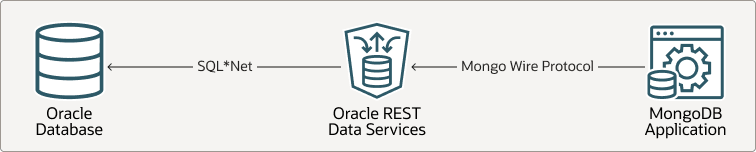
It is a software component, which allows a native MongoDB application to work with an Oracle Database as its backend. As it is visible in the below diagram, a MongoDB application is not connected directly into a database, instead of this ORDS component plays the role of a MongoDB service and translates native MongoDB commands into SQL and PL/SQL calls.
As popularity of this functionality grows, our customers start to consider it for critical applications, where stability of performance is one of the most important requirements. This article describes the way of building highly scalable configuration of MongoDB API in an on-premises deployment model.
2. Components used to build a highly scalable solution
High Scalability means, that a solution we want to build can consume significantly heavier workloads, than usually happen. Since then, the following requirements must be met
- We need to eliminate every potential bottleneck at all layers of the target architecture
- The target system has to be extensible – mostly by adding new nodes at a particular layer. In case of Oracle API for MongoDB two layers should be considered
- Database – usually to build scalable database systems based on Oracle Database, Real Application Cluster and/or Active Data Guard should be considered. As this article puts pressure on ORDS, we will not deal with this layer here.
- ORDS layer. To eliminate potential bottleneck at this layer, we should use multiple ORDS instances connected to the same Oracle Database, with a load balancer working in front of them – to make the configuration transparent to an application.
As a result, we should consider the following architecture:
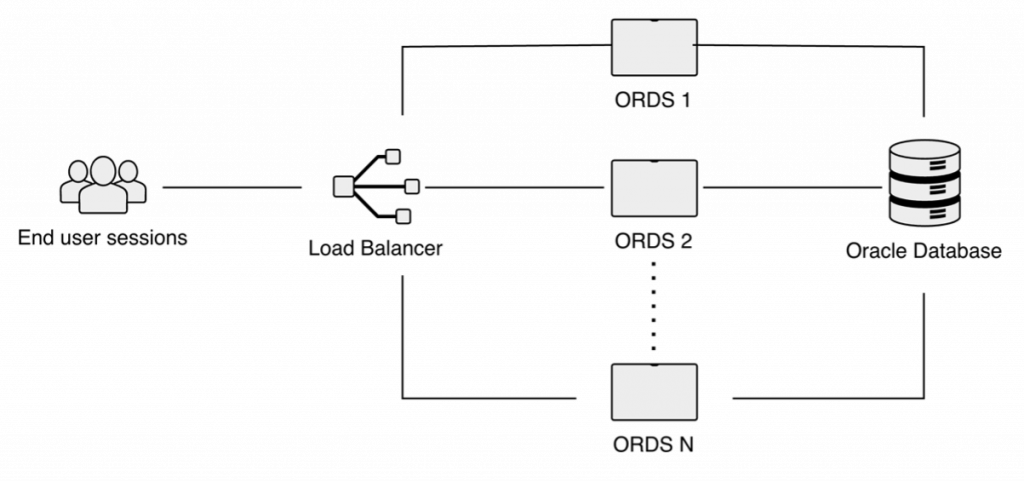
As wired protocol used by a MongoDB applications to interact with the database is stateless, i.e. every request contains complete information about the session, then a single session does not need to be physically bound to a single one network endpoint. Therefore – technically – any type of Load Balancer can be used. For example, technically in case of Oracle OCI both types of OCI load balancers can be used, including NLBs. However – in case of an on-premises deployments we cannot use OCI load balancers. For such deployment models there is need to use a third-party solution, like, for example, very popular HA Proxy.
Also, when we plan to build a highly scalable configuration, we need to consider additional requirements:
- Elimination of possible OS/hardware resources overconsumption. Because of this reason we recommend installing HA Proxy on a separate machine, not shared with any other components (for example with an ORDS instance)
- Elimination of possible network bottlenecks. To do this we need to ensure, that all network connections used in our configuration offer enough throughput and low latency.
3. Configuration of ORDS instances
To build a highly scalable ORDS configuration there is no need to perform any specific configuration steps apart from usual configuration, described excellently in Oracle official documentation, however – there are two ORDS parameters related to performance, which should be set explicitly, as their default values are not suitable for production use cases, so they are especially important in a highly scalable environment. We present them in the below table:
| Parameter | Description | Default Value |
| jdbc.MaxLimit | Maximum size of a JDBC connection pool | 10 |
| jdbc.InitialLimit | Initial number of JDBC connections in a pool | 10 |
They should be set to values, which eliminate waits for the next available connection, so as a good start point is to set them in the following way:
- jdbc.MaxLimit to estimated maximum number of concurrent sessions
- jdbc.InitialLimit to estimated average number of concurrent sessions
It can be done easily as presented in below example
[oracle@ords01 ~]$  ords config set jdbc.MaxLimit 200

ORDS: Release 26.1.1 Production on Wed Jun 10 15:23:39 2026

Copyright (c) 2010, 2026, Oracle.

Configuration:
  /etc/ords/config

[oracle@ords01 ~]$ ords config set jdbc.MaxLimit 200

ORDS: Release 26.1.1 Production on Wed Jun 10 15:23:39 2026

Copyright (c) 2010, 2026, Oracle.

Configuration:
  /etc/ords/config

The setting named: jdbc.MaxLimit was set to: 200 in configuration: default
[oracle@ords01 ~]$ ords config set jdbc.InitialLimit 100

ORDS: Release 25.4 Production on Wed Jun 10 15:24:22 2026

Copyright (c) 2010, 2026, Oracle.

Configuration:
  /etc/ords/config

The setting named: jdbc.InitialLimit was set to: 100 in configuration: default
Of course, all instances must share the same configuration. The easiest way to ensure this is to copy configuration files of the first ORDS instance we configured to all other machines running ORDS instances.
After that we can start all our ORDS instances as usually.
4. Installation and configuration of HA Proxy
For this article, we will use HA Proxy Community Edition – it is a free edition, but with some limitations, partially related to HA/DR configurations. This software is available for all major platforms; in case of Oracle Linux 9 it is even available in its official yum repository. So, on this platform the installation is extremely easy and it comes down to execution of dnf install command:
root@haproxy ~]# dnf install -y haproxy
Last metadata expiration check: 0:09:45 ago on Wed 10 Jun 2026 12:49:12 PM CEST.
Dependencies resolved.
==================================================================================
 Package                 Architecture           Version
==================================================================================
Installing:
 haproxy                 x86_64                 2.8.14-1.el9_7.1

Transaction Summary
==================================================================================
Install  1 Package

Total download size: 2.6 M
Installed size: 7.7 M
Is this ok [y/N]: y
Downloading Packages:
haproxy-2.8.14-1.el9_7.1.x86_64.rpm                                18 MB/s | 2.6 MB     00:00
-----------------------------------------------------------------------------------
Total                                                              18 MB/s | 2.6 MB     00:00
Running transaction check
Transaction check succeeded.
Running transaction test
Transaction test succeeded.
Running transaction
  Preparing        :                                                   1/1
  Running scriptlet: haproxy-2.8.14-1.el9_7.1.x86_64                   1/1
  Installing       : haproxy-2.8.14-1.el9_7.1.x86_64                   1/1
  Running scriptlet: haproxy-2.8.14-1.el9_7.1.x86_64                   1/1
  Verifying        : haproxy-2.8.14-1.el9_7.1.x86_64                   1/1

Installed:
  haproxy-2.8.14-1.el9_7.1.x86_64

Complete!
The next step is to configure this component to act as load balancer for a MongoDB native applications and ORDS instances working in the background. To do this we need to edit its configuration file, which is usually /etc/haproxy/haproxy.cfg file.
Below table presents parameters, which need to be configured for this purpose:
| Parameter | Description | Example |
| frontend main | definition of the main frontend | frontend main |
| backend | definition of the backend set | backend ords |
- frontend section defines how HA Proxy works for clients. As our clients will be MongoDB applications, then we need to make it working on ports used by such applications (in our example HA Proxy is bound to default port for MongoDB: 27017). Also – as we want to build a highly scalable architecture, we need to ensure, that also our HA Proxy will not be a bottleneck. By default, HA Proxy runs only one worker process, and this can be an issue. To change this behavior, there is need to explicitly set shards parameter to a value larger than 1. In our example it is set to 32, in general its value should be higher than 1, but from the second point of view – should not cause any CPU waits – setting it to the number of physical CPU cores seems to be a good starting point. Also we set default backend set to ords.
- backend parameter – in our case it defines backend set called ords, consisting of N ORDS servers working on 27017 ports. We used for this backend roundrobin method of load balancing. In case of a stateless communication used by Mongo Wire Protocol it provides excellent load balancing factor, where all ORDS instances will be evenly loaded by requests.
Of course, we must remember about opening appropriate ports in the firewall at the machine, which runs HA Proxy component, in our case the only port, which needs to be opened is 27017.
Now we can enable and start HA Proxy service – the whole configuration is done:
[root@haproxy]# systemctl enable haproxy
Created symlink /etc/systemd/system/multi-user.target.wants/haproxy.service → /usr/lib/systemd/system/haproxy.service.
[root@haproxy]# systemctl start haproxy
[root@haproxy]# systemctl status haproxy
● haproxy.service - HAProxy Load Balancer
     Loaded: loaded (/usr/lib/systemd/system/haproxy.service; enabled; preset: disabled)
     Active: active (running) since Wed 2026-06-10 15:37:41 GMT; 6s ago
    Process: 24002 ExecStartPre=/usr/sbin/haproxy -f $CONFIG -f $CFGDIR -c -q $OPTIONS (code=exited, status=0/SUCCESS)
   Main PID: 24004 (haproxy)
     Status: "Ready."
      Tasks: 33 (limit: 98388)
     Memory: 19.2M (peak: 21.6M)
        CPU: 71ms
...
Jun 10 15:37:41 machine[24004]: [NOTICE]   (24004) : Loading success.
Jun 10 15:37:41 machine systemd[1]: Started HAProxy Load Balancer.
...
And finally we can test the system by, for example, trying to connect to load balancer node from mongosh tool:
user@client]$ mongosh --tls --tlsAllowInvalidCertificates
'mongodb://user:****@haproxy:27017/user?authMechanism=PLAIN&authSource=$external&ssl=true&retryWrites=false&loadBalanced=true'

Current Mongosh Log ID:	6a2a5c020b72b425c5686ddb
Connecting to:		...
Using MongoDB:		7.0.22
Using Mongosh:		2.8.3

For mongosh info see: https://www.mongodb.com/docs/mongodb-shell/

oradev>
5. High Availability Considerations
Although “Scalability” and “High Availability” are two different requirements, architectures, which must meet them, are very similar. In both cases we need to multiply nodes in every layer, so – for example at Oracle Database layer Real Application Cluster can be used (and is recommended) in both cases. This is also true for MongoDB API.
If we review the diagram of our architecture, we will see, that the only component, which has not been multiplied, is the load balancer (in our case HA Proxy). As in case of HA Proxy Community Edition there is no native support for high availability, so to build a high availability cluster of HA Proxy instances, there is need to use some additional solutions, like, for example Kubernetes.
6. Summary
Results of the designing and performance tuning, which we described here definitely show, that Oracle API for MongoDB is suitable for scenarios, where scalability and high availability are the most important business requirements. It has also been proven, that building a cluster of multiple ORDS instances is easy and can be done in all possible deployment models. Of course – in case, when we plan to use this functionality in OCI, it is recommended to use OCI load balancers: they provide excellent performance and additional features, like, for example, DPI, or – in case of network load balancer – backup backend sets. And in collaboration with OCI DNS service – additionally to scalability we got high availability. However, even in a case of an on-premise installation we can do that easily by using some third-party solutions.
7. Additional resources
Oracle REST Data Services official documentation
Oracle REST Data Services download page