What if you could ask an LLM to answer a question, describe an image, or summarize a document—all in a single call, using integrated Retrieval-Augmented Generation (RAG) in one Oracle database?
The idea is simple: give the LLM relevant context from your own data and instruct it to use that context for its answer. If the answer isn’t there, it can safely say, “I don’t know.” In this example, it also returns the exact source chunk IDs, making the response fully auditable. This is what I wanted to try when I prepared my POUG 2026 demo. Oracle AI Database 26ai makes it possible through SQL and PL/SQL.
So, how does it work?
The DBMS_VECTOR_CHAIN package handles the main steps: extracting text, splitting it into chunks, creating embeddings, finding the most relevant chunks, and sending the context to an LLM. If you only need chunking and embeddings—for example, for a CREATE TABLE AS SELECT (CTAS) workflow—you can use the SQL functions VECTOR_CHUNKS and VECTOR_EMBEDDING.
The advantages are obvious: you don’t have to use a different Python library or external service for every step e.g. extracting documents, chunking text, creating embeddings, retrieving relevant content, and generating responses. In addition, less data needs to move between systems, and there are fewer copies, integrations, and separate components to secure and maintain.
After several participants asked me to share the example, I turned the demonstration into this tutorial. The complete RAG pipeline uses SQL and PL/SQL and works with the HTML version of Alice’s Adventures in Wonderland from Project Gutenberg as its source document. Everything can be downloaded here.
Here are the steps:
- Load the source document into the database.
- Convert the HTML into plain text.
- Inspect and tune the chunking.
- Create embeddings using an in-database ONNX model.
- Retrieve the chunks most relevant to a question.
- Send the retrieved context to an LLM and generate an answer.
The last step is where it all comes together. You send the retrieved text to an LLM with a natural-language prompt and get an answer, description, or summary. Images can be part of this step too: send an image together with a prompt such as “What is this image about?” or “How many birds are there in this painting?” The LLM can return a description or analysis of the image, and can even extract text from a picture or photo.
If you prefer Python APIs, the last section shows how langchain-oracledb works with Oracle Database.
Setup
To run the example, you’ll need:
- an Oracle AI Database 26ai database, either in the cloud or on premises
- a database user with the required privileges
- Oracle AI Database as the service provider or third-party embedding model to generate embeddings
- the REST provider that you want to access to generate text
- scripts and HTML document (from here)
To execute the scripts use whichever SQL tool you prefer, such as SQLcl, SQL Worksheet, SQL Developer, SQL Developer for VS Code, or SQL*Plus to execute the scripts.
The DBMS_VECTOR_CHAIN package relies on Oracle Text’s CONTEXT component, so make sure it is installed and available in your database. In general, it should be available in all your database installations. For details for the DBMS_VECTOR_CHAIN package, see the Oracle Database 26ai documentation.
If you don’t already have a database user for this tutorial, create one as follows:
create user &username identified by &password;

grant db_developer_role, connect to &username;
grant all on dbms_cloud to &username;
grant create mining model to &username;
alter user &username quota unlimited on users;
You may optionally enable REST if you want to expose the example through a REST-based client.
Load the source document
Now create a table for the source document and load the HTML into it. The document is stored as a BLOB so that the database can pass it directly to the text-extraction stage.
create table rag_documents (
doc_id       number generated always as identity primary key,
title        varchar2(500) not null,
source_url   varchar2(4000) not null,
html_blob    blob not null,
loaded_at    timestamp default
systimestamp not null);
The document is stored in OCI Object Storage, so we use DBMS_CLOUD.GET_OBJECT to read it as a BLOB. Because we access the object through a pre-authenticated request (PAR) URL, no database credential is required. Set credential_name to NULL, or omit the parameter.
The example below loads the document into rag_documents and stores its content in the html_blob column:
insert into
rag_documents (title, source_url, html_blob)
select 'Alice’s Adventures in Wonderland', 'OCI_CRED',
       dbms_cloud.get_object(
          credential_name => null,
          object_uri      => '&object uri')
from dual;
commit;
To verify that the document was loaded, inspect its identifier, title, size, and load timestamp:
select doc_id, title,
       round(dbms_lob.getlength(html_blob)/1024/1024, 2) as html_mb,
       loaded_at
from rag_documents;
The result should look like this:
DOC_ID TITLE                            HTML_MB LOADED_AT
------ -------------------------------- ------- ---------------------------
     1 Alice’s Adventures in Wonderland    0.18 2026-08-13T09:49:40.054288Z
Extract text and inspect chunking
Now that the document is in the database, convert the HTML BLOB into a plain-text CLOB. The query below applies DBMS_VECTOR_CHAIN.UTL_TO_TEXT, collapses consecutive whitespace characters into a single space, and displays 3,000-characters. In this example, the excerpt starts at character 10,000.
select
dbms_lob.substr(regexp_replace(
      dbms_vector_chain.utl_to_text(html_blob),'[[:space:]]+',' '), 3000, 10000)
      as extracted_text
from rag_documents;
Before creating embeddings for a large document, split it into appropriately sized pieces, called chunks. Chunking keeps each embedding focused and allows the retrieval step to return only the passages that are relevant to a question.
Next, let’s inspect the chunks produced by DBMS_VECTOR_CHAIN.UTL_TO_CHUNKS. The function accepts the source text as a CLOB and chunking parameters as JSON, and returns an array of chunk documents.
The example uses parameters such as by, which selects the unit used for splitting; max, the maximum chunk size; overlap, the amount of repeated content between adjacent chunks; split, which controls how the text is split when it reaches the limit, and normalize applies text normalization before or during chunking. For the complete list of parameters, see the Oracle documentation for UTL_TO_CHUNKS.
The query uses JSON_TABLE to turn the JSON returned for each chunk into regular SQL columns:
select j.chunk_id, j.chunk_offset, j.chunk_length,
       substr(j.chunk_data, 1, 100) as chunk_preview
from rag_documents d,
     table(
      dbms_vector_chain.utl_to_chunks(
          dbms_vector_chain.utl_to_text(d.html_blob),
      json('{"by":"words","max":"100","overlap":"20",'
             ||'"split":"recursively","normalize":"all"}')
           )) c,
     json_table(c.column_value, '$'
     columns (
         chunk_id     number         path '$.chunk_id',
         chunk_offset number         path '$.chunk_offset',
         chunk_length number         path '$.chunk_length',
         chunk_data   varchar2(4000) path '$.chunk_data'
             )) j
order by j.chunk_id fetch
first 8 rows only;
The result might look like
CHUNK_ID CHUNK_OFFSET CHUNK_LENGTH CHUNK_PREVIEW
-------- ------------ ------------ ----------------------------------------------------------------------------------------------------
       1            4          128 Alice's Adventures in Wonderland | Project Gutenberg

The Project Gutenberg eBook of Alice's Adventu
       2            4          504 Alice's Adventures in Wonderland | Project Gutenberg

The Project Gutenberg eBook of Alice's Adventu
       3          436          428 If you are not located in the United States, you will have to check the laws of the country where yo
       4          816          535 Credits: Arthur DiBianca and David Widger

*** START OF THE PROJECT GUTENBERG EBOOK ALICE'S ADVENTUR
Try changing max, overlap, and split, then run the query again. Comparing the number of chunks, their offsets, and their lengths makes it easy to see how each setting affects the result.
Load an embedding model
For embeddings, this example uses Oracle’s prebuilt all_MiniLM_L12_v2 ONNX model, which produces 384-dimensional embeddings. You can find the model and its download link in Oracle’s pretrained ONNX model documentation and load it into the database.
begin
dbms_vector.load_onnx_model_cloud(
model_name => '&model_name',
credential => null,
uri        => '&model_url');
end;
/
The model is then available to the database provider used by the embedding functions. You may check the result with
select model_name, mining_function, algorithm, algorithm_type, model_size
from user_mining_models;
and for more details with this query.
select model_name, attribute_name, attribute_type, data_type, vector_info
from user_mining_model_attributes
order by attribute_name;
Build the end-to-end text-to-vector pipeline
Once the document has been converted to text and split into chunks, the next step is to create an embedding for each chunk. For each source document, use UTL_TO_TEXT, UTL_TO_CHUNKS, andUTL_TO_EMBEDDINGS. The first stage extracts text, the second creates chunks, and the third sends those chunks to the in-database ONNX model. The embedding step returns an array of JSON objects containing the embedding ID, chunk text, and vector. JSON_TABLE then projects these values into relational columns.
The following CREATE TABLE AS SELECT (CTAS) statement performs the complete transformation in one database operation and stores the results in RAG_CHUNKS:
create table rag_chunks as
select d.doc_id,
 e.embed_id as chunk_id,
 e.embed_data as chunk_data,
 to_vector(e.embed_vector) as embedding
from rag_documents d,
     table(
        dbms_vector_chain.utl_to_embeddings(
         dbms_vector_chain.utl_to_chunks(
           dbms_vector_chain.utl_to_text(d.html_blob),
           json('{"by":"words",
                  "max":"200",
                  "overlap":"20",
                  "split":"recursively",
                  "normalize":"all" }')),
              json('{"provider":"database",
                     "model":"MINILM_L12_V2"}'))
              ) t,
     json_table(t.column_value, '$[*]'
     columns (
         embed_id     number         path '$.embed_id',
         embed_data   varchar2(4000) path '$.embed_data',
         embed_vector clob           path '$.embed_vector') ) e
where length(trim(e.embed_data)) > 50;

alter table rag_chunks
add constraint rag_chunks_pk primary key (doc_id, chunk_id);
The provider value database uses the ONNX embedding model that we previously loaded into the database. The model value identifies the imported model—in this example, MINILM_L12_V2.
The WHERE clause removes very short chunks, which are usually not useful for retrieval. You can adjust or remove this filter depending on your source documents.
The database provider is only one option. You can also use a supported third-party embedding provider by changing the JSON configuration and supplying the provider-specific credentials, endpoint, model, and other required parameters. See Oracle’s documentation for UTL_TO_EMBEDDINGS for the available options.
Query by similarity
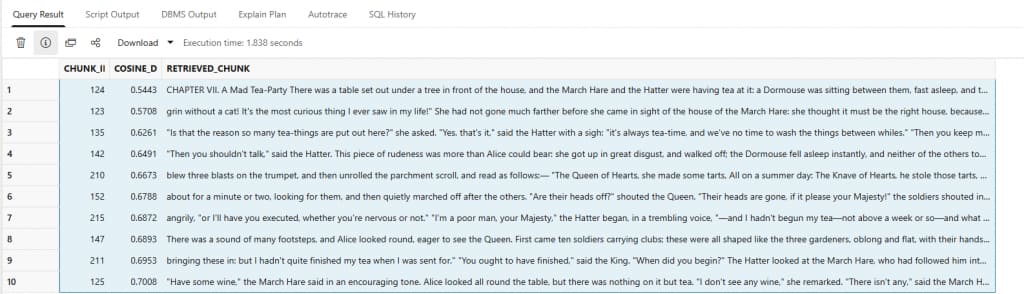
Now use DBMS_VECTOR_CHAIN.UTL_TO_EMBEDDING to turn a question into a query vector and compare it with the vectors stored in RAG_CHUNKS. The query returns the closest chunks and a preview of their text.
For example, try the question: ‘Who attends the tea party?’
The query below generates the question embedding, calculates the cosine distance for each stored chunk, and returns the 10 closest matches with a preview of their text:
select chunk_id,
round(vector_distance(embedding,
    dbms_vector_chain.utl_to_embedding(:questions,
    json('{"provider":"database","model":"MINILM_L12_V2"}')), cosine), 4)
    as cosine_distance,
    substr(chunk_data, 1, 750) as retrieved_chunk
from rag_chunks
order by cosine_distance
fetch exact first 10 rows only;
See Oracle’s vector distance documentation for more details.
A typical result might look like this:
Generate an answer with UTL_TO_GENERATE_TEXT
The final stage turns the similarity search into a RAG response. For each question, the process:
retrieves the ten most similar chunks; combines them into a prompt; and sends the prompt to an LLM.
This example uses OCI Generative AI. Update the provider, credential, endpoint, and model to match your environment. Here, the provider is ocigenai and the credential is OCI_GENAI_CRED.
The prompt tells the LLM to answer only from the supplied context, say when the answer is not present, and cite the source chunk IDs. These instructions make the retrieved evidence visible and make unsupported answers easier to detect.
Before running the generation query, create the required credential with DBMS_CREATE_CREDENTIAL. You also need to grant the database user outbound network access to the host used by your OCI Generative AI endpoint with DBMS_NETWORK_ACL_ADMIN.APPEND_HOST_ACE.
The exact credential parameters and network configuration depend on your environment and OCI region. See Oracle’s documentation for CREATE_CREDENTIAL, UTL_TO_GENERATE_TEXT, and APPEND_HOST_ACE.
You can check whether the credential is available to the current database user with:
select credential_name
from user_credentials
where credential_name = 'OCI_GENAI_CRED';
Now try questions such as:
- Who attends the tea party?
- Why is the White Rabbit in a hurry?
- What did Alice think about a book without pictures or conversations?
- What happened when Alice drank from the little magic bottle?
- Which animal was sitting on a mushroom?
- Why did Alice fall down the rabbit hole?
- What role does the Queen of Hearts play?
The following call retrieves the top ten chunks, builds the prompt, and sends it to the LLM. This was the single PL/SQL call I was looking for. It embeds the user question, retrieves the ten most similar chunks using vector search, builds a context prompt, and sends it to OCI Generative AI to generate a cited answer.
set serveroutput on
declare
  l_query_vector vector;
  l_context      clob := empty_clob();
  l_prompt       clob;
  l_answer       clob;
begin
  l_query_vector := dbms_vector_chain.utl_to_embedding(
    :question, json('{"provider":"database","model":"MINILM_L12_V2"}')
  );

  for r in (
    select chunk_id, chunk_data
    from rag_chunks
    order by embedding <=> l_query_vector
    fetch approx first 10 rows only
  ) loop
    l_context := l_context || chr(10) || '[chunk ' || r.chunk_id || ']' ||
                 chr(10) || r.chunk_data || chr(10);
  end loop;

  l_prompt := 'Answer only from the supplied context. If the answer is absent, say so. '
           || 'Cite chunk IDs in square brackets.' || chr(10) || chr(10)
           || 'QUESTION: ' || :question || chr(10) || 'CONTEXT:' || l_context;

  l_answer := dbms_vector_chain.utl_to_generate_text(
    l_prompt,
    json('{"provider":"ocigenai",' ||
         '"credential_name":"OCI_GENAI_CRED",' ||
         '"url":"https://inference.generativeai.us-chicago-1.oci.oraclecloud.com/20231130/actions/chat",' ||
         '"model":"cohere.command-a-03-2025",' ||
         '"chatRequest":{"maxTokens":300,"temperature":0}}')
  );

  dbms_output.put_line(l_answer);
end;
/
Here are two sample outputs from the demo.
Question: Who attends the tea party?
The attendees of the tea party, as mentioned in the context, are:

- The March Hare [chunk 124, 125, 135, 215]
- The Hatter [chunk 124, 125, 134, 135, 142, 210, 215]
- The Dormouse [chunk 124, 134, 135, 142]
- Alice [chunk 124, 125, 134, 135, 142]

There is no mention of other attendees at the tea party in the provided context.
Question: What role does the Queen of Hearts play?
The context does not explicitly state a specific task for the Queen of Hearts. However, she is depicted as a ruler who presides over a court, issues commands, and makes decisions, such as ordering beheadings [chunk 151, chunk 161, chunk 234].
She is also mentioned in a rhyme about making tarts [chunk 210], but this does not appear to be her primary task.
Python integration with langchain-oracledb
If you prefer to work with Python, langchain-oracledb provides LangChain components for loading documents, splitting text, generating embeddings and summaries, storing vectors, and retrieving relevant content.
Depending on how you configure them, these components can use Oracle AI Database for the underlying document processing, embedding, vector storage, and retrieval. Keeping documents, metadata, chunks, and vectors together in the database can reduce application-side glue code and data movement. It also lets you use Oracle’s document-processing capabilities for formats such as HTML, XML, PDF etc.
The table below shows how selected langchain-oracledb components map to Oracle capabilities:
| LangChain component | Related Oracle capability |
|---|---|
| OracleDocReader | DBMS_VECTOR_CHAIN.UTL_TO_TEXT for metadata and text extraction |
| OracleDocLoader | DBMS_VECTOR_CHAIN.UTL_TO_TEXT for metadata and text extraction from table rows |
| OracleTextSplitter | DBMS_VECTOR_CHAIN.UTL_TO_CHUNKS |
| OracleEmbeddings | DBMS_VECTOR.LOAD_ONNX_MODEL and DBMS_VECTOR_CHAIN.UTL_TO_EMBEDDINGS |
| OracleVectorizerPreference | DBMS_VECTOR_CHAIN.CREATE_PREFERENCE, VECTORIZER, and DROP_PREFERENCE |
| OracleSummary | DBMS_VECTOR_CHAIN.UTL_TO_SUMMARY |
| OracleVS | DBMS_VECTOR_CHAIN.UTL_TO_EMBEDDING |
OracleEmbeddings can use an ONNX model stored in the database or a supported third-party embedding provider. OracleVS acts as the LangChain vector store, keeping document text, metadata, and embeddings together in an Oracle table.
In one of the next posts we will provide a complete Python example using the LangChain integration.