
JSON (JavaScript Object Notation) is a lightweight data-interchange format that provides a standardized, efficient way for systems to exchange data. Its simplicity, flexibility, and compatibility with popular programming languages have made JSON the de facto standard for web applications. As a result, developers increasingly expect to store, query, and manage JSON data directly in their databases.
Oracle AI Database addresses this requirement by providing native JSON support alongside relational database features such as transactions, indexing, declarative querying, and views.
In this blog, I explore some of the Oracle JSON search capabilities, including relevance scoring, prefix and fuzzy matching, thesaurus-based synonym expansion, and facet search over a JSON collection.
Before you start
If you are not already familiar with Oracle JSON and Oracle Text, you can learn more by visiting the links at the end of this blog. For clarity, I have included the output from the SQL commands throughout the post.
The scripts and movie dataset are available in the JSON Full-Text Search with Oracle AI Database 26ai GitHub repository. To run them, you need access to Oracle AI Database 26ai, either on premises or in the cloud. For testing and non-production use, the following free options are available:
Getting Started
After you have access to Oracle AI Database 26ai, create a database user to run the search queries.
CREATE USER json_text IDENTIFIED BY <password>;
-- Grants
GRANT CONNECT, RESOURCE TO json_text;
GRANT SODA_APP, DB_DEVELOPER_ROLE TO json_text;
You can also use an existing user in your Oracle AI Database 26ai or Autonomous Database environment. Ensure that the user has been granted DB_DEVELOPER_ROLE.
Creating a JSON Collection Table
In Oracle Database, a JSON collection table is a special table that stores JSON documents in a single column named DATA. We will create an external table that points to the sample dataset, then populate the JSON collection table from the external table.
The following example creates external table on Autonomous AI Database by loading the sample dataset from the OCI object storage
-- connect as json_text
DROP TABLE mflix_movies_ext;
DROP TABLE j_movies CASCADE CONSTRAINTS PURGE;

--Your PAR URL to the sample dataset
define movies_par_url = 'https://objectstorage.eu-frankfurt-1.oraclecloud.com/p/.../movies.ndjson';

BEGIN
  DBMS_CLOUD.CREATE_EXTERNAL_TABLE(
    table_name      => 'mflix_movies_ext',
    credential_name => NULL,  -- use NULL for a PAR URL
    format          => JSON_OBJECT('type' VALUE 'jsondoc'),
    file_uri_list   => '&&movies_par_url'
  );
END;
Alternatively, if you are using Oracle AI Database, the ORACLE_BIGDATA driver can be used to create an external table pointing to the sample dataset. Download the dataset here, copy it to a file system accessible to the Oracle Database server, and create a DIRECTORY object that points to that location.
--connect as system on the PDB
CREATE OR REPLACE DIRECTORY movies_dir as '<path to movies.ndjson>;
GRANT READ, WRITE ON DIRECTORY movies_dir TO json_text;

-- connect as json_text
DROP TABLE mflix_movies_ext;
DROP TABLE j_movies CASCADE CONSTRAINTS PURGE;

CREATE TABLE mflix_movies_ext (
  data JSON
)
ORGANIZATION EXTERNAL (
  TYPE ORACLE_BIGDATA
  DEFAULT DIRECTORY movies_dir
  ACCESS PARAMETERS (
    com.oracle.bigdata.fileformat = jsondoc
  )
  LOCATION (movies_dir:'movies.ndjson')
)
PARALLEL
REJECT LIMIT UNLIMITED;

/*
 Table MFLIX_MOVIES_EXT created
/*
Next, we will create and populate the Collection Table from the external table previously created.
CREATE JSON COLLECTION TABLE j_movies;
INSERT INTO j_movies
SELECT *
FROM mflix_movies_ext;
COMMIT;

/*
JSON collection table J_MOVIES created.
21,349 rows inserted.
Commit complete.
*/
After creating the collection, validate the load by counting the documents in j_movies:
-- validate load
COLUMN title format a60
COLUMN year format 9999
SELECT count(*) AS document_count
FROM j_movies;

/*
DOCUMENT_COUNT
--------------
         21349
*/
Now let’s inspect our JSON document. The below query retrieves a movie document from the JSON collection table j_movies. This document is a mix of searchable text, structured metadata, arrays, nested objects, and operational fields.
-- load one document
SELECT
 JSON_SERIALIZE(DATA PRETTY)
FROM j_movies
FETCH FIRST 1 ROWS ONLY;
----- output
{
  "title": "The Saphead",
  "imdb": {
    "rating": 6.2,
    "votes": 1020,
    "id": 11652
  },
  "directors": [
    "Herbert Blachè",
    "Winchell Smith"
  ],
  "year": 1920,
  "poster": "https://m.media-amazon.com/images/M/MV5BZDNiODA3NzQtNTBmZS00NTM3LWJlOGMtMDg2NzFiNDU2M2M3XkEyXkFqcGdeQXVyMjUxODE0MDY@._V1_SY1000_SX677_AL_.jpg",
  "awards": {
    "wins": 0,
    "nominations": 1,
    "text": "1 nomination."
  },
  "runtime": 77,
  "type": "movie",
  "cast": [
    "Edward Jobson",
    "Beulah Booker",
    "Edward Connelly",
    "Edward Alexander"
  ],
  "writers": [
    "Bronson Howard (original play \"The Henrietta\")",
    "Victor Mapes (play)",
    "June Mathis (scenario)",
    "Winchell Smith (play)"
  ],
  "plot": "The simple-minded son of a rich financier must find his own way in the world.",
  "_id": "573a1391f29313caabcd6ea2",
  "fullplot": "Nick Van Alstyne owns the Henrietta silver mine and is very rich. His son Bertie is naive and spoiled. His daughter Rose is married to shady investor Mark. Mark wrecks Bertie's wedding plans by making him take the blame for Mark's illegitimate daughter. Mark also nearly ruins the family business by selling off Henrietta stock at too low a price. Bertie, of all people, must come to the rescue on the trading floor.",
  "genres": [
    "Comedy"
  ],
  "countries": [
    "USA"
  ],
  "lastupdated": "2015-06-20 00:38:08.303000000",
  "num_mflix_comments": 0,
  "released": "1920-09-01T00:00:00",
  "tomatoes": {
    "viewer": {
      "rating": 3.3,
      "numReviews": 435,
      "meter": 49
    },
    "dvd": "2000-01-11T00:00:00.000000Z",
    "lastUpdated": "2015-06-23T19:23:34.000000Z"
  }
}
For full text search the most useful fields in the document and their JSON Paths are:
title– Movie title; $.title.plot– Short synopsis; ideal for keyword searches; $.plot.fullplotricher description; usually the best field for general text searches; $.fullplotcast,directors,writers: arrays of names, useful for people based searches; $.cast, $directors,$writers.- NOTE:
JSON_TEXTCONTAINSsearches the scalar values of an array when you target the array field itself. For example, use$.cast, not $.cast[*] . Array steps are not supported inJSON_TEXTCONTAINSpath arguments.
- NOTE:
genres: useful for filtering and faceted searches, $.genres.
Creating the Oracle Text JSON search index
Before we run search queries, we need to create an index. The following statement creates a JSON Search index. A JSON Search index is an Oracle Text index designed specifically for JSON data. It indexes words, values, and JSON paths, enabling efficient word and phrase searches within JSON documents.
By default, the search index is maintained automatically by Oracle in the background, and it indexes text and numeric ranges.
--  JSON search index creation
CREATE SEARCH INDEX j_movies_text_idx
ON j_movies (DATA) FOR JSON;
/*
INDEX J_MOVIES_TEXT_IDX created.
*/
Note that with Oracle AI Database 26ai, FOR JSON can be omitted when the indexed column is of type JSON or is constrained with IS JSON.
CTX_USER_INDEXES dictionary view contains information about Oracle Text indexes, including JSON search indexes. For example, the following query lists synchronization and maintenance settings:
COL IDX_NAME FOR A30
COL IDX_SYNC_TYPE FOR A20
COL IDX_MAINTENANCE_TYPE FOR A20
SELECT IDX_NAME, IDX_SYNC_TYPE, IDX_MAINTENANCE_TYPE FROM CTX_USER_INDEXES;

/*

IDX_NAME                       IDX_SYNC_TYPE        IDX_MAINTENANCE_TYPE
------------------------------ -------------------- --------------------
J_MOVIES_TEXT_IDX              MANUAL               AUTO
*/
If you need to synchronize index changes at commit time, use manual maintenance with SYNC (ON COMMIT) when creating the index:
CREATE SEARCH INDEX j_movies_text_idx
ON j_movies (data)
FOR JSON
PARAMETERS ('MAINTENANCE MANUAL SYNC (ON COMMIT)');
And to reduce index size and maintenance overhead, you can index only the JSON paths needed by your application. The following index supports full-text and string-equality searches on title and plot:
CREATE SEARCH INDEX j_movies_text_idx
ON j_movies (DATA)
FOR JSON PARAMETERS ('SEARCH_ON TEXT INCLUDE ($.title, $.plot)');
Text search with JSON in action
Oracle AI Database provides the SQL condition JSON_TEXTCONTAINS for full-text searches over JSON data. JSON_TEXTCONTAINS requires a JSON search index on the JSON column. Let’s explore some examples:
The following query finds movies whose title field contains the word ‘Robbery‘:
COLUMN title format A30
COLUMN plot format A30
COLUMN year format 9999
SELECT
  JSON_VALUE(DATA, '$.title' returning varchar2(200)) as title,
  JSON_VALUE(DATA, '$.plot' returning varchar2(200)) as plot,
  JSON_VALUE(DATA, '$.year' returning number null on error) as year
FROM j_movies
WHERE JSON_TEXTCONTAINS(DATA, '$.title', 'Robbery')
FETCH FIRST 3 ROWS ONLY;

/*
TITLE                          PLOT                            YEAR
------------------------------ ------------------------------ -----
The Great Train Robbery        A group of bandits stage a bra  1903
                               zen train hold-up, only to fin
                               d a determined posse hot on th
                               eir heels.

The Great St. Trinian's Train  The all-girl school foil an at  1966
Robbery                        tempt by train robbers to reco
                               ver two and a half million pou
                               nds hidden in their school.
Robbery                        A dramatization of the Great T  1967
                               rain Robbery. While not a 'how
                                to', it is very detail depend
                               ent, showing the care and plan
                               ning that took place to pull i
                               t off.
*/
The below query combines JSON_TEXTCONTAINS conditions with AND and NOT, then rank the results by relevance :
COLUMN title format A30
COLUMN plot format A40
COLUMN genres format A20
SELECT
  JSON_VALUE(m.data, '$.title' RETURNING VARCHAR2(500)) AS title,
  JSON_VALUE(m.data, '$.plot'  RETURNING VARCHAR2(4000)) AS plot,
  JSON_QUERY(m.data, '$.genres' RETURNING CLOB)          AS genres
FROM j_movies m
WHERE JSON_TEXTCONTAINS(m.data, '$.plot', 'bank robbery', 1)
  AND NOT JSON_TEXTCONTAINS(m.data, '$.genres', '(Drama OR Romance)')
ORDER BY SCORE(1) DESC
FETCH FIRST 3 ROWS ONLY;
/*
TITLE                PLOT                           GENRES
-------------------- ------------------------------ --------------------
The Ladykillers      Five diverse oddball criminal  ["Comedy","Crime"]
                     types planning a bank robbery
                     rent rooms on a cul-de-sac fro
                     m an octogenarian widow under
                     the pretext that they are clas
                     sical musicians.

Loot                 Based on the play by 'Joe Orto ["Comedy","Crime"]
                     n' this film follows the adven
                     tures of two pals who have pul
                     led off a bank robbery and hav
                     e to hide the loot. Fortunatel
                     y one of them works in a funer
                     al parlor...

Sherlock Holmes in   In this mystery, Holmes pursues ["Crime","Mystery"]
New York             his arch-enemy Moriarty to N
                     ew York, which the villainous
                     scoundrel has carried out the
                     ultimate bank robbery. Meanwhi
                     le, Holmes enjoys a blossoming
                      romance ...

*/
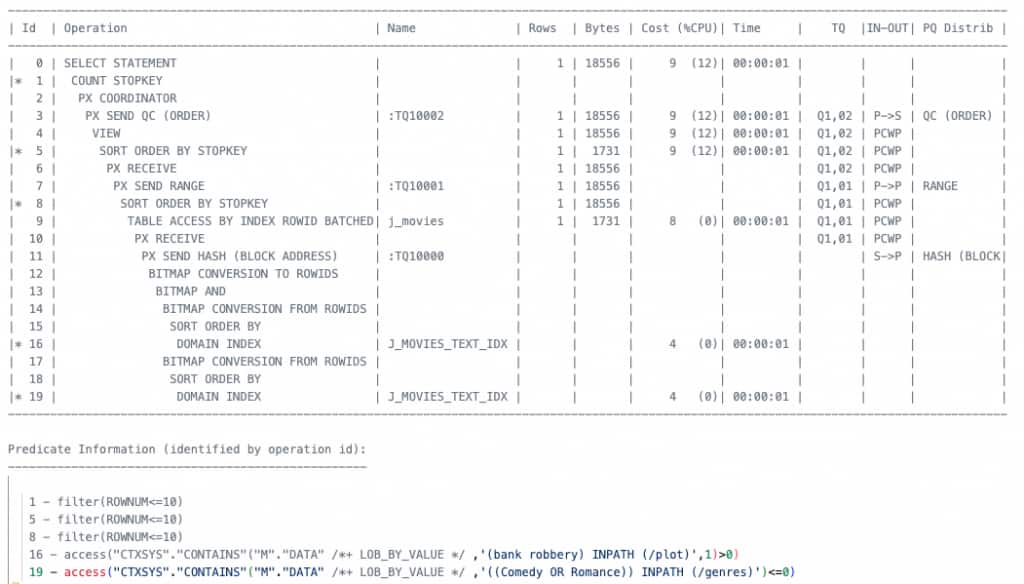
The execution plan shows that the JSON search index has been chosen by the Oracle optimizer. Steps 16 and 19 DOMAIN INDEX indicate that the search index is used for each predicate below:
- ((Comedy OR Romance)) INPATH (/genres) <= 0
- (bank robbery) INPATH (/plot)
Prefix Matching in a JSON search
Another useful full-text search capability is prefix matching. The query below uses the prefix operator % inside JSON_TEXTCONTAINS. The expression politi% matches indexed words that begin with politi, such as politician, politics, and political.
Applications can use prefix matching for implementing type-ahead or autocomplete functionality. In other words, as a user types, the application can suggest matching words or titles, allowing the user to select a suggestion instead of entering the complete text manually.
-- prefix matching/wildcard example
COLUMN title format A30
COLUMN plot format A40
SELECT
  JSON_VALUE(m.data, '$.title' RETURNING VARCHAR2(500)) AS title,
  JSON_VALUE(m.data, '$.plot'  RETURNING VARCHAR2(4000)) AS plot
FROM j_movies m
WHERE JSON_TEXTCONTAINS(m.data, '$.title', 'politi%', 1)
ORDER BY SCORE(1) DESC
FETCH FIRST 3 ROWS ONLY;
/*
TITLE                PLOT
-------------------- ----------------------------------------
The Power of Nightma A series of three documentaries about th
res: The Rise of the e use of fear for political gain.
 Politics of Fear

Beyond Gay: The Poli Before the 30th anniversary, Vancouver's
tics of Pride         Gay Pride Parade director examines rele
                     vance of Pride celebrations internationa
                     lly. He travels to places where Pride is
                      steeped in protest to ...

Political Animals    A divorced, former First Lady, is curren
                     tly serving as the Secretary of State. S
                     he deals with State Department issues, w
                     hile trying to keep her family together.

*/
Fuzzy search
The below query searches the title field for misspellings of “Bridget Jones”. Each FUZZY expression expands one misspelled word to similar terms that exist in the Oracle JSON Search index:
fuzzy(Jons, 50, 100, weight)looks for terms similar toJons, such asJones.fuzzy(Briget, 60, 100, weight)looks for terms similar toBriget, such asBridget.
60 and 50 in the fuzzy expression represent similarity thresholds, 100 allows up to 100 matching indexed terms to be considered, and weight gives closer spellings a higher relevance contribution.
-- JSON search with FUZZY and NEAR operators.
-- The following query will return documents where the title field
-- contains words that are fuzzy matches for "Briget" and "Jons" within 5 -- words of each other.

COLUMN title format A30
COLUMN plot format A40
SELECT
  JSON_VALUE(data, '$.title' RETURNING VARCHAR2(1000)) AS title,
  JSON_VALUE(data, '$.plot'  RETURNING VARCHAR2(4000)) AS plot,
  SCORE(1) AS relevance
FROM j_movies
WHERE JSON_TEXTCONTAINS(
        data,
        '$.title',
        'NEAR((fuzzy(Briget,60,100,weight), fuzzy(Jons,50,100,weight)), 5)',1)
ORDER BY SCORE(1) DESC
FETCH FIRST 10 ROWS ONLY;

/*

TITLE                PLOT                                      RELEVANCE
-------------------- ---------------------------------------- ----------
Bridget Jones's.     A British woman is determined to improve         14
Diary                herself while she looks for love in a y
                     ear in which she keeps a personal diary.

Bridget Jones: The   After finding love, Bridget Jones questi         14
Edge of Reason       ons if she really has everything she's d
                     reamed of having.

*/
Using Synonyms
Synonyms improve search recall as they help users find relevant documents even when the document uses different terminology from the query. They are especially important when users use different vocabulary for the same concept, data contains product names or abbreviations, and You want consistent results without requiring users to know the exact wording used in the documents.
In Oracle Text, synonym expansion is controlled explicitly with the SYN operator, so the application can decide when broader matching is appropriate:
The below example uses an Oracle Text thesaurus to expand a search term with synonyms.For demonstration purposes, the first block drops the MOVIE_THES thesaurus. This step might not be appropriate in a production environment, where you would typically preserve an existing thesaurus.
The next block creates a new, empty thesaurus and defines a synonym group with the desired related terms. Then the query uses the SYN operator to expand the word robot at query time to include the terms android and cyborg. It then searches the $.plot JSON field for any of those terms:
In summary, this lets a user search for robot and retrieve movies whose plots use android or cyborg instead, even if the word robot does not appear. SCORE(1) places the most relevant matches first.
--cleanup
BEGIN
  CTX_THES.DROP_THESAURUS('movie_thes');
END;
/

-- create a small movie-search thesaurus
BEGIN
  CTX_THES.CREATE_THESAURUS('movie_thes', FALSE);
  CTX_THES.CREATE_RELATION(
    'movie_thes', 'robot', 'SYN', 'android'
  );
  CTX_THES.CREATE_RELATION(
    'movie_thes', 'robot', 'SYN', 'cyborg'
  );
END;
/
-- expands "robot" to include "android" and "cyborg".
SELECT
  JSON_VALUE(data, '$.title' RETURNING VARCHAR2(1000)) AS title,
  SCORE(1) AS relevance
FROM "j_movies"
WHERE JSON_TEXTCONTAINS(
        data,
        '$.plot',
        'SYN(robot, movie_thes)',
        1
      )
ORDER BY SCORE(1) DESC
FETCH FIRST 10 ROWS ONLY;
/*
TITLE                           RELEVANCE
------------------------------ ----------
Terminator 2: Judgment Day             24
The Iron Giant                         21
Real Steel                             21
Robot Stories                          21
Ghost in the Shell Arise: Bord         12
er 1 - Ghost Pain
Appleseed Alpha                        12
RoboCop 2                              12
The Machine                            12
The Terminator                         12
Manborg                                12

10 rows selected.
*/
JSON Facet Search
You can use the JSON Result Set Interface, CTX_QUERY.result_set, to perform facet search over JSON data. This interface is optimized to return search hits, counts, and facets in a single operation, avoiding multiple separate queries using JSON_TEXTCONTAINS.
To search using CTX_QUERY.result_set you pass a result set descriptor (RSD) which specifies the JSON values you want to find from the indexed data.
The facet search example below summarizes movies whose plots contain mystery by genre, rating, release year, and IMDb rating:
- $query — selects movies whose
plotcontainsmystery. - $search — requests ranked hits 1 through 10.
- $facet — Ask Oracle to calculate genre counts and the average IMDb rating across all matching movies (mystery).
A user can therefore start with “movies whose plot contains mystery,” see the available genre and period distribution, and decide to narrow the result to, for example, mystery thrillers released after 1980.
--  Run this once. This is a pre-requisite for facet search
ALTER INDEX j_movies_text_idx REBUILD
    PARAMETERS ('SEARCH_ON TEXT_VALUE_STRING');
/*
Index J_MOVIES_TEXT_IDX altered.
*/
-- define rs_output
variable rs_output clob
-- build descriptor
DECLARE
rs_descriptor CLOB := q'~
{
"$query" : {
"plot" : { "$contains" : "mystery" }
},
"$search" : {
"start" : 1,
"end" : 10
},
"$facet" : [
{ "$uniqueCount" : "genres" },
{ "$uniqueCount" : "rated" },
{ "$uniqueCount" : { "path" : "year", "type" : "number" } },
{ "$count" : {
"path" : "year",
"bucket" : [
{ "$lt" : 1950 },
{ "$gte" : 1950, "$lt" : 1980 },
{ "$gte" : 1980 }
]
}
},
{ "$avg" : "imdb.rating" }
]
}~';
BEGIN
DBMS_LOB.CREATETEMPORARY(:rs_output, TRUE);
CTX_QUERY.RESULT_SET(
index_name => 'j_movies_text_idx',
query => NULL,
result_set_descriptor => rs_descriptor,
result_set => :rs_output,
format => CTX_QUERY.JSON_FORMAT
);
END;
/
-- show resulset output
OLUMN title FORMAT A30
COLUMN plot FORMAT A30
WITH search_hits AS (
SELECT hit_position,
score,
rowid_text
FROM JSON_TABLE(
:rs_output,
'$."$hit"[*]'
COLUMNS (
hit_position FOR ORDINALITY,
score NUMBER PATH '$.score',
rowid_text VARCHAR2(18) PATH '$.rowid'
)
)
)
SELECT JSON_VALUE(m.data, '$.title' RETURNING VARCHAR2(1000)) AS title,
JSON_VALUE(m.data, '$.plot' RETURNING CLOB NULL ON ERROR) AS plot,
h.score AS relevance
FROM search_hits h
JOIN j_movies m
ON m.ROWID = CHARTOROWID(h.rowid_text)
ORDER BY h.hit_position;
/*
PL/SQL procedure successfully completed.
TITLE PLOT RELEVANCE
------------------------------ ------------------------------ ----------
The Guatemalan Handshake A mysterious power failure in 13
a small mountain town coincide
s with the disappear
Murder, My Sweet After being hired to find an e 7
x-con's former girlfriend, Phi
lip Marlowe is drawn
The Hospital Horror/mystery in which an ove 7
r-burdened doctor struggles to
find meaning in his
Sherlock Holmes in New York In this mystery, Holmes pursue 7
s his arch-enemy Moriarty to N
ew York, which the v
Murder by Death Five famous literary detective 7
characters and their sidekick
s are invited to a b
The Last of Sheila A year after Sheila is killed 7
in a hit-and-run, her multi-mi
llionaire husband in
The Mirror Crack'd Jane Marple solves the mystery 7
when a local woman is poisone
d and a visiting mov
Who Is Killing the Great Chefs Mystery abounds when it is dis 7
of Europe? covered that, one by one, the
greatest Chefs in Eu
Agatha A fictional account of the rea 7
l life, eleven day, never expl
ained 1926 disappear
Un papillon sur l'èpaule Mystery film about a man who f 7
inds there is another world to
the one we know.
*/
Summary
Oracle AI Database brings the benefits of SQL and relational databases to JSON data, which you can store, query, and manage with the same confidence as other database data. With Oracle JSON Search, you can use the database itself for full-text search rather than relying on a separate specialized search engine.
Read the below links for further information on Oracle JSON and JSON text search