
When an Oracle Cloud Infrastructure (OCI) tenancy is created, it is provisioned with a single IAM domain—the Default Domain. This domain serves as the foundational control plane for identity and access management within the tenancy. It contains the initial administrative account, core authorization constructs, and the baseline authentication configuration.
OCI follows a zero-trust model from the outset: no implicit access is granted beyond what is explicitly configured. At creation time, authentication is limited to username and password, as external identity providers cannot yet be defined during tenant provisioning (as of May 2026). This behavior is governed by the default IDP policy within the IAM domain. To strengthen security, multi-factor authentication (MFA) is enforced out-of-the-box via the sign-on policy.
- IDP policies define how users authenticate
- Sign-on policies define under which conditions access is granted
For detailed documentation, refer to the official OCI IAM documentation:
IDP Policy: https://docs.oracle.com/en-us/iaas/Content/Identity/idppolicies/understand-identity-provider-policies.htm
SignOn Policy: https://docs.oracle.com/en-us/iaas/Content/Identity/signonpolicies/managingsignonpolicies.htm
IAM Domains: Structure and Design Considerations
Each IAM domain in OCI is a self-contained identity boundary, with its own users, groups, policies, and applications. Domains are independent and can operate autonomously.
A common and recommended pattern is:
- Use the Default Domain for administrative access and OCI resource management
- Use Secondary Domains for end users (employees, customers, partners, IoT identities, etc.)
External identity systems (e.g., corporate SSO) are typically integrated into these domains to provide:
- Federated authentication (SAML, OpenID Connect)
- User lifecycle management (SCIM)
- Advanced authentication methods (FIDO, X.509, etc.)
Importantly, the Default Domain cannot be replaced by an external identity provider. It remains a permanent control point for tenancy access.
OCI IAM Authentication
At first glance, setting up authentication in OCI IAM domains seems straightforward: define an identity provider, reference it in a policy, and enable single sign-on. In practice, however, the behavior does not always align with initial expectations.
It is common to encounter scenarios such as:
- An “SSO-only” setup still presenting a username/password option
- Different login experiences across OCI environments
- IDP&SignOn Policy updates that do not produce the expected authentication behavior
These situations can appear to be misconfigurations, but they are actually intentional. OCI IAM incorporates built-in safeguards designed to protect tenant access and ensure recovery options remain available.
Designing a secure and predictable authentication model requires an understanding of:
- How IDP policies are evaluated
- Why the Default IAM Domain behaves differently from secondary domains
- How OCI balances strict authentication controls with lockout protection
This blog explores these nuances and demonstrates how to design IDP policies that:
- Enforce strong, consistent authentication (such as corporate SSO only)
- Reduce unintended fallback options for regular users
- Preserve controlled administrative access for recovery scenarios
By aligning policy design with OCI IAM’s evaluation model, it becomes possible to achieve both strong security and consistent, predictable login behavior across all user types.
IDP Policies and Authentication Flow Control
OCI IAM domains allow fine-grained control over authentication through IDP policies, which can be scoped:
- Globally (default policy)
- Per application or group of applications
When multiple policies exist, application-specific policies take precedence over the default.
A key capability is enforcing a single authentication method. For example:
- Configuring exactly one SAML IDP or OpenID provider removes the login selection screen
- Users are automatically redirected to the configured identity provider
This enables a streamlined SSO experience and reduces ambiguity during login.
However, if an IDP policy is not clearly defined (e.g., overlapping or incomplete rules), the login screen may display multiple authentication options, leading to inconsistent user experience.
Default vs. Secondary Domain Behavior
A critical distinction exists between Default and Secondary IAM domains in how IDP policies are enforced.
Default Domain: Built-in Safeguards
To prevent accidental lockout of administrators, OCI enforces a fail-safe mechanism in the Default Domain:
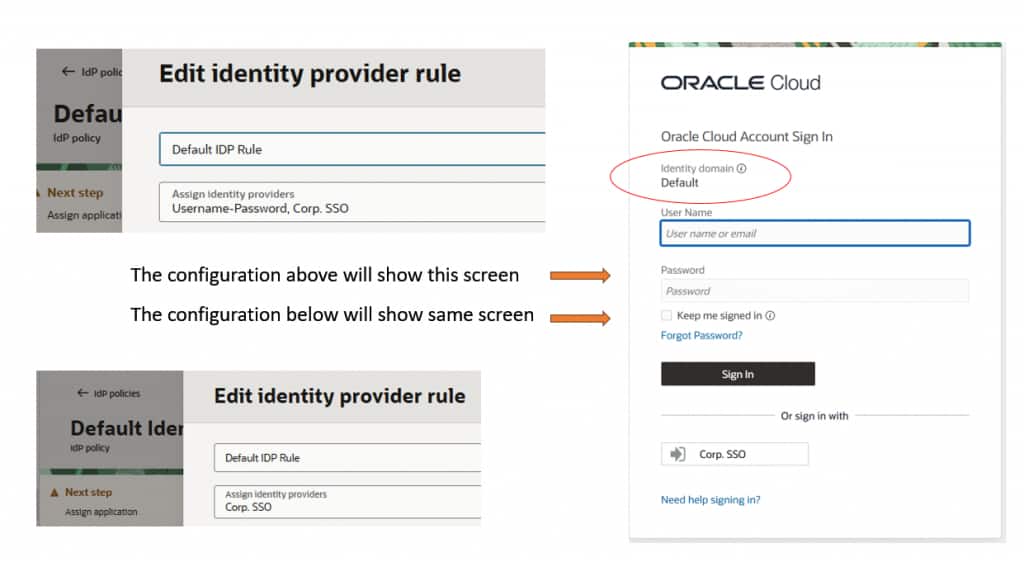
Even if an IDP policy specifies that only a corporate SSO should be used for the OCI Console, the login flow will still present:
- The configured SSO option
- A fallback username/password option
This occurs after entering the tenancy name and selecting the default domain.
This safeguard ensures administrative recovery if the external identity provider becomes unavailable.
Secondary Domains: Strict Enforcement
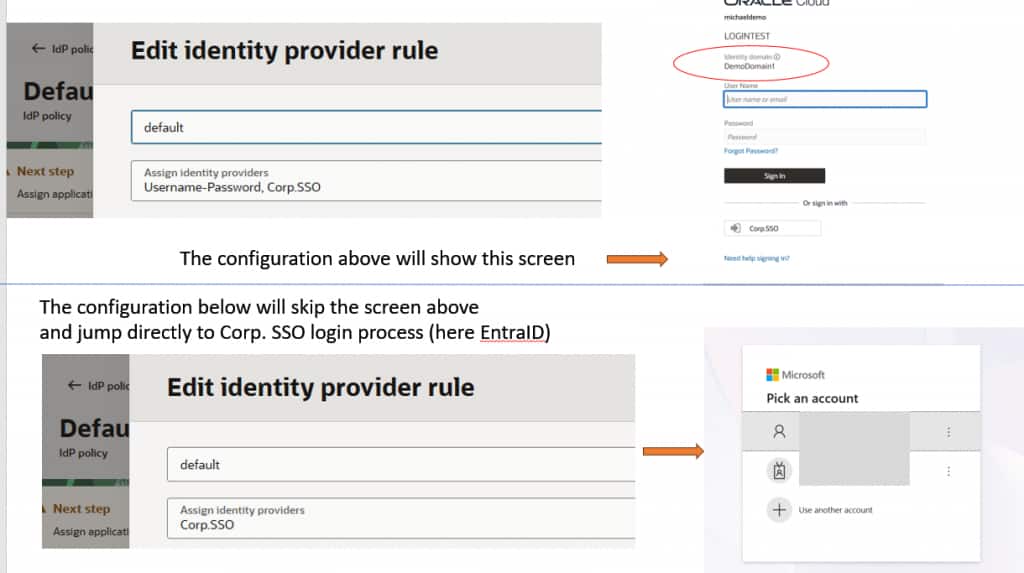
In contrast, Secondary Domains strictly enforce IDP policies:
- If only one identity provider is configured, only that option is presented
- No fallback authentication method is exposed unless explicitly configured
This makes Secondary Domains more predictable and suitable for enforcing strict SSO-only access.
User’s perspective
Here the two configuration cases and login screens for default domain (no username first flow):
Here the two configuration and login screens for secondary domain (no username first flow):
Controlling Username/Password Access
Even though the Default Domain may display the username/password option, its actual usability can be restricted:
- Federated-only users: Cannot authenticate locally, even if a password exists
- Local login disabled: Prevents password-based authentication entirely
- Sign-on policy rules: Can explicitly deny access after authentication
These controls allow administrators to maintain the fallback mechanism without exposing it to regular users.
Common Workarounds for Default Domain Behavior
Because the Default Domain always preserves a fallback login path, organizations often implement workarounds to optimize user experience:
1. Use a Secondary Domain
The most straightforward approach: enforce strict SSO behavior in a Secondary Domain and direct users there.
2. Enable Username-First Flow
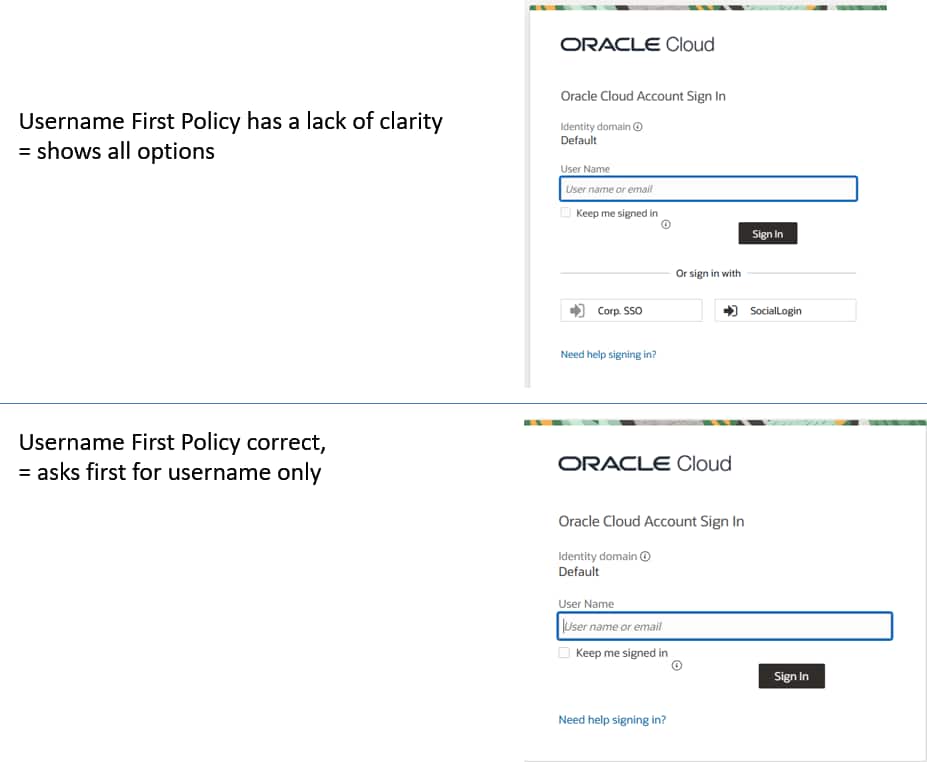
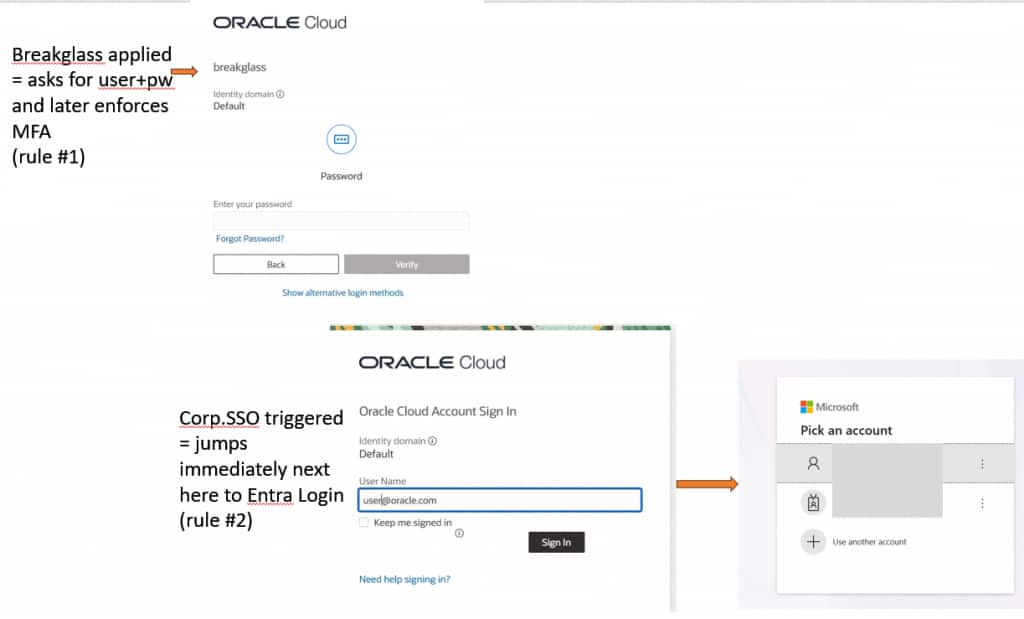
With Username-First Flow, the system determines the appropriate authentication method after the user enters their username. The rules in IDP policy decide if username password is shown or directly the Corporate-SSO.
To show how username first flow works in general: https://www.ateam-oracle.com/identity-provider-policies-in-oci-identity This blog shows also howto adjust IDP policies with the API if needed options are not in the UI.
This enables:
- Conditional routing (e.g., admins vs. regular users)
- Suppression of unnecessary login options
More in next section “Configuration of Option 2 with Username First Flow”
3. Use Bookmark with IDP-Initiated Login URLs
Unfortunately you need to bookmark a URL for IDP initiated login as the SP initiated login or the Bookmarking with Query String like https://cloud.oracle.com/?tenant=<tenant_name>&domain=<domain_name>&provider=CorpSSO stops at the selector in case of default domain (same reason as before). To build this URL: https://blogs.oracle.com/coretec/oci-saml-with-idp-initiated-login-for-oci-console-entraid-as-sample
4. Custom Login UI
OCI allows replacement of the login interface using a custom authentication widget:
- Enables full control over user experience
- Requires custom development and hosting
- Behavior depends entirely on implementation
If this behaviour can be overwritten will depend on your custom code which is not included in the linked tutorial: https://www.oracle.com/webfolder/technetwork/tutorials/obe/cloud/idcs/idcs_authn_api_obe/authn-api.html
Details for Configuration of Option 2 with Username First Flow
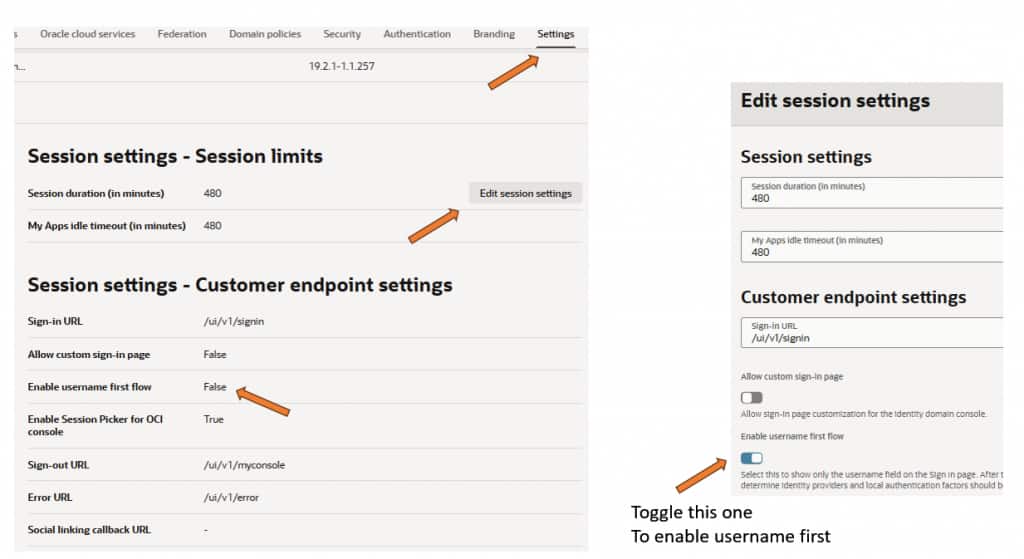
Enable Username First Flow in the default domain. This is a config in menu “Settings”. Subsection Session settings (press Button Edit session settings) and enable the username first feature as shown in screenshot below:
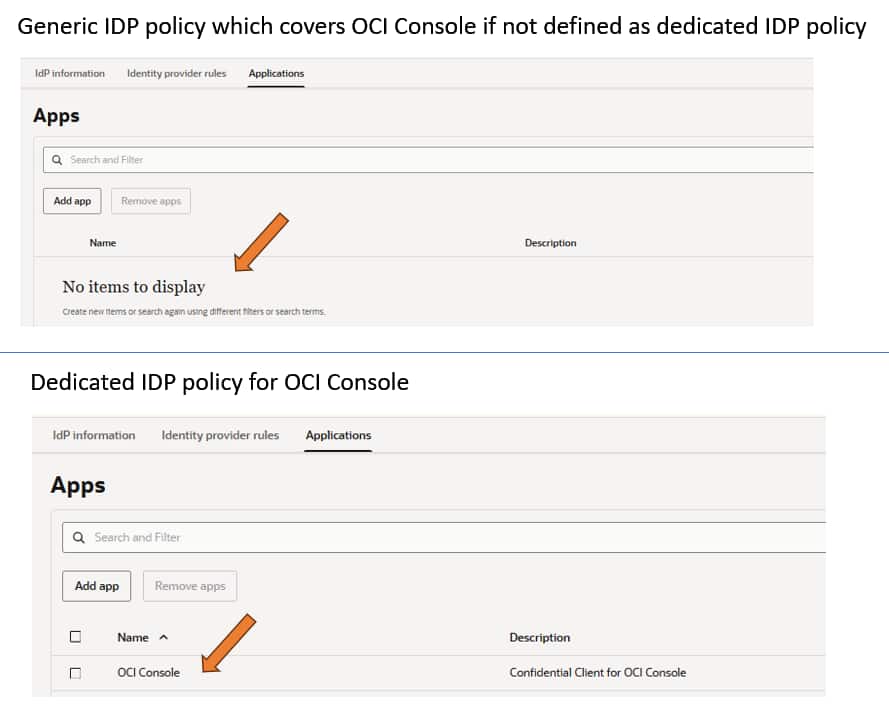
Modify default IDP policy or create a new policy for OCI Console only. Following screen shows the difference:
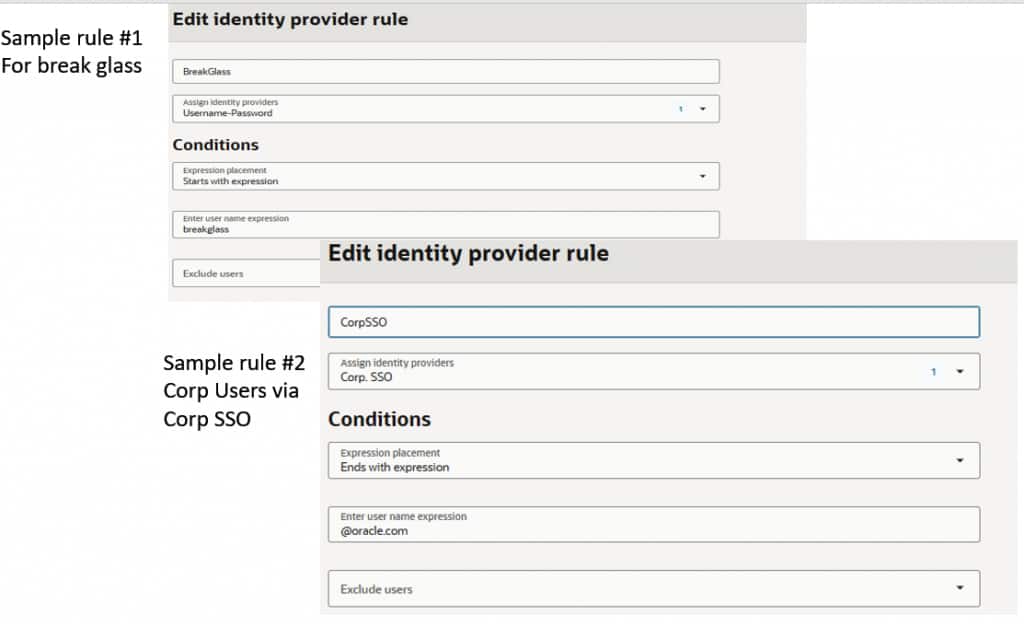
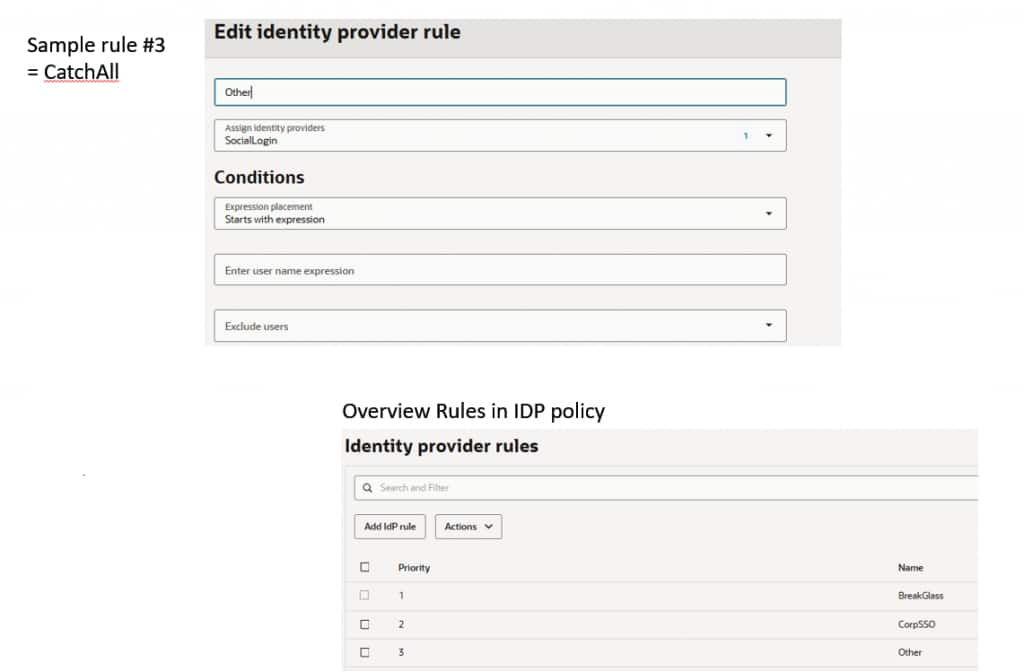
Edit the IDP policy. Take the first rule or add a first rule and modify it to specify how to recognize the BreakGlass, then in this blog a second rule for corporate SSO and finally for all remaining cases.
If the login shows like this, then the IDP policy itself has a lack of clarity and shows all IDP options defined within this policy:
In case everything looks ok but does not work, check config with API (see link for blog in option 2).
Here the rules executed
Practical Considerations
In practice, most users do not navigate to the OCI Console login page directly. Instead, they:
- Access OCI via bookmarks
- Launch applications via SSO portals
In these cases, the Default Domain effectively behaves like a Secondary Domain from a user perspective. The unique fallback behavior is only encountered in direct login scenarios.
Key Takeaways
- The Default Domain prioritizes recoverability, always preserving a fallback authentication path
- Secondary Domains prioritize control, strictly enforcing IDP policies
- Properly designed IDP and sign-on policies enable both strong security and a seamless user experience
- Advanced configurations (username-first flow, conditional rules) are essential to balance usability and security
Overall, IDP policies are evolving from simple routing rules to a key mechanism for enforcing authentication behavior. Their design increasingly impacts security, usability, and operational stability.