
Oracle offers numerous ways to automate the lifecycle of Oracle databases of any type within its own cloud stack, regardless of where it runs – whether OCI, Azure, AWS, Google, or in a private or sovereign cloud. Which resource manager is the best fit for you? After a brief overview, I’d like to discuss an example using the latest CrossPlane Provider for OCI, which runs on Kubernetes.
Infrastructure as code, state management with target/actual comparison, standardized or quasi-standard – this applies to almost all participants in the following list. Simply use the method that suits you best, that you are most familiar with, or that sounds most promising.
- Terraform and Terraform Provider for OCI:
The Oracle-developed provider is available for download from GitHub as an open-source project. The Terraform core and provider for OCI are included as a free resource manager service within OCI, meaning they don’t require any additional prerequisites such as a separate VM or container environment. The Terraform Resource Manager core is developed by HashiCorp/Red Hat/IBM. The Terraform Provider for OCI internally utilizes the Oracle Cloud (OCI) REST API. The provider is updated several times a month to reflect changes or enhancements to parts of the OCI REST API.

- OpenTofu and provider for OCI:
A free spin-off branch of Terraform, available at opentofu.org.
Requires a separate installation and is not included as a “Resource Manager Service” in OCI. The provider is updated several times a month as soon as changes or extensions occur in parts of the OCI REST API. The provider is almost as up-to-date as the one for Terraform; resource definitions can be adopted or are promptly transferred to the opentofu repository.

- OCI REST API (and Ansible):
Ansible also requires a separate installation. Alternatively, the OCI REST services can be accessed directly from the Cloud Shell or via the oci-cli command line. Direct access to the OCI REST API is possible using common tools like curl , but generating the necessary headers for the URL call usually requires separate tools and JavaScript APIs for data encryption or preprocessing. A description with examples can be found, for instance, in this blog .

- Oracle Autonomous Database PL/SQL API DBMS_CLOUD_OCI_*
Use Oracle Database as a resource manager. Requires an Oracle Autonomous Database; this could also be a dedicated instance or PDB without any additional user data. Database packages , functions, and data types call the OCI REST API.
Tip: Oracle Database can also use and connect to Git repositories via the DBMS_CLOUD_REPO package.
- AI powered by the Oracle OCI MCP Server
Requires a separate installation of the OCI MCP server (or here’s the link to the GitHub project ) and integration with AI tools such as Cline, Copilot, or Oracle Private Agent Factory .
It does not support all cloud services in OCI or all lifecycle operations, but existing services can be viewed, analyzed, started, and stopped.

- AI powered by in-Database Agents for OCI
Requires an Oracle Autonomous Database as the controlling element and access to a Large Language Model, either locally or on the internet. Agents defined in the database use the PL/SQL API to access OCI. This API currently only exists in an Autonomous Database.
Not all OCI services are currently covered by agents. The agents available for download from GitHub serve as examples for managing Autonomous Databases, OCI Vault, Object Storage, and Load Balancers.
The agents can be started via the SQL API or integrated into the Private Agent Factory and used in chats. Alternatively, integration into the open-source APEX application “Ask Oracle” is possible.

- Oracle Database Operator for Kubernetes (OraOperator)
Is installed in an existing Kubernetes cluster (AKS, GKS, OKE, OpenShift, etc.) and can be selected as a plugin when creating an OKE cluster in OCI. It supports numerous Oracle Database variants in clouds, on-premises, and within the Kubernetes cluster. Version 2.1, released in March 2026 , now supports RAC-protected databases in addition to Data Guard, which are intended to be run within the Kubernetes cluster. Several database components that are not available as cloud services, such as ORDS or Private AI Services Containers , can be managed within Kubernetes. However, OraOperator does not support OCI infrastructure services. Therefore, updates are not required as frequently as with providers that claim to support all (200+) OCI services.

- CrossPlane Provider for OCI
Is another Kubernetes operator that uses Kubernetes as a resource manager. In this case, it enables the automation of services across different clouds. CrossPlane is extensible with plugins for various clouds such as AWS, Azure, and Google Cloud, as well as with custom, user-defined services that can be accessed via the REST protocol (e.g., Ansible scripts via a generic HTTP provider). Version 1.0.1 of the CrossPlane Provider for OCI, released in April 2026 , supports not only all OCI infrastructure services but also all platform services such as PostgreSQL and MySQL databases, Oracle Database in all its forms (Autonomous, Exadata, Base Database), and new services like the AI Data Platform.
Internally, the CrossPlane Provider also uses the Oracle Cloud Infrastructure (OCI) REST API. The resource definitions typical for Kubernetes (CRDs or XRDs in CrossPlane slang) are translated from the existing current Terraform structures via cross-compiler and kept up to date.

Initial Experiences with the CrossPlane Provider for OCI
Installation and setup are quite quick and well described in the README of the GitHub repository : simply download the CrossPlane Helm Chart repository and start the installation with a Helm command.
After downloading and starting the CrossPlane core components (at least version 1.1, preferably version 2.x), additional containers for specific parts of OCI need to be downloaded from the GitHub container registry (ghcr.io). Unnecessary components can be omitted, reducing the number of Kubernetes resources that need to be supported.
A small note: the CrossPlane provider for OCI was compiled with CrossPlane 1.1, but works well with the CrossPlane 2.0 and 2.1 cores. It doesn’t yet utilize any CrossPlane 2.x features, but the current roadmap includes CrossPlane 2.x support, which is planned for implementation soon.
To provision a database service in OCI, at least the following sub-providers are required:
- oracle-provider-family-oci offers core functions for OCI
- provider-oci-identity , for accessing organizational structures such as compartments
- provider-oci-networking , to define or integrate a network
- provider-oci-database , which supports all conceivable Oracle Database Service variants
Registering new providers works in the Kubernetes style, by creating new resources, in this case of type ` pkg.crossplane.io.Provider` . The CrossPlane kernel then handles the setup of the new providers. A ` kubectl apply -f` command on the following file sets up the sub-providers mentioned above:
apiVersion: pkg.crossplane.io/v1
kind: Provider
metadata:
  name: oracle-provider-family-oci
spec:
  package: ghcr.io/oracle/provider-family-oci:v1.0.1
---
apiVersion: pkg.crossplane.io/v1
kind: Provider
metadata:
  name: provider-oci-database
spec:
  package: ghcr.io/oracle/provider-oci-database:v1.0.1
---
apiVersion: pkg.crossplane.io/v1
kind: Provider
metadata:
  name: provider-oci-identity
spec:
  package: ghcr.io/oracle/provider-oci-identity:v1.0.1
---
apiVersion: pkg.crossplane.io/v1
kind: Provider
metadata:
  name: provider-oci-networking
spec:
  package: ghcr.io/oracle/provider-oci-networking:v1.0.1
The associated containers should also soon be visible in your crossplane-system namespace:
$ kubectl get pod -n crossplane-system
NAME                                                       READY   STATUS    RESTARTS      AGE
crossplane-794b6bd899-2sgx8                                1/1     Running   0             28d
crossplane-rbac-manager-b6885667b-pmb65                    1/1     Running   1 (41h ago)   28d
oracle-provider-family-oci-2b3022a67775-dbcdddcf9-2d22p    1/1     Running   0             10d
provider-oci-database-a1e1af7fc7ff-5d8cfcd8cd-fnmvw        1/1     Running   0             10d
provider-oci-identity-4492f61491db-6c596cb84c-86n86        1/1     Running   0             9d
provider-oci-networking-1aa2e0844a70-7554546646-gfs45     1/1     Running   0             47h
Now we can link the providers to the existing tenant in OCI in various ways, as described in the
README . For brevity, I chose to use my own cloud user and the API keys stored there, but so-called instance principals would also have been possible without having to use a technical “dummy user” like mine in OCI. An oci.m.upbound.io.ProviderConfig resource needs to be created, which is interpreted by the CrossPlane core and transmits the necessary security data to the providers .
apiVersion: oci.m.upbound.io/v1beta1
kind: ProviderConfig
metadata:
  name: oci-provider-config
  namespace: crossplane-demo
spec:
  credentials:
    source: Secret
    secretRef:
      name: oci-creds
      namespace: crossplane-demo
      key: credentials
You’re correct, the security configuration is stored in a Kubernetes secret . This secret should contain a JSON structure under the aforementioned key credentials , which includes the OCIDs (Oracle Cloud Identifiers) and the private key of the OCI tenant and the user with the corresponding cloud permissions. For example, the secret could look like this, shown here as a shell script with spoofed data:
$ kubectl create secret generic oci-creds \
--namespace=crossplane-demo \
--from-literal=credentials='{
"tenancy_ocid": "ocid1.tenancy.oc1..aaaaaaaanaj36xpawsehrgeheimercontentr7frjixy3lshllsa",
"user_ocid": "ocid1.user.oc1..aaaaaaaajofbzcepdv6jsuperadminuser46uz44uu5ivu6p3ximja",
"private_key": "-----BEGIN PRIVATE KEY-----\nMIIEvQIBADANBgkqhkiG9w0BAQEFAASCBKcwggSjAgEAAoIBAQC5fYiOpY0/qUwj\nMXag3Ee3DkD6I.....\n-----END PRIVATE KEY-----\n",
"fingerprint": "9b:f5:18:cf:b1:06:db:hh:ho:ho:he:he:15:ee:a7:ee",
"region": "eu-frankfurt-1",
"auth": "ApiKey"
}'
I decided to place all new resources in a separate Kubernetes namespace called crossplane-demo. Such namespace-organized resources have only been possible for OCI since version 1.0 of the provider, but they work as far as I could test.
We can quickly see whether the security information was correct when we try to integrate an existing cloud resource or create a new one. The resource status provides relevant information. It’s not strictly necessary to check the provider container’s log ( kubectl logs …), although this can sometimes be helpful.
First, we create a new compartment (or connect to an existing one) in which we want to create a new database service. The new Kubernetes resource, created with kubectl apply, looks something like this:
apiVersion: identity.oci.m.upbound.io/v1alpha1
kind: Compartment
metadata:
  labels:
    testing.upbound.io/object-name: compartment-marcel2
  name: marcel2
  namespace: crossplane-demo
spec:
  providerConfigRef:
    name: oci-provider-config
    kind: ProviderConfig
  forProvider:
    compartmentId: "ocid1.compartment.oc1..aaaaaaaarq642bv46bdclhgtj3oxp2nuvtp42sqa"
    description: "Marcels Test Compartment"
    name: Marcel2
In Kubernetes, the new resource is named marcel2 in the crossplane-demo namespace and has the type identity.oci.m.upbound.io.Compartment. In the Oracle Cloud Stack, a new compartment Marcel2 would be created if it doesn’t already exist, or connected if it does. The OCID or compartmentID to be specified here is that of the parent (!) compartment, which must already exist. In case of doubt, use the always-existing root compartment. This is just as necessary in the OCI REST API as it is, for example, in Terraform.
This is almost the only place in our configuration where an OCID needs to be looked up in the cloud interface (e.g., using the oci iam compartment list command). Almost all other resources can be referenced from here on using selectors, which are essentially Kubernetes pointers or name filters. This requires a label that is always specified and freely selectable . In our example, it is named testing.upbound.io/object-name and has the value compartment-marcel2.
Was the compartment correctly mounted? We can see this from the status, which should show TRUE after a short while for both SYNCED and READY:
$ kubectl get compartment -n crossplane-demo
NAME      SYNCED   READY   EXTERNAL-NAME                                                                         AGE
marcel2   True     True    ocid1.compartment.oc1..aaaaaaaawy7rmmvmuv42nsagx4cqe5yd6kxrb6vgkc6e73zblexr56br5d4q   2d4h
marcelb   True     True    ocid1.compartment.oc1..aaaaaaaarq642bv46bdumvfvebgsg2b7ci6m2ycclhgtj3oxp2nuvtp42sqa   2d4h
In my personal environment, I have integrated both an existing compartment marcelb and created a new compartment marcel2 directly below it.
Incidentally, if I delete the compartment resources from Kubernetes (kubectl delete…), the compartments do NOT disappear from Oracle Cloud. This is by design and is also explained as such in the OCI REST API documentation. Many other resources, such as networks or databases, are also removed from Oracle Cloud when deleted from Kubernetes, if possible.
Now we come to a rather lengthy section: creating a new virtual network (VCN) with the unfortunately necessary routing rules and access to the cloud storage service so that the database has somewhere to store its data. Here’s a whole block of resource descriptions for a private VCN with storage access, all created in the marcel2 compartment:
apiVersion: networking.oci.m.upbound.io/v1alpha1
kind: Vcn
metadata:
  labels:
    testing.upbound.io/object-name: vcn-testvcn
  name: testvcn
  namespace: crossplane-demo
spec:
  forProvider:
    cidrBlocks:
      - 10.0.0.0/16
    compartmentIdSelector:
      matchLabels:
        testing.upbound.io/object-name: compartment-marcel2
    displayName: testvcn
  providerConfigRef:
    name: oci-provider-config
    kind: ProviderConfig
---
apiVersion: networking.oci.m.upbound.io/v1alpha1
kind: ServiceGateway
metadata:
  labels:
    testing.upbound.io/object-name: servicegateway-service1
  name: service1
  namespace: crossplane-demo
spec:
  forProvider:
    compartmentIdSelector:
      matchLabels:
        testing.upbound.io/object-name: compartment-marcel2
    displayName: service1
    services:
      # "All FRA Services In Oracle Services Network"
    - serviceId: "ocid1.service.oc1.eu-frankfurt-1.aaaaaaaa7ncsqkj6lkz36dehifizupyn6qjqsmtepsegs23yyntnsy7qrvea"
    vcnIdSelector:
      matchLabels:
        testing.upbound.io/object-name: vcn-testvcn
  providerConfigRef:
    name: oci-provider-config
    kind: ProviderConfig
---
apiVersion: networking.oci.m.upbound.io/v1alpha1
kind: NatGateway
metadata:
  labels:
    testing.upbound.io/object-name: natgateway-nat1
  name: nat1
  namespace: crossplane-demo
spec:
  forProvider:
    blockTraffic: false
    compartmentIdSelector:
      matchLabels:
        testing.upbound.io/object-name: compartment-marcel2
    displayName: nat1
    vcnIdSelector:
      matchLabels:
        testing.upbound.io/object-name: vcn-testvcn
  providerConfigRef:
    name: oci-provider-config
    kind: ProviderConfig
---
apiVersion: networking.oci.m.upbound.io/v1alpha1
kind: RouteTable
metadata:
  labels:
    testing.upbound.io/object-name: routetable-table1
  name: table1
  namespace: crossplane-demo
spec:
  forProvider:
    compartmentIdSelector:
      matchLabels:
        testing.upbound.io/object-name: compartment-marcel2
    displayName: table1
    routeRules:
      - destination: 0.0.0.0/0
        destinationType: CIDR_BLOCK
        networkEntityIdSelector:
          matchLabels:
            testing.upbound.io/object-name: natgateway-nat1
      - destinationType: SERVICE_CIDR_BLOCK
        destination: "all-fra-services-in-oracle-services-network"
        networkEntityId:
         matchLabels:
           testing.upbound.io/object-name: servicegateway-service1
    vcnIdSelector:
      matchLabels:
        testing.upbound.io/object-name: vcn-testvcn
  providerConfigRef:
    name: oci-provider-config
    kind: ProviderConfig
---
apiVersion: networking.oci.m.upbound.io/v1alpha1
kind: Subnet
metadata:
  labels:
    testing.upbound.io/object-name: subnet-dbsubnet
  name: dbsubnet
  namespace: crossplane-demo
spec:
  forProvider:
    compartmentIdSelector:
      matchLabels:
        testing.upbound.io/object-name: compartment-marcel2
    vcnIdSelector:
      matchLabels:
        testing.upbound.io/object-name: vcn-testvcn
    routeTableIdSelector:
      matchLabels:
        testing.upbound.io/object-name: routetable-table1
    displayName: dbsubnet
    cidrBlock: "10.0.2.0/24"
    prohibitInternetIngress: true
    prohibitPublicIpOnVnic: true
  providerConfigRef:
    name: oci-provider-config
    kind: ProviderConfig
---
apiVersion: networking.oci.m.upbound.io/v1alpha1
kind: SecurityList
metadata:
  labels:
    testing.upbound.io/object-name: securitylist-testvcn
  name: testvcnlist
  namespace: crossplane-demo
spec:
  forProvider:
    compartmentIdSelector:
      matchLabels:
        testing.upbound.io/object-name: compartment-marcel2
    displayName: testvcnlist
    egressSecurityRules:
      - destination: 0.0.0.0/0
        protocol: all
    ingressSecurityRules:
      - protocol: "6"
        source: 10.0.0.0/16
        tcpOptions:
          - max: 2050
            min: 2048
      - protocol: "6"
        source: 10.0.0.0/16
        tcpOptions:
          - sourcePortRange:
              - max: 2050
                min: 2048
      - protocol: "6"
        source: 10.0.0.0/16
        tcpOptions:
          - max: 111
            min: 111
      - protocol: "6"
        source: 0.0.0.0/0
        tcpOptions:
          - max: 22
            min: 22
    vcnIdSelector:
      matchLabels:
        testing.upbound.io/object-name: vcn-testvcn
  providerConfigRef:
    name: oci-provider-config
    kind: ProviderConfig
As previously described, all resources and their dependencies function through selectors, a type of name filter that has been extensively used here. Only one additional OCID and one hardcoded name needed to be looked up: the OCID of the storage service in Frankfurt and its internal name, all-fra-services-in-oracle-services-network. The oci network services list command in the Cloud Shell provides information about available network services and their IDs.
And now we come to the final step: creating a “Database System.” This includes a Database Cloud Service with storage, VM nodes, default backup, database software image, patch sets, and much more. The details can be added and retrieved later; during provisioning, the Database System alone is sufficient, without having to specify too many details and sub-resources.
apiVersion: database.oci.m.upbound.io/v1alpha1
kind: DbSystem
metadata:
  labels:
    testing.upbound.io/object-name: dbsystem-testdb
  name: test-db-system
  namespace: crossplane-demo
spec:
  forProvider:
    availabilityDomain: "hnNp:EU-FRANKFURT-1-AD-1"
    compartmentIdSelector:
      matchLabels:
        testing.upbound.io/object-name: compartment-marcel2
    cpuCoreCount: 1
    dataStorageSizeInGb: 256
    databaseEdition: ENTERPRISE_EDITION
    dbHome:
      - database:
          - adminPasswordSecretRef:
              key: admin-key
              name: dbadmin-secret
            characterSet: AL32UTF8
            dbName: testdb
            dbWorkload: OLTP
            freeformTags:
              Department: Finance
            ncharacterSet: AL16UTF16
            pdbName: boermann
        dbVersion: 23.26.1.0.0
        displayName: DBHome
    dbSystemOptions:
      - storageManagement: LVM
    diskRedundancy: NORMAL
    displayName: DBSystem
    domain: dbsubnet.testvcn.oraclevcn.com
    faultDomains:
      - FAULT-DOMAIN-1
    freeformTags:
      Department: Finance
    hostname: OracleDB
    licenseModel: LICENSE_INCLUDED
    nodeCount: 1
    shape: VM.Standard2.1
    sshPublicKeys:
      - ssh-rsa AAAAB3NzaC1yc2EAAAADAQABAAABAQDuS+RSSqBKfakefakefakeJyZtLconRznC/XCqCjQNeZbjni/dadada3KkkebEaSYoLdyk7Mr/EsFxgssG7mS5aKE+DUd6HOOixCaDsfh+5I1WDgLeylrO6psc41NrAJl/jO4WQ+93nspt2abababaYl73rz8+AwfT2jpTIiSlXTcaBHfgs0q3tC5BebqbdJNFvQ9y6CQvzcGCxS1C6UviaxistnichtechtDm2DVp8epbSs6GUZeB+aBMi19fM1gApLXrRogEIwp
    subnetIdSelector:
      matchLabels:
        testing.upbound.io/object-name: subnet-dbsubnet
   providerConfigRef:
    name: oci-provider-config
    kind: ProviderConfig
For the database administrator password, a Kubernetes secret dbadmin-secret , was used to prevent the use of plaintext passwords. It can understandably take several minutes for this service to report “READY: TRUE” because a VM with the database is being set up in the background.
$ kubectl get dbsystem -n crossplane-demo
NAME             SYNCED   READY   EXTERNAL-NAME                                                                                    AGE
test-db-system   True     True    ocid1.dbsystem.oc1.eu-frankfurt-1.antheljshycylkyaftsdo5ueox4zyzgn5xurp6ukngji5wx35z7sghjm3jna   46h
However, the new database service should soon be visible in the Oracle Cloud Console itself under the display name DBSystem , initially in the Provisioning status. Provisioning was also successful in my environment at some point.
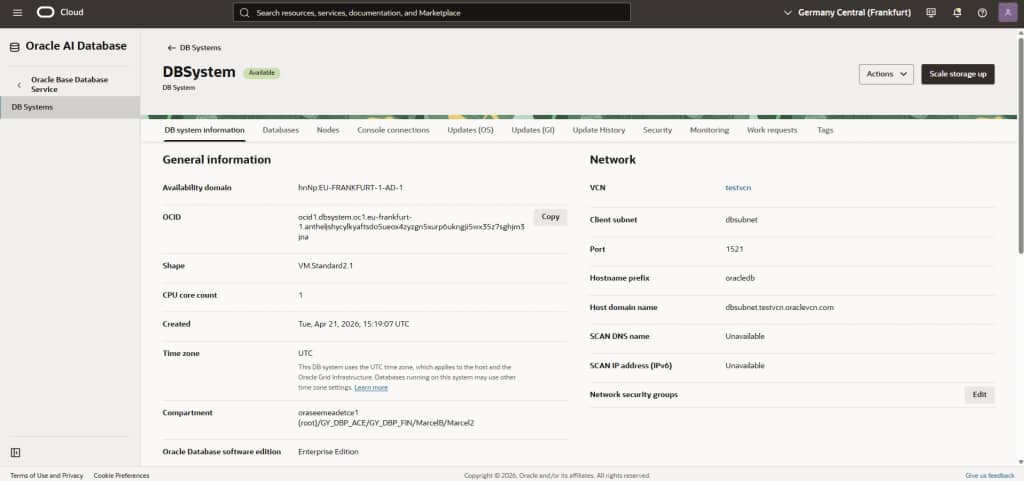
I am very curious to hear about your experiences, if you would like to share them!
Conclusion and outlook:
There are many ways to automate the management of Oracle databases. AI certainly offers interesting new possibilities, but these still require some exploration. If you’re working in a Kubernetes and container environment, CrossPlane enables you to manage and configure any cloud services in addition to Kubernetes services, using familiar and established methods. This also applies to cross-cloud environments with Oracle@Azure and similar services, or with the corresponding downloadable providers for AWS, Azure, and Google services.
With standard DevOps tools like Git and ArgoCD, you can now create entire IT landscapes, not just launch individual container applications. Frankly, I found this much more enjoyable than Terraform, but that’s just my personal preference: you always have a choice, and Oracle is happy to ensure that!
Links:
Many more similar examples for the Crossplane Provider for OCI on GitHub (Storage Buckets, PostgreSQL Database, AI Data Platform, etc.).
Announcement from Oracle Product Management regarding the new Crossplane Provider for OCI.