
Event driven architectures are now essential for many enterprises. Whether you’re tracking customer activity, monitoring devices, or capturing business signals, your ability to move data quickly and act on it matters. OCI Streaming with Apache Kafka gives you a reliable cloud native place to land high velocity events at scale. What many teams want next is an easy way to process that data in motion without operational overhead.
DeltaStream provides a way to do just that. It connects to your Kafka compatible clusters, lets you explore and query live data with SQL, and then writes filtered, joined, aggregated, enriched results back into your event ecosystem. The result is a real time pipeline that you can build and run without owning or managing complex compute or connector infrastructure.
In this post we walk through how this works with OCI Streaming for Kafka and explain why this pattern matters for Oracle users.
Transforming data “in-motion”
Raw event streams are useful, but they are rarely in the shape that downstream consumers or analytics systems want. Many teams spend time and effort building and maintaining streaming clusters, connectors, and transformation code that runs on managed infrastructure. That work takes specialized skills and draws resources away from core business priorities.
With DeltaStream and OCI Streaming with Apache Kafka you can:
• Connect to your event sources fast
• Explore topics and schemas without extra tooling
• Use standard SQL to express continuous filtering, joins, and transformations
• Publish results as new Kafka topics that feed analytics, microservices, or other systems
• Avoid standing up and managing your own Flink clusters
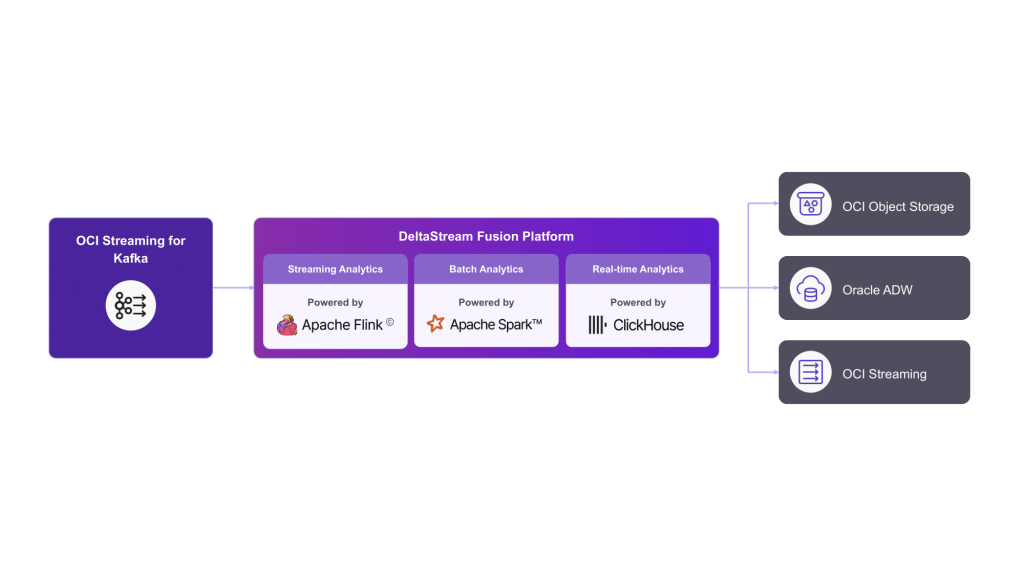
This approach reduces the operations burden and gets meaningful results into production faster. And because DeltaStream runs transformations in a managed service, teams can focus on value rather than day to day system maintenance.
Connect to OCI Streaming with Apache Kafka
If you already have events flowing into OCI Streaming with Apache Kafka you are ready to go. In our demo we had a topic called pageviews that was receiving page view events at a steady rate.
To get started with DeltaStream we added a new data store for our Kafka source. OCI’s Kafka service exposes a Kafka compatible API so connecting is straightforward. We provided:
• A name for the store: oci_kafka
• The bootstrap server address on port 10000
• A username and password
DeltaStream also supports TLS encryption and schema registries so you can use stronger authentication or managed schema evolution if your environment requires it.
Once connected, DeltaStream listed all available topics from the OCI cluster. We selected our source topic and chose to view the data from the beginning. Inside the UI you can inspect messages in either JSON or table format, which helps teams verify the shape of the incoming events before writing any transformation logic.
Explore and query with SQL
DeltaStream’s workspace is designed to help users interact with streaming data as if it were a table. This feels familiar for database teams and reduces the learning curve for people who do not live in streaming frameworks every day.
After printing our pageviews data to the screen, we define the schema and link it to that topic:
CREATE STREAM pageviews_stream (
  event_id VARCHAR,
  userid VARCHAR,
  viewtime TIMESTAMP_LTZ(3),
  event_type STRING
)WITH (
   'store' = 'oci_kafka',
   'topic'='pageviews',
   'value.format'='JSON'
);
DeltaStream started a compute sandbox that reads from the topic and streams the results back. This is not a one time snapshot. As new events arrive in the source topic, the results update continuously.
We then refined our query to focus on a specific event type:
select *
from pageviews
where event_type = 'purchase';
This filtered view gave us only the purchase events, which are frequently the data businesses want to analyze, alert on, or deliver to downstream applications in real time.
Publish transformed results to a new Kafka topic
Filtering and inspecting data is useful, but many workflows require publishing a derived stream back into Kafka so other consumers can act on it. DeltaStream makes that easy.
We created a new stream by telling DeltaStream to write the filtered results into a new Kafka topic:
create stream pageviews_purchases_stream
with (
  store = 'oci_kafka',
  topic = 'pageviews_purchases'
) as
select *
from pageviews
where event_type = 'purchase';
Under the covers this starts a managed Flink job that reads the source topic, applies the query logic, and writes matching events into the output topic. You can monitor throughput, latency, and other metrics from DeltaStream’s job dashboard or pull them into your existing observability tools through a compatible API.
A quick kcat check confirmed that the new topic was created inside OCI and was already receiving the expected events.
You can also control things like the number of partitions and retention policies for new topics, or include more complex SQL logic such as aggregations and window functions.
Supporting more than just Kafka
While this post focuses on OCI Streaming with Apache Kafka, DeltaStream supports connectors for many other systems as well. That means you can read from relational databases, cloud storage, and message queues, apply the same continuous SQL logic, and publish into Kafka or other targets.
This flexibility is useful for migrations and hybrid architectures. For example, you might:
• Migrate legacy queues into Kafka or a database with minimal disruption
• Blend change streams from OLTP systems with Kafka events in real time
• Populate data lakes and analytical stores from multiple live sources
Supporting more connectors gives teams a unified way to build real time data paths without custom code for every source and target.
Why this matters for OCI customers
OCI Streaming with Apache Kafka gives you a scalable place to collect high velocity events. With DeltaStream you now have a simple way to turn those raw streams into data products that applications, analytics, and dashboards can use immediately.
This pattern helps you deliver real time value without the operational burden of managing a dedicated streaming platform. It combines the strengths of OCI’s cloud native event service with an intuitive SQL driven processing layer so your teams can deliver results faster and with less complexity.
Get Started with OCI Streaming with Apache Kafka
OCI Streaming with Apache Kafka is ready to help you harness the power of real-time streaming applications with reduced operational overhead—and with the scalability, availability, and security you expect from Oracle Cloud Infrastructure.
Start building your data streaming solutions now!
Get Started with DeltaStream
Walk through the solution architecture and connect with our experts to design a DeltaStream deployment aligned to your OCI workloads.
Watch the demo
Start with a guided setup, talk to an expert
Authors

Abhishek Bhaumik, Senior Product Manager, Oracle

Andy Sacks, President, DeltaStream

Rachael Pedreschi, Head of Field Engineering, DeltaStream