
Search systems often start simple. A single OpenSearch cluster powers everything — application search, logs, analytics, and monitoring. For a while, this architecture works well. Queries are fast, infrastructure is manageable, and operations remain straightforward.
But as systems grow, data grows with them. Suddenly, organizations begin operating across multiple regions, environments, and workloads. A single cluster becomes difficult to scale and manage. Teams start introducing additional clusters to support new requirements: regional deployments to reduce latency, separate clusters for analytics workloads, disaster recovery clusters for resilience, and environment isolation for security and reliability.
Once multiple clusters exist, a new challenge appears: How do these clusters work together without becoming operationally complex?
This is where Cross-Cluster Search (CCS) and Cross-Cluster Replication (CCR) become essential capabilities in OpenSearch. These features allow organizations to connect clusters, distribute workloads, and build globally scalable search platforms—without forcing every dataset into a single cluster.
Cross-Cluster Search (CCS)
Cross-Cluster Search allows one OpenSearch cluster to search data stored in other clusters. Instead of copying or replicating data everywhere, CCS allows queries to run at query time across multiple clusters, with results aggregated into a single response. This is often described as federated search across clusters.
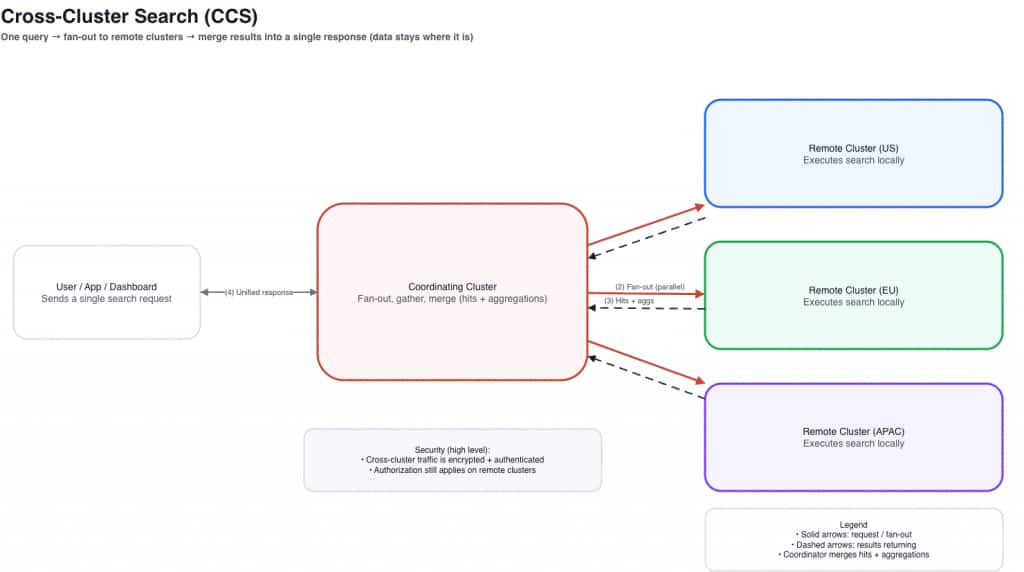
The core idea is simple: the data stays where it is. A coordinating cluster sends the query out to remote clusters, remote clusters execute locally, and the coordinator merges results into one response.
How Cross-Cluster Search Works –
In a CCS architecture:
- A coordinating cluster receives the user query
- The coordinating cluster forwards the query to remote clusters
- Each cluster executes the search locally
- Results are returned and merged into a unified response
Conceptually:
This approach allows teams to analyze distributed datasets without duplicating data across clusters.
Essential commands –
- Check configured remote clusters and connection status:
GET _remote/info
- Example cross-cluster query using a remote alias:
GET {remoteAlias}:movies-*/_search
{
  "query": {
    "match": {
      "service": "checkout"
    }
  }
}
Common CCS Use Cases
Global Observability Platforms
Large organizations often collect logs in regional clusters to reduce ingestion latency. Using CCS, engineers can run a single query across all clusters to investigate incidents globally—without centralizing all logs into one place. Benefits include unified log analysis, faster troubleshooting, and reduced data movement.
Security Operations
Security teams frequently need to analyze data from multiple environments, such as production, staging, internal infrastructure, and partner environments. CCS enables analysts to run threat detection and investigation queries across all clusters while maintaining separation between environments.
Distributed Analytics
Organizations that maintain separate clusters for analytics workloads can use CCS to query data across clusters without centralizing everything into one environment.
Cross-Cluster Replication (CCR)
While CCS focuses on querying distributed data, Cross-Cluster Replication focuses on replicating data between clusters. CCR continuously replicates indices from a leader cluster to one or more follower clusters. This ensures that clusters maintain near real-time copies of critical datasets.
If CCS is about global visibility, CCR is about data placement. With CCR, you decide that certain datasets should exist in more than one cluster—typically to improve resilience, support disaster recovery strategies, or place data closer to users and readers.
How Cross-Cluster Replication Works
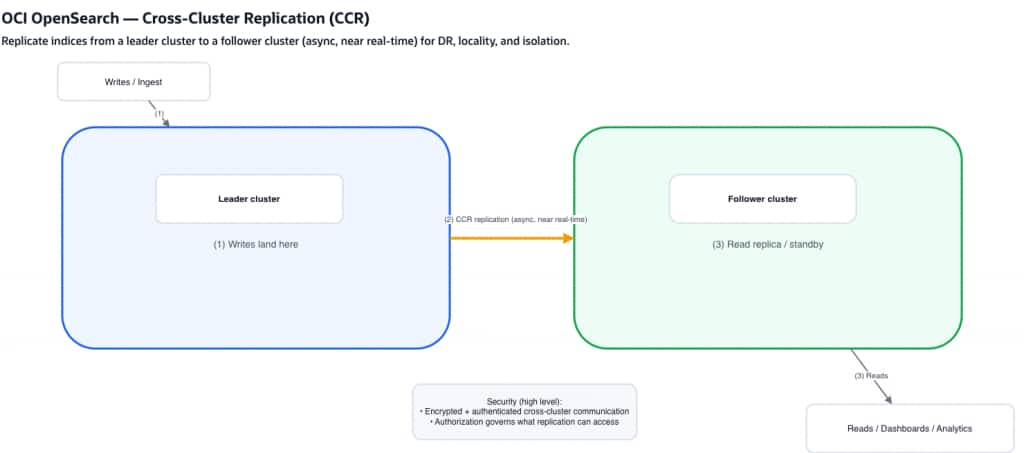
CCR follows a leader–follower model.
Key characteristics:
- data is written to the leader cluster
- follower clusters continuously pull updates
- replication happens asynchronously but near real time
CCR keeps a follower index in sync with a leader index so reads can be served locally or used for recovery readiness.
This architecture improves availability, resilience, and geographic distribution when used with a clear operational plan.
Essential commands (for customers validating CCR)
API shapes can vary by version/distribution, but a common pattern is:
- Start replication on the follower:
PUT _plugins/_replication/{followerIndex}/_start
{
  "leader_alias": "{leaderAlias}",
  "leader_index": "{leaderIndex}",
  "use_roles": {
    "leader_cluster_role": "{roleName}",
    "follower_cluster_role": "{roleName}"
  }
}
- Check replication status (health/lag indicators):
GET _plugins/_replication/{followerIndex}/_status- Pause replication:
POST _plugins/_replication/{followerIndex}/_pause
{}- Resume replication:
POST _plugins/_replication/{followerIndex}/_resume
{}- Use auto follow to automatically replicate indexes created on the leader cluster based on matching patterns:
POST _plugins/_replication/_autofollow
{
  "leader_alias": "{leaderAlias}",
  "name": "my-replication-rule",
  "pattern": "movies*",
  "use_roles": {
    "leader_cluster_role": "all_access",
    "follower_cluster_role": "all_access"
  }
}
Common CCR Use Cases
Disaster Recovery
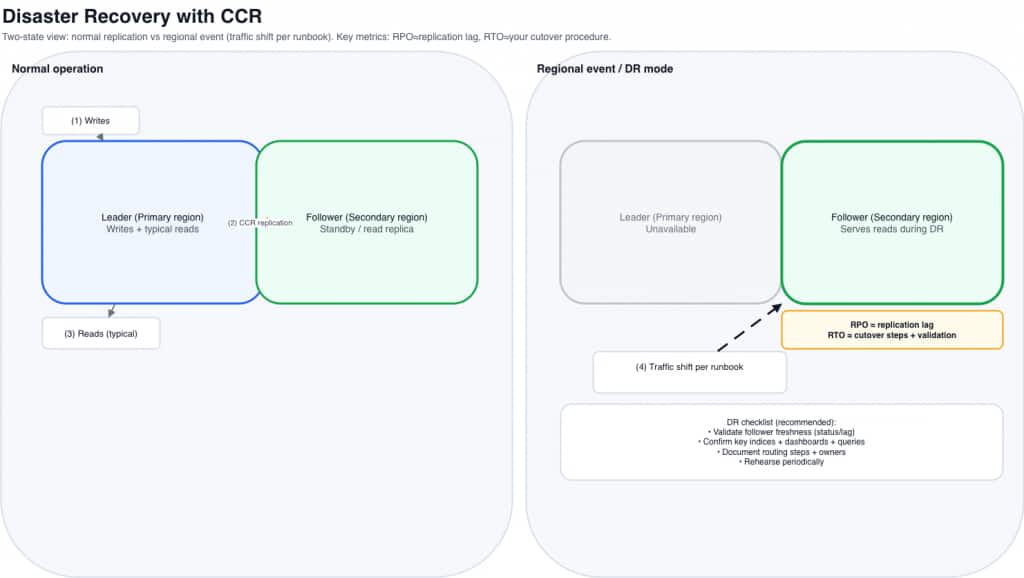
Organizations replicate critical indexes to secondary clusters in different regions. If the primary cluster becomes unavailable, teams can shift to recovery procedures that rely on the follower’s up-to-date copy—typically faster and operationally simpler than rebuilding large datasets from periodic restores alone. Benefits include improved resilience, faster recovery actions, and reduced risk of data loss (depending on lag and operational readiness).
Geo-Distributed Applications
Global applications often replicate data to clusters closer to users. Users can query nearby clusters, improving latency and performance.
Workload Isolation
Some organizations replicate indexes into clusters dedicated to analytics workloads, reporting dashboards, or downstream pipelines. This prevents heavy queries from affecting production workloads.
Secure by design
Cross-cluster features are typically enabled over private, tightly controlled connectivity, and inter-cluster traffic is encrypted and mutually authenticated. Equally important, connectivity does not imply access: authorization is still enforced on each cluster. Users (and any replication process) can only query or replicate the indices and operations permitted by your access policies and role-based controls, helping you maintain strong separation even as clusters work together.
Performance Considerations in Multi-Cluster Architectures
Performance is one of the most important aspects when designing distributed OpenSearch deployments. Both CCS and CCR introduce inter-cluster communication, which requires thoughtful architecture.
Query Fan-Out
In CCS environments, queries may execute across many shards across multiple clusters. High shard fan-out increases CPU usage, memory overhead, and query latency. Targeted index patterns and optimized shard sizing help mitigate this issue.
Coordinating Cluster Load
The coordinating cluster must distribute queries, gather responses, and merge results. In large deployments, organizations often use dedicated coordinating cluster (or a dedicated “query hub” cluster) to handle this workload.
Network Latency
Cross-cluster communication depends heavily on network performance. Latency between regions can affect query response time. Best practices include keeping frequently queried clusters geographically close when possible, minimizing unnecessary cross-region queries, and replicating frequently accessed indexes locally.
Replication Lag
CCR operates asynchronously. Follower clusters may temporarily lag behind the leader depending on indexing throughput, network bandwidth, and follower cluster capacity. Monitoring replication health helps ensure data remains nearly synchronized.
A Real-World Example: Scaling a Global Observability Platform
Imagine a global technology company operating services across multiple regions. Their applications generate terabytes of logs and metrics every day, and OpenSearch is used as the central platform for observability.
Initially, the company deployed a single OpenSearch cluster to store all application logs. As the platform grew, several challenges began to emerge:
- Log ingestion volume increased significantly.
- Queries became slower as data volumes grew.
- Global teams experienced higher latency when accessing the cluster.
- Disaster recovery planning became more complex.
To address these challenges, the organization redesigned their architecture to use multiple OpenSearch clusters distributed across regions.
Each region now runs its own OpenSearch cluster to ingest logs locally.
Example deployment:
US Cluster → Handles North America logsEU Cluster → Handles European logsAPAC Cluster → Handles Asia-Pacific logsThis improves ingestion performance and reduces cross-region traffic.
This approach provides several benefits:
- Lower ingestion latency
- Reduced cross-region network traffic
- Better fault isolation
- Improved scalability
However, the operations team still needed a way to analyze logs globally.
To enable global observability, the company deployed a central analytics cluster –
- This cluster connects to all regional clusters using Cross-Cluster Search.
- To ensure resilience, the organization also configured Cross-Cluster Replication.
Global Analytics at Scale –
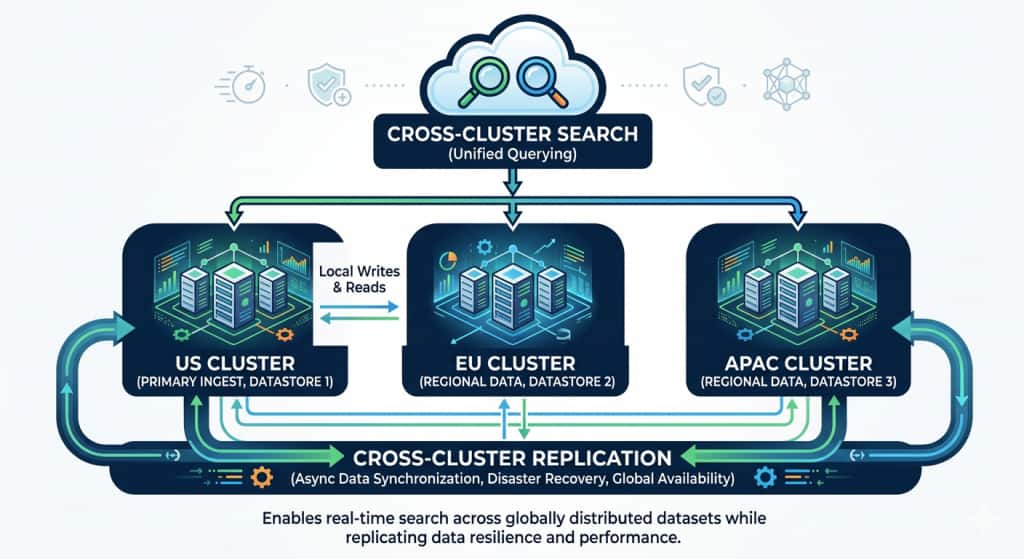
Critical indexes from the US cluster are replicated to a secondary cluster in Europe.
What Makes This Architecture Powerful
By combining CCS and CCR, the organization achieved several key goals.
Global Visibility
Teams can search data across multiple regions without moving all data into a single cluster.
Regional Performance
Applications ingest and query data from local clusters, improving latency and reliability.
Disaster Resilience
Critical indexes are replicated to secondary clusters, ensuring data availability.
Workload Isolation
Analytics workloads can run on separate clusters without impacting production systems.
Design Recommendations for Multi-Cluster OpenSearch Deployments
Organizations adopting CCS and CCR often benefit from several best practices.
1. Architect for Workload Isolation
Use different clusters for ingestion, analytics, and dashboards when it makes sense. This improves performance isolation.
2. Optimize Shard Strategy
Avoid excessive small shards. Balanced shard sizes improve both query performance and replication efficiency.
3. Replicate Only What Is Necessary
Not all datasets require replication. Replicate critical or frequently accessed indexes.
4. Plan for Growth
Design architectures that allow clusters to scale independently as workloads evolve.
Getting Started (simple steps)
The fastest way to get value from CCS/CCR is to start with a small, two-cluster pilot and validate the workflow end-to-end before expanding to more regions or more indices.
1) Pick a simple pilot topology
Start with:
- Two clusters (same region or two regions, depending on your goal)
- A small set of indices (for example, one log index pattern or one business index)
- A clear success criterion:
- CCS: “I can run one query across both clusters and get merged results”
- CCR: “My follower stays within an acceptable lag under normal write load”
2) Establish cross-cluster connectivity (the shared prerequisite)
Both CCS and CCR rely on creating a cross-cluster relationship between clusters. In OCI, follow the official workflow described in the product documentation for Cross-Cluster Connection—it walks through the required steps and APIs to configure cross-cluster connectivity:
Official doc: https://docs.oracle.com/en-us/iaas/Content/search-opensearch/opensearchcrossclustersearch.htm
As you go through the steps, keep your pilot simple if you want:
- connect one source (coordinator) cluster to one remote cluster
- use a short, memorable remote alias you’ll reuse in queries and/or replication setup.
3) Validate CCS (connectivity + query)
Once your cross-cluster configuration is in place:
- Run a small query that targets a remote alias and index pattern
- Validate response correctness (hits/aggregations) and record baseline latency
- If you’re building dashboards, test a representative dashboard panel—not just a single match query
4) Enable CCR for one critical index (optional next step)
After connectivity is proven, choose one index that is meaningful for DR/read locality and enable replication from a leader to a follower. Then:
- monitor replication status and lag over time
- run representative reads against the follower
- document how you would shift reads during a regional incident (your DR runbook)
5) Operationalize before you scale out
Before adding more clusters or more indices:
- define what “healthy” means (connection health, acceptable lag, acceptable cross-cluster query latency)
- decide how you want to handle partial availability for CCS (for example, whether some remotes can be treated as optional for certain dashboards)
- keep mappings/templates consistent across clusters where you expect consistent aggregations
Final Thoughts
Modern search platforms rarely operate within a single cluster.
Cross-Cluster Search and Cross-Cluster Replication are not just advanced features — they are foundational building blocks for distributed search systems.
As organizations grow and operate across multiple environments, these capabilities allow OpenSearch deployments to evolve into scalable, resilient, multi-region platforms.
For teams building large-scale search infrastructure, understanding how to leverage CCS and CCR effectively can unlock entirely new architectural possibilities.