
Automate secure OCI Bastion sessions and SSH tunnelling with a one-touch Python tool-cutting manual effort and boosting cloud productivity across all your projects.
Introduction
In today’s cloud-driven landscape, secure access to internal cloud environments is fundamental for developers, DBAs, and operations teams. However, managing access to resources such as databases, Oracle Kubernetes Engine (OKE) clusters, and application servers often involves error-prone manual steps—especially when these resources are shielded within OCI private subnets, accessible only via a Bastion host. Tasks become even more challenging when working across multiple projects or switching between environments such as DEV, UAT, and PROD.
A frequent pain point is OCI Bastion’s 3-hour session limit, which forces repeated session creations and SSH tunnel setups, disrupting workflows and lowering team productivity.
What is the ONE-Touch Solution?
This solution introduces a Python-based automation tool designed to solve these challenges. The tool simplifies and streamlines Bastion session and SSH tunnel management with a single action—making secure resource access in OCI reliable, fast, and developer-friendly.
Key Benefits
- Automated creation, monitoring, and recreation of OCI Bastion sessions
- Dynamic, zero-touch SSH tunnel setup for all private OCI resources
- Automatic re-creation and restoration when a session expires (every 3 hours), so you’re always connected.
- Eliminates manual console logins, repeated MFA, or session hunting—just fast, secure access across any number of projects and environments.
Solution Overview and Architecture
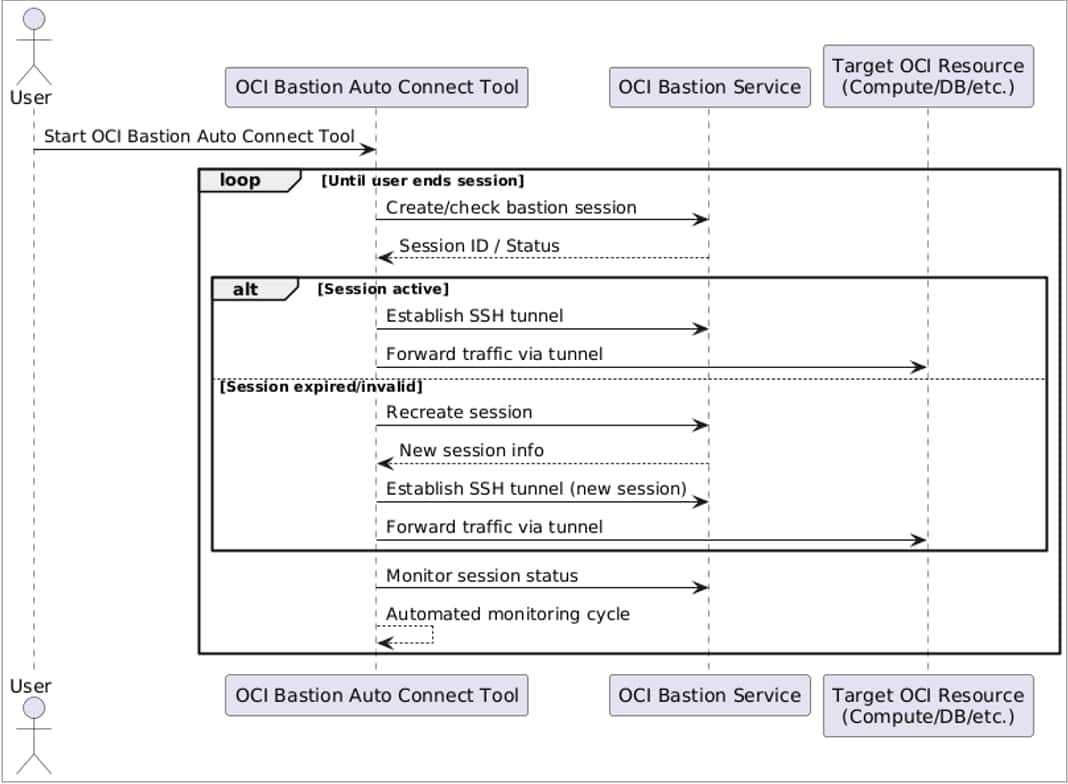
The solution operates from a single script and a unified configuration file (bastion.json),removing complexity from Bastion access management.
High-Level Workflow:
- User runs the automation script.
- The script loads configuration for selected project/environment.
- Checks for an active Bastion session; creates a new one if needed.
- Automatically establishes or restores the SSH tunnel.
- Monitors both session and tunnel, re-connecting as needed-especially after network glitches or the 3-hour Bastion expiration.
Key Features
- Multi-Environment & Multi-Project Support: Seamlessly manage access to DEV, UAT, PROD, and any number of projects.
- Developer and Operator Friendly: Enables rapid, no-fuss connections to OCI-protected databases, OKE clusters, and apps.
- Centralized, Human-Readable Config: Easily organize and update credentials, endpoints, and key paths in a single JSON file.
- Continuous Monitoring: Automatically recovers from dropped sessions or tunnels, keeping users connected.
- Oracle Best Practice Security: Applies time-bound, least privilege sessions with all actions logged and auditable.
Prerequisites
- Oracle Cloud Infrastructure tenancy with Bastion service enabled and configured.
- OCI CLI and Python 3.x installed.
- OCI Python SDK
pip install oci- SSH client (on your operating system)
- SSH key pair (public key uploaded to Bastion)
- Completed
bastion.jsonconfiguration file - Proper IAM permissions in OCI
How to Use
- Clone or download the repository and scripts.
- Edit the
bastion.jsonfile to list your environments/projects and insert your credentials and paths. - Open a command prompt or terminal window.
- Install dependencies with
pip install oci- Run the script:
python bastion_automation.py- When prompted, select your target environment/project.
- Access your OCI resource (database, OKE, etc.) through the local tunnel established by the script.
Call to Action
Ready to stop rebuilding SSH tunnels? Try one-touch OCI Bastion access, get the source code, and simplify access today. Questions or feedback: Reach out to narayanan.v@oracle.com.