
Apply supported security updates to running Oracle Linux systems while keeping planned maintenance focused on changes that need it.
Security fixes shouldn’t wait weeks for a reboot window. Oracle Ksplice applies supported kernel fixes to a running Oracle Linux system. This post shows how to apply them, how to prove they took effect, and what it takes to make the process survive node replacement on Oracle Kubernetes Engine (OKE).
On OCI, Ksplice is available at no additional cost for Oracle Linux instances (Ten Years of Oracle Ksplice).
Why patches wait
The patch is available. The application owner wants it applied. The security team wants the vulnerability closed. What holds up the work is finding an acceptable time to restart the system.
For a virtual machine, that can mean coordinating application shutdown, checking dependencies, rebooting, and confirming that services recover. For an OKE worker node, the process can involve draining workloads, accommodating their resource requirements elsewhere, and waiting for replacement pods to become ready.
A resilient application makes this easier. It does not remove the work. In containerized environments, pod disruption budgets, limited spare capacity, long startup times, and stateful workloads can turn routine maintenance into a carefully scheduled operation.
Meanwhile, the vulnerability remains open.
This is where online patching has practical value. When a supported fix can be applied to a running system, teams can address it without waiting for the next reboot window. Oracle Ksplice provides that capability for supported Oracle Linux systems on OCI.
What matters is how long a known vulnerability stays open. Live patching shortens that window from “next maintenance cycle” to “now.”
What Ksplice does, and what it doesn’t
Ksplice applies supported fixes to a running Linux kernel without a reboot. Oracle’s documentation also describes live updates for selected user-space libraries such as glibc and OpenSSL, but this post covers the kernel only. (Oracle Ksplice)
The kernel is the layer every workload on a host depends on. On a VM, a kernel vulnerability affects everything running on it. On container platforms such as Kubernetes, the exposure is broader: every container on a node shares that node’s kernel, whatever is in its image. Rebuilding or redeploying an application image doesn’t change the kernel underneath it. Patching the host does, and that is the layer Ksplice updates.
Ksplice complements the rest of your patching process. It has limits worth knowing up front:
- It doesn’t update Kubernetes, the container runtime, or libraries inside your container images.
- It doesn’t install a newer bootable kernel. You still need regular on-disk
kernel-uekupdates (Updating an Instance). - It doesn’t cover every fix. Check what is actually available for your kernel rather than assuming.
- It can confuse tooling. After live patching,
uname -rstill reports the booted kernel. Scanners that compare that string to a fixed version may flag a patched host as vulnerable. Check how yours handles Ksplice’s effective kernel version.
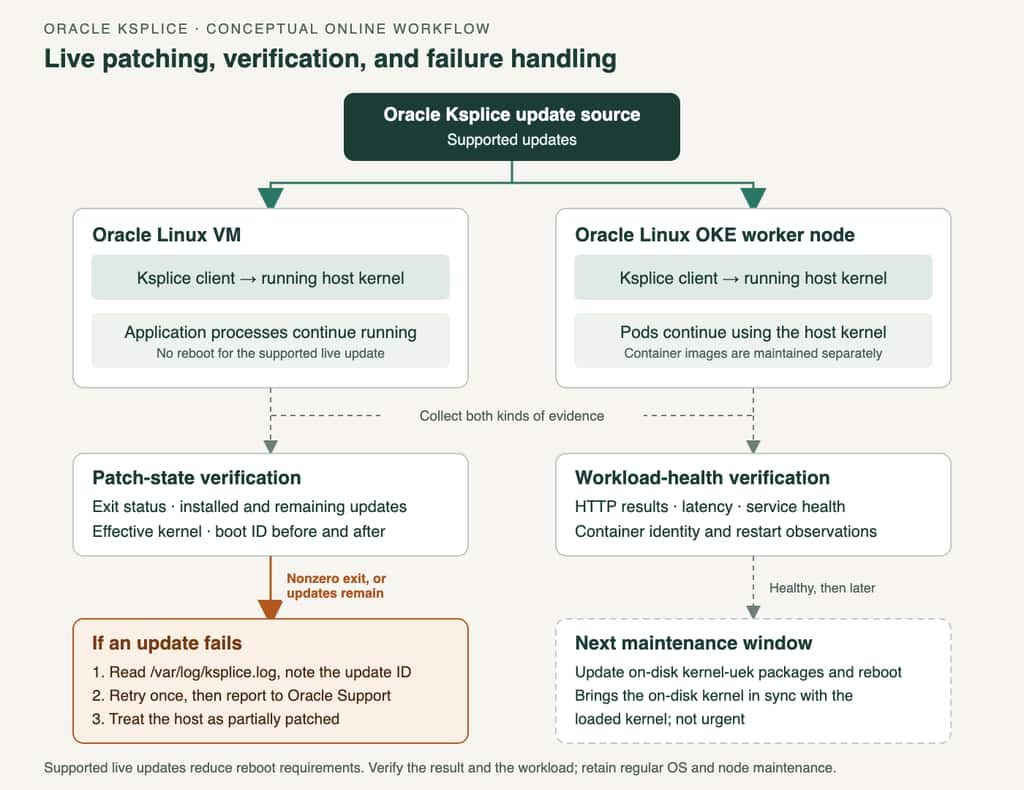
Figure 1. Illustrative workflow for supported Ksplice kernel updates. The client updates the running host kernel. Patch-state verification and workload-health checks provide separate evidence, a failed or incomplete update follows its own path, and the on-disk kernel is brought up to date at the next maintenance window. Network gateways and proxies are omitted.
Prerequisites
- Oracle Linux with a supported kernel, and the Ksplice Enhanced Client installed. Release, architecture, and booted kernel determine which updates apply (Ksplice User’s Guide).
- Network access to the Ksplice update source. On OKE, check this explicitly for private worker subnets: without a NAT gateway or service gateway path, updates can’t be fetched.
sudoon the host.
Oracle states that Ksplice has been enabled by default on Oracle Linux instances in OCI since 2017. Confirm on your own image with rpm -q ksplice before relying on it.
Apply a live kernel update
Our test used an active OKE worker running Oracle Linux 9.8, reached through a bastion. Results below are for that worker and its kernel build. Capture the baseline first:
cat /etc/oracle-release
uname -r
uptime -s
cat /proc/sys/kernel/random/boot_id
sudo ksplice kernel show
sudo ksplice kernel show --available
sudo ksplice kernel uname -r
ksplice kernel uname -r reports the effective kernel version, including live patches. Plain uname -r keeps showing the version you booted, so an unchanged uname -r tells you nothing about whether patching worked (Ksplice Enhanced Client commands).
Apply the updates and capture the exit status immediately:
sudo ksplice -y kernel upgrade
patch_status=$?
printf 'Ksplice exit status: %s\n' "$patch_status"
Zero (0) means success. Anything else needs investigation. Then repeat the baseline commands and compare.
Results on the OKE worker
The upgrade completed successfully. The effective kernel moved from 6.12.0-206.104.4.4.el9uek to 6.12.0-207.111.5.6.el9uek, and a follow-up --available check returned None.
Installed updates:
[a11t3zp9] Enablement update for live patching.
[e7qlnbnr] Known exploit detection.
... (17 further exploit-detection entries) ...
[mx0o76vk] Enablement update for dynamic per-CPU allocation in Ksplice core modules.
[2k3fuhng] CVE-2026-99999: Out-of-bounds memory access in IPv4 networking stack.
[mpyzpkpk] CVE-2026-98432: Use-after-free in IPv4 networking stack.
[smkzmxwy] Write-tracking bypass due to stale KVM MMIO cache.
[d7o5l42n] Information disclosure in vhost-scsi.
[nilmqusa] Reference count leak in vhost-scsi.

Effective kernel version is 6.12.0-207.111.5.6.el9uek
Read that inventory carefully. Of 25 entries, 20 are enablement or exploit-detection updates. Exploit-detection entries watch for known exploit attempts and aren’t fixes for the named CVEs. Five entries are fixes. “25 updates installed” overstates what changed.
Workload evidence from the same run:
- The boot ID was unchanged.
- Kubelet and CRI-O stayed active, and the local kubelet health endpoint returned
ok.
That’s good evidence of no restart. It’s weak evidence of no pause: one-per-second sampling can’t see a brief stall. This validation used node-local evidence (container runtime and kubelet) for one endpoint on one node. It did not include cluster-wide readiness checks or Kubernetes events. Treat it as a single data point, and run your own checks, including a higher-rate probe and Kubernetes readiness and events, before relying on live patching for a critical workload.
If an update fails
Ksplice applies updates in sequence, and a failure partway through stops the batch. Entries before the failure stay installed. Entries after it, which may include actual security fixes, are not applied. A command that prints a list of installed updates before erroring has not succeeded.
If the upgrade reports an error:
- Check the exit status and run
sudo ksplice kernel show --available. Anything other thanNonemeans work remains. - Read
/var/log/ksplice.logand note the ID of the update that failed. - Retry once. A second identical failure means the problem is deterministic, not transient.
- Confirm your on-disk kernel packages are current. Ksplice updates are matched to the booted kernel, so a newer supported kernel may behave differently.
- If it persists, report it to Oracle Support with the update ID,
uname -r, the Ksplice client version (rpm -q ksplice), and the log excerpt.
Until the failure is resolved, treat the system as partially patched and track it explicitly.
Verify every time
Installation success and application health are separate questions. Check both:
sudo ksplice kernel show
sudo ksplice kernel uname -r
sudo ksplice kernel show --available
cat /proc/sys/kernel/random/boot_id
- The exit status was zero.
- The intended updates appear in the installed inventory.
- The effective kernel changed and
--availableis empty (or explained). - The boot ID matches the baseline.
- The workload is healthy by your own measures.
Track failures and unreachable hosts explicitly. A system that errored mid-update shouldn’t disappear into a fleet average.
Make it repeatable on OKE
SSHing into one node proves the mechanism. It isn’t a process. OKE worker nodes are replaceable, and a replacement node doesn’t inherit another node’s local patch inventory. Scale-outs and node cycling bring up nodes at whatever patch state their image carries.
Put the Ksplice step in node provisioning so every new worker converges to the same baseline. With a custom cloud-init script on the node pool, that looks roughly like this:
#cloud-config
runcmd:
  # OKE bootstrap (required when you supply custom cloud-init)
  - 'curl --fail -H "Authorization: Bearer Oracle" -L0 http://169.254.169.254/opc/v2/instance/metadata/oke_init_script | base64 --decode >/var/run/oke-init.sh'
  - 'bash /var/run/oke-init.sh'
  # Ksplice: apply available kernel updates and log the result
  - 'ksplice -y kernel upgrade || echo "ksplice upgrade failed with status $?" | logger -t ksplice-provision'
Validate this on a single node pool before rolling it out. The Ksplice client must be present at that point in the boot sequence, and because the node bootstraps first, it can join the cluster before patching finishes. Decide whether a failed upgrade should alert you or keep the node out of service.
Then check replacement nodes against the same baseline: effective kernel version, empty --available output, and no failed updates in /var/log/ksplice.log. Follow any additional workload-restart or node-cycling instructions Oracle publishes for a specific issue (Known Issues for Kubernetes Engine).
Roll out in stages: one representative node, review patch and workload results, then expand. For standalone Oracle Linux instances, OS Management Hub offers centralized Ksplice update management and reporting when the software sources and client are configured (Understanding Oracle Linux Package Management).
What happens after a reboot
A reboot reloads the kernel from disk, but you don’t reapply Ksplice updates by hand. By default Ksplice reinstalls them at boot when the system returns to the same kernel (Ksplice FAQ). The relevant defaults in /etc/uptrack/uptrack.conf are:
[Settings]
install_on_reboot = yes
#upgrade_on_reboot = yes
autoinstall = no
Because upgrade_on_reboot is commented out, it isn’t active. Images and management tools can change these values, so read the file before editing (Enable Oracle Ksplice).
| Setting | Default behavior | Change it? |
|---|---|---|
install_on_reboot = yes | Reinstalls previously applied updates when booting the same kernel. | No. Keep it. |
upgrade_on_reboot (commented out, default behavior) | Boot restores the old patch set but doesn’t pull newly available updates. | Enable if your boot policy should apply all available updates, including for a different supported kernel. |
autoinstall = no | New updates aren’t applied automatically during normal operation. | Only if your patch policy allows ongoing automatic updates. |
Neither boot option replaces updating the Ksplice client through normal package management (configuration options). After a planned reboot, verify:
uname -r
sudo ksplice kernel uname -r
sudo ksplice kernel show
sudo ksplice kernel show --available
If expected patches are missing, read the boot-service result and /var/log/ksplice.log. Also check for /etc/uptrack/disable and for nouptrack on the kernel command line, either of which prevents reapplication.
Keep the next boot current
Live patching protects the running kernel. It doesn’t install a newer bootable image, and rebooting alone doesn’t either. Oracle requires regular on-disk kernel package updates alongside Ksplice. In this walkthrough (Oracle Linux 9, UEK 8), that package family is kernel-uek, maintained separately from the Ksplice kernel subsystem.
Standalone VM. When convenient, such as your next maintenance window:
rpm -q kernel-uek kernel-uek-core          # what's installed
sudo grubby --default-kernel               # what boots next
sudo dnf repolist --enabled                # confirm the UEK repo (ol9_UEKR8)
sudo dnf --refresh upgrade 'kernel-uek*'
sudo grubby --default-kernel               # confirm the new image is the default
# Not urgent: Ksplice already protects the running kernel, so this reboot can wait
# for any maintenance window. Its purpose is to bring the on-disk kernel back in
# sync with the loaded kernel.
sudo systemctl reboot
If the intended image isn’t the default, set it from the actual path under /boot/vmlinuz-*, not from Ksplice’s effective-kernel string. Keep a known-working boot entry available (Manage the Boot Kernel, Obtaining UEK 8 Packages). After the reboot, re-run the verification commands above. The booted kernel should match the installed image, and the effective Ksplice version may be newer if more live patches have landed.
OKE managed node pools. Don’t treat the VM reboot sequence as a node-pool upgrade:
- Select an updated supported worker image matching the pool’s Kubernetes version and architecture.
- Review disruption budgets and spare capacity, then set the cycling surge and unavailable limits.
- Cycle nodes with Replace nodes or Replace boot volume. OKE handles cordon and drain. Changing the image property alone affects only newly created nodes.
- Check
kubectl get nodes -o wideand workload health, thenuname -rand the Ksplice inventory on each refreshed worker.
Details are in Updating OKE Worker Properties and Images.
Continue normal OS package maintenance too. Updating the kernel doesn’t patch unrelated packages.
Conclusion
Ksplice lets you close eligible kernel vulnerabilities on a running Oracle Linux system and verify that it worked, without waiting for the next reboot window. It works as a complement to scheduled maintenance, not a replacement.
The practice is: apply and verify live patches, let boot-time reinstall restore them after restarts, keep on-disk kernels and OKE node images current, bake the configuration into node provisioning, and never let a failed update go unnoticed.
References
- Oracle Ksplice on OCI
- Oracle Linux Ksplice User’s Guide
- Using the ksplice Command for the Ksplice Enhanced Client
- Ksplice Client Configuration Options
- Ksplice FAQ
- Enable Oracle Ksplice in Oracle Linux
- Updating an Instance
- Manage the Boot Kernel for Oracle Linux
- Obtaining UEK 8 Packages
- Known Issues for Kubernetes Engine
- Updating OKE Worker Properties and Images
- Understanding Oracle Linux Package Management (OS Management Hub)
- Ten Years of Oracle Ksplice