
You don’t have to decide the ultimate future of every VMware application before deciding where it should run next.
For many infrastructure teams, the VMware question in 2026 isn’t whether every application needs to be rebuilt. It’s more immediate: Where should the VMware estate run next?
There are plenty of reasons that question may be coming up now. Licensing models are changing, data center contracts and hardware are reaching renewal cycles, and capacity and disaster recovery requirements continue to evolve. At the same time, the applications running on VMware still have users, dependencies, SLAs, and change windows that IT teams need to protect.
Moving workloads can be a separate decision from refactoring applications, changing databases, adopting a new operating model, or redesigning security. Those changes may make sense for a particular application, but they don’t have to be prerequisites for moving it.
Oracle Cloud VMware Solution (OCVS) provides a practical migration path. Organizations can run a customer-managed VMware environment on Oracle Cloud Infrastructure (OCI), continue using familiar VMware tools and operations, and establish a cloud landing zone where applications can evolve over time.
The goal is to simplify the move of VMware workloads to OCI without making application modernization a prerequisite. IT teams can address the immediate migration need first, then decide what comes next for each application on its own timeline.
Think in applications, not VM counts
VM counts are useful for sizing a migration, while application dependencies help determine how those workloads should move.
Consider an enterprise application running across 18 VMs. The application servers themselves may be relatively straightforward to migrate, but the application could also rely on DNS, identity, firewall rules, storage performance, backup tooling, monitoring, an on-premises database, and downstream systems.
Planning around the 18 individual VMs misses those relationships. Planning around the application and its dependencies gives the team a much better basis for defining a migration wave.
Before selecting a migration window, teams should understand:
- Which applications should move together because they share dependencies?
- Which systems must remain connected to on-premises environments?
- What latency, throughput, and recovery requirements need to be preserved?
- Which operational and security controls must be ready before cutover?
- Which workloads are candidates for future modernization—and which may simply need a reliable VMware environment?
This is an important distinction because OCVS allows organizations to move VMware workloads to OCI without requiring every application to be redesigned first. Applications can continue operating in a familiar VMware environment while gaining proximity to OCI capabilities across databases, storage, networking, security, analytics, and AI when there is a business case to use them.
Make the first wave production-ready, not a demo
The first migration wave should establish a production-ready foundation that subsequent waves can build on.
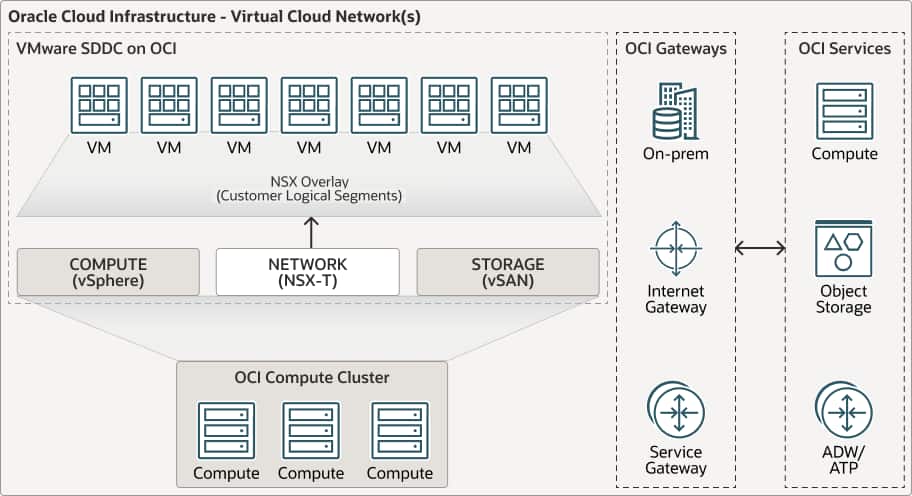
A typical target architecture includes an OCVS software-defined data center within an OCI tenancy, connected to the broader OCI network and, where required, to on-premises environments through private connectivity. Customers retain administrative control of their VMware environment, while OCI provides the underlying cloud infrastructure.
That means some of the most important work happens before workloads begin moving. Five areas are worth addressing early:
- Connectivity. Design private connectivity, routing, firewall rules, DNS, and hybrid access before workloads begin moving.
- Security. Align OCI compartments, identity, access controls, logging, and network security with enterprise standards.
- Capacity. Size the environment for the first migration wave while accounting for expected growth and operational headroom.
- Licensing. Evaluate eligible VMware Cloud Foundation (VCF) license portability and bring-your-own-license requirements early in the planning process.
- Recovery. Validate backup, replication, disaster recovery, and rollback requirements before cutover—not after.
VMware HCX can help simplify workload mobility, especially when teams need to migrate in planned waves. But the migration method should follow the application plan, not the other way around.
Move first. Modernize later where it makes sense.
Cloud migrations become more complicated when teams try to address every infrastructure and application change at once. A single project can quickly expand to include replatforming, application refactoring, database changes, new security patterns, containers, and a new operating model.
There may be good reasons to make any or all of those changes. But they don’t have to happen at the same time as the migration. Separating them from the initial move gives teams the flexibility to modernize each application later, on the timeline that makes sense for it.
For some VMware workloads, continuity may be the better first objective. Move the application to a stable cloud landing zone, keep its VMware operating model intact, and validate performance, connectivity, security, backup, and recovery. Once the application is stable in its new environment, the team can evaluate what changes would actually improve it.
That answer will vary by application. Some workloads may continue running on OCVS for the long term. Others may benefit from modernization over time, whether that means evolving individual application components or adopting additional OCI services when there is a clear technical or business case.
Separating these decisions gives teams room to modernize where there is a clear technical or business benefit, rather than making modernization a requirement for migration.
The destination doesn’t have to be the final architecture
An application’s path may include several stages over time. OCVS gives teams a way to address an immediate need to move VMware workloads while leaving room for modernization or other longer-term architecture decisions later.
This can be particularly useful when the immediate driver is a data center decision, capacity constraint, hardware lifecycle, disaster recovery requirement, or licensing change. In those situations, the decision at hand may simply be where an application should run next—not what its architecture should look like five years from now.
Move without starting over
If your team is reconsidering where VMware workloads should run, an incremental approach can provide a practical path forward.
A migration can start with the applications that need a new operating location, organize them into sensible waves, and establish a production-ready foundation on OCI. From there, teams can decide which applications to modernize and when.
Moving an application and determining its long-term architecture are different decisions. Treating them that way can make the next step a lot more manageable.

Get started
Ready to take the next step? Use these resources to plan your next step: