A practical workflow for diagnosing OCI Kubernetes Engine incidents with read-only evidence, Kubernetes-to-OCI correlation, and approval-gated remediation.
Core value. The OKE Troubleshooter helps operators move from a visible Kubernetes symptom to an evidence-backed OCI or Kubernetes root cause, while requiring approval before any change is made.
Most OKE incidents start as a Kubernetes symptom and end somewhere in OCI. A pod stuck in Pending, a Service that never gets a load balancer IP, a Multus interface that will not come up: behind any of these you might find events, node pools, subnets, NSGs, IAM, load balancers, storage, or a service limit nobody remembered was there. The symptom and the root cause are rarely in the same layer.
From Runbook to Agent Skill
The way teams work these incidents is changing. For years the response to a tricky OKE symptom was a runbook: an operator running kubectl and OCI CLI commands by hand, reading the output, and trying to hold the Kubernetes and OCI sides of the problem in their head at the same time. Agents change where that work starts. An agent can now run the read-only investigation itself and correlate what it finds across both layers, so the runbook stops being a static checklist and starts working the incident with you.
A skill is what makes that repeatable. Rather than re-prompting an agent from scratch each time, a skill bundles the procedure and its guardrails, along with the domain knowledge behind them, into a unit the agent loads when it needs it. Cloud and IDE vendors are all converging on this pattern. The OKE Troubleshooter is Oracle’s version of it for Kubernetes Engine: the investigative discipline an experienced SRE already works by, encoded once so any agent pointed at an OKE cluster can use it.
Today, I’m excited to announce the availability of the OCI OKE Troubleshooter skill. It gives an AI agent a disciplined way to work one of these incidents. The agent gathers read-only evidence from both Kubernetes and OCI, then correlates it into a ranked set of likely causes. It stops there. Nothing in the cluster changes until you approve it.
Consider an anonymized customer case: a CSI-backed volume was not attaching to the worker node. The team had inspected the volume repeatedly, but the root cause was still unclear. The breakthrough came from mapping the Kubernetes resources to the backing OCI objects. Once the PVC, Volume Attachment, worker node, VNIC, subnet, and NSG were viewed together, the investigation found that an NSG rule in the environment was blocking the required attachment path. The symptom surfaced at the volume, but the cause was a network rule sitting one layer removed from it.
What It Handles
- Scheduling and runtime issues such as Pending, Unschedulable, CrashLoopBackOff, and ImagePullBackOff.
- Networking issues such as missing load balancer IPs, ingress failures, DNS failures, OCI CNI/IPAM problems, and Multus or GVA failures.
- Platform issues such as unhealthy add-ons, autoscaler failures, private endpoint connectivity, workload identity errors, CSI problems, and node health failures.
- Advanced workload issues involving DPDK, SR-IOV, RDMA, or missing Multus network-status.
These cases are difficult because the first visible error is often only a symptom. The skill keeps Kubernetes facts and OCI facts separate until the evidence supports a specific root cause.
Requirements
The OKE Troubleshooter depends on access to both Kubernetes and OCI evidence. For best results, the operator should have:
- kubectl access to the target OKE cluster.
- OCI CLI access to the tenancy, compartment, and region where the cluster runs.
- Read-only permission to inspect OKE cluster metadata, node pools, VCN networking resources, load balancers, Block Volumes, and the IAM policies relevant to the incident.
- The correct kubeconfig context and OCI CLI profile or auth mode configured.
- Access to relevant logs when troubleshooting load balancers, CSI, image pulls, or workload identity.
Partial access is fine. If either kubectl or OCI CLI access is missing, the skill can still collect partial evidence, but the final report should call out those gaps and lower confidence where needed.
How the Workflow Works
The OKE Troubleshooter follows a phased workflow instead of running a broad set of commands and hoping something stands out.
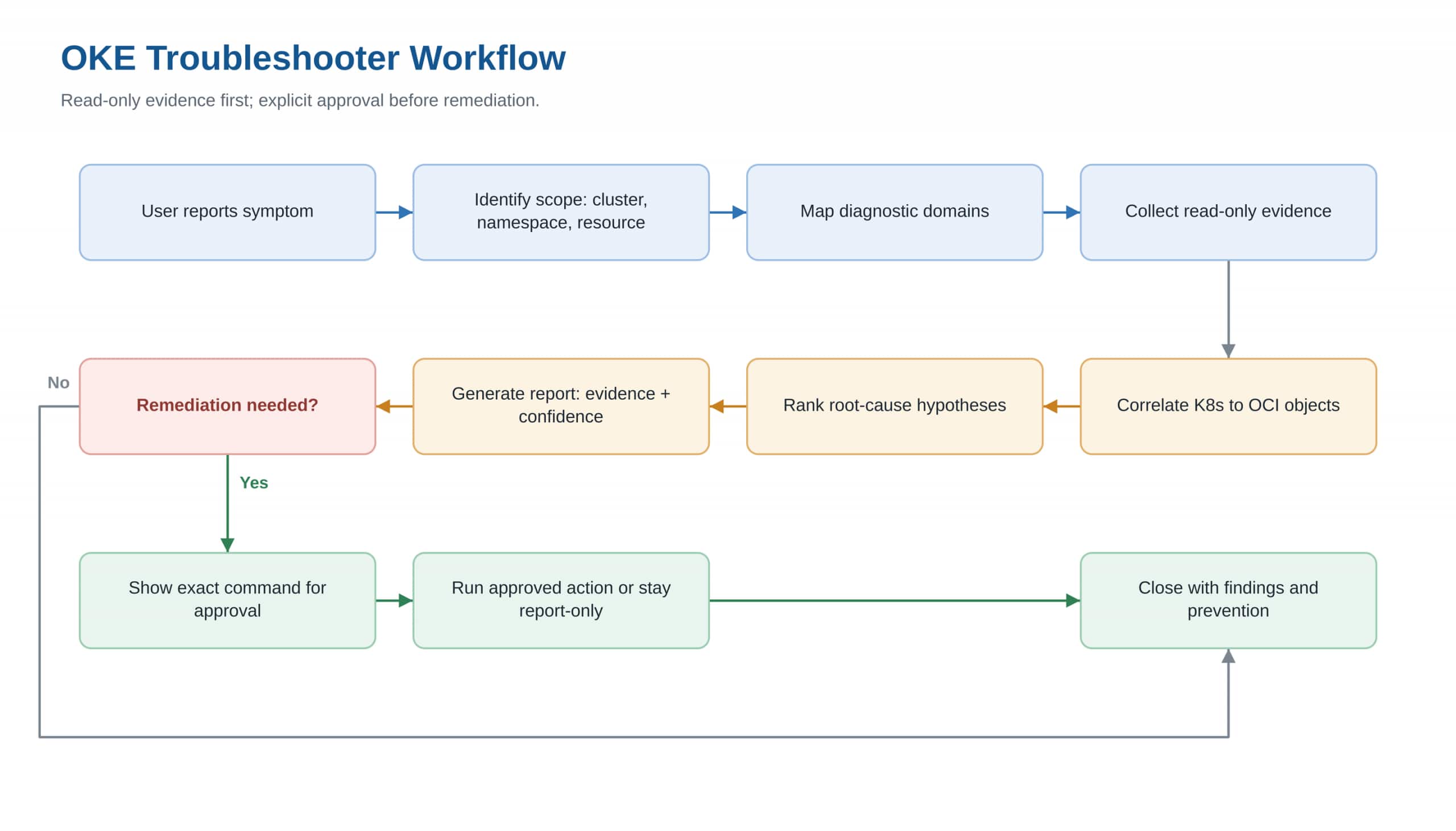
Figure 1. OKE Troubleshooter workflow: evidence first, approval before remediation.
A typical prompt can be as specific as:
Use the OKE troubleshooter for service web in namespace prod
has no load balancer IP
From there, the skill can inspect the Service, events, endpoints, annotations, OCI load balancer state, subnet and NSG context, route tables, and logs when available.
Evidence First, Remediation Second
The skill draws a hard line between what it runs on its own and what it never runs without sign-off:
| Runs automatically (read-only) | Requires explicit approval |
|---|---|
| kubectl get, describe, logs | kubectl apply, patch, annotate, delete |
| OCI get and list operations | Rollout restarts and node debug flows |
| Helper scripts that normalize evidence | OCI create / update / delete operations |
| Load balancer logging changes |
This guardrail matters in production. By default the skill collects read-only evidence on its own and stops to show you the exact command before any change, and an approval for one command does not carry to the next.
That stop is the skill following its instructions, so for production I would not lean on it alone. Scope the credentials the skill runs under, a Kubernetes ServiceAccount limited to get, list, and watch and an OCI policy limited to inspect and read, and a mutating command fails at the API regardless of what the agent decides. When you do need to apply a fix, grant the elevated credentials separately and only for that change, rather than leaving them on the identity the skill investigates with.
Correlating Kubernetes and OCI
The strongest troubleshooting output comes from connecting Kubernetes symptoms to the OCI resources behind them.
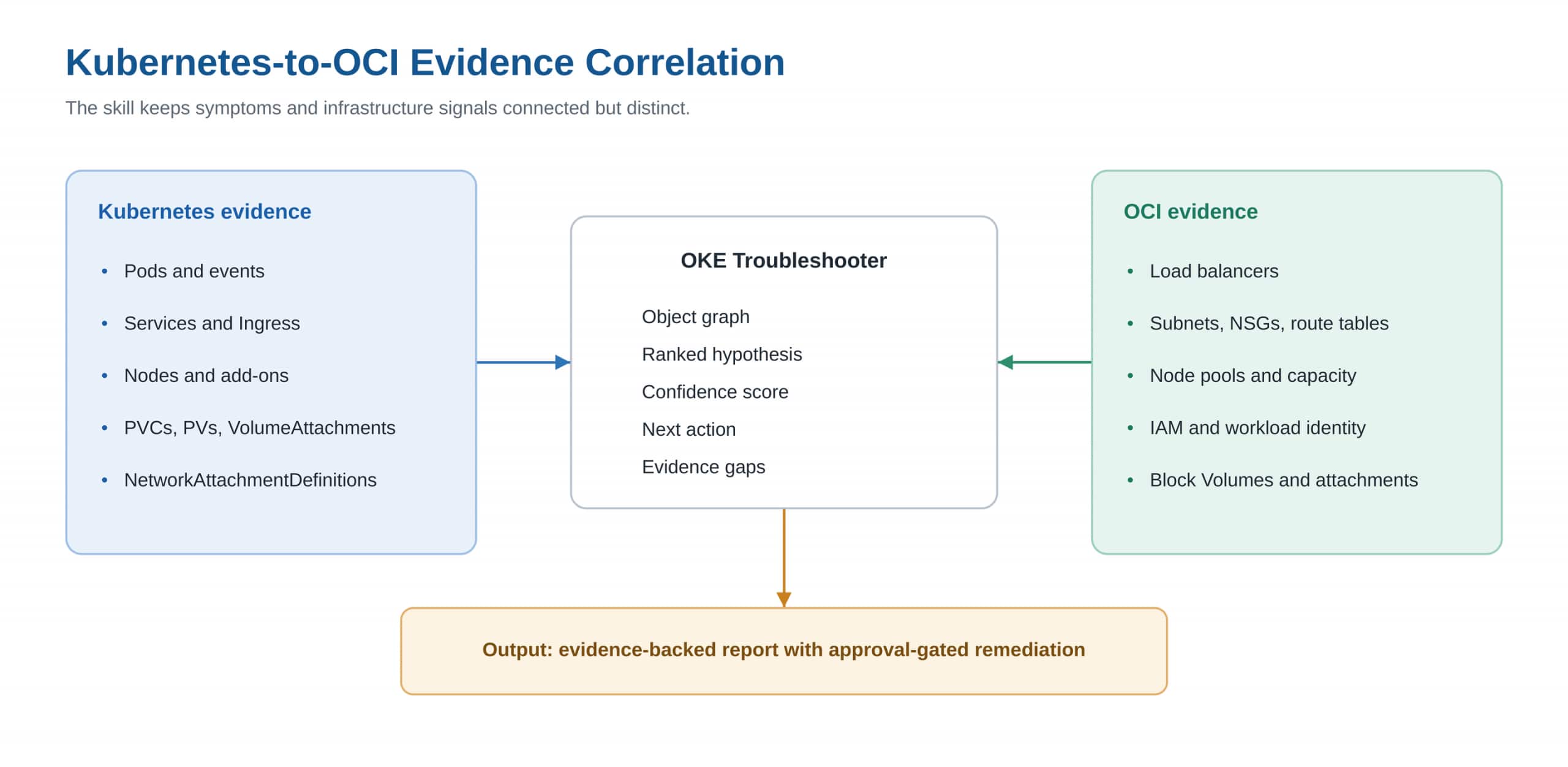
Figure 2. Kubernetes and OCI signals converge into ranked hypotheses, actions, and evidence gaps.
Take a Pending pod. The cause might be taints, resource requests, an autoscaler limit, OCI capacity, or simply a subnet that has run out of IPs. A failing CSI mount pulls in a different cast: the PVC and PV, the VolumeAttachment, the backing OCI Block Volume, where the pod landed, and the IAM and networking in between. Multus is different again, usually a missing NetworkAttachmentDefinition, absent network-status, OCI CNI or IPAM state, or CNI binaries that never made it onto the node.
What the Report Gives Operators
The report is built so you can act on it without re-deriving everything yourself. The most likely root cause sits at the top, with competing hypotheses below it and a confidence level on each. Supporting evidence stays grouped by where it came from, Kubernetes or OCI. Where the picture is incomplete, the report says so. The excerpt below is the report from the CSI volume case in the introduction.
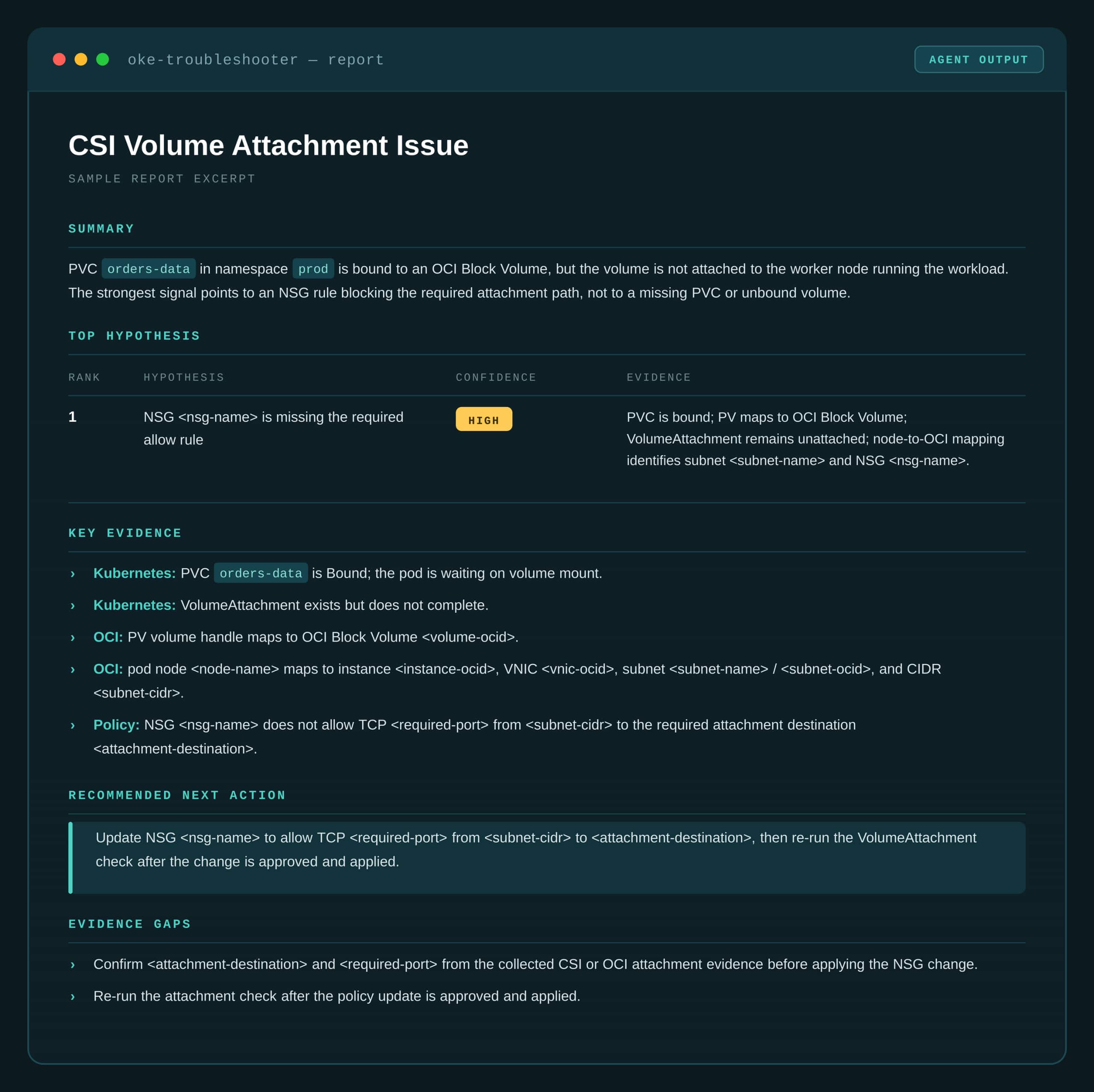
Figure 3. Sample OKE Troubleshooter report for the CSI volume case
Summary
PVC orders-data in namespace prod is bound to an OCI Block Volume, but the volume is not attached to the worker node running the workload. The strongest signal points to an NSG rule blocking the required attachment path, not to a missing PVC or unbound volume.
Top Hypothesis
| Rank | Hypothesis | Confidence | Evidence |
|---|---|---|---|
| 1 | NSG <nsg-name> is missing the required allow rule | High | PVC is bound; PV maps to OCI Block Volume; VolumeAttachment remains unattached; node-to-OCI mapping identifies subnet <subnet-name> and NSG <nsg-name>. |
Key Evidence
- Kubernetes: PVC
orders-datais Bound; the pod is waiting on volume mount. - Kubernetes: VolumeAttachment exists but does not complete.
- OCI: PV volume handle maps to OCI Block Volume
<volume-ocid>. - OCI: pod node
<node-name>maps to instance<instance-ocid>, VNIC<vnic-ocid>, subnet<subnet-name>/<subnet-ocid>, and CIDR<subnet-cidr>. - Policy: NSG
<nsg-name>does not allow TCP<required-port>from<subnet-cidr>to the required attachment destination<attachment-destination>.
Recommended Next Action
Update NSG
<nsg-name>to allow TCP<required-port>from<subnet-cidr>to<attachment-destination>, then re-run the VolumeAttachment check after the change is approved and applied.
Evidence Gaps
- Confirm
<attachment-destination>and<required-port>from the collected CSI or OCI attachment evidence before applying the NSG change. - Re-run the attachment check after the policy update is approved and applied.
I want to be clear that this does not replace a good platform engineer. It encodes the discipline experienced SREs already have: begin at the affected object and follow the evidence before reaching for a fix. The guardrail is the part I cared about most while building the skill. Plenty of agents can investigate. What makes this one safe to keep near a live cluster is that it waits for a human before it changes anything.
Getting Started
Install the Skill
Clone the skills repository and make the OKE Troubleshooter available to your agent, then point it at a cluster you can reach:
bash
git clone https://github.com/oracle/skills.git
cd skills/oci/oke/skills/oke-troubleshooter
Load the skill into your agent from that directory, following the README in the repo. Confirm kubectl and OCI CLI are configured for the target tenancy before your first run.
The OKE Troubleshooter skill is available now and runs against any OKE cluster you can reach with kubectl and the OCI CLI.
To run it, you need kubectl access to your target OKE cluster and OCI CLI access to the tenancy, compartment, and region where the cluster runs, as described under Requirements above. From there, describe the symptom in plain language and let the skill collect read-only evidence before it proposes any change:
Use the OKE troubleshooter: service web in namespace prod
has no load balancer IP
Ready to try the OKE Troubleshooter? Get the skill at this repo.
Learn more
- OCI Kubernetes Engine
- OKE documentation
- Get started with OCI today with our Oracle Cloud Free Trial