
Introduction
In a previous post, we explored how Oracle Cloud VMware Solution (OCVS) and Exadata Exascale can be combined to build a unified, cross-region disaster recovery architecture.
That design focuses on resilience and operational consistency.
However, in many real-world environments, performance becomes just as critical as resilience—especially when VMware workloads interact with OCI database services such as Exadata, DB Systems, or Autonomous Database.
Network latency between OCVS and OCI databases can directly impact application response times, throughput, and overall user experience.
The challenge is no longer just ensuring recovery but optimising the data path between application and database layers.
This post explores how different OCVS networking models impact database access latency, and how to choose the right architecture depending on workload requirements.
The Three Networking Models in OCVS
OCVS provides multiple networking approaches, each offering a different balance between performance, security, and operational consistency.
NSX-T Overlay (Default Model)
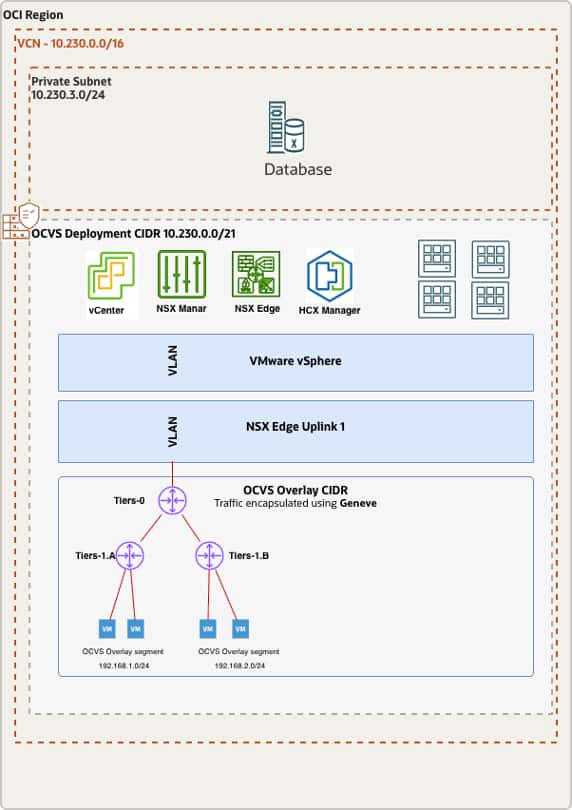
- Traffic Path:
- VM → NSX Segment → T1 → T0 → VCN → Database
How it works:
- Traffic is encapsulated using Geneve
- Routed through NSX-T gateways (T1/T0)
- Fully managed within the NSX datapath
Advantages:
- Full micro-segmentation
- Distributed firewall
- Consistent networking across regions
- Ideal for DR architectures
Trade-offs:
- Encapsulation overhead
- Additional routing hops
- Slightly higher latency and jitter
Best suited for standard enterprise workloads.
NSX VLAN-Backed Segment (Balanced Model)
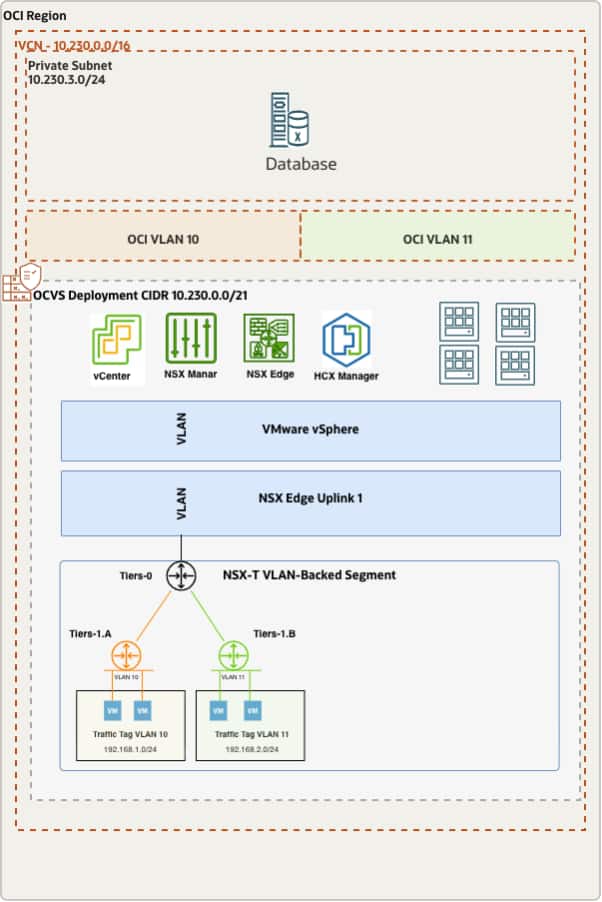
Traffic Path:
- VM → NSX VLAN Segment → OCI VLAN → VCN → Database
How it works:
- No Geneve encapsulation
- Traffic mapped to native OCI VLAN
- Still governed by NSX control plane
Advantages:
- Lower latency than overlay
- Reduced encapsulation overhead
- Maintains NSX governance
Trade-offs:
- Still traverses NSX datapath
- Some routing overhead remains
Best suited for balanced architectures requiring both performance and control.
Native OCI VLAN via Distributed Port Group (Lowest Latency Model)
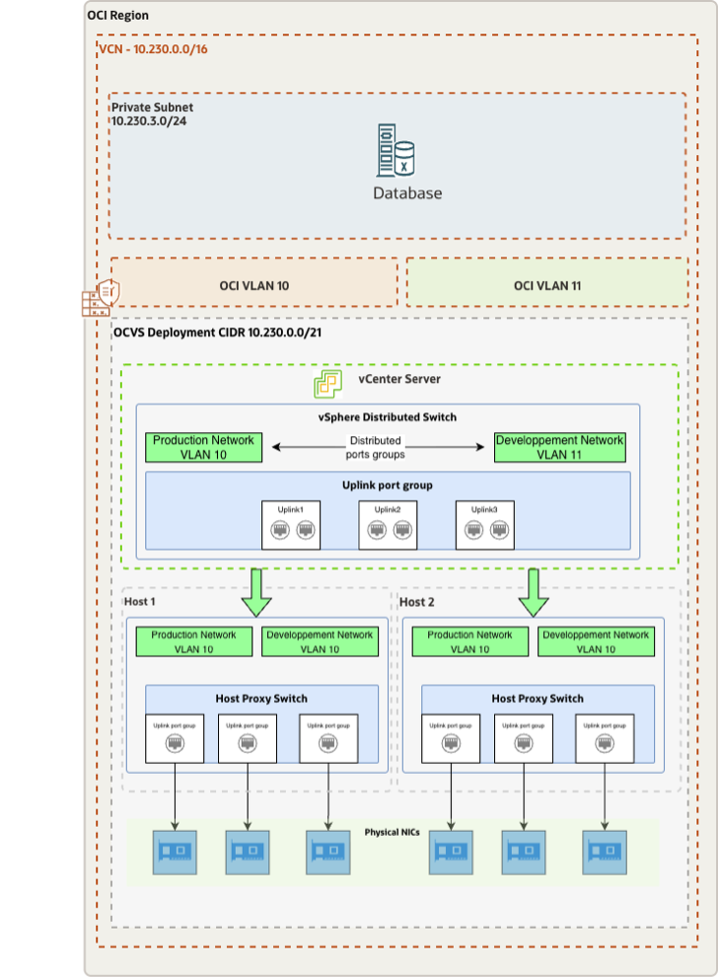
Traffic Path:
- VM → Distributed Port Group → OCI VLAN → VCN → Database
This model enables a direct Layer-2 path between OCVS workloads and OCI database services.
How it works:
- VMs connect to a vSphere Distributed Port Group
- The port group is mapped directly to an OCI VLAN
- Traffic bypasses NSX overlay and routing layers
Advantages:
- Lowest possible latency
- No encapsulation
- Reduced hop count
- Deterministic performance
Trade-offs:
- No NSX micro-segmentation on that interface
- Security handled via OCI controls (NSGs, Security Lists)
Best suited for performance-critical workloads.
Architecture Strategy: Choosing the Right Model
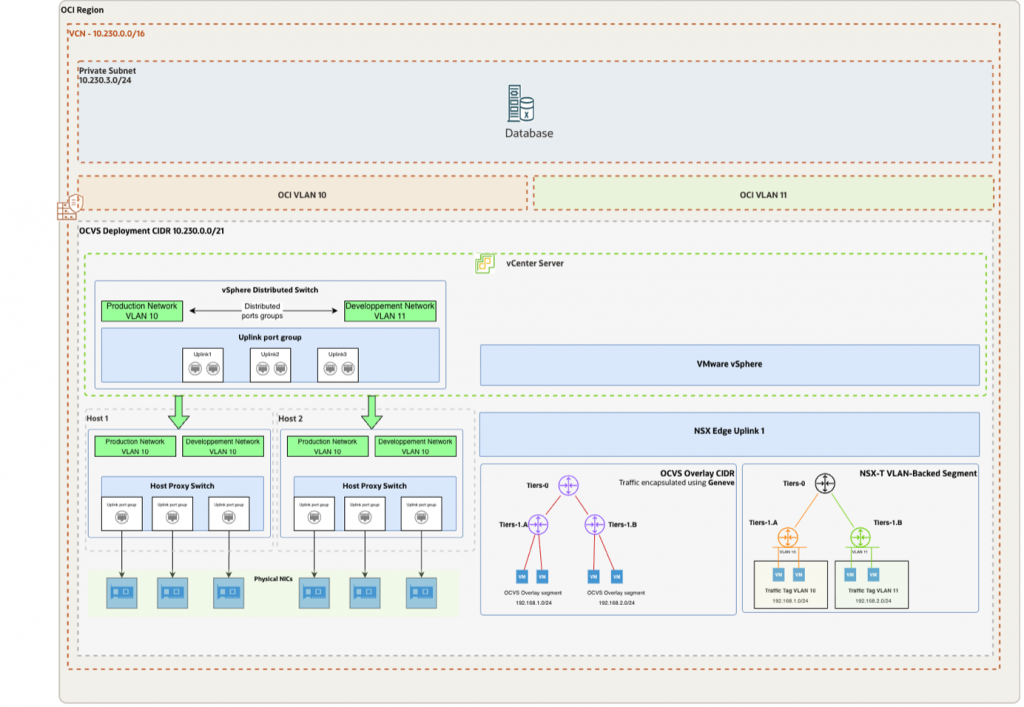
Each networking model represents a trade-off between:
- Performance
- Security
- Operational consistency
A common mistake is optimizing compute and storage while ignoring the network path between application and database.
In database-driven architectures, network latency often becomes the primary bottleneck.
In practice, most deployments adopt a hybrid model:
- NSX Overlay for general application traffic
- VLAN-backed segments for optimized flows
- Native OCI VLAN for database communication
This approach allows organizations to optimize performance while maintaining operational consistency.
Latency Comparison
The following table summarizes the key differences between each networking model, helping you quickly identify the best option based on performance and architectural requirements.
| Option | Encapsulation | NSX Data Path | Latency | Best For |
|---|---|---|---|---|
| NSX Overlay | Geneve | Yes | High | Standard workloads |
| NSX VLAN-Backed Segment | None | Partial | Moderate | Balanced design |
| VLAN Distributed PG | None | No | Low | Performance-first |
Technical Deep Dive: Native OCI VLAN Model
To achieve the lowest possible latency between OCVS workloads and OCI database services, architects can implement a native OCI VLAN connectivity model, effectively bypassing the NSX overlay data path.
This approach creates a direct Layer-2 communication path between virtual machines and OCI resources, significantly reducing latency and improving performance predictability.
Step 1: Create an OCI VLAN
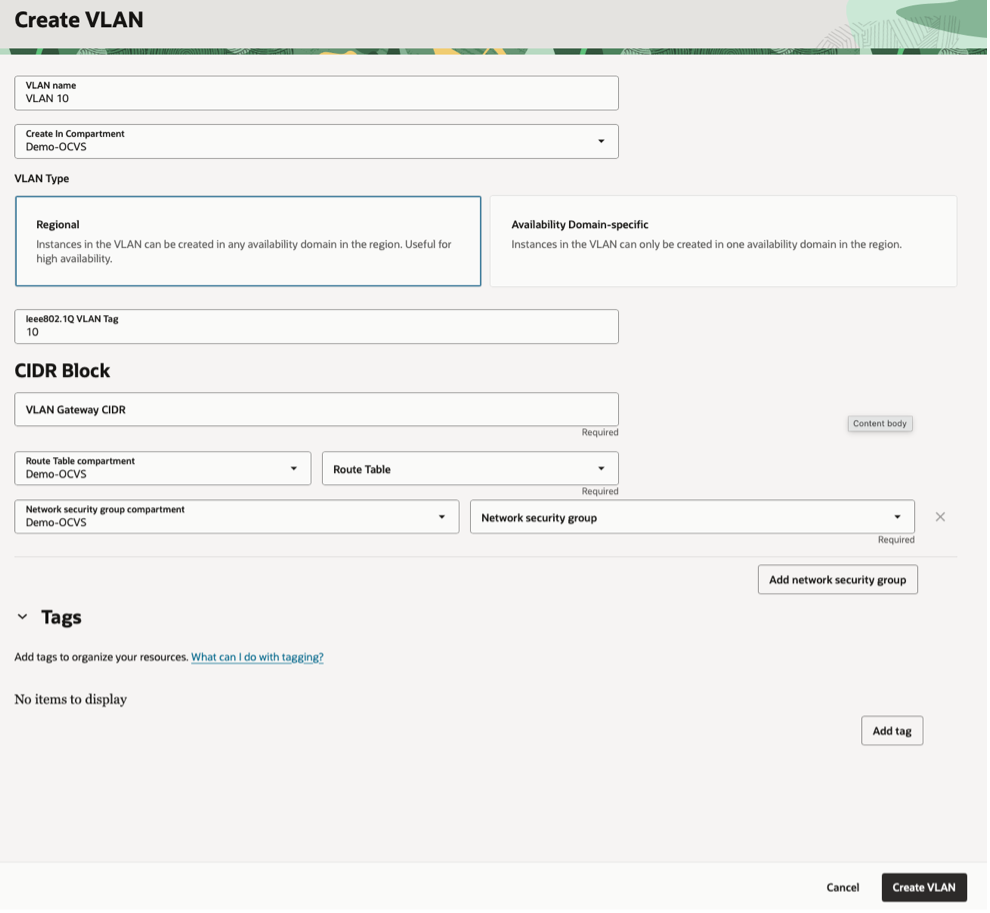
OCI allows the creation of VLANs within a Virtual Cloud Network (VCN) to enable Layer-2 adjacency.
Key characteristics:
- Native OCI networking with no encapsulation
- Direct Layer-2 connectivity within the VCN
- Predictable and low latency communication
Step 2: Attach the VLAN to OCVS ESXi Hosts
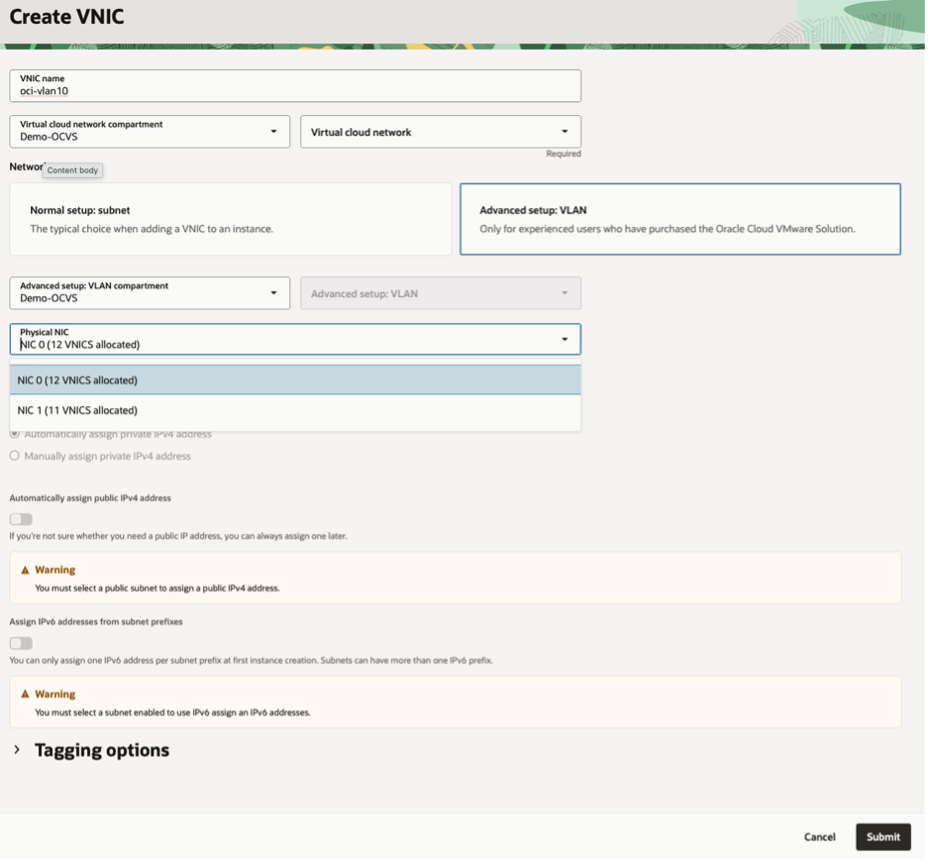
Each ESXi host must be connected to the OCI VLAN through a secondary network interface.
This involves:
- Attaching a secondary vNIC to the ESXi host
- Mapping the VLAN to the appropriate physical NIC
- Ensuring VLAN tagging is aligned with OCI configuration
This step establishes the physical network path between OCVS and OCI.
Step 3: Create a vSphere Distributed Port Group
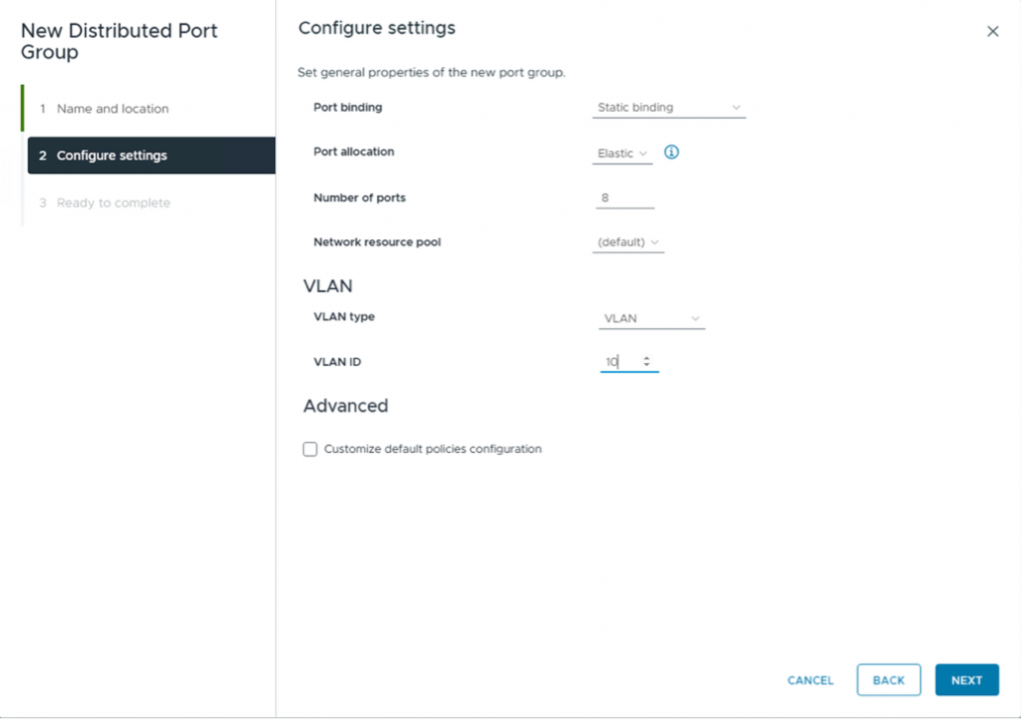
Within vCenter:
- Create a Distributed Port Group on the vSphere Distributed Switch
- Map the port group to the OCI VLAN
- Configure the appropriate VLAN ID
This enables virtual machines to connect directly to the native OCI VLAN.
Step 4: Connect Virtual Machines
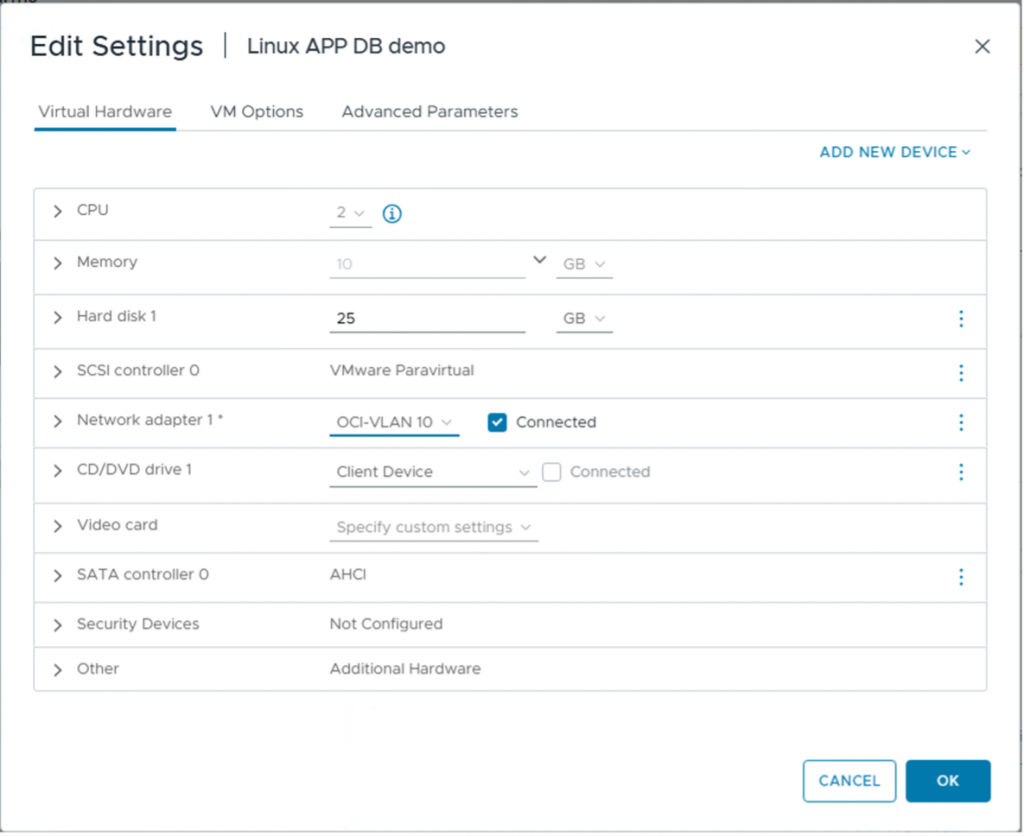
For database-facing workloads:
- Add a secondary network interface (vNIC) to the virtual machine
- Attach it to the Distributed Port Group
- Configure IP addressing consistent with the OCI subnet
At this stage, traffic flows directly to OCI without traversing the NSX overlay.
Step 5: Validate Connectivity to OCI Database Services
The database can be:
- Exadata Database Service on Exascale Infrastructure
- OCI DB Systems
- Autonomous Database
Validation should include:
- Network reachability
- Latency measurements
- Throughput validation
Because traffic remains native:
- No encapsulation overhead
- No NSX routing dependency
- More predictable performance
Automation Considerations
Configuring VLAN networking manually across multiple ESXi hosts can be complex and error-prone.
OCI provides Terraform-based automation to simplify this process:
- Automates VLAN creation
- Configures networking components
- Attaches interfaces consistently
- Reduces configuration errors
Using Infrastructure as Code enables repeatable and scalable low-latency architectures.
When to Use Each Model
Use NSX Overlay when:
- Micro-segmentation is required
- DR consistency is a priority
- Simplicity and standardization matter
Use VLAN-Backed Segments when:
- You need improved performance
- You still require NSX governance
- You want a balanced architecture
Use Native OCI VLAN when:
- Ultra-low latency is required
- High-frequency transaction systems
- Real-time analytics pipelines
- OLTP workloads sensitive to commit latency
- Exadata-intensive workloads
Security Considerations
Bypassing NSX does not mean reducing security—it shifts it to OCI-native controls:
- Network Security Groups (NSGs)
- Security Lists
- Private subnets
- DRG routing policies
- Database-level controls
This ensures that security remains enforced even when optimizing the network path.
Key Insight
Not all performance issues originate from compute or storage layers.
In many architectures, the network path between application and database is the hidden bottleneck.
Optimizing this path can significantly improve:
- Application response time
- Throughput
- User experience
Conclusion
Not all OCVS networking models are equal.
Each option serves a different purpose:
- NSX Overlay provides consistency and security
- VLAN-backed segments offer balanced optimization
- Native OCI VLAN delivers maximum performance
The most effective architectures combine these approaches rather than relying on a single model.
By aligning networking design with workload requirements, organizations can achieve predictable low latency, high performance, and operational consistency across OCI environments.