

Oracle Essbase Release 26.1 is available on OCI Marketplace, giving you a simpler path to modernize your Essbase deployment and adopt AI and usability enhancements.
Why Migrate from 21c to 26ai?
Moving your Essbase applications from 21c to 26ai gives you a great opportunity to review lifecycle practices, validate automation, refresh governance, and prepare for AI-assisted administration and analysis.
Staying current is an important part of maintaining secure and supportable Essbase environments. With this upgrade, you also get the latest technology in your Essbase platform stack, helping keep your environment secure, supportable, and ready for future Oracle updates.
If you’re currently on Essbase 21c, the upgrade to 26ai builds on the flexibility, control, and enterprise analytics you expect of Essbase, while adding:
- Platform modernization
- AI-assisted query and administration
- A web interface redesigned for usability and multitasking
A built-in Essbase MCP Server
Essbase MCP ships as a built-in, managed part of the Marketplace deployment — not something you install and maintain yourself. Model Context Protocol gives AI clients a standard way to discover and invoke approved tools, so an assistant can discover applications, browse outlines, query data, run calculations, load data, and perform supported administrative tasks in natural language.
For a quick start, see The Built-in Essbase MCP Server and for more details the Essbase MCP Server User’s Guide.
Improved Web UI
Essbase 26.1 also introduces administrative web UI updates designed to reduce the friction in everyday Essbase work. The usability improvements enable you to navigate swiftly between Applications, Jobs, Files, Scenarios, Security, Sources, Console, and Academy, switch between your applications more easily, and open selected targets in new tabs, so that you can keep multiple work areas open at once.
Data loading is more direct: you can select local files when loading data, reducing the number of steps required to bring source files into Essbase.
Monitor jobs more easily with enhanced filtering and sorting. You can find jobs by application, job type, date range, and system job status. Manage Essbase files more easily with bulk selection and copy, cut, and delete actions.
For more information, see What’s New in Essbase 26ai Navigation and File Management.
Oracle Essbase Stack Upgrade
Upgrade Stack creates a target instance from your source instance’s configuration. It clones the source block volumes, attaches them to a new instance built on the 26.1 image, and places that instance in the same VCN and subnet, using the same repository database. Your applications and data come across with the volumes.
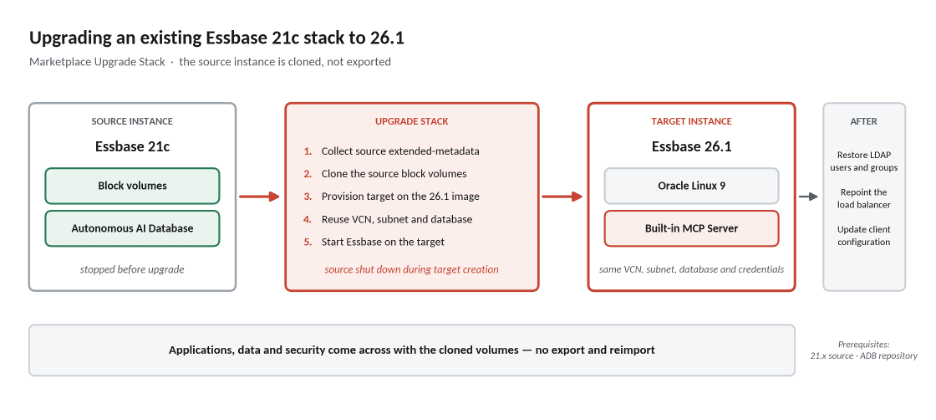
If you already run Essbase on OCI Marketplace, you can upgrade your Marketplace stack to Essbase 26.1 and move onto the refreshed platform components delivered with the new stack image.
As with any production upgrade, review the release notes, backup and restore procedures, custom integrations, security configuration, and validation plan before you begin.
For migration planning and application migration guidance, see Oracle Essbase 26 migration documentation.
For release-specific details, see Stack Deployment on OCI.