
AI assistants are good at language and reasoning, but they cannot touch your data until you give them tools. The Model Context Protocol (MCP) is the open standard that closes that gap: it lets an AI agent discover and call real operations on a real system. Instead of you copying numbers into a chat window, the agent queries your cubes directly, reasons over what it finds — “which products drove the West region’s variance last quarter?” — and combines those results with data from the other sources it can reach, such as your Autonomous AI Lakehouse tables or a data pipeline’s run history. The analysis happens against live Essbase data, not a stale export.
Oracle Essbase now ships an MCP endpoint inside the server itself. There is nothing to install and nothing extra to deploy: if your Essbase instance is running, https://<essbase-server>/essbase/rest/v1/ess-mcp is your AI gateway. Point ChatGPT, OpenAI Codex, or Claude Code at it and they can explore cubes, browse and edit outlines, run MDX queries and calculations, and administer applications — all in natural language.
Because that agent reaches live financial data, two questions matter from the first minute, and Essbase answers both:
- Who is the agent? Identity comes from OAuth. Access tokens are issued by your Oracle Identity Domain (OCI IAM / IDCS), so nobody hands out Essbase usernames and passwords. Each client authenticates through the identity domain and calls tools as the signed-in user — their own Essbase roles, filters, and permissions apply, unchanged.
- What is it allowed to do? Authority comes from access profiles. A
profileparameter on the endpoint bounds the tool set the client ever sees —viewer(read-only, the default),analyst, oradmin— so you can hand an analyst a read-only assistant and never expose the administrative surface at all.
Identity and authority are independent controls, and you want both: OAuth establishes who, the profile bounds what, and Essbase security still governs which data. The rest of this post shows the endpoint, then how to wire each client.
Related reading: the Essbase MCP Server introduction, and the companion post on the Oracle Data Studio MCP Server — the Python server that spans Essbase, the Autonomous AI Lakehouse, and Data Transforms.
What the endpoint is
The MCP server lives at the Essbase REST base path. A plain GET returns a discovery document:
{
  "server": { "name": "Essbase MCP", "version": "0.2.3" },
  "endpoints": {
    "tools": "<base>/essbase/rest/v1/ess-mcp/tools",
    "call":  "<base>/essbase/rest/v1/ess-mcp/call"
  },
  "capabilities": { "tools": { "listChanged": false } }
}
Clients speak JSON-RPC 2.0 to the base URL — initialize, tools/list, tools/call — and REST-style /tools and /call sub-endpoints exist for simple integrations. An optional profile query parameter selects how much the client sees:
https://<essbase-server>/essbase/rest/v1/ess-mcp?profile=analystviewer(the default) — read-only: explore, describe, query, outline browsinganalyst— adds query and run capabilitiesadmin— the full management surface (applications, users, filters, files, jobs)
The profile bounds only the tool set the client sees. Every operation is still authorized by Essbase security for the authenticated user — the profile is a least-privilege and context-size control, not a bypass. Tool design stays deliberately close to the REST API: management tools take an action plus a payload (the JSON the underlying REST operation expects), which keeps the catalogue compact and transparent — what the model sends is what Essbase receives.
Architecture
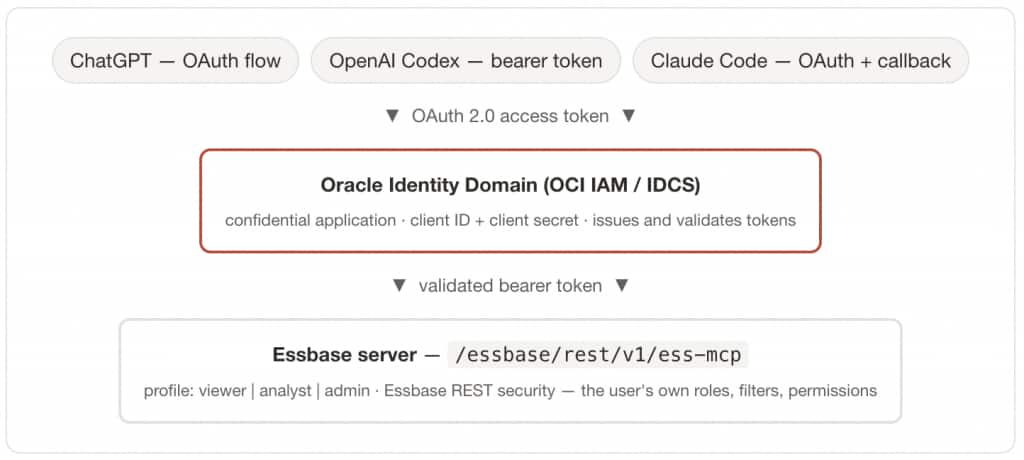
Nothing is deployed alongside Essbase: the MCP endpoint is part of the server. The identity domain issues the token, Essbase validates it, and every tool call runs as the authenticated user — so existing roles and filters apply unchanged.
Before you begin: one confidential application
Register (or reuse) a confidential application in your identity domain and collect:
| Value | Example |
|---|---|
| Essbase MCP URL | https://<essbase-server>/essbase/rest/v1/ess-mcp |
| Identity domain base URL | https://<identity-domain> |
| Authorization URL | https://<identity-domain>/oauth2/v1/authorize |
| Token URL | https://<identity-domain>/oauth2/v1/token |
| Token endpoint auth method | client_secret_post (or client_secret_basic) |
| Client ID / Client secret | from the app’s OAuth configuration → General Information |
A note on scopes, because it trips people up. The IDCS meta-scope urn:opc:idm:__myscopes__ is right for the interactive authorization-code flows (ChatGPT, Claude Code). When you mint a token directly with the password grant (Codex), request the resource scope configured on your Essbase app instead — its primary audience followed by /essbase, typically https://<identity-domain>:443/essbase — so the token’s audience is Essbase.
Connecting the clients
ChatGPT — OAuth connector
- In ChatGPT, go to Settings → Apps → Advanced settings → Create app.
- Set Server URL to your MCP endpoint. Append
?profile=viewerto start read-only. - Set Authentication to OAuth.
- Under Client registration, choose User-Defined OAuth Client. (DCR and CIMD show as unavailable — expected, because the endpoint advertises no registration URL.)
- Copy the callback URL ChatGPT generates —
https://chatgpt.com/connector/oauth/<id>— and add it as a Redirect URL on your confidential application. - Enter the Client ID and Client secret, set the token method to
client_secret_post, and leave the scope asurn:opc:idm:__myscopes__. - Confirm the discovered Authorization and Token URLs, then Create.
- Click Sign in and authenticate at the Oracle Cloud sign-in for your identity domain (including a federated option such as MSAD, if configured).
OpenAI Codex — bearer token
Codex sends a bearer token from an environment variable. Mint one with the password grant, using the resource scope:
export ACCESS_TOKEN=$(curl -s \
  -H "Authorization: Basic <base64(client-id:client-secret)>" \
  -H "Content-Type: application/x-www-form-urlencoded;charset=UTF-8" \
  --request POST "https://<identity-domain>/oauth2/v1/token" \
  -d "grant_type=password&username=<oci-username>&password=<url-encoded-password>&scope=https://<identity-domain>:443/essbase" \
  | sed -rn 's/.*"access_token":"([^"]+)".*/\1/p')

export ESSBASE_MCP_TOKEN="$ACCESS_TOKEN"

codex mcp add essbase \
  --url "https://<essbase-server>/essbase/rest/v1/ess-mcp" \
  --bearer-token-env-var ESSBASE_MCP_TOKEN
The ~/.codex/config.toml section header must be mcp_servers, with an underscore, or Codex silently ignores the block. Tokens follow the IDCS lifetime — 3600 seconds by default — so regenerate when they lapse.
Claude Code — OAuth
Register the redirect URI http://localhost:8080/callback on the confidential app, then add the server with a fixed callback port:
claude mcp add --transport http \
  --client-id "<your-client-id>" --client-secret \
  --callback-port 8080 \
  essbase "https://<essbase-server>/essbase/rest/v1/ess-mcp"
--client-secret prompts for the secret with masked input and stores it in your OS keychain — it never goes into config. Authenticate with claude then /mcp; Claude Code stores the credentials securely and refreshes the token automatically.
Native server vs. the Python Oracle Data Studio MCP server
Oracle offers two MCP paths to Essbase, and they suit different situations. The native server is what this post describes: built into Essbase, per-user OAuth, Essbase-only. The Oracle Data Studio MCP server (oracle-data-studio on PyPI, also in the oracle/mcp repository) is a separately deployed Python server that spans Essbase and the Autonomous AI Lakehouse and Data Transforms, with cross-domain routing.
| Native Essbase MCP | Oracle Data Studio MCP (Python) | |
|---|---|---|
| Where it runs | Built into the Essbase server | A Python server you deploy |
| Install | Nothing — part of Essbase | pip install "oracle-data-studio[mcp]" (or uvx) |
| Scope | Essbase only | Essbase + Autonomous AI Lakehouse + Data Transforms |
| Identity | Per-user OAuth via IDCS (client ID/secret) | Configured service identity behind a shared bearer token |
| Whose identity reaches the data | The signed-in end user’s | The one configured backend account |
| Endpoint | …/essbase/rest/v1/ess-mcp | Your host, e.g. https://host:8443/mcp |
| Profiles | viewer / analyst / admin (query param) | viewer / analyst / admin (--profile) |
| Tool style | Generic payload passthrough | Typed parameters + confirmation gates on destructive actions |
| Cross-domain routing | — | Table ⇄ analytic view ⇄ Essbase cube |
Best practices
- Always use HTTPS — remote clients should never connect over plain HTTP.
- Register a redirect URI per client — ChatGPT and Claude Code each use a different callback.
- Keep secrets out of shared config — ChatGPT stores its secret in the connector; Claude Code in the OS keychain; Codex uses a bearer token via an env var, never a secret in
config.toml. - Match the auth method to the client —
client_secret_post(orclient_secret_basic) for a confidential client with a secret; reservenonefor a public/PKCE client. - Start read-only with
?profile=viewer, confirm auth and tool discovery, then widen.