In previous two articles a manifest and profile were introduced. In theory we can associate a manifest or profile into multiple install service, such as i386-11_2, i386-11_1 for different OS installation,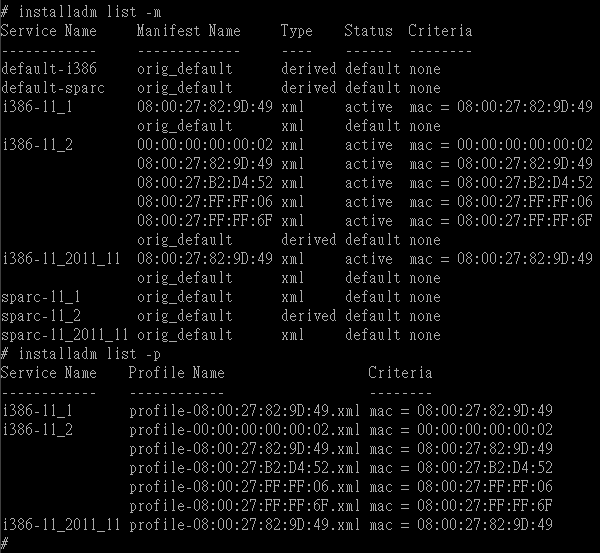
In above screenshot we see that each of the 3 install services i386-11_1, i386-11_2, i386-11_2011_11 has its own manifest/profile for mac address 08:00:27:82:9D:49. Although the 3 manifests have same names 08:00:27:82:9D:49, content in the manifests can be varied. And although the 3 profiles have same names profile-08:00:27:82:9D:49.xml, settings in the profiles can be varied. That is, even though we have created a manifest and a profile to an install service for a mac address, we still have to tell AI server which install service should a mac address belong to.
This task is quite easy, compare to manifest and profile setup, no xml is needed, just one command,
# installadm create-client -n i386-11_2 -e 08:00:27:82:9D:49
You can then verify this association by
# installadm list -c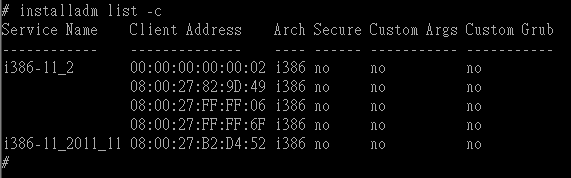
Or check this mac address 08:00:27:82:9D:49 directly,
# installadm list -e 08:00:27:82:9D:49
To associate this mac address to another install service, just execute “installadm create-client” again. Check out below example, 08:00:27:82:9D:49 was originally for i386-11_2, and after a new create-client command it finally belongs to i386-11_2011_11,
To remove this association use the command,
# installadm delete-client 08:00:27:82:9D:49
Note that installadm delete-client, delete-manifest and delete-profile are totally independent, manifest/profile will not be affected by delete-client and same for two others.
Customize your AI (5): create client to associate a client to an install service

Authors
Nikki Serapio
Next post