
PeopleSoft HCM Update Image 55 delivers a broad set of enhancements designed to help organizations simplify everyday HR work, improve visibility into key processes, and create a more engaging experience for employees, managers, and administrators. This update focuses on practical improvements across Time and Labor, Absence Management, Employee Recognition, Approvals, Profile Management, Activity Guides, Landing Page Suggestions and Continue With Notifications, Human Resources, Payroll, and U.S. Federal functionality.
Together, these updates help PeopleSoft customers enhance the employee and manager experience while streamlining administrative work by providing easier access to the information and actions that matter most.
New Team Time Dashboard with Enhanced Employee Navigation for Managers
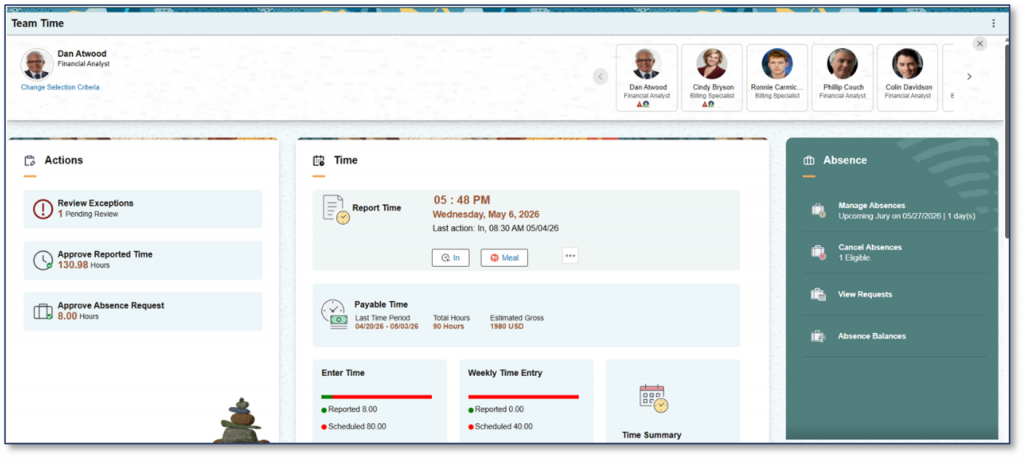
Image 55 introduces the new Fluid Team Time Dashboard, giving managers a centralized place to manage employee time and absence activities. From a single interface, managers can select employees, review exceptions, approve reported time and absences, and access key actions tied to the selected employee.
The dashboard is designed to make navigation faster and more intuitive. A contextual header displays employee information, and managers can quickly move between employees using these cards for an enhanced experience. As managers select different employees, the dashboard dynamically refreshes the data and counts shown in the action, time, and absence sections.
Digital Badges to Recognize Achievements and Milestones
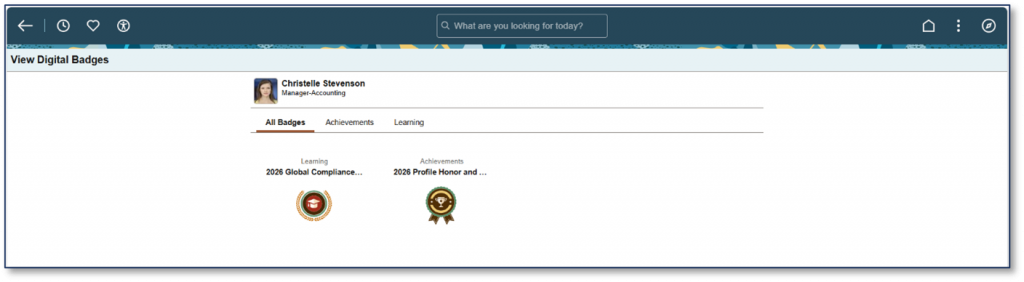
The Digital Badges enhancement in PeopleSoft HCM enables organizations to recognize employee achievements, skills, certifications, milestones, and contributions through configurable digital badges integrated across multiple HCM experiences. The feature is designed to improve employee engagement, increase visibility of accomplishments, and support recognition-driven culture initiatives.
Absence Management WorkCenter
Absence Management now features a new WorkCenter that brings together absence tasks, approvals, insights, reports, and key resources in one centralized space, enabling administrators to manage transactions efficiently through configurable individual row level and bulk actions.
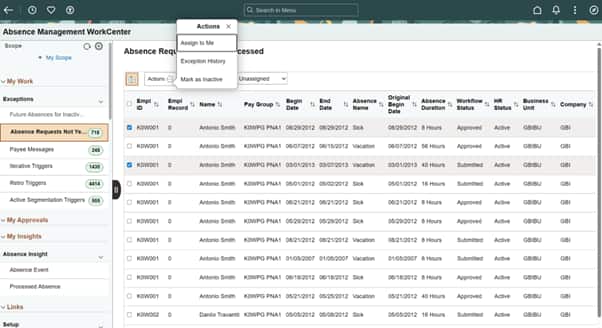
Administrators can use the My Work area to review warnings and errors requiring attention. The Work Management Framework actions like ‘Assign to Me’, ‘Mark as Inactive’ are enabled by default for selected work items like ‘Including Future Absences for Inactive Employees’ and ‘Absence Requests Not Yet Processed’.
Approval Insights for Administrators
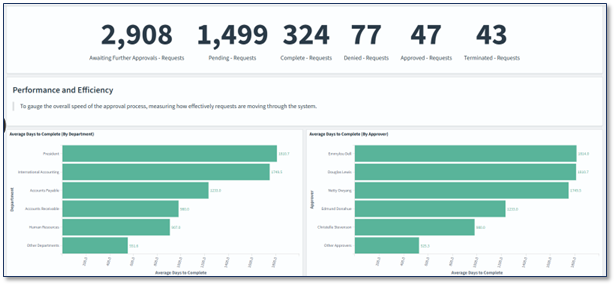
Image 55 introduces the Approval Insights Dashboard for Administrators which provides visibility into approvals across functional areas, helping administrators visualize incoming trends, manage approval workload, identify bottlenecks, and accelerate approvals.
Profile Management for Additional Employee Data
Profile Management now supports additional employee information beyond the Talent Profile. Organizations can create custom profile types such as hobbies, clothing sizes, and meal preferences and use Tile Wizard to publish dedicated tiles, providing users with easy access to manage this information separately from their talent profile.
Additional Features in Update Image 55
- View Personnel Actions Summary in a new window from Fluid Guided Personnel Action Request for US Federal.
- Override prompts in Page and Field Configurator.
- Process level due dates in Activity Guide Composer.
- Emergency Type Controls, allowing employees to specify which emergency contacts should be notified for different types of emergencies.
- Suggestion for employees to review their ‘Benefits Confirmation Statements’.
- Continue With for Inactive Positions where the Position Administrator. created a position and saved in an Inactive status.
- Announcement that 1095-C Forms are ready for employees.
Watch the PeopleSoft HCM Image Highlights Video to see a demo of some of the key enhancements delivered with this image and learn more.