
Summary
NACHA has adopted a rule change requiring a standardized Company Entry Description value for certain ACH payroll-related payments. PeopleSoft Financials is delivering an updated ACH layout to help customers comply.
Compliance date (no later than): March 20, 2026
Originators may begin using the new description as soon as practical.
Who is impacted
This update affects any organization originating PPD Credits that represent wages, salaries, or similar compensation—including scenarios where payments may be made to individuals through supplier/payables processes, such as:
- 1099-NEC suppliers receiving wage-like compensation
- Retirees or other individuals receiving pension/benefit-type disbursements processed as PPD Credits and paid via PeopleSoft AP or Financial Gateway
- Any other wage-like payments where the ACH entry is a PPD Credit
Regulatory requirement (what’s changing)
For PPD Credits used for payment of wages, salaries, and similar types of compensation, NACHA requires the Company Entry Description field to contain: PAYROLL
Why NACHA made this change
Standardizing payroll descriptions can:
- Provide RDFIs clearer information for identifying inbound payroll credits (including multiple payroll deposits)
- Support RDFI logic related to early funds availability decisions
- Reduce fraud involving payroll redirections by making payroll entries more consistently identifiable
What PeopleSoft Financials is delivering
PeopleSoft Financials delivers a new PPD Payroll layout for both Pay Cycle and Financial Gateway:
Layout name: PPDPAYROLL
Purpose: Output PAYROLL in the Company Entry Description for applicable payroll PPD credit entries.
Customer action required
To comply by March 20, 2026, customers should apply the patch 39065005 and use the delivered PPDPAYROLL layout for applicable payments.
Financial Gateway configuration:
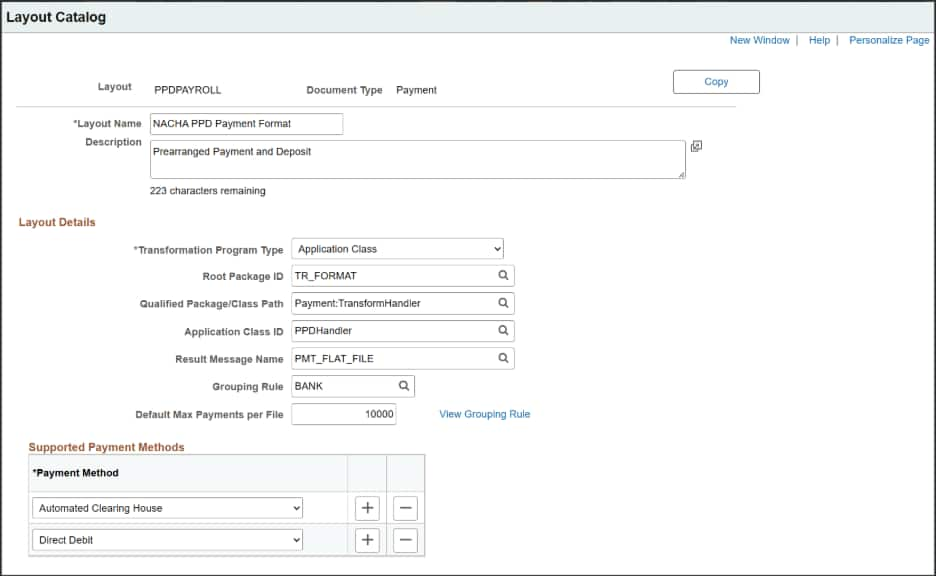
- Verify the delivered layout in Layout Catalog
Navigation: Banking > Administer Bank Integration > Layout Catalog
Confirm PPDPAYROLL is present.
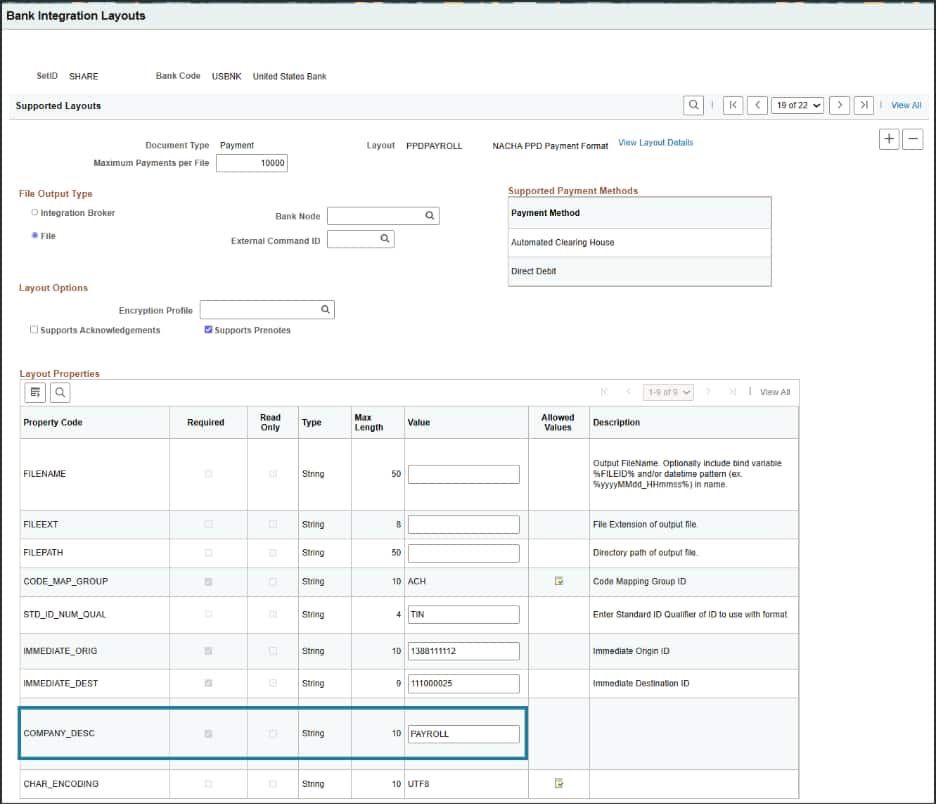
- Add the layout to Bank Integration Layouts
Navigation: Banking > Administer Bank Integration > Bank Integration Layouts
Add PPDPAYROLL to the appropriate bank definition (example shown: USBNK).
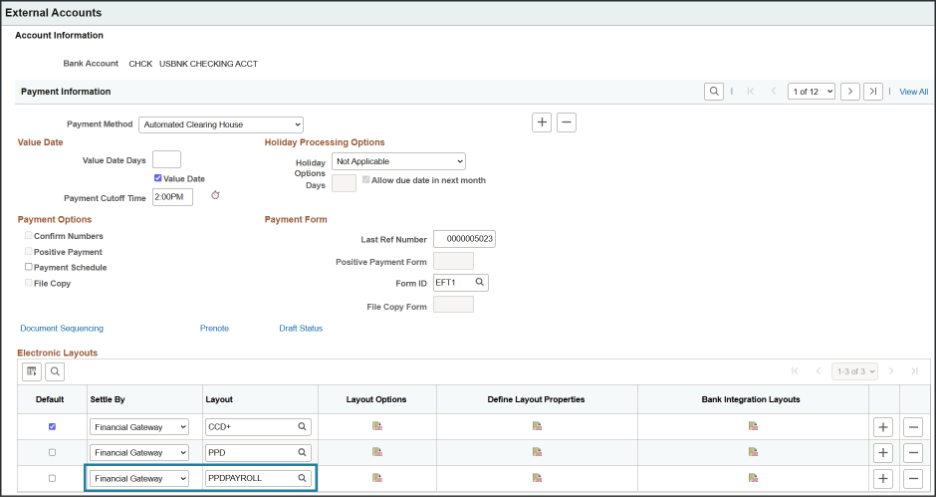
- Associate the layout to the payment method(s) on the External Account
Navigation: Banking > Bank Accounts > External Accounts
Add/associate PPDPAYROLL to the relevant payment method(s) used for these ACH payments.
Pay Cycle configuration:
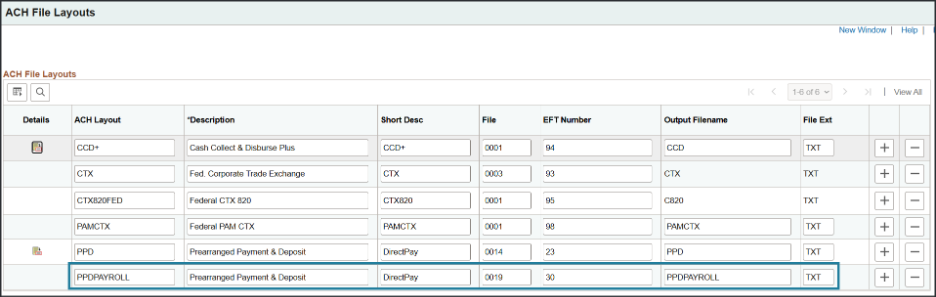
- ACH File Layout
Navigation: Main Menu > Set Up Financials/Supply Chain > Common Definitions > EFT > ACH Layout
Confirm the delivered PPDPAYROLL layout is present/available for ACH processing.
- EFT File Layout (if applicable)
Navigation: Main Menu > Set Up Financials/Supply Chain > Common Definitions > EFT > EFT File Layout
Confirm the delivered PPDPAYROLL layout is present/available.
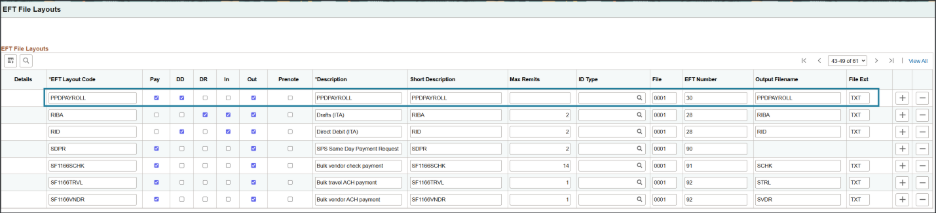
- Assign PPDPAYROLL to the External Account payment methods
Navigation: Main Menu > Banking > Bank Accounts > External Accounts
Locate the external account used for these payments (example: USBNK CHCK).
Add/select PPDPAYROLL for:
- ACH Method
- EFT Method (if applicable)
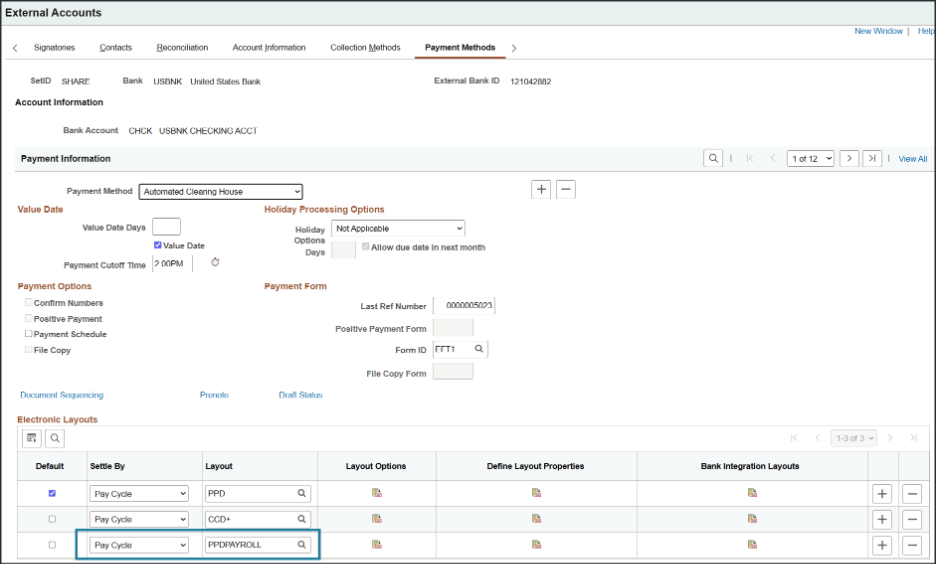
Specifying PPDPAYROLL layout:
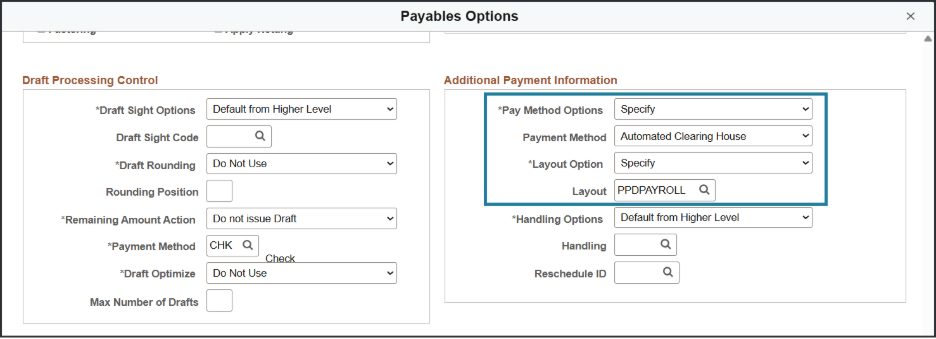
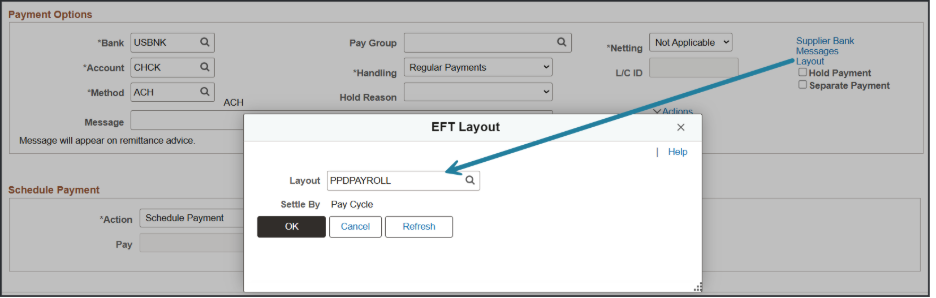
After you have configured the new layout, you can specify the new layout on your supplier locations or directly on the voucher.
Option 1 – Add/Update Supplier locations (Payable Options) to utilize the new bank layout
Option 2 – Update voucher directly with new bank layout
Recommended validation (post-setup)
After configuration, generate a test ACH file through your normal process and confirm the output includes Company Entry Description = PAYROLL for applicable PPD Credits. Also follow your standard bank/RDFI change management and certification practices.
FAQ
- What exactly is required by NACHA?
For PPD Credits used for payment of wages, salaries, and similar compensation, the NACHA rule requires the Company Entry Description field to be PAYROLL. Adoption is allowed as soon as practical, with an effective “no later than” date of March 20, 2026.
- Which PeopleSoft customers does this impact?
Any customer originating ACH PPD Credits for wage-like payments, including (but not limited to):
- Payroll-style payments made through Payables to individuals (for example, certain 1099-NEC payees)
- Payments to retirees (pension/benefit-style disbursements) where the ACH entry is a PPD Credit
- Other compensation-type disbursements that your organization sends as PPD Credits
- Does this apply to CCD or CTX entries?
This regulatory update is specifically about PPD Credits for payroll-like compensation. If you use CCD/CTX, this particular “PAYROLL” Company Entry Description requirement may not apply in the same way. Validate which SEC code(s) your organization uses with your bank/RDFI and internal payments/compliance team.
- How do we know whether a supplier payment is considered “wage-like”?
PeopleSoft doesn’t determine the “wage-like” classification for regulatory purposes—customers should apply their own policy and compliance guidance to decide which payees/payments should use the payroll PPD treatment. A practical approach is to review any payments to individuals that represent compensation (rather than standard trade payables).
- What do we need to change in PeopleSoft Financials?
Apply patch 39065005. Configure and use the delivered PPDPAYROLL layout for the applicable payment stream(s). The configuration depends on your processing model:
- Pay Cycle: enable PPDPAYROLL via Bank Integration setup and assign it to the relevant external account payment methods.
- Financial Gateway: confirm PPDPAYROLL is available in EFT/ACH layout setup and assign it to the relevant external account payment methods.
- Do we have to wait until March 20, 2026 to adopt this?
No. NACHA allows originators to begin using the standardized description as soon as practical. Many organizations will prefer to adopt earlier to avoid a last-minute compliance change.
- What should we test after enabling PPDPAYROLL?
After setup:
- Generate a test ACH file using your normal process.
- Confirm the file output shows Company Entry Description = PAYROLL for applicable PPD Credits.
- Follow your standard bank/RDFI testing and certification practices before moving to production.
- What if we support multiple banks or multiple external accounts?
Apply the PPDPAYROLL layout configuration to each applicable bank/external account/payment method combination used for the relevant PPD Credit payments and validate outputs for each.