
Search is often the first step in getting work done in PeopleSoft. employees search for benefits information, managers look for their directs, and administrators locate transactions they may use only occasionally.
Traditional search, however, often expects users to know the right terminology and spell it correctly. PeopleTools 8.63 introduces two upcoming capabilities that make the experience more intuitive: Semantic Search and Typo Tolerance.
Together, they help users find what they need with less guessing and fewer dead ends.
Semantic Search: Understanding What Users Mean
Traditional keyword search looks for words that closely match indexed content. This works when users know the terminology used in the application, but it can fall short when they describe a task in everyday language.
For example, an employee may search for:
“I want to add dependents.”
The relevant PeopleSoft transaction may be named Dependent/Beneficiary. Because the words do not exactly match, a traditional keyword search may return no results.
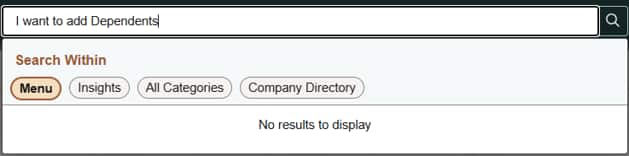
Semantic Search goes beyond keyword matching by considering the meaning and intent of the query to find matches. It can connect a phrase such as “I want to add dependents” with the appropriate Dependent/Beneficiary transaction.
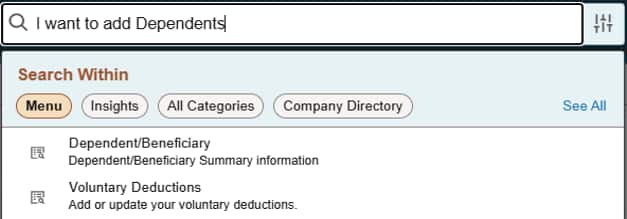
With PeopleTools 8.63, Semantic Search allows users to search naturally, using phrases and sentences instead of trying to guess the exact transaction name.
Why Semantic Search Matters
- More relevant results when terminology does not exactly match
- Support for natural-language phrases and sentences
- Fewer failed searches
- Less dependence on manually maintained synonym libraries
- Faster access to PeopleSoft transactions and information
The experience becomes less about knowing the system’s vocabulary and more about describing what you need.
Typo Tolerance: Search That Understands Mistakes
Even when users know the right word, they may not type it correctly. Typing errors are especially common on mobile devices, where smaller keyboards make mistakes easier. With Typo Tolerance, PeopleSoft Search can recognize a likely misspelling and return results using the corrected term.
For example, a user who searches for:
“Dependnt”
With Typo Tolerance, the user can receive results, whereas today no results are found.
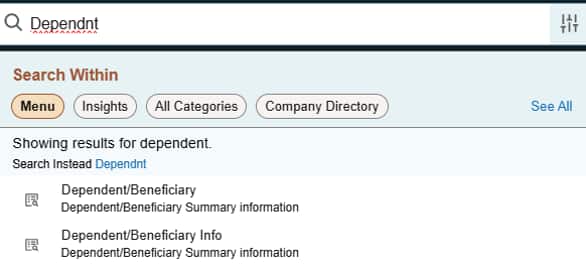
PeopleSoft displays a message explaining that results are being shown for the corrected term, while still giving the user the option to search for the original entry. The user does not need to correct the word and submit the search again. The experience simply keeps moving.
Why Typo Tolerance Matters
- Fewer unsuccessful searches caused by spelling errors
- Faster task completion
- A better search experience on mobile devices
- Improved PeopleSoft Self Service adoption
- Less frustration from empty search results
Perfect spelling should not be required to get work done.
Business Benefits with PeopleTools 8.63
For users, these capabilities make PeopleSoft Search feel more intuitive and forgiving. For organizations, they can help deliver:
- Faster navigation and task completion
- Greater Self-Service adoption
- Fewer support requests about locating transactions
- Better discoverability of PeopleSoft functionality
- A more consistent experience across desktop and mobile devices
- Reduced effort maintaining synonyms and alternative search terms
Closing Thoughts
Users should not need to memorize transaction names, understand internal terminology, or type every word perfectly to find what they need.
Semantic Search and Typo Tolerance, delivered with PeopleTools 8.63, bring PeopleSoft Search closer to the way people naturally communicate. One understands the meaning behind the words. The other understands that people sometimes misspell them.
Together, they create a smarter, faster, and more human search experience.