
Requesters need to know where their requisitions are in the procurement lifecycle. Has the requisition been approved? Has it been sourced to a purchase order? Is it on hold? Is there a budget issue? Are rush requests moving through the process quickly enough?
Without a centralized view, answering those questions can require moving between different pages, filters, and individual requisition details. That can make it harder for requesters to identify bottlenecks, prioritize urgent requests, and understand which requisitions need attention.
To help requesters stay informed and take action more quickly, PeopleSoft eProcurement introduces Requester Operations Insights.
A Centralized View of Requisition Activity
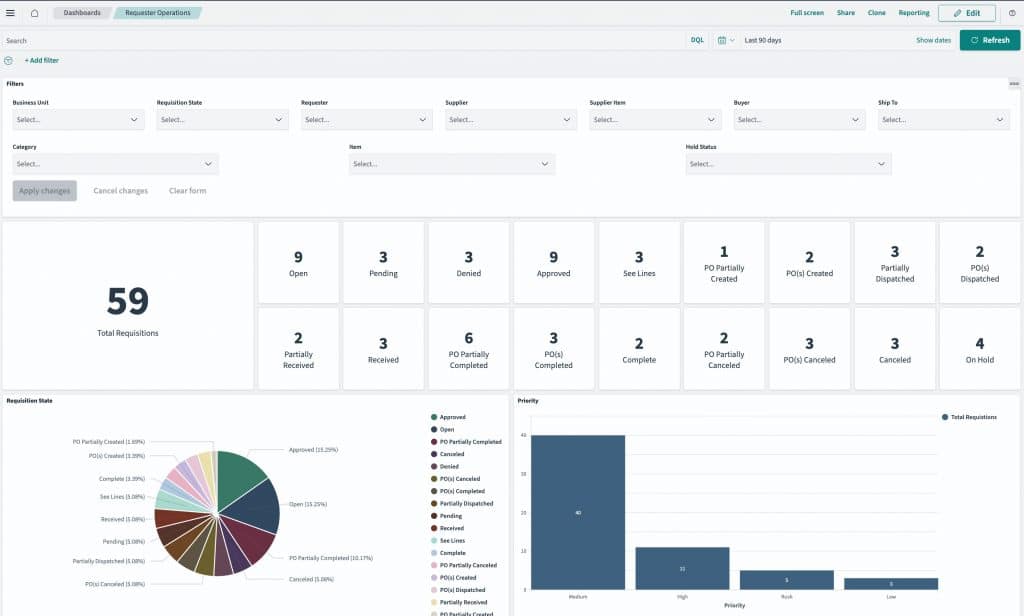
Requester Operations Insights provides a dashboard view of requisition activity and key lifecycle metrics. Instead of looking at requisitions one at a time, requesters can see a broader picture of their requisition workload and quickly understand where requests stand.
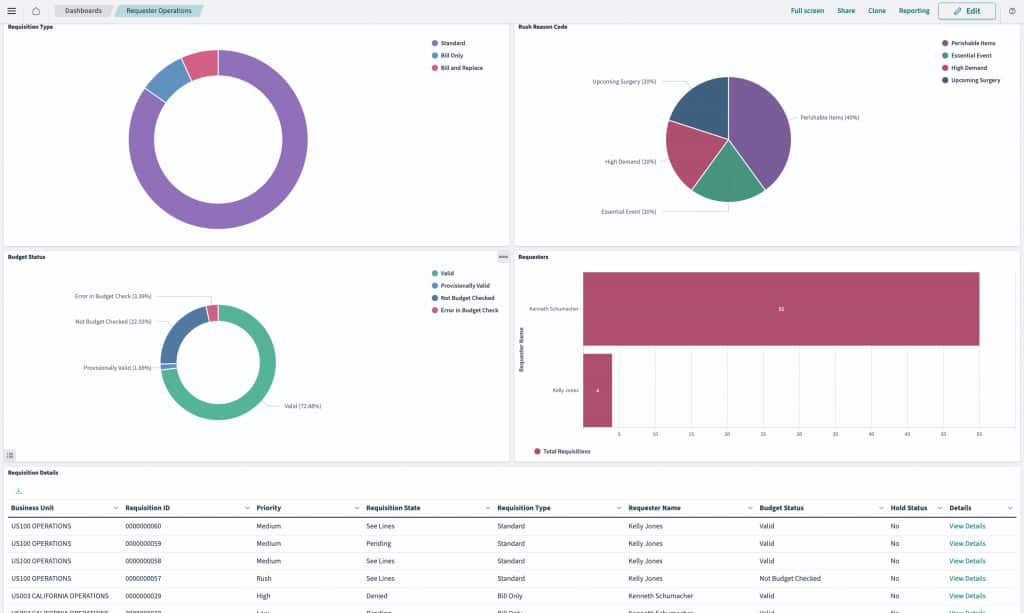
The dashboard displays requisition counts across available requisition states, including statuses such as Open, Pending, Approved, Denied, PO Created, PO Dispatched, Received, Canceled, and other lifecycle states. It also includes visibility into hold status, budget status, requisition priority, requisition type, rush reason codes, and requester activity.
This gives requesters a single place to monitor the health of their requisitions and identify where attention may be needed.
Finding Bottlenecks Faster
One of the key benefits of Requester Operations Insights is the ability to identify bottlenecks. Requesters can filter and analyze requisitions by criteria such as:
- Business Unit
- Requisition State
- Requester
- Supplier
- Supplier Item
- Buyer
- Ship To
- Category
- Item
- Hold Status
This makes it easier to answer practical questions, such as:
- Which requisitions are still pending?
- Which approved requisitions have not yet moved forward?
- Which requests are on hold?
- Which requisitions have budget issues?
- Which rush or high-priority requests need follow-up?
- Which requisitions are sitting in a particular lifecycle state?
By combining lifecycle state, priority, and hold or budget status, requesters can focus on the items most likely to need attention.
Prioritizing Rush and High-Priority Requests
Not every requisition requires the same level of urgency. Some requests are routine, while others need fast turnaround. Requester Operations Insights helps requesters focus first on the requisitions that matter most.
For example, a requester can use the dashboard to identify rush or high-priority requisitions that are still pending, on hold, or not yet sourced. This helps ensure urgent requests do not get lost in a larger requisition list.
As new lifecycle states and supporting statuses are introduced in future updates, this same insight model can become even more valuable. Requesters will be able to focus on additional conditions such as shipped, backordered, overdue, or other fulfillment-related statuses.
From Insight to Action
Requester Operations Insights is not just a reporting view. It is designed to help requesters move from visibility to action.
The dashboard includes requisition detail information for the requisitions that meet the selected criteria. From there, requesters can use the View Details link to navigate to the My Requisitions page, where they can review the requisition and take available actions based on their authorization.
This connection between insight and action is important. Requesters can identify a set of requisitions that need attention, drill into the details, and then continue working in the familiar My Requisitions experience.
Better Visibility Across the Requisition Lifecycle
Requester Operations Insights gives requesters a more complete view of requisition activity, helping them:
- Monitor requisitions across lifecycle states
- Identify bottlenecks and exceptions
- Focus on rush and high-priority requests
- Review hold and budget status
- Analyze requisition activity by requester, supplier, item, category, buyer, or ship-to
- Drill into requisition details and take action from My Requisitions
By bringing these insights together in one dashboard, PeopleSoft eProcurement helps requesters better understand where their requisitions are, what may need attention, and where to focus first.
As procurement teams continue to look for ways to improve visibility and reduce manual follow-up, Requester Operations Insights provides a practical foundation for more proactive requisition management.