
In the fast-paced world of procurement, smooth operations depend on requisitions flowing seamlessly through many approval workflows. But what happens when something goes wrong? Enter requisition exceptions – those frustrating interruptions that can slow down your entire procurement process if not managed effectively.
What Are Requisition Exceptions?
Requisition exceptions are purchase requests that fail to complete the normal approval or processing workflow due to validation errors, policy violations, or system issues. Think of them as red flags that require human intervention before a requisition can move forward to become a purchase order.
These exceptions can range from simple data entry errors to complex compliance violations, and they represent one of the most common challenges procurement teams face in maintaining efficient operations.
Centralized Workcenter for Managing Exceptions
The Fluid Procurement Workcenter is a one stop shop for Requesters, Approvers and Buyers to view and action their procurement exceptions as well as other pending activities such as ‘PO’s not dispatched’, ‘PO Acknowledgements’ and many others.
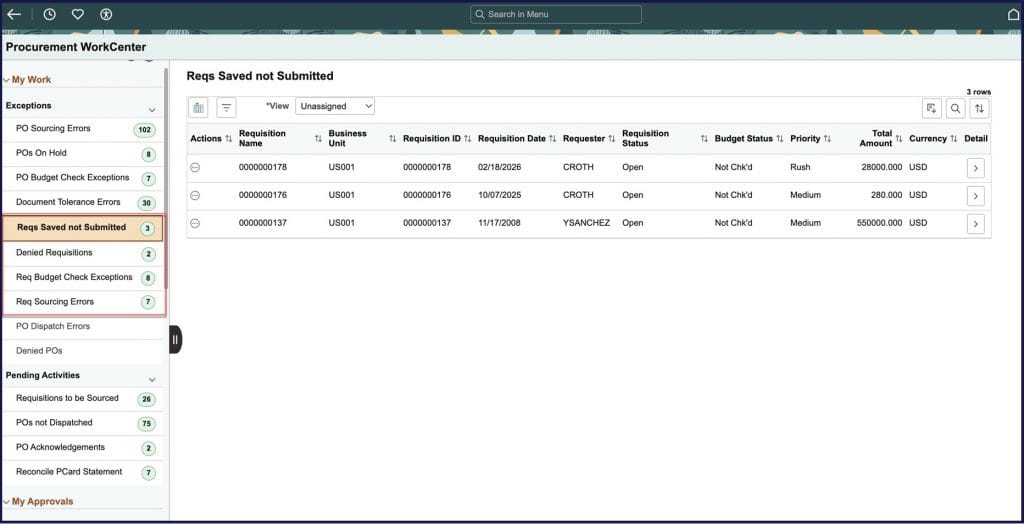
Only the exceptions that the user is authorized to will be displayed and, for requesters, only the requisitions that they are authorized to will be displayed (based on the Requisition Authorization setup) so the list of exceptions and the associated transactions are targeted specifically for those requesters to action.
The Requisition exceptions that have been recently added to the Workcenter include:
- Requisitions saved but not submitted: The requester saves the requisition but forgets to submit it leaving it in the ‘Open’ status- happens a lot more frequently than you would think
- Denied Requisitions: The approver denies the Requisition at the Fiscal (Header) or Commodity (Line) level for one of many reasons including:
- Invalid or incorrect data
- Exceeding spending limits
- Off contract or incorrect supplier
- Not following stated Purchasing policies
- Budget Check Exceptions: The Budget has been exceeded or not set up correctly when performing the Budget Check for the requisition
- Requisition Sourcing Errors: The requisition has failed to source for one of many reasons including issues with the supplier, item, UOM etc. Typically the Buyer would be responsible for these exceptions but the requester may want the buyer to know by notifying them through the workcenter actions
The primary action for most of the exceptions would be to take them to the checkout page where they could submit the requisition or change the requisition information based on the reason for the approval denial. They can also notify the requester if they are not the requester themselves.
Once the relevant actions have been taken and the exception resolved, the Procurement Workcenter will be refreshed to see that the count of exceptions has reduced based on the actions taken.
On an exception by exception basis , the (optional) Work Management Framework can be enabled which allows for additional functionality including tracking the history of the actions taken (both manual and system). The details are outlined in this recent blog which explains more about the Work Management framework.
Planned Procurement Exceptions
Going forward, we have additional exceptions planned such as ‘Requisitions on Hold’, ‘Change Request errors’, ‘Requisitions that are Overdue’ and many more, so watch this space for more Procurement Workcenter content and stay tuned for upcoming updates as we continue to expand the functionality and bring you even more tools to streamline your procurement process.