
Drop Zones give organizations a powerful way to extend PeopleSoft pages while preserving the delivered application objects. They make it possible to add content and functionality where it is needed without directly changing the delivered page.
But before an administrator or developer can configure a Drop Zone, they need to know whether a component has one available.
In prior PeopleTools versions, customers often had to rely on documentation to determine whether a component supported Drop Zone configuration. With continuous delivery and objects delivered off cycle through patches, that documentation may not always reflect the current state of every component. The Drop Zone Configuration search returned all components matching the search criteria, whether or not a Drop Zone was available to configure. Developers then had to review the results, consult documentation, and pull up individual component pages in Application Designer to find whether a Drop Zone was even available.
More Meaningful Drop Zone Search Results
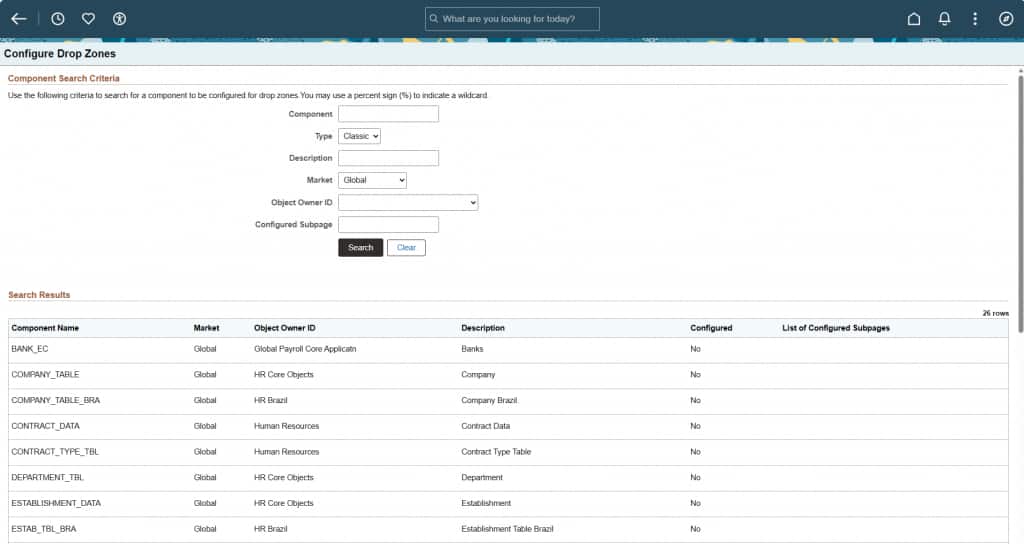
In PeopleTools 8.63, the Configure Drop Zone page now returns only components that both match the search criteria and have a Drop Zone available for configuration.
This makes search results more useful from the start. Instead of seeing a broad list of matching components across the whole application that may or may not be configurable, administrators and developers see components with an available Drop Zone.
The informational message warning that search results could include components that cannot be configured is no longer necessary. The search itself now provides that clarity.
Closing Thoughts
Drop Zones are an important PeopleSoft extensibility tool. They enable organizations to add content to delivered pages without customizing the delivered application.
This PeopleTools 8.63 enhancement is simple but practical. It helps organizations:
- Find valid Drop Zone configuration points more quickly.
- Reduce reliance on external documentation and manual review in Application Designer.
- Improve discovery of where pages have been extended.
- Make every day PeopleTools administration more efficient.
The real value of this enhancement: it makes the Drop Zone lifecycle more efficient from the start, helping organizations spend less time investigating where they can extend PeopleSoft pages and more time implementing the extension itself.